What is this?
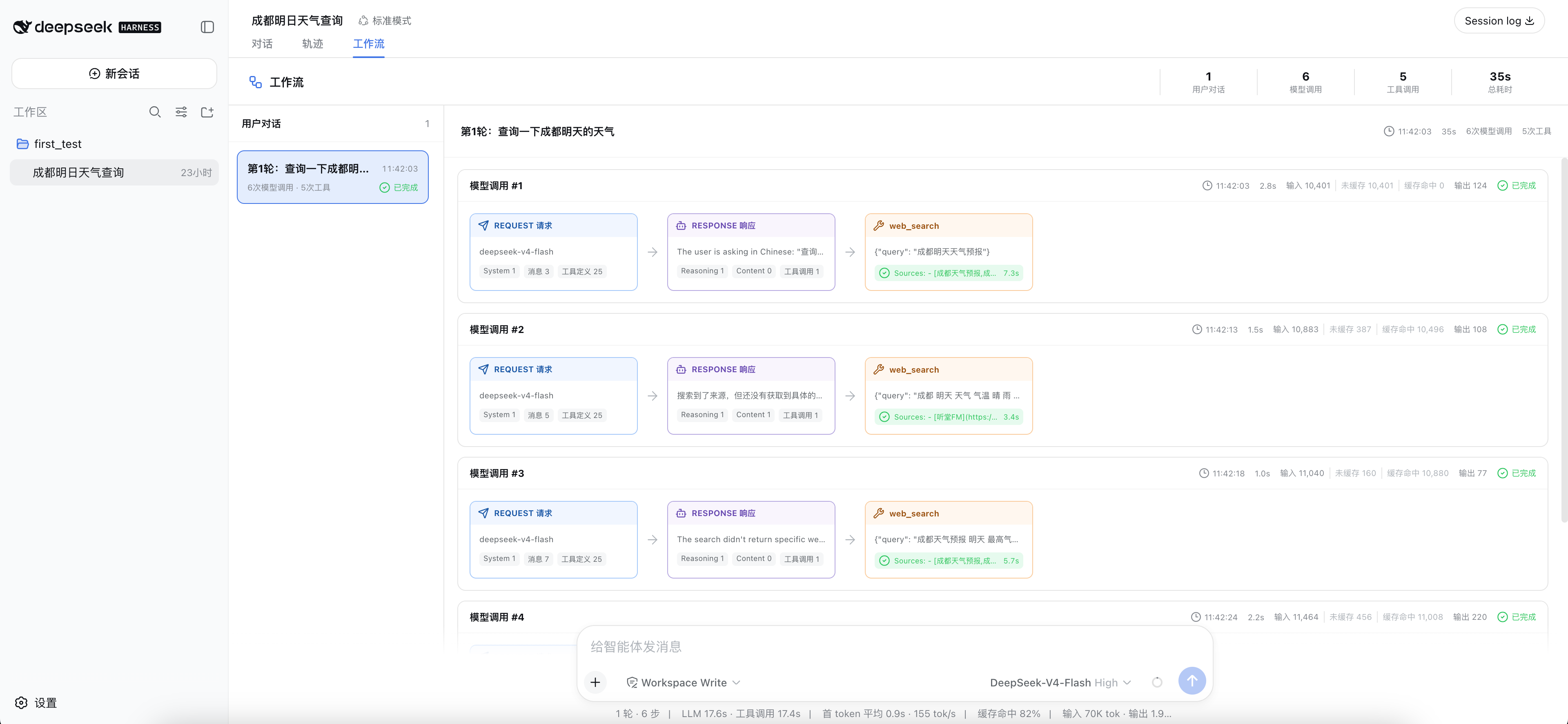
 It is a web UI plugin for DeepSeek Harness (DSH) that adds a new 'Workflow' tab, turning each user conversation turn into a clear execution chain of the agent's model requests, model responses, and tool calls.
It is a web UI plugin for DeepSeek Harness (DSH) that adds a new 'Workflow' tab, turning each user conversation turn into a clear execution chain of the agent's model requests, model responses, and tool calls.Does it replace the built-in Trajectory tab?No, it sits alongside the existing 'Conversation' and 'Trajectory' tabs as a separate add-on and does not replace or modify DSH's built-in trajectory feature.
No, it sits alongside the existing 'Conversation' and 'Trajectory' tabs as a separate add-on and does not replace or modify DSH's built-in trajectory feature.Does it work with any version of DeepSeek Harness?No, the current 0.1.x release only targets a specific DSH build, and since DSH is still in pre-release, RC client interfaces can change, so you need to install a matching plugin version after upgrading DSH.
No, the current 0.1.x release only targets a specific DSH build, and since DSH is still in pre-release, RC client interfaces can change, so you need to install a matching plugin version after upgrading DSH.What are its known limitations?Summary stats only cover session history the client can actually load, JSON panel/card expand state isn't shareable via deep link, and multiple tool calls from one response show as a scrollable linear list rather than a parallel branch diagram.
Summary stats only cover session history the client can actually load, JSON panel/card expand state isn't shareable via deep link, and multiple tool calls from one response show as a scrollable linear list rather than a parallel branch diagram.Does the plugin send extra data to the model?No — it is read-only. It only displays events already recorded in the DSH session and never injects extra messages, prompts, or tools into a model request.
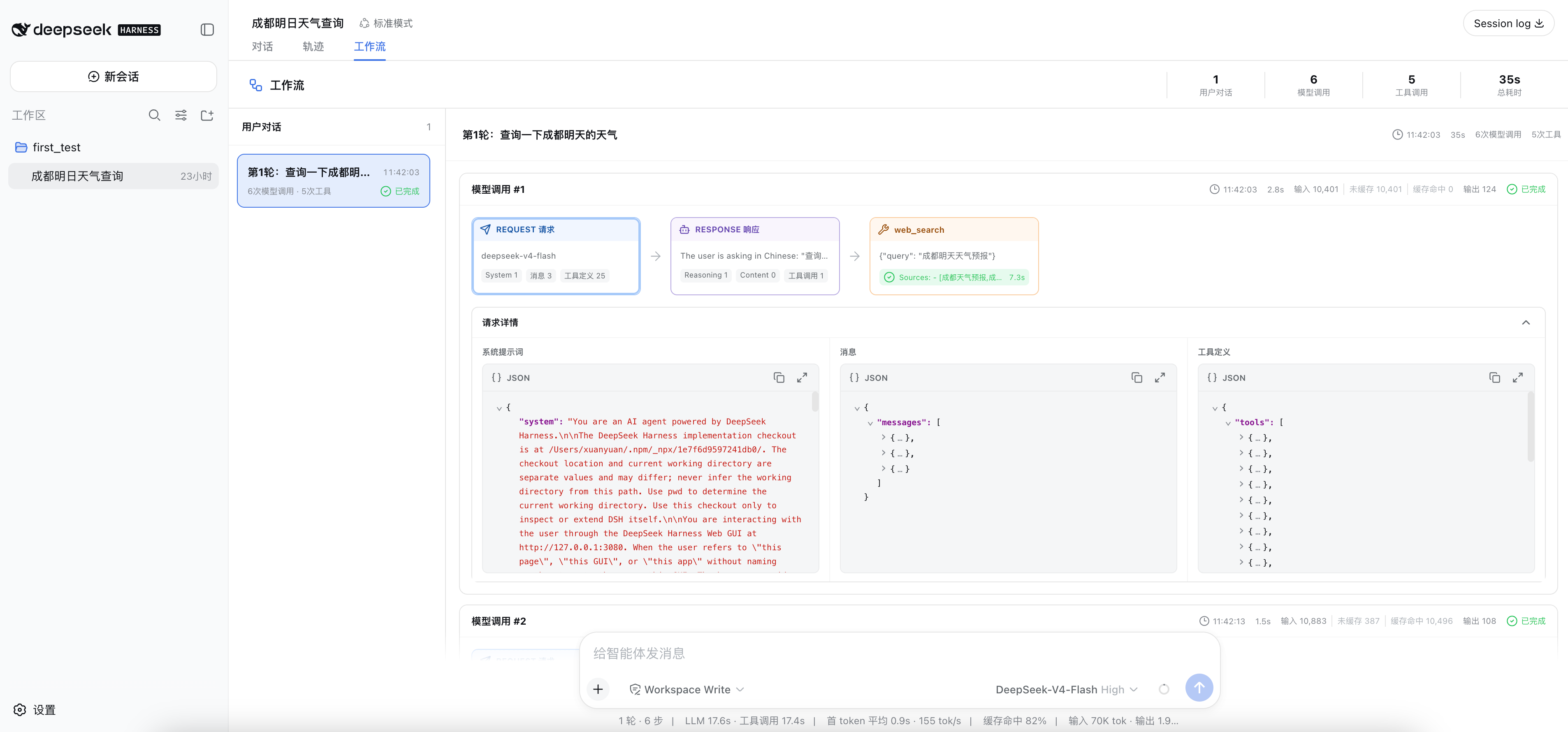
No — it is read-only. It only displays events already recorded in the DSH session and never injects extra messages, prompts, or tools into a model request.What exactly can I inspect in a request card?Clicking a request card opens the real recorded system prompt, the provider-agnostic messages[] array, and tool definitions, each rendered as a collapsible, copyable JSON tree.
Clicking a request card opens the real recorded system prompt, the provider-agnostic messages[] array, and tool definitions, each rendered as a collapsible, copyable JSON tree.What token stats does the workflow view show?Each model call breaks down input, uncached input, cache-read, cache-write, and output tokens, which helps you analyze how much context is being reused.
Each model call breaks down input, uncached input, cache-read, cache-write, and output tokens, which helps you analyze how much context is being reused.What are similar projects?dsh-damage-pulse, cocode, dsh-lowtide, dsh-dafeiyu, DeepSeek-Balance-Whale-Widget, dsh-synapse, dsh-cost-meter, dsh-agent-team-gui
dsh-damage-pulse, cocode, dsh-lowtide, dsh-dafeiyu, DeepSeek-Balance-Whale-Widget, dsh-synapse, dsh-cost-meter, dsh-agent-team-guiWhich topics is it in?agent-monitoring, llm-observability, token-usage, webui, dsh, visualization, dsh-plugin, deepseek-harness, observability, json, deepseek, monitoring
agent-monitoring, llm-observability, token-usage, webui, dsh, visualization, dsh-plugin, deepseek-harness, observability, json, deepseek, monitoring