


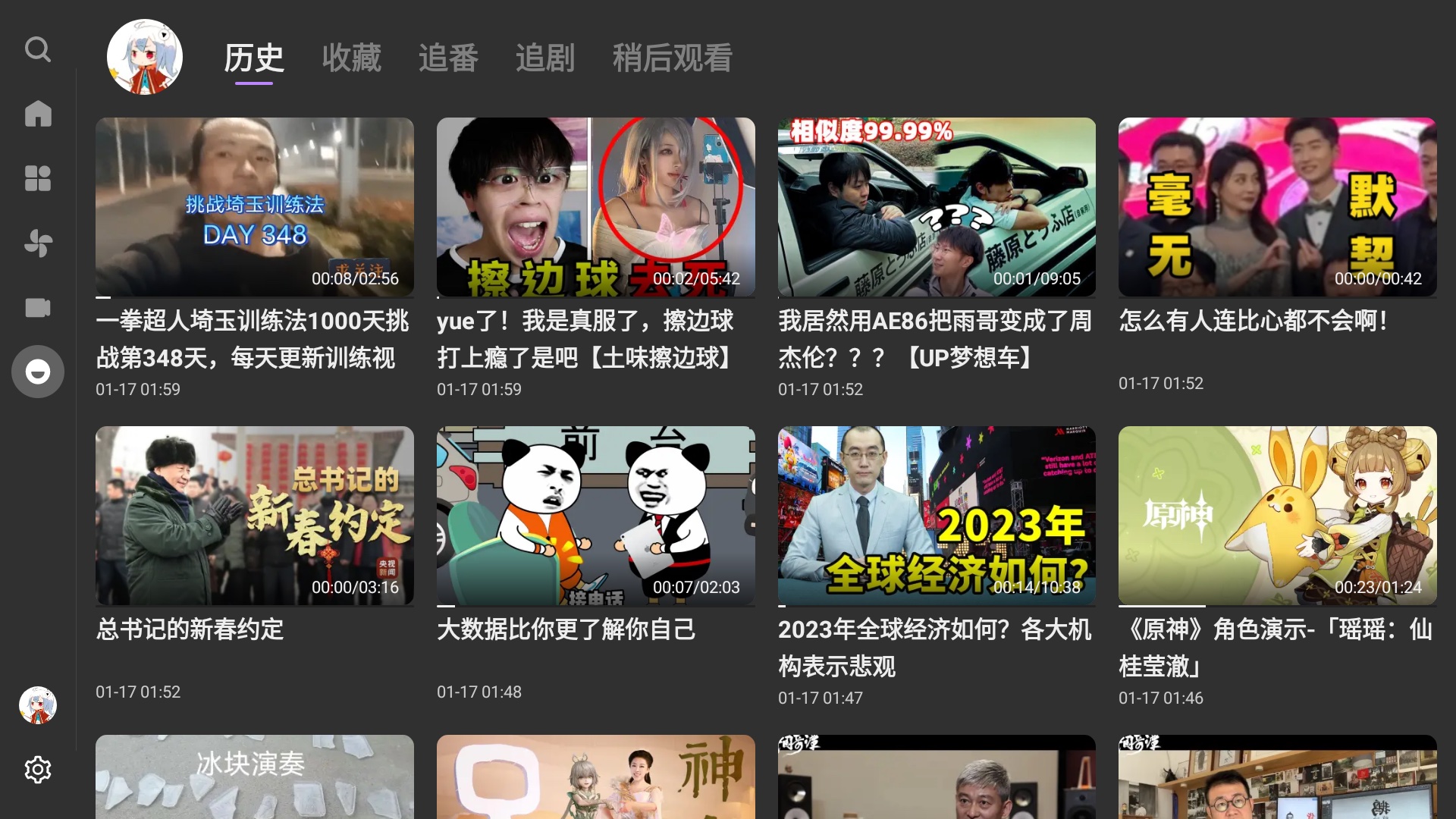

What is this?
 BBLL is a third-party Bilibili client for Android TV, built by an individual developer for learning and communication. It is not a hack of the official app: it simply wraps Bilibili's existing APIs to bring Bilibili videos and live streams to the big screen.
BBLL is a third-party Bilibili client for Android TV, built by an individual developer for learning and communication. It is not a hack of the official app: it simply wraps Bilibili's existing APIs to bring Bilibili videos and live streams to the big screen.Is BBLL an official Bilibili product?No. It is a personal hobby project with no cracking involved: it only encapsulates Bilibili's existing APIs, all data comes from Bilibili's official API, and the author is not responsible for the content shown.
No. It is a personal hobby project with no cracking involved: it only encapsulates Bilibili's existing APIs, all data comes from Bilibili's official API, and the author is not responsible for the content shown.How do I get it onto my TV?Follow the download links in the README and install the APK on the device. Pick the regular release build if your device runs Android 5.0 or newer; there is also an api19 build with compatibility work for Android 4.4.
Follow the download links in the README and install the APK on the device. Pick the regular release build if your device runs Android 5.0 or newer; there is also an api19 build with compatibility work for Android 4.4.Do I need a Bilibili membership to use every feature?The app itself is free, but some features need a Bilibili premium membership. A regular web or mobile membership is enough to unlock everything, including video quality above 1080P.
The app itself is free, but some features need a Bilibili premium membership. A regular web or mobile membership is enough to unlock everything, including video quality above 1080P.Will video playback work on every device?Not necessarily. Playback relies purely on hardware decoding, and no software decoders are included yet, so not every device is guaranteed to play every video. If playback fails, try switching the video's resolution or codec.
Not necessarily. Playback relies purely on hardware decoding, and no software decoders are included yet, so not every device is guaranteed to play every video. If playback fails, try switching the video's resolution or codec.Is this for Android TV, phones, or both?It is an Android app built around TV use: the README describes playback gestures with a remote control, like pressing the D-pad left and right while the playback controls are hidden. You install it by sideloading an APK; no Play Store version is mentioned.
It is an Android app built around TV use: the README describes playback gestures with a remote control, like pressing the D-pad left and right while the playback controls are hidden. You install it by sideloading an APK; no Play Store version is mentioned.Does the app collect my personal data?According to the README, no personal information is collected. Through Firebase and App Center the app gathers device-related information and crash logs only.
According to the README, no personal information is collected. Through Firebase and App Center the app gathers device-related information and crash logs only.Is there an open-source license I can rely on?No standard license is attached (GitHub lists none). The README only positions BBLL as a learning-and-communication project: it contains no cracking, just encapsulation of Bilibili's existing official APIs, and the author takes no responsibility for content.
No standard license is attached (GitHub lists none). The README only positions BBLL as a learning-and-communication project: it contains no cracking, just encapsulation of Bilibili's existing official APIs, and the author takes no responsibility for content.How do I control playback with the remote?Double-tap the left or right side of the screen, drag the progress bar, press the D-pad left and right while the playback controls are hidden, or use the fast-forward and rewind buttons on a multimedia remote.
Double-tap the left or right side of the screen, drag the progress bar, press the D-pad left and right while the playback controls are hidden, or use the fast-forward and rewind buttons on a multimedia remote.How do I refresh the current page?Click the highlighted tab on the left side of the screen and the current page reloads.
Click the highlighted tab on the left side of the screen and the current page reloads.My TV box runs Android 4.4 — which APK do I need?Take the api19 build, which carries the compatibility work for Android 4.4. The regular release APK only supports Android 5.0 and newer.
Take the api19 build, which carries the compatibility work for Android 4.4. The regular release APK only supports Android 5.0 and newer.What is ACAC, mentioned next to the download link?ACAC is the author's sibling project: a similar third-party TV client for AcFun (the 'A site'), linked in the README right beside BBLL's download links.
ACAC is the author's sibling project: a similar third-party TV client for AcFun (the 'A site'), linked in the README right beside BBLL's download links.What are similar projects?my-tv-webview, hongguo-desktop-releases, tvbox, my-tv, PiliPlus, dart_simple_live, cloudstream, TVAPP
my-tv-webview, hongguo-desktop-releases, tvbox, my-tv, PiliPlus, dart_simple_live, cloudstream, TVAPPWhich topics is it in?unofficial, danmaku, livestream, android-tv, firebase, client, multimedia, media, tv, player, live-streaming, media-player
unofficial, danmaku, livestream, android-tv, firebase, client, multimedia, media, tv, player, live-streaming, media-player