grok-build README

The project's README from github.com/xai-org/grok-build. As one markdown file: README.md.

SpaceXAI logo
Grok Build (grok)

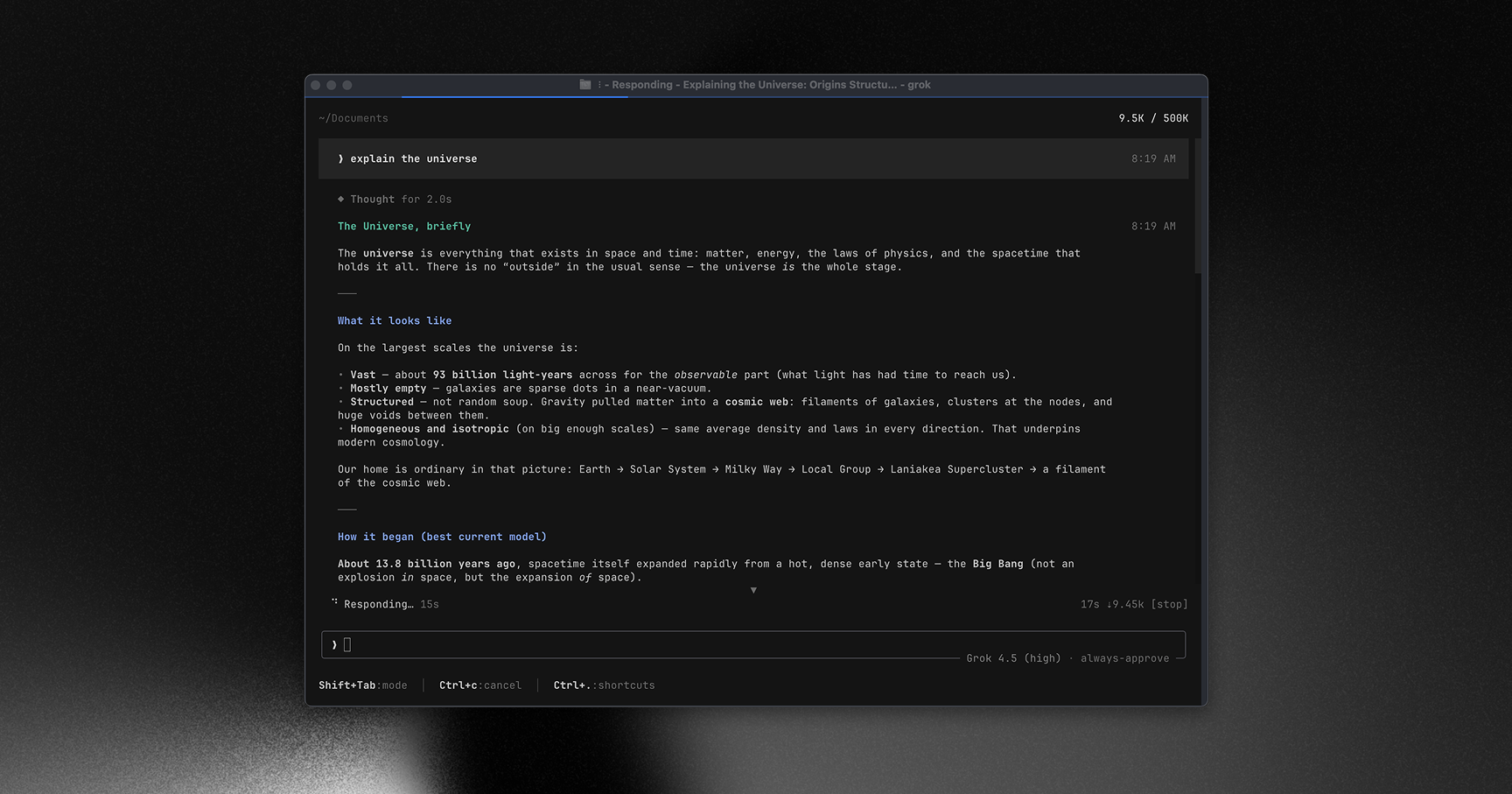
Grok Build is SpaceXAI's terminal-based AI coding agent. It runs as a full-screen TUI that understands your codebase, edits files, executes shell commands, searches the web, and manages long-running tasks — interactively, headlessly for scripting/CI, or embedded in editors via the Agent Client Protocol (ACP).

Installing the released binary · Building from source · Documentation · Repository layout · Development · Contributing · License

Grok Build TUI

Learn more about Grok Build at x.ai/cli

This repository contains the Rust source for the grok CLI/TUI and its agent runtime. It is synced periodically from the SpaceXAI monorepo.

A small SOURCE_REV file at the root records the full monorepo commit SHA for the version of the code present in this tree.


Installing the released binary

Prebuilt binaries are published for macOS, Linux, and Windows:

curl -fsSL https://x.ai/cli/install.sh | bash   # macOS / Linux / Git Bash
irm https://x.ai/cli/install.ps1 | iex          # Windows PowerShell
grok --version

See the changelog for the latest fixes, features, and improvements in each release.

Building from source

Requirements:

cargo run -p xai-grok-pager-bin              # build + launch the TUI
cargo build -p xai-grok-pager-bin --release  # release binary: target/release/xai-grok-pager
cargo check -p xai-grok-pager-bin            # fast validation

The binary artifact is named xai-grok-pager; official installs ship it as grok. On first launch it opens your browser to authenticate — see the authentication guide.

Documentation

Full online documentation is available at docs.x.ai/build/overview.

The user guide ships with the pager crate: crates/codegen/xai-grok-pager/docs/user-guide/ — getting started, keyboard shortcuts, slash commands, configuration, theming, MCP servers, skills, plugins, hooks, headless mode, sandboxing, and more.

Repository layout

Path Contents
crates/codegen/xai-grok-pager-bin Composition-root package; builds the xai-grok-pager binary

crates/codegen/xai-grok-pager The TUI: scrollback, prompt, modals, rendering
crates/codegen/xai-grok-shell Agent runtime + leader/stdio/headless entry points
crates/codegen/xai-grok-tools Tool implementations (terminal, file edit, search, ...)
crates/codegen/xai-grok-workspace Host filesystem, VCS, execution, checkpoints
crates/codegen/... The rest of the CLI crate closure (config, MCP, markdown, sandbox, ...)
crates/common/, crates/build/, prod/mc/ Small shared leaf crates pulled in by the closure
third_party/ Vendored upstream source (Mermaid diagram stack) — see below

[!IMPORTANT] The root Cargo.toml (workspace members, dependency versions, lints, profiles) is generated — treat it as read-only. Prefer editing per-crate Cargo.toml files.

Development

cargo check -p <crate>        # always target specific crates; full-workspace builds are slow
cargo test -p xai-grok-config # per-crate tests
cargo clippy -p <crate>       # lint config: clippy.toml at the repo root
cargo fmt --all               # rustfmt.toml at the repo root

Contributing

[!NOTE] External contributions are not accepted. See CONTRIBUTING.md.

License

First-party code in this repository is licensed under the Apache License, Version 2.0 — see LICENSE.

Third-party and vendored code remains under its original licenses. See:

grok-build (xai-org/grok-build)

Searching Database…

这是什么?Grok Build 是 SpaceXAI 推出的终端 AI 编程智能体。它以全屏 TUI 界面运行,能够理解你的代码库、编辑文件、执行 Shell 命令、搜索网页,并管理长时间运行的任务。它可以交互式使用,也可以以无界面方式用于脚本或 CI,还可以通过 Agent Client Protocol(ACP)嵌入到编辑器中。
这是命令行工具,还是可以嵌入编辑器的东西?两者都是。它既是一个名为 'grok' 的独立命令行/TUI 可执行程序,可以在终端中运行;也是一个智能体运行时,编辑器可以通过 Agent Client Protocol(ACP)将它嵌入使用。此外,它还提供用于脚本和 CI 的无界面模式。
我该怎么让它运行起来?下载 macOS、Linux 和 Windows 上发布的任一预编译可执行文件,或使用固定版本的 Rust 工具链从源码构建。首次启动时,它会打开浏览器进行身份验证。
Windows 版本已经完全可用了吗?Windows 预编译版本已经发布,但在 Windows 上从源码构建只是尽力支持,目前尚未在此代码树中测试;官方目前只支持 macOS 和 Linux 作为构建主机。
Agent Client Protocol(ACP)是做什么用的?ACP 让 Grok Build 可以直接嵌入代码编辑器,作为智能体后端使用,而不只是作为独立的终端应用运行。
我能在 CI 流水线中运行它,而不是交互式使用吗?可以。除了交互式 TUI 外,它还提供专为脚本和 CI 使用而设计的无界面模式。
它支持 MCP 服务器、Skills 和插件吗?支持。随附的用户指南涵盖了 MCP 服务器、Skills、插件、Hooks、主题和沙箱的配置方法。
Creator
xai-org
Size
60.8 MB
Stars
27.5K
Updated
CommitSep 29
Age
3mo
Commits · 90 Days