


What is this?
 ReBarUEFI is a UEFI DXE driver that enables Resizable BAR on systems whose firmware doesn't support it officially — a free performance boost, mostly noticeable in games.
ReBarUEFI is a UEFI DXE driver that enables Resizable BAR on systems whose firmware doesn't support it officially — a free performance boost, mostly noticeable in games.So do I install this inside Windows, or is it part of the BIOS itself?It lives in your UEFI firmware: the module is added to the DXE volume and runs on every boot. A small companion tool, ReBarState (buildable on Windows or Linux), then sets the BAR size via an NVRAM variable.
It lives in your UEFI firmware: the module is added to the DXE volume and runs on every boot. A small companion tool, ReBarState (buildable on Windows or Linux), then sets the BAR size via an NVRAM variable.How do I get it onto my system?Follow the wiki guide Adding FFS module to inject the driver into your firmware, make sure 4G decoding is on and CSM is off, then run ReBarState from Releases (or build it with CMake) to set the BAR size.
Follow the wiki guide Adding FFS module to inject the driver into your firmware, make sure 4G decoding is on and CSM is off, then run ReBarState from Releases (or build it with CMake) to set the BAR size.Does my hardware need anything special for this to work?4G Decoding should be enabled — without it you're limited to a 1GB BAR (sometimes 512MB). BIOS support for Large BARs helps too, but UEFIPatch patches exist to fix most issues there.
4G Decoding should be enabled — without it you're limited to a 1GB BAR (sometimes 512MB). BIOS support for Large BARs helps too, but UEFIPatch patches exist to fix most issues there.What happens if I pick a BAR size my system can't handle?The system won't boot. Clear CMOS and Resizable BAR gets disabled — in stubborn cases you may have to physically remove the CMOS battery for it to reset.
The system won't boot. Clear CMOS and Resizable BAR gets disabled — in stubborn cases you may have to physically remove the CMOS battery for it to reset.Can I get Resizable BAR without flashing a modified BIOS at all?On Linux, with 4G Decoding on, recent versions automatically resize and allocate GPU BARs. On Windows there is currently no known method without BIOS modification.
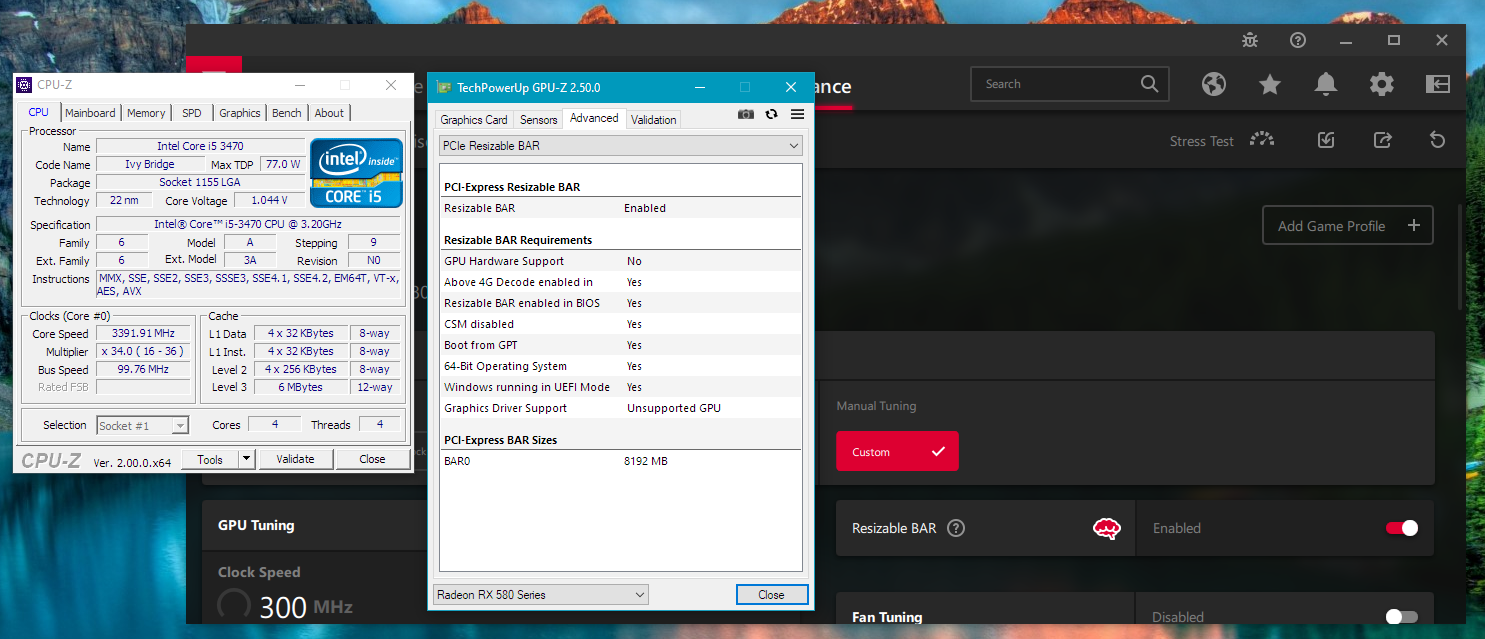
On Linux, with 4G Decoding on, recent versions automatically resize and allocate GPU BARs. On Windows there is currently no known method without BIOS modification.How much FPS does this actually add?The author measured up to 12% more FPS with a 2GB BAR on an i5-3470 with a Sapphire Nitro+ RX 580 8GB, and even less-than-ideal BAR sizes still gave an increase.
The author measured up to 12% more FPS with a 2GB BAR on an i5-3470 with a Sapphire Nitro+ RX 580 8GB, and even less-than-ideal BAR sizes still gave an increase.I have an NVIDIA Turing card — does it work for me too?Not with this driver alone: for Turing GPUs (RTX 20 / GTX 16 series) the author points to a separate project, NvStrapsReBar, for enabling Resizable BAR on them.
Not with this driver alone: for Turing GPUs (RTX 20 / GTX 16 series) the author points to a separate project, NvStrapsReBar, for enabling Resizable BAR on them.My PC is old — any chance it works on a PCIe Gen2 board?Surprisingly yes: it was previously thought impossible, but one user got it working on a system with an i5-2500k. UEFIPatch patches also cover MMIO limits on Sandy Bridge through Coffee Lake.
Surprisingly yes: it was previously thought impossible, but one user got it working on a system with an i5-2500k. UEFIPatch patches also cover MMIO limits on Sandy Bridge through Coffee Lake.Will Secure Boot block the patched firmware?Usually not — most firmware accepts unsigned or patched modules with Secure Boot on, so you won't have problems running certain games.
Usually not — most firmware accepts unsigned or patched modules with Secure Boot on, so you won't have problems running certain games.What are similar projects?cpu-performance-engineering, open-gpu-kernel-modules, deck-as-controller, OpenCorePkg, NoGraphicsAPI, frank-386, llama.cpp, RingOut
cpu-performance-engineering, open-gpu-kernel-modules, deck-as-controller, OpenCorePkg, NoGraphicsAPI, frank-386, llama.cpp, RingOut