Know the risk of merging a pull request, and where it lives.
A free, open-source CLI and GitHub Action. After your AI review, farol tells the person who approves how risky the
merge is and which files carry the risk, so the riskiest changes get the most attention.
Agents write the code and agents review it. The last call is still a person's: approve the merge or not. That
approval is the scarce part, and spread evenly over every pull request it turns into a skim, which is how a one-line
change to a shared hook takes down forty pages.
farol comes after the AI review, not instead of it. Your review agent comments on the lines in the diff. farol
gives the person who approves what the agent cannot reliably give: the risk of accepting the change, and where it
lives. The goal is not only a faster review: low-risk pull requests can go fast, and the risky ones get read line by
line, starting with the files that carry the risk. It works from static analysis (the compilers' own view of your
code, not a model's guess), so the same pull request always gets the same answer.
The Claude Code team describes the same principle in
How the Claude Code team does code review: review effort
follows the risk of the change. As they put it, "The change sets the tier, not the author."
farol (Portuguese for lighthouse) does the triage before the reviewer opens the diff:
What does this change reach? Every existing page, API operation, RPC method, job and script that runs the changed code, with the call chain to each.
How risky is the merge? A verdict (fast track, quick review, careful review) and a 0–100 risk score from reach, diff coverage, security findings, contract breaks and dependency changes.
Where do I start? What must be checked by hand (breaking API changes, security findings), then the files by risk, each with its diff and the lines no test ran.
Free and open source (MIT). Run it as a CLI with npx @winninjs/farol, or on every pull request with the GitHub
Action winnin/farol/action. No account, no hosted service: it runs on your machine or in your CI runner, comments on
every PR and never blocks a merge. It never executes your code and never sends it anywhere.
The demo holds the reports farol produced in CI for a pull request on the
FastAPI full-stack template: a FastAPI backend and a React
frontend with TanStack Router. The pull request adds a status to items and an Insights page, with the kind of problems
a reviewer should catch: a breaking API change, SQL built with an f-string, a shared component without tests.
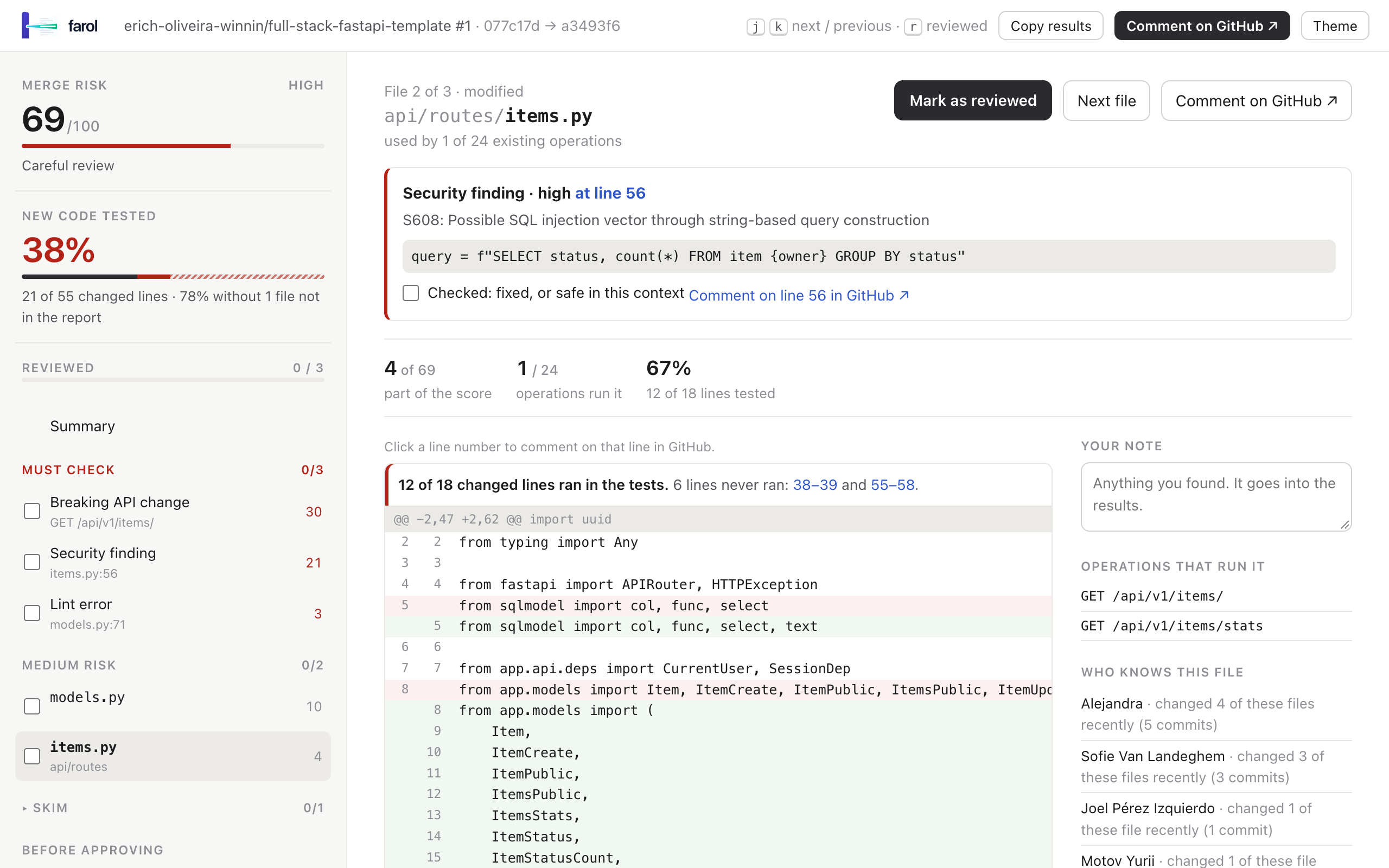
Backend report: ⚠ careful review at 69/100, a breaking contract change and a high-severity security finding.
Frontend report: ⚠ careful review, a new page and the existing pages a shared component reaches.
The reports are interactive: check the findings, tick files as reviewed and watch the risk drop, mark a page as behind
a feature flag, and copy the results for the pull request. They were built from the analysis farol ran in CI on
the pull request; the copies live in
docs/demo/.
farol after your AI review
AI review agents
farol
Reads
the diff, and whatever context fits in the prompt
the whole program at the base and the head, with the compilers (TypeScript type checker, go/types, Python ast)
Tells you
what may be wrong in these lines
what these lines reach, how risky the merge is, and where to look first
Answers are
probabilistic: worded differently on every run
deterministic: the same PR gives the same report, and every claim comes with its call chain
When unsure
may sound confident anyway
says unknown and asks for a careful review
Runs
a model, usually a hosted service
locally or in your CI: it never executes your code and never sends it anywhere
Use both, in that order. The agent reviews the lines first; then farol tells the person who approves how much attention
the merge needs, which files deserve it, which pages and endpoints to test by hand and which contract changes need
their clients checked. The agent's review is not enough exactly when a small change has a large reach, and that is
what farol shows.
Why farol
Review attention goes where the risk is. A 40-file PR usually has two or three files that can actually hurt. farol ranks them, so the reviewer reads those closely and skims the rest with a clear conscience.
It follows the code, not the file names. farol builds a declaration graph with the real compilers (the TypeScript type checker, go/types, Python's ast). A change to formatPrice lists the twelve pages that render it, not "1 file changed".
Contract breaks are caught before clients are. Removed response fields, new required parameters, changed types in GraphQL, FastAPI, Go handlers and gRPC, with the services that call each endpoint.
Review the whole PR, or just what changed since your last look. Every push gets two reports: the full pull request, and only the commits since the previous push. After a round of fixes, the reviewer checks the new commits instead of starting over.
It uses what your CI already has. Coverage, lint, security and audit reports become diff coverage and findings on the changed lines. Nothing runs twice.
Fail closed. When farol cannot read part of a change, it says so (unknown) and asks for a careful review. It never calls something safe because it did not understand it.
Built for the human in the loop. Check off findings, tick files as reviewed and watch the risk drop, mark pages as behind a feature flag, and paste the results back in the PR as a record of what was reviewed.
2. Check what farol sees: the pages, endpoints, jobs and scripts it found.
npx @winninjs/farol routes
3. Analyze a branch against its target and open the report.
npx @winninjs/farol analyze --base origin/main --head HEAD --out farol.json
npx @winninjs/farol html --in farol.json --out farol.html && open farol.html     # xdg-open on Linux
Example: a React app with React Router
cd path/to/your/react-app
echo '{ "routes": { "file": "src/routes.tsx" } }' > farol.config.json

npx @winninjs/farol routes                                        # lists your pages: "/", "/products", "/settings"…
git checkout my-feature-branch
npx @winninjs/farol analyze --base origin/main --head HEAD --out farol.json
npx @winninjs/farol html --in farol.json --out farol.html && open farol.html
The report already shows the verdict, the score, the files to start with, the pages the change reaches and what to
test by hand. Next steps: add your coverage, lint and audit reports and run farol on every PR with the
recipe for your stack. Every option is in the reference and, per stack, in
examples/README.md.
Running it often? npm install --global @winninjs/farol gives you a plain farol command.
Recipes
Each recipe has three parts: the farol.config.json to commit, the reports to produce, and the GitHub Actions
workflow. The workflows in examples/ are complete and share one shape:
tests runs your tests, linter and audit and keeps the reports. It runs the PR's code, so it has no secrets and a read-only token. If you already have a test job, keep it and add its upload step.
farol runs after it (pass or fail), reads git and the reports, and posts a new comment on every push with a link that opens the HTML report in the browser, plus a second report with only the commits since the previous push. It never runs the PR's code.
Drafts are skipped, fork PRs get no comment (their token is read-only), and every farol step is continue-on-error.
Pin the action to a commit once it works for you: winnin/farol/action@<sha> # main as of <date>.
examples/README.md goes deeper for each stack: every configuration key, CLI parameter and
action input, and how to check a setup.
React frontend (React Router)
React Router route tables (object and JSX forms, lazy routes, split route modules), reach per declaration.
Set coverage.include: ['src/**/*.{ts,tsx}'] in the Vitest config so files no test loads are reported as untested.
Split route trees go in routes.extraFiles; a fuller config is in examples/farol.config.json.
Next.js
Pages Router and App Router: every page, API route, layout, _app/_document and middleware, read from the file
names. Dynamic segments ([id]), catch-alls, route groups and parallel slots are understood.
pages/ and app/ are found in the project or in its src/; set "dir" when they live elsewhere. Reports and CI
are the same as for React Router (Jest or Vitest coverage, ESLint, audit). In a
monorepo whose tsconfig extends a workspace package ("extends": "tsconfig/nextjs.json"), install dependencies
before analyzing, so the package is in node_modules.
TanStack Router
File-based routing: every module calling createFileRoute('<id>') under the routes directory, with the root route,
pathless layouts (_app) and parent routes as layouts of their children.
File-based routing for Expo and React Native apps: every screen under src/app/ (or app/), with the _layout of
every folder above it as its layouts, API routes (+api), +not-found, and the root +native-intent, +html and
+middleware that run before every screen. Groups ((tabs), (a,b)), dynamic segments ([id], [...rest]) and
platform modules (about.ios.tsx is part of about.tsx) are understood.
src/app/ (or else app/) is found in the project, as Expo CLI picks it; set "dir" to the routes directory when it
lives elsewhere. Reports and CI are the same as for React Router.
TypeScript API (GraphQL or REST)
GraphQL root operations (schema files and gql templates, per resolver) and Fastify/Express-style REST endpoints.
Reports and CI are the same as for React Router: examples/workflow.yml. If
resolvers reach data through an injected context (ctx.loaders.Brand.byId()), tell farol where the providers live:
"backend": { "context": { "loaders": ["src/modules/*/loaders/index.ts"] } }.
Go service
chi, gin, echo and net/http routes, gRPC service methods and main binaries, reach per declaration with interface
calls resolved to their implementations.
{ "language": "go", "surface": "backend" }
go test -coverpkg=./... -coverprofile=reports/cover.out ./...
golangci-lint run --output.json.path=reports/golangci.json --issues-exit-code=0 ./...   # enable gosec
govulncheck -json ./... > reports/govulncheck.json

npx @winninjs/farol analyze --base origin/main --head HEAD \
  --coverage reports/cover.out --eslint reports/golangci.json --audit reports/govulncheck.json --out farol.json
CI: copy examples/workflow-go.yml. farol reads modules offline, so the workflow runs
go mod download for the base and the head first.
Python service
FastAPI and Flask routes (routers, blueprints, prefixes), Django URLs, MCP tools/resources/prompts, Celery tasks,
Temporal workflows and activities, Prefect flows and __main__ scripts. farol parses your code; it never imports it.
Optional, and information only: it never changes the score. With it the report shows how much traffic each affected
page or operation gets, its distinct production errors (linked to Datadog), the changed files that already throw
errors, and the services that call each changed endpoint.
DD_API_KEY=… DD_APP_KEY=… npx @winninjs/farol usage --out usage.json      # last 14 days
npx @winninjs/farol analyze … --usage usage.json
CI: the example workflows have a farol-usage job: set the DD_API_KEY and DD_APP_KEY secrets and the
repository variable FAROL_DATADOG=true. It reads Datadog once a day and never sees the PR's code. Keys, scopes and
matching rules are in the reference.
What is supported
TypeScript / React frontends
TypeScript / JavaScript backends
Go
Python
Entry points
React Router route tables (object and JSX forms, lazy routes, split route modules); Next.js Pages and App Router (pages, API routes, layouts, middleware); TanStack Router file-based routes; Expo Router (screens, layouts, API routes)
GraphQL root operations (schema files and gql templates), REST endpoints (Fastify/Express style) and command-line commands (commander, cac, yargs)
chi, gin, echo and net/http routes; gRPC service methods; main binaries
FastAPI and Flask routes (routers, blueprints, prefixes); Django URLs; MCP tools, resources and prompts; Celery tasks; Temporal workflows and activities; Prefect flows; __main__ scripts
Reach precision
per declaration (TypeScript type checker)
per module, per resolver for GraphQL
per declaration (go/types, interface calls resolved to implementations)
per declaration (Python ast with local type inference)
In every language: environment, infrastructure and CI files (.env*, Dockerfiles, compose, CI pipelines, helm, k8s,
terraform…) in a section of their own; incremental analysis since any commit (--since); suggested reviewers from
git blame and CODEOWNERS; reports as a GitHub comment, Markdown or a single-file HTML page.
farol reviews its own pull requests with .github/workflows/farol.yml: a TypeScript
command-line tool, with "surface": "backend" and its commands (analyze, html, comment…) as the entry points.
Reading the review
farol produces two things: a PR comment and a single-file HTML report (linked from the comment) where the
review happens. The comment is the report's summary in Markdown and counts the same way: merge risk and verdict,
where the risk comes from, Must check as a task list, the High and Medium files with their share of the
score, and how much new code is tested; every other signal sits in a collapsed All signals block. The report is a workbench: the left
rail holds the risk that is left and what to read next, the main area shows what you picked.
The short version: open the report, clear Must check, read the High and Medium files and tick each one,
skim the rest, try the pages it can affect, then Copy results into the pull request. When the risk is low and
nothing is left to check, the report says so.
Merge risk and verdict
The number at the top of the rail, 0–100, is the chance that at least one risky part of the change breaks something.
It is live: every part of it belongs to something you can clear (a file you read, a finding you checked, a
contract change whose clients you confirmed), and it drops as you clear them. Was 69 tells you where it started.
Verdict
Means
What to do
✓ Fast track
Only new code, tests or low-risk changes.
Skim the files and approve.
◐ Quick review
Existing code changed in a contained way, or a weaker signal (low coverage, lint errors, a config file).
Read the High and Medium files, then approve.
⚠ Careful review
Wide or silent breakage is possible: a score of 60+, a breaking contract change, a high-severity finding, an untested central file, or code farol could not read.
Clear Must check, read the risky files line by line and try what they reach.
The summary says in one sentence where most of the risk comes from, and What makes up the N shows every part of
the score with its share. The shares add up to the score, so a part's share is exactly what clearing it removes.
When the score falls below 30 with nothing left in Must check, the risk turns green: likely safe to approve.
Must check
Breaking API contract changes, security findings, lint errors and vulnerable dependencies, listed above every file.
Reading a file does not clear them: each one needs your confirmation (clients updated or versioned, fixed or
safe in this context). A lint error on the same line as a security finding counts once.
Files by risk
Every changed file that adds to the score, in tiers by its own risk: High, Medium, Skim (collapsed) and
Test files (collapsed, trimmed tests only). Tick the box next to a file once you read it; the number on its right
is its share of the score right now. Opening a file shows:
why it is risky (how many existing pages or operations run it), its share of the score and its diff coverage;
its diff, with the lines no test ran marked in red and each untested stretch labeled; the coverage line above it jumps to them;
Comment on GitHub: opens the file's diff in the pull request. Click any line number of the diff to open that line, ready for a comment;
the pages or operations that run it, who knows the file (git history and CODEOWNERS), and a note field whose text goes into the results.
A dependency manifest shows each package bump (^0.37.0 → ^0.39.1), what the bump means (a 0.x minor may break the
API) and how to check it. Bumps weigh by how much they can break: a major or a removed package more than a 0.x minor,
a compatible minor or patch little.
How much of the new code is tested
On the summary, collapsed: the share of changed executable lines that ran in your tests, file by file, with the lines
that never ran. A changed file missing from the coverage report counts as untested, except:
a file that only declares things (types, static constants): nothing for a test to run;
a file your coverage settings leave out: when the report shows that it lists files no test loaded, a file missing
from it was excluded on purpose (migrations, generated code, config). farol sees that in Vitest reports with
coverage.include (they mark such files), in coverage.py reports with source, and in Jest/Istanbul reports with
collectCoverageFrom when one of the unloaded files has code that runs on load (a top-level statement; a file of
functions only proves nothing). Without that proof, and always for Go profiles (they leave out packages without
tests), a missing file stays untested;
a file in signals.coverageIgnore.
The last two are listed as left out of coverage on purpose: neither tested nor untested, they keep half of their
risk. Without a coverage report the line says so; it never counts as tested.
Can affect
The existing pages or operations that run the changed code, plus the new ones, riskiest first; with Datadog, their
traffic and errors. Tick the ones you tried by hand. Mark the ones that ship behind a feature flag: once every
page that runs a file is flagged, that file leaves the score, so the risk that is left is what users will hit.
Results
Copy results (top bar or the Results page) copies a Markdown comment for the pull request: the risk before and
after, Must check as a checklist, the files reviewed per tier and the ones left, the pages tried and flagged, the
coverage and your notes. Paste it in the PR so the next person knows what was looked at. The page also shows, just
for curiosity, how much of the change needed a careful read and the time that saves.
Details
The full analysis behind the workbench: the reach and risk points of every changed file, security, dependencies,
signals (coverage, lint, suppressions, tests), contracts, reviewers, every page or operation with the import graph
that reaches it, all files, the reasons and the diagnostics.
Since the last push
After a push to an open PR, the comment carries a second report with only the commits since the previous push
(analyze --since <sha>; after a force-push, from its merge-base). Its verdict, score and files cover just
those changes. Use it for the second round of a review: check that the fixes do what was asked and nothing
else, then go back to the full report only if the new commits reach somewhere new.
Class and reasons
Kept in the report's Details and a collapsed block of the comment, so reviewers form their own opinion first:
isolated (only adds), touches-existing (existing code changed), global (a global file, manifest or critical
dependency) and unknown (part of the change could not be read: never safe). Every reason code is in
docs/reasons.md.
How it works
Diff the merge-base and the head, detecting renames and ignoring whitespace-only and trailing-comma lines.
Read both trees without running anything: the TypeScript compiler API, go list + go/types (offline), Python ast. From them, the entry points and a graph of which declaration uses which.
Compare declarations by a hash of their code, so comments and formatting never count. New declarations and entry points are additive.
Reach: from each changed declaration to every entry point that runs it, keeping the shortest chain.
Classify, weigh and plan: class, score, verdict, files to start with, test checklist.
On 662 past commits of four repositories, fast track had 0 problems in 56 commits and the score's AUC was
0.72–0.83; run farol calibrate on your own history.
The details per language are in docs/how-it-works.md, and the reasons behind every choice in
docs/DECISIONS.md.
Security and privacy
analyzenever executes code of the analyzed repository and never uses the network. The Go and Python helpers use only their standard libraries and only parse.
Only comment (GitHub API) and usage (Datadog API) talk to the network. Error messages are not copied from Datadog, only error types.
In CI the job that runs your code has no secrets and no write token; the job that comments never runs your code.
Shadow mode: farol informs, it never approves, requests changes or fails a check.
Limitations
Static reading: values built at runtime are invisible (computed route paths, getattr, importlib, DI containers, registries filled in loops). When an entry point cannot be read, the PR is unknown; when a call cannot be resolved, farol assumes it reaches more, never less.
TypeScript frontends: React Router, Next.js, TanStack Router (file-based) and Expo Router only: no code-based TanStack route trees, Remix/React Router file conventions, Vue or Svelte. JavaScript files, renamed files and TypeScript backends use module-level reach.
Go: route prefixes from middleware stacks other than chi/gin/echo groups are not applied, and project types that wrap a router with their own registration API (Gitea's web.Router) are not read. Python: Django REST Framework routers are not read.
The score and verdict thresholds are heuristics checked on a few repositories. Calibrate them on yours.
FAQ
We already have an AI reviewer. Why add farol? They answer different questions. The agent comments on the lines
in the diff; after it, farol tells the person who approves how risky the merge is and which files carry the risk, from
static analysis of the whole program. Run both: farol's comment and report sit next to the agent's, and neither blocks
the merge.
Is it free? Yes. farol is open source under the MIT license, with no account, hosted service or paid tier: run it
with npx @winninjs/farol or the GitHub Action winnin/farol/action.
Will it slow down CI? No. farol runs after your tests and reuses their reports. The analysis takes about 3 s for
a 300-file Python service, 8–10 s for a large TypeScript monorepo or a Go service with a cold cache, and under a
second for the base when its helper output is cached.
Can I use it outside GitHub? Yes. analyze, html and report work anywhere; only comment is
GitHub-specific. Post the output of npx @winninjs/farol report with your platform's API.
The report says "not verified". That report was not given, or the path is wrong. Paths given to analyze are
relative to the current directory; paths in farol.config.json are relative to the project.
A page I changed is not listed. Run npx @winninjs/farol routes to see the entry points farol reads, and
npx @winninjs/farol impact <file>
to see what reaches a file. Unreadable route constructs are listed under diagnostics.
Go: "farol reads Go modules offline: run go mod download". The module cache lacks a dependency of the base or the
head. Run go mod download for both before analyzing.
Monorepo? Point --cwd at the app. Paths stay relative to the repository root, and changes in apps the project
does not use are listed as outside it.
Contributing
Contributions are welcome: route adapters, frameworks, languages, report formats and better heuristics. See
CONTRIBUTING.md for the setup, the architecture and the conventions, and
SECURITY.md to report a vulnerability.






 Farol 是一个免费的开源 CLI 工具和 GitHub Action,在 AI 代码审查之后运行,告诉审批拉取请求(PR)的人这次合并有多大风险,以及具体哪些文件和调用链带来了这些风险。