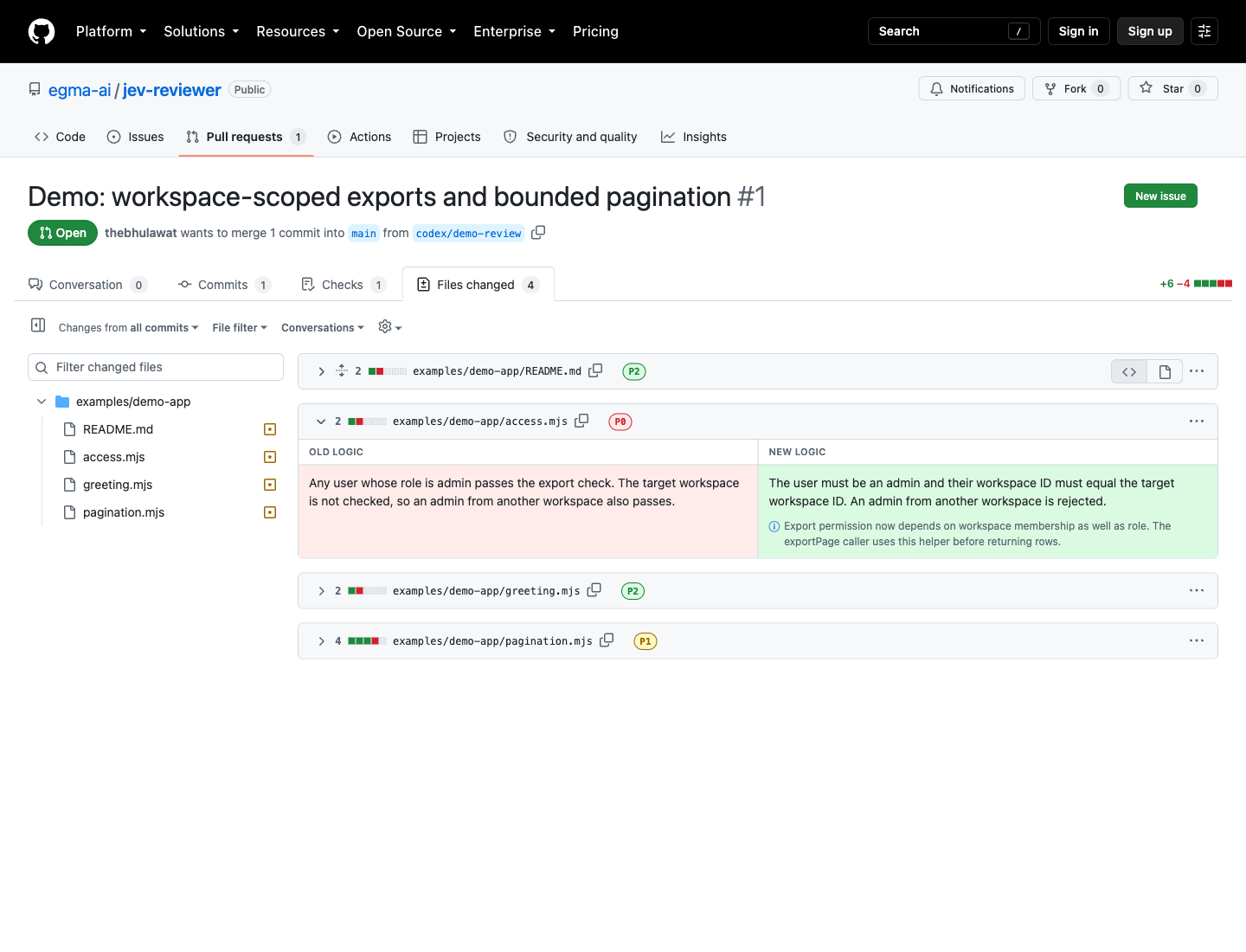
What is this?
 Jev is a local code review tool for pull requests opened by coding agents: it classifies each diff hunk into P0, P1 or P2 attention priority and explains the change in natural language instead of raw code.
Jev is a local code review tool for pull requests opened by coding agents: it classifies each diff hunk into P0, P1 or P2 attention priority and explains the change in natural language instead of raw code.Is this a CLI tool, a browser extension, or both?It is three pieces working together: a local Node.js CLI that analyzes the diff, a Chrome extension that overlays the explanations on GitHub's Files changed page, and an agent skill your coding agent can invoke after opening a PR.
It is three pieces working together: a local Node.js CLI that analyzes the diff, a Chrome extension that overlays the explanations on GitHub's Files changed page, and an agent skill your coding agent can invoke after opening a PR.How do I review my own PR with it?Load the extension/ folder as an unpacked Chrome extension, run 'jev-reviewer token | pbcopy' and paste it into the extension's Connection popup, then open the PR's Files changed page and toggle 'Show logic in place of code'.
Load the extension/ folder as an unpacked Chrome extension, run 'jev-reviewer token | pbcopy' and paste it into the extension's Connection popup, then open the PR's Files changed page and toggle 'Show logic in place of code'.What do I need installed before trying it?Node.js 22+ and the GitHub CLI signed in (gh auth login), plus a local clone whose origin matches the PR's repository; an OpenAI API key is required for analysis.
Node.js 22+ and the GitHub CLI signed in (gh auth login), plus a local clone whose origin matches the PR's repository; an OpenAI API key is required for analysis.Does it analyze the whole diff, and does it work on any GitHub PR page?No: only the first 12 diff hunks are analyzed by default (up to 100 with --max-units), unanalyzed files keep GitHub's original code view, and it only works on the classic Files changed page, not GitHub's new /changes page.
No: only the first 12 diff hunks are analyzed by default (up to 100 with --max-units), unanalyzed files keep GitHub's original code view, and it only works on the classic Files changed page, not GitHub's new /changes page.Does my code get sent anywhere?Yes, the analyze step sends changed code and nearby context to TypeSafe and OpenAI; the Chrome extension itself only talks to a local server on 127.0.0.1:4731.
Yes, the analyze step sends changed code and nearby context to TypeSafe and OpenAI; the Chrome extension itself only talks to a local server on 127.0.0.1:4731.How are the P0, P1, P2 priorities decided and can I change them?They represent how much human attention a change deserves, not correctness. P0 files open by default while P1 and P2 start collapsed, and you can retune the thresholds by copying config/policy.json into a .jev-reviewer.json file in the reviewed repo or passing --policy.
They represent how much human attention a change deserves, not correctness. P0 files open by default while P1 and P2 start collapsed, and you can retune the thresholds by copying config/policy.json into a .jev-reviewer.json file in the reviewed repo or passing --policy.Where are my API keys stored?Keys live in ~/.config/jev-reviewer/credentials.json (owner-only, unencrypted) rather than shell exported variables, since a coding agent's shell often can't see env vars. You can swap your OpenAI key with 'node scripts/setup-keys.mjs --replace-openai'.
Keys live in ~/.config/jev-reviewer/credentials.json (owner-only, unencrypted) rather than shell exported variables, since a coding agent's shell often can't see env vars. You can swap your OpenAI key with 'node scripts/setup-keys.mjs --replace-openai'.Can I try it without connecting my own PR?Yes, there is a bundled demo recording using real Jev classifications and prepared explanation copy that replays with no provider calls, plus an open demo PR you can load the extension against.
Yes, there is a bundled demo recording using real Jev classifications and prepared explanation copy that replays with no provider calls, plus an open demo PR you can load the extension against.What happens if the PR gets new commits after I ran analyze?Old reports are never shown automatically; the extension keeps displaying GitHub's original code until you rerun analyze and click Refresh report.
Old reports are never shown automatically; the extension keeps displaying GitHub's original code until you rerun analyze and click Refresh report.What are similar projects?perch, pr-agent, no-mistakes, 1code, open-swe, open-code-review, issue-graph, diffle
perch, pr-agent, no-mistakes, 1code, open-swe, open-code-review, issue-graph, diffleWhich topics is it in?pull-request, byok, devtools, code-quality, code-review, chrome-extension, browser-extension, github, cli-tool, git, local-first, coding-agent
pull-request, byok, devtools, code-quality, code-review, chrome-extension, browser-extension, github, cli-tool, git, local-first, coding-agent