 Translate for Zotero


Translate for Zotero, a.k.a. Zotero PDF Translate, is a Zotero plugin.
Translate PDF, EPub, webpage, metadata, annotations, notes to the target language. Support 20+ translate services.
中文文档
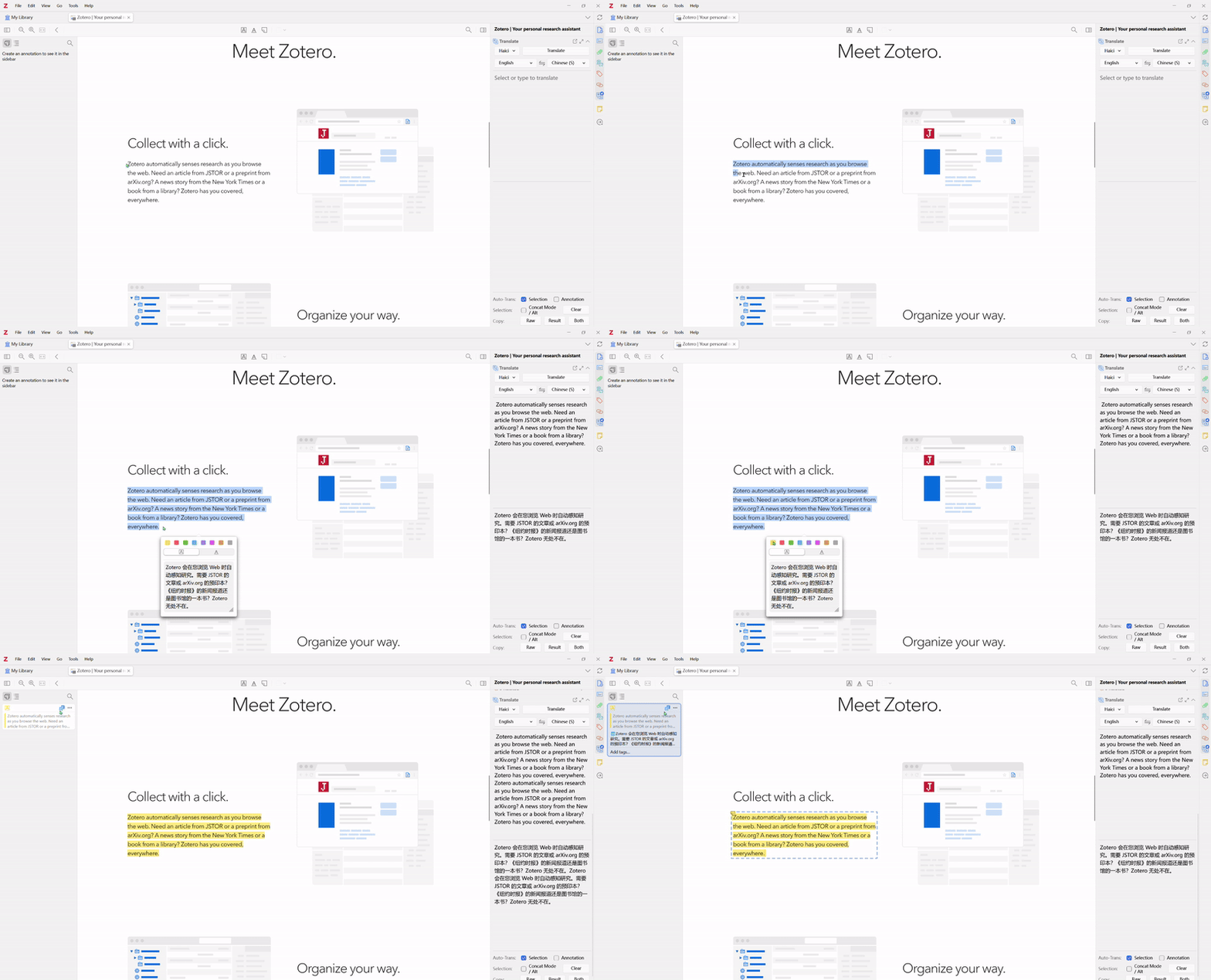
Quick Start Guide
Install
Download the plugin (.xpi file) from below.
Note If you're using Firefox as your browser, right-click the .xpi and select "Save As.."
In Zotero click Tools in the top menu bar and then click Plugins
Go to the Extensions page and then click the gear icon in the top right.
Select Install Plugin from file.
Browse to where you downloaded the .xpi file and select it.
Finish!
Usage
Open any PDF/EPub/webpage in the Zotero reader.
Select text, the translations are shown on the pop-up and the item pane(v0.2.0).
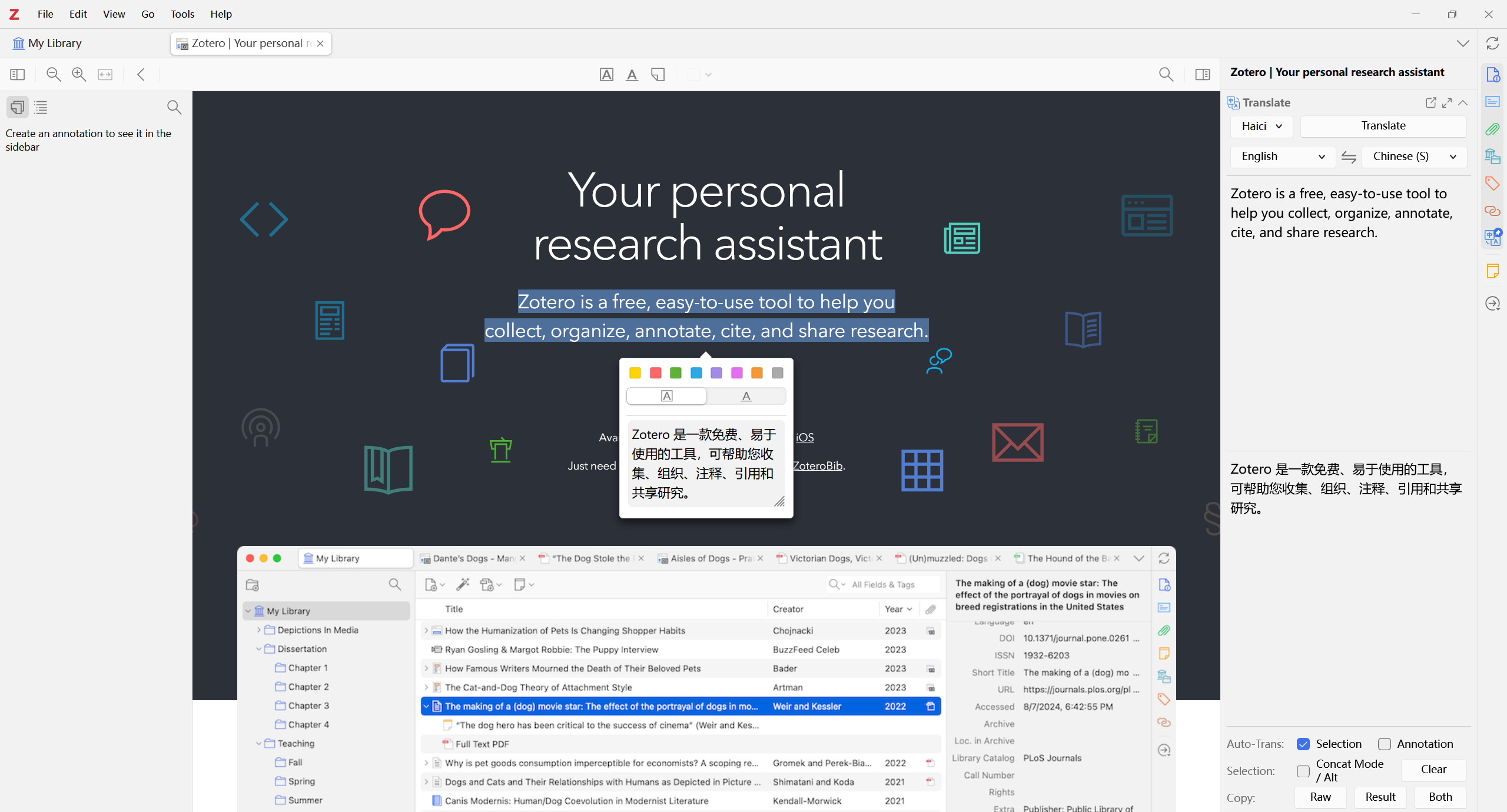
Highlight/Underline some text, the translations are added to the annotation comment(v0.3.0); Modify & retranslate the annotation text in the item pane and click the Update Annotation to modify the annotation text and translation(v0.6.6);
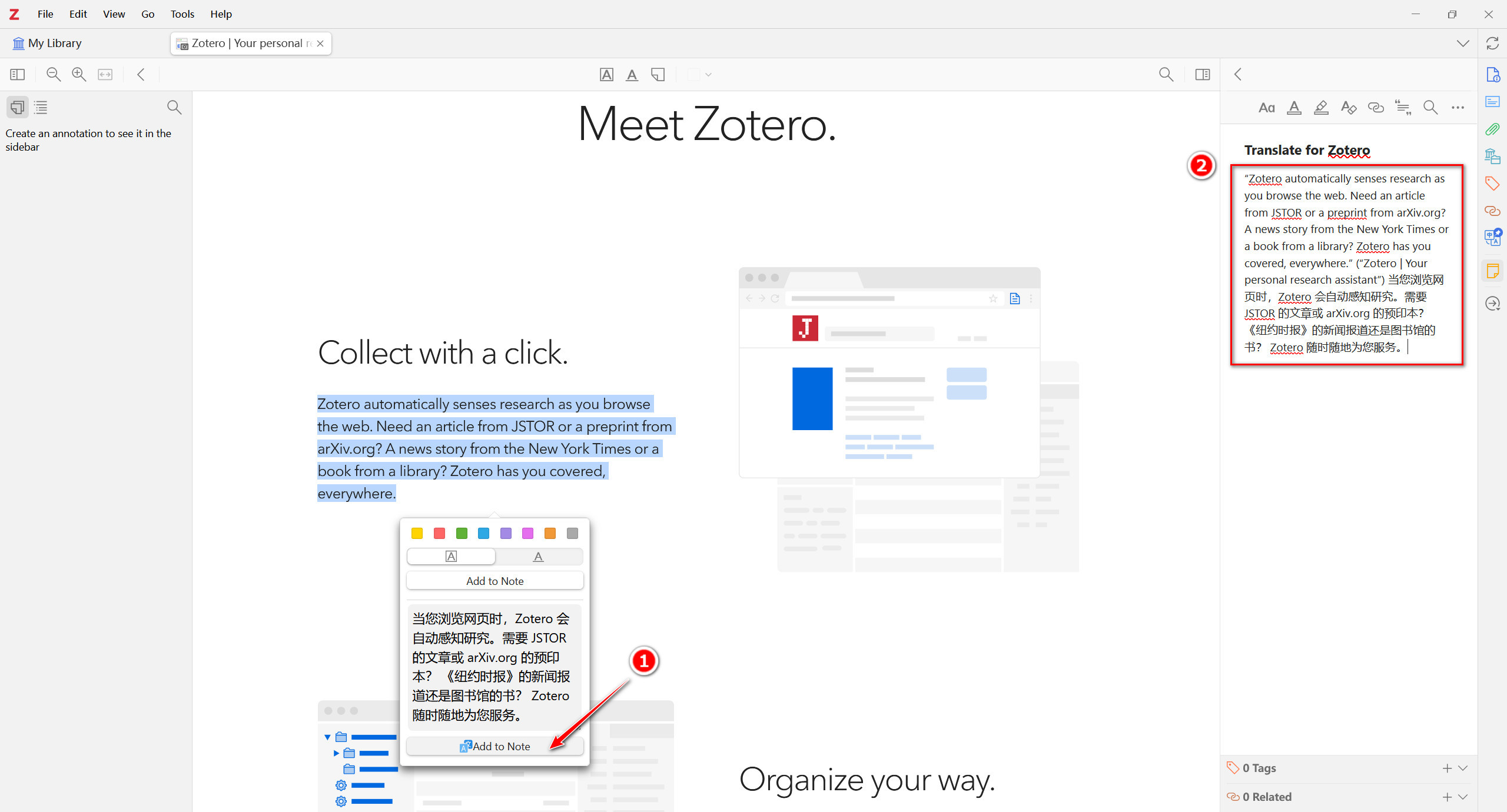
Add selected text along with translation to note(v0.4.0); Only works when a note editor is active.
Translate item titles with right-click menu or shortcut Ctrl+T(v0.6.0).
Translate item abstract with right-click menu(v0.8.0). Thanks @iShareStuff
Standalone translation window available(v0.7.0). View & compare translations from multiply services in one window!
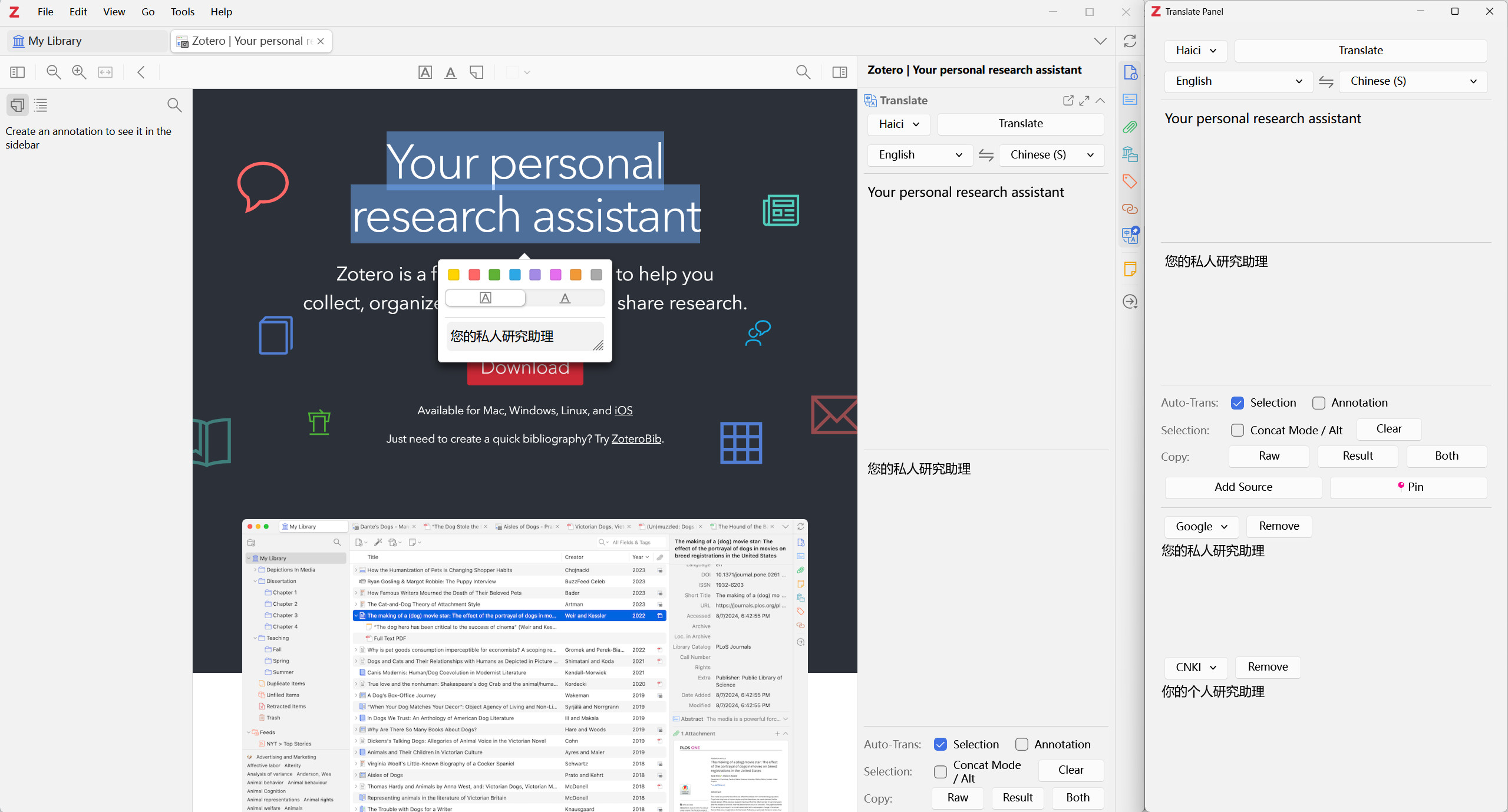
Dictionary for single word translation(v0.7.1).
SentenceBySentence Translation(v1.1.0). After a translation, press shift+P and select Translate Sentences. Only for en2zh and en2en now. Thanks @MuiseDestiny
Since v2.2.0, the concat mode shortcut is ctrl (on Windows/Linux) or ⌘ (on macOS).
Q&A
Q I want to translate manually.
A Go to Edit->Settings->Translate->General, uncheck the Automatically Translate Selection. Click the Translate button on the pop-up or item pane to translate.
Q I want a translate shortcut.
A
Press shortcut Ctrl+T after you selected some text. If you are in the collection view, the titles' translation will show/hide.
Q I want to concat different selections and translate them together.
A Press Ctrl/⌘ or select the Concat Mode check box on item pane when selecting text in PDF/EPub/webpage.
Q Not the language I want.
A The default target language is the same as your Zotero language. Go to Edit->Settings->Translate->Service and change the language settings.
Q Translation not correct or report an error.
A See Language Settings above and FAQ(#6). Make sure you use the right secret.
Q I want to change the font size.
A Go to Edit->Settings->Translate->User Interface and set the font size.
Q I want to resize the raw and result text area in the translate panel.
A Drag the separator up and down to adjust the size. Double-click the separator to reset the size.
Settings
General
- Automatically Translate Selection, default
true
- Automatically Translate Annotation: Save annotation's translation to annotation comment or annotation body, default
false
- Automatically Translate Annotation from Sync: Automatically translate annotations synced from other devices if
true, default false
- Enable Reader Selection Pop-up: Show results in the pop-up panel or only in the item pane, default
true
- Show "Add Translation to Note" in Pop-up: default
true
Invisible if no active note editor opened.
- Replace Raw: Use translation to replace the raw text when adding to note, default
false
- Enable Dictionary: Single word will be translated using dictionary service instead of translate service, default
true
- Show Play Buttons: Show the word pronunciation play buttons if available, default
true
- Auto-play Pronunciation, default
false
Service
The default service is Google Translate. Currently, we support:
| Translate Service |
Require Secret |
Supported Languages |
| Google Translate |
No [Free] |
100+ |
| Google Translate(API) |
No [Free] |
Use translate.googleapis.com |
| CNKI |
No [Free] |
https://dict.cnki.net |
| Haici Translate |
No [Free] |
https://fanyi.dict.cn |
| Youdao Translate |
No [Free] |
100+? |
| iCIBA Translate |
No [Free] |
https://www.iciba.com/translate |
| MyMemory |
No [Free 5k/day per IP] |
https://mymemory.translated.net/
(Free upgrade: enter your email in Settings to get 50k/day per IP quota) |
| Bing |
No [Free] |
en-zh |
| DeepLX |
No [Free] |
Based on DeepLX |
| DeepLX(API) |
No [Require config] |
DeepLX related projects |
| LibreTranslate |
Optional [Require config] |
LibreTranslate |
| MTranServer |
Optional [Require config] |
MTranServer |
| NLLB |
No [Require config] |
nllb-api or NLLB Serve |
| Pot |
No [Require config] |
Pot Translate results show in Pot |
| Huoshan |
Yes |
50+ |
| Volcengine Web |
No [Free] |
en, zh, and more (auto-detect, web version) |
| Youdao Zhiyun |
Yes |
100+ |
| Youdao LLM |
Yes |
LLM-based(en-zh) |
| Niu Trans |
Yes |
400+ |
| Microsoft Translate |
Yes(free 2M) |
200+ |
| LingoCloud(Caiyun) Translate |
Yes |
10+ |
| DeepL Translate |
Yes(free 500k) |
100+ |
| Aliyun Translate |
Yes(free-1M) |
200+ |
| Baidu Translate |
Yes(free-QPS1/free-2M) |
200+ |
| Baidu Field |
Yes(free-QPS1/free-2M) |
en-zh |
| OpenL |
Yes |
11 |
| Tencent Translate |
Yes(QPS5, free-5M) |
15 |
| Tencent Transmart |
No [Free] |
en, zh, and more (auto-detect, web version) |
| Xftrans |
Yes(free 2M) |
Xftrans API(70+), NiuTrans API(100+) |
| GPT |
Yes(free-$18) |
OpenAI(ChatGPT), AzureGPT, compatible GPT-like LLM (Custom GPT) |
| Gemini |
Yes(free-) |
LLM-based |
| Qwen-MT |
Yes(free-) |
LLM-based |
| Claude |
Yes |
LLM-based |
If the service you want is not yet supported, please post an issue.
Google
Google does not require a secret, but you can put your own API URL in the secret to replace the default URL (translate.google.com/translate.googleapi.com).
Huoshan
Apply here.
The secret format is accessKeyId#accessKeySecret
Youdao Zhiyun Translate 有道智云
Apply here.
The secret format is MY_APPID#MY_SECRET#MY_VOCABID(optional).
About VOCABID
登录控制台,选择文本翻译服务,点击右侧的术语表,选择新建,填写表名称和语言方向,添加需要的术语表,然后获取对应词表 id 即可。
About Config -> Domain
登录控制台,点击创建应用,输入应用名称,在选择服务一栏勾选文本翻译,然后勾选领域化翻译即可开通领域化翻译。领域化翻译仅支持中英互译。
Official Document
Youdao LLM Translate 有道智云子曰大模型
Apply here.
The secret format is MY_APPID#MY_SECRET.
登录控制台,点击创建应用,输入应用名称,在选择服务一栏勾选大模型翻译,大模型翻译仅支持中英互译。
Official Document
NiuTrans
Apply here.
The secret format is MY_APIKEY#dictNo(optional)#memoryNo(optional).
Chinese Document
Microsoft Translate
Apply here. Copy your secret and paste it into the settings.
The secret format is serviceKEY#region(required if the region is not global).
See this issue for detailed steps to set up the Microsoft Translate.
LingoCloud(Caiyun) Translate
Apply here.
DeepL Translate
Apply official API or third-party API.
The secret format is secretToken or secretToken#glossaryId (if you want to specify some translate glossary).
Aliyun Translate
Apply here.
The secret format is accessKeyId#accessKeySecret#endpoint(optional).
The endpoint is the region of the service, default https://mt.aliyuncs.com. For cn-hangzhou, the endpoint is mt.cn-hangzhou.aliyuncs.com. See also here.
Chinese Document
Baidu Translate
Apply here.
The secret format is MY_APPID#MY_KEY#ACTION(optional, see https://api.fanyi.baidu.com/doc/21, default 0)(split with '#').
Baidu Field Translate 百度垂直领域翻译
Apply here.
The secret format is MY_APPID#MY_KEY#DOMAIN_CODE(split with '#').
| Domain Code |
领域 |
支持语言方向 |
| it |
信息技术领域 |
中文(简)-> 英语、英语 -> 中文(简) |
| finance |
金融财经领域 |
中文(简)-> 英语、英语 -> 中文(简) |
| machinery |
机械制造领域 |
中文(简)-> 英语、英语 -> 中文(简) |
| senimed |
生物医药领域 |
中文(简)-> 英语、英语 -> 中文(简) |
| novel |
网络文学领域 |
中文(简)-> 英语 |
| academic |
学术论文领域 |
中文(简)-> 英语、英语 -> 中文(简) |
| aerospace |
航空航天领域 |
中文(简)-> 英语、英语 -> 中文(简) |
| wiki |
人文社科领域 |
中文(简)-> 英语 |
| news |
新闻资讯领域 |
中文(简)-> 英语、英语 -> 中文(简) |
| law |
法律法规领域 |
中文(简)-> 英语、英语 -> 中文(简) |
| contract |
合同领域 |
中文(简)-> 英语、英语 -> 中文(简) |
Chinese Document
OpenL Translate
Apply here.
The secret format is service1,service2,...#apikey(split with '#'; split service codes with ',').
Supported service codes are: deepl,youdao,tencent,aliyun,baidu,caiyun,wechat,sogou,azure,ibm,aws,google, See Service Code
Chinese Document
Tencent Translate
Apply here.
The secret format is secretId#SecretKey#Region(optional, default ap-shanghai)#ProjectId(optional, default 0)(split with '#').
Chinese Document
Xftrans 讯飞翻译
Apply here.
GPT
Apply OpenAI ChatGPT API or Azure OpenAI REST API.
The secret format is sk-* for ChatGPT, and MY_APIKEY for AzureGPT and Custom GPT.
Support third-party or self-deployed compatible APIs.
Chinese Document
Gemini
Apply here.
The secret format is MY_APIKEY.
Qwen-MT
Apply here.
The secret format is MY_APIKEY.
Claude
Apply here.
LibreTranslate
See LibreTranslate. API Key is optional.
MTranServer
See MTranServer. Token is optional.
MTranServer only supports zh-en language pairs for v2.1.1 and previous versions. For MTranServer v3.0.0+, please check the checkbox in the Config panel to use zh-Hans or zh-Hant language. See explanation of the supported languages.
NLLB
See nllb-api or NLLB Serve.
Pot
See Pot. Translate results show in Pot.
User Interface
Font Size: The font size of result text, default 12Line Height: The line height of result text, default 1.5Item Context Menu: Show xxx: Show or hide Title/Abstract tanslation, default trueItem Pane Section: Show xxx: Show or hide elements in the item pane, default trueItem Pane Section: Hold down Ctrl/⌘: Press key to enable concat mode when selecting text in PDF/EPub/webpage if true, default trueItem Pane Section: Reverse Raw/Result: Reverse the order of Raw/Result in the item pane if true, default falseItem Pane Info: Show xxx: Show or hide Title/Abstract tanslation in the item info rowsStandalone: Keep Windows on Top: Top the standalone translate panel if true, default falsePop-up: Remember Size: Remember size of pop-up if true, else automatically adjust the size, default false
Advanced
- Strip empty lines and thinking from translation results: Automatically remove empty lines or thinking labels from translation results, especially for some LLM translation services.
- Automatically Detect Item Language
- Disable Automatic Translation when File Language is(comma-separated): If you want to disable automatic translation in
zh and ja files, set zh,ja. Default zh,zh-CN,中文.
- Delimiter (between text and translation): When translating annotations, the result will be wrapped inside this character to allow safe re-translate. If set to empty, re-translating annotations will replace the annotation comment/body with the new translate result.
- Regex for removing extra text from translation results (leave empty to disable): Automatically remove text from translation results using regex. You need to understand how to use regex in advance.
- Reset field of selected items in library: Batch reset the Title Translation or Abstract Translation of selected items. Please select the items in Library or Collection panel and then click the button.
Development & Contributing
This plugin is built based on the Zotero Plugin Template. See the setup and debug details there.
To startup, run
git clone https://github.com/windingwind/zotero-pdf-translate.git
cd zotero-pdf-translate
npm install
npm run build
The plugin is built to ./build/*.xpi.
Contributing
Add new translate service
- Copy
src/modules/services/_template.ts > src/services/<your-service-id>.ts;
- Fill in the required fields (id, type, and translate) and optional fields (name, helpUrl, defaultSecret, secretValidator(secret), and config(settings)) following the introduction. The translation function sets the translation result to
data.result if runs successfully and throws an error if fails;
- Import the new service object in
src/modules/services/index.ts.
- Add locale string
service.${serviceId} and service-<your-service-id>-dialog-xxx(if necessary) in addon/locale/${lang}/addon.ftl.
- Build and test.
Disclaimer
Use this code under AGPL. No warranties are provided. Keep the laws of your locality in mind!
My Zotero Plugins
Thanks
peachgirl100,
youngfish42,
and other anonymous sponsors!
If you want to leave your name here, please email me or leave a message with the donation.
Contributors


 Zotero PDF Translate 是一款 Zotero 插件,可以将 PDF、EPub、网页、元数据、批注和笔记翻译成你所需的目标语言。