Open-source Obsidian alternative that works with your existing vault.
Your AI tools keep it organized and up to date, with no API keys or plugins. For you and your team.
I started Wenlan because my notes, documents, and AI chats were scattered, and keeping a note system from rotting took constant upkeep. Since then we keep hearing the same about Obsidian: too much setup, with plugins to find, install, and keep updated. Wenlan is for people who use AI tools every day and don't want to maintain a note system.
Personal: download the desktop app and use it on your own.
Teams (in the next release): a self-hosted Wenlan server everyone connects to, with view-only or edit access for each person.
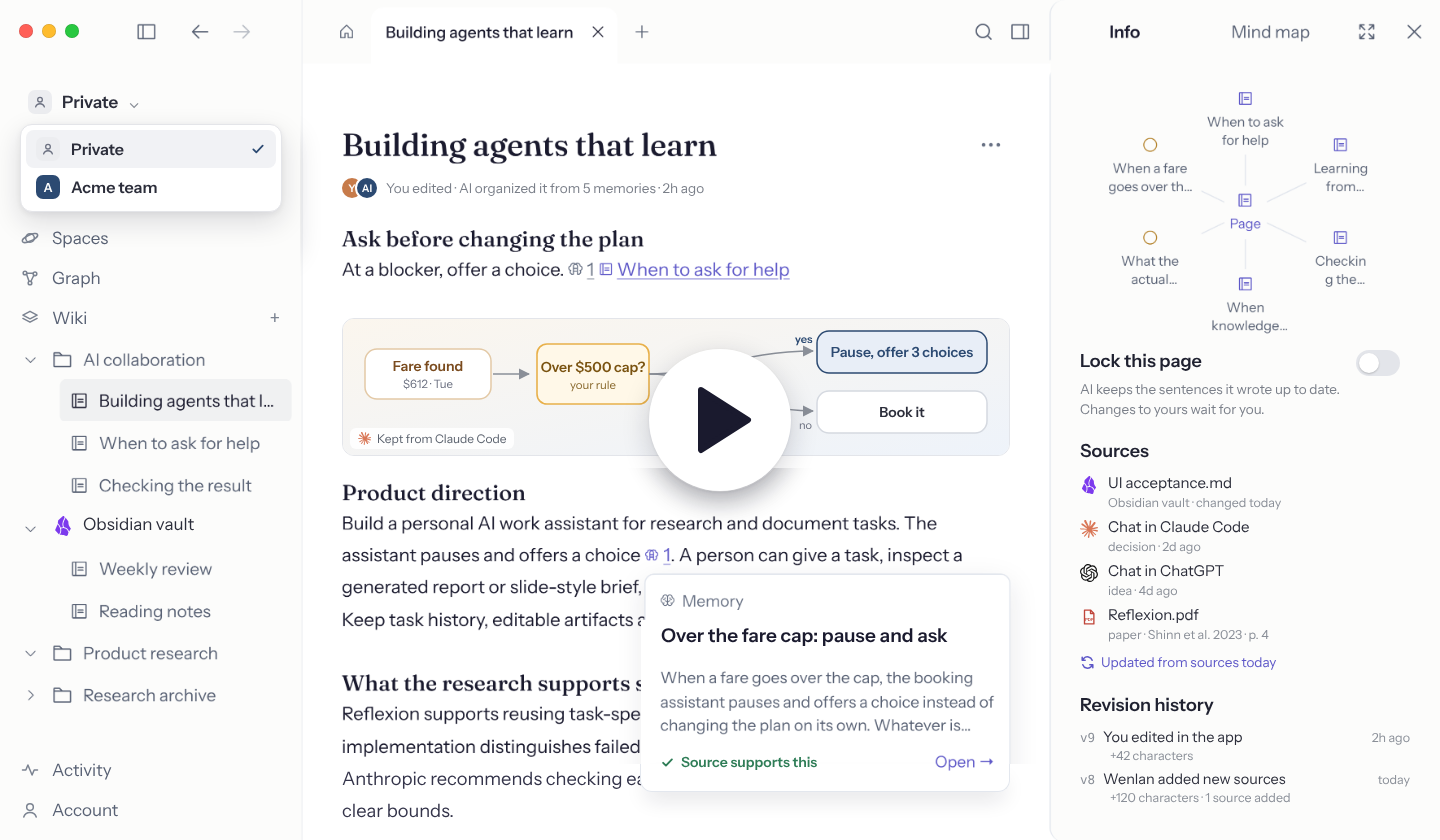
Keeps itself up to date. Your AI tools save what you decide in chats as memories and fold them into pages. When a source changes, the pages that rely on it get updated.
No plugins, no setup.Connect all in Settings connects your AI tools in one click. No plugins to find or update, and no API keys.
Bring what you have. Obsidian vaults, notes, documents, and AI chats. Full list.
You decide what AI changes. See every change, undo it, and choose which pages wait for your OK.
Pages cite their sources. A citation opens the original; a page whose citations mostly don't match isn't saved.
A page can be text or HTML. Ask your AI to make an HTML view of any page, or keep the HTML it made as an HTML page of its own. An HTML view shows the page's live text, so you never redo it.
Share a Space. With a colleague, or across your own computers, through a Google Drive or iCloud Drive folder.
How it compares
Obsidian + plugins
Notion
LLM wiki apps
Wenlan
Who organizes
You, with plugins
You, or Notion's agents
An AI you set up
Your AI tools; updates when a source changes
Setup
Find and update plugins
Full AI on the Business plan
Model key or scheduled routine
One click, no API key
Checks the AI's work
Depends on the plugin
Cites sources; no match check
Links to sources
Refuses pages whose citations don't match
What AI may change
Depends on the plugin
Pages you give an agent
Its wiki folder
You choose per page; restore anytime
Where notes live
Your computer
Notion's cloud
Your computer
Your computer; works with your vault
Get started
1. Download and open Wenlan
Download the desktop app for macOS 11 or later on Apple Silicon, Windows x64, or Linux x64 (AppImage or .deb, from v0.22). The app is in English, 简体中文, and 繁體中文.
Prefer the terminal? On a Mac, run npx -y wenlan setup, or brew install 7xuanlu/tap/wenlan and then wenlan setup. Linux and Windows: CLI install guide.
2. Bring in your material
Create a page, or bring in an Obsidian vault, a Logseq graph, a folder, or earlier AI chats. Import guide.
3. Connect your AI tool
In the App's Settings, Add a tool finds the AI tools on your computer and Connect all sets them up in one press. There is nothing else to install or keep updated. Then start a new AI session and ask:
/wenlan what did I decide about this before? Then help me: …
/wenlan ($wenlan in Codex) is the one command to remember: say what you want after it.
Works with Claude Code, Claude Desktop, Codex, Cursor, GitHub Copilot, VS Code, Gemini CLI, Windsurf, Grok Bot, and other MCP tools. Set one up by hand.
When an import finishes, the app offers Write pages with your AI tool to turn it into your first cited pages. No command needed.
What you can bring in
Files and folders: Markdown, text, text-based PDFs, and DOCX. Import once, or keep a folder in sync.
Obsidian vaults and Logseq graphs: keep them in sync, or import once. Notes you wrote start on Ask me first.
Web links: paste a link into a page and it becomes a source. YouTube, X, Threads, Instagram, and RedNote links show as a card or video.
Gmail, Notion, Google Drive, Slack, GitHub: your AI tool reads them with its own connectors and saves what matters, with a link to the original.
AI chats: decisions and findings are saved as memories, not full transcripts. ChatGPT and Claude export ZIPs work too.
A code repository:/wenlan wiki writes pages tied to the code. Code wiki.
You can also connect an Open Knowledge Format (OKF) folder as a source. Scanned PDFs need text extraction first; chat attachments are not imported. Import guide.
How it stays organized
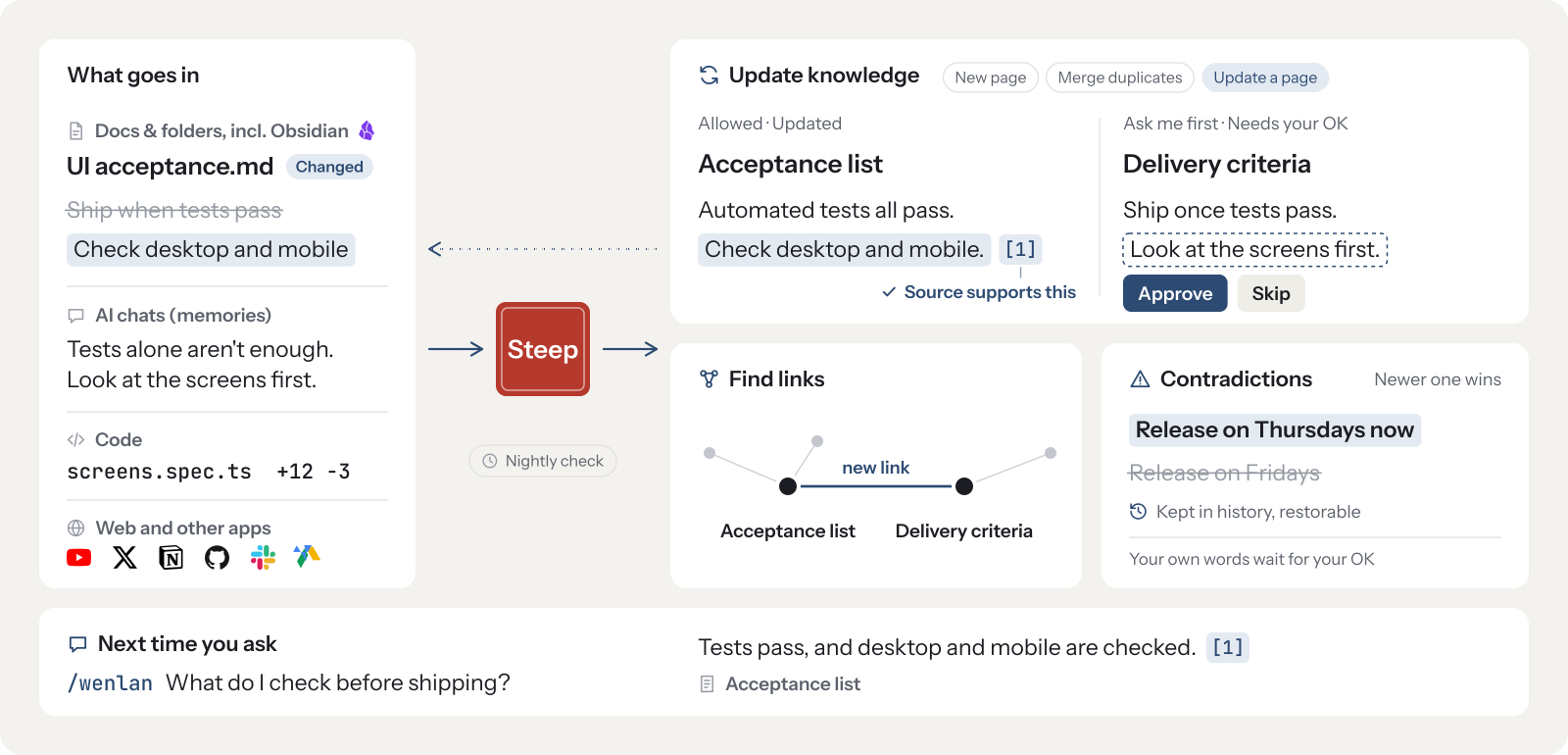
Your AI tool reads what you bring in and writes it into Markdown pages. It links related pages, cites where each sentence came from, and brings pages up to date when a source changes. You can open any page and write in it yourself.
Illustration based on current update behavior; not an App screenshot.
Pages with sources: Each citation opens the original. When a page cites its sources as [n], Wenlan compares each cited sentence with its source and refuses the page when most citations don't match. Passing the check does not prove a page correct.
Kept current: When a source, memory, or cited code changes, the pages that rely on it are flagged for an update. Without any model, Wenlan also suggests merging near-duplicate pages and lists [[links]] that point to no page yet.
You decide what AI may change: Pages you wrote start on Ask me first, so AI changes wait for your OK. Set any page to Allowed or Ask me first, see what changed, and restore an earlier version.
Two ways to run it: In On demand, the default, your AI tool does the writing while it works, so there is no API key to set up. In Automatic, Wenlan does it in the background with a model you choose, on your computer or in the cloud. Steep guide.
In your AI tool: type /wenlan and say what you want: look up earlier decisions, save a lesson, or pick up where you stopped. Shortcuts: /recall, /capture, /handoff, /brief. Plugin commands.
In the app: Add material, write and edit pages, follow citations, and review proposed changes without connecting an AI. Pages can include Mermaid diagrams, which the app draws.
Already using Claude Code or Codex on a folder of notes? Keep doing that. Wenlan connects to the same tool and adds what a folder can't do alone: citation checks, flags when sources change, and per-page control over what AI may change.
A wiki for your code repository
Run /wenlan wiki ($wenlan wiki in Codex) in a repository. Your AI tool writes an overview and one page for each part or flow a newcomer needs. A rerun writes only the pages that are missing.
Tied to the code: Each page records the code lines it was read from, and shows what changed when that code changes.
As a pull request: The GitHub button on a Space puts the pages in the repository's wiki/ folder as a pull request, when you press it or daily. The daily run uses your own AI tool on your computer, or GitHub Actions with your AI tool's key saved as a repository secret. The same pull request fixes sentences in the repository's docs that the code no longer agrees with.
Your edits stay: A wiki page someone edited in the repository keeps that edit. Pages that cite your memories or chats stay out of the repository.
For technical readers
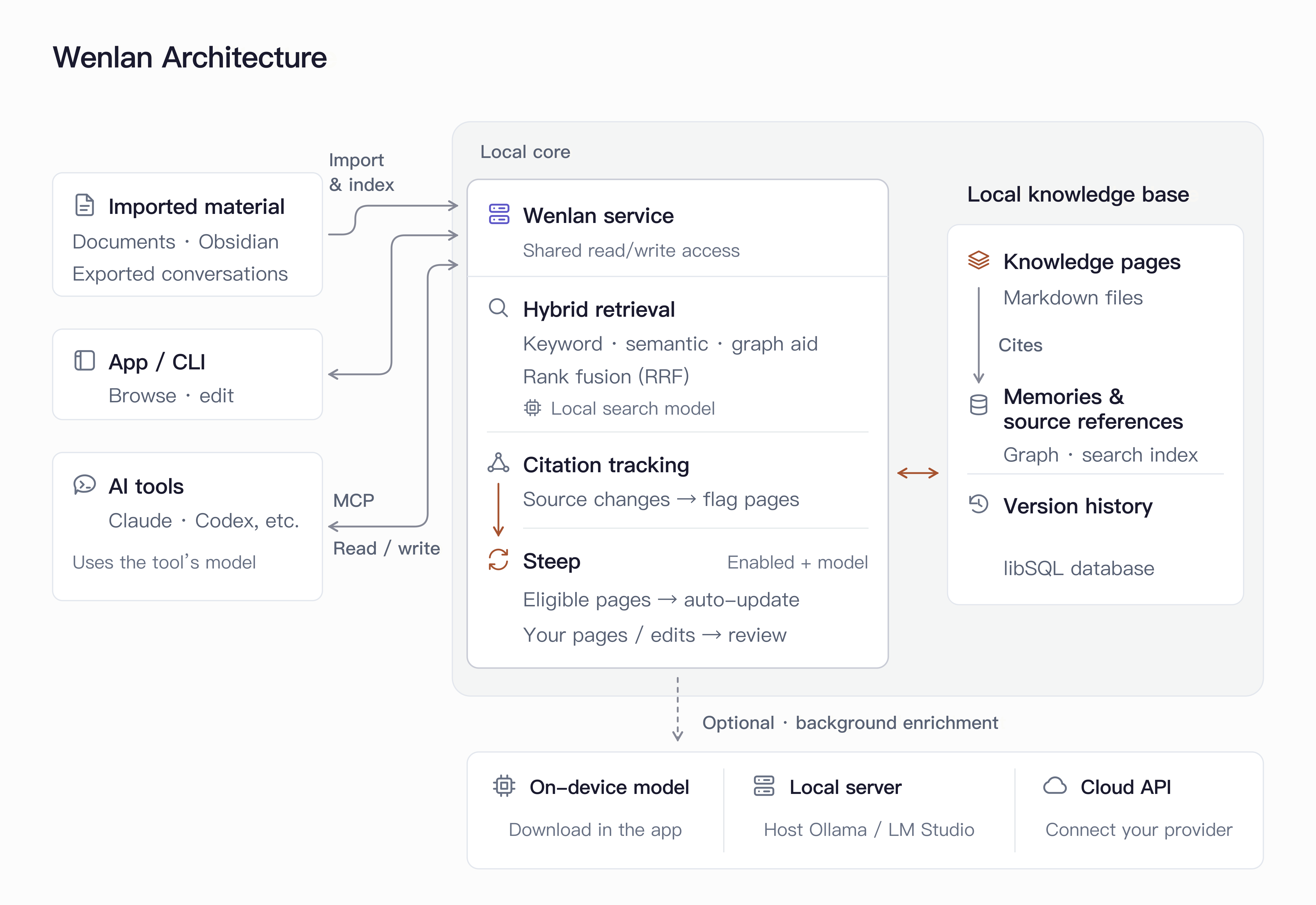
One local knowledge base. The app, CLI, and connected AI tools read and write through Wenlan’s local service. Pages are Markdown files; memories, relationships, and search indexes live in local libSQL. The service, CLI, and MCP server are written in Rust; the desktop app uses Tauri with React and TypeScript.
Retrieval: SQLite FTS5 finds exact terms and BGE embeddings in a libSQL DiskANN index find similar meaning, fused by weighted Reciprocal Rank Fusion (RRF). Base search needs no API key. Shared-entity links boost related memories, and optional cross-encoder reranking refines the order. Choosing a Space limits results to that project.
Graph: With an enrichment model, entity extraction and resolution link mentions of the same person, project, or concept across sources. Label Propagation (default) or Leiden groups related topics.
Memories: Findings are saved as small, separate memories, so one can be found without loading a whole conversation or page.
These LongMemEval (LME) snapshots measure retrieval of saved knowledge, not AI answer quality. Recall@5 measures how much relevant material appears in the top five results.
Benchmark
Recall@5
MRR
NDCG@10
LME_Oracle (500 Q)
93.6%
0.857
0.883
LME_S (deep, 90 Q)
87.7%
0.815
0.822
On a 10,000-page test (generated pages, M2 Pro with 16 GB, v0.20.0), App search answered in 11 to 50 ms, restart took under 0.3 s, and memory peaked at about 1.2 GB. With the search fix in 0.20.1, AI-tool search found all 30 rare test words in that library.
Importing a 10,000-note Obsidian vault in 0.20.2 (invented notes, M2 Pro Mac with 16 GB, debug build, Claude Code writing the pages): searchable in 15 s, the first page in about 2 minutes, and 8 cited pages in about 4 minutes.
Pages are Markdown files on your computer, and they go only where you send them.
Export eligible pages as an Open Knowledge Format (OKF) wiki.
A cloud AI tool may send what it retrieves to its provider, and a cloud model receives the material it processes, so local storage does not keep those interactions local.
Usage statistics are off by default.
Web access (experimental): Turn on Web access in Settings to let web AI clients such as Claude, ChatGPT, or Muse search your library or a chosen Space while your computer is online. When you allow an app, choose search only or search and write; a write app can also add, edit and delete, and AI apps can ask you before each change. Queries and results pass through a relay. See the privacy limits.
The local runtime, CLI, MCP server, shared types, and plugins use Apache-2.0. The desktop app and its frontend use AGPL-3.0-only; modified versions run as a network service must offer their source to users.





 Wenlan 是一款开源的桌面工作室,你的 AI 工具可以把你的笔记、聊天记录和决策整理成 Markdown 页面、技能和规则,并保持内容更新。它可以作为 Obsidian 的替代品,直接使用你现有的 vault。