sghtmltopdf




An HTML-to-PDF renderer like wkhtmltopdf written in Rust that does not depend on Chromium, WebKit, or Gecko.
Documentation (English)
What is this
sghtmltopdf turns HTML into PDF without starting a browser process.
It is aimed at documents that flow top to bottom with explicit breaks invoices, receipts, reports rather than at rendering arbitrary web pages.
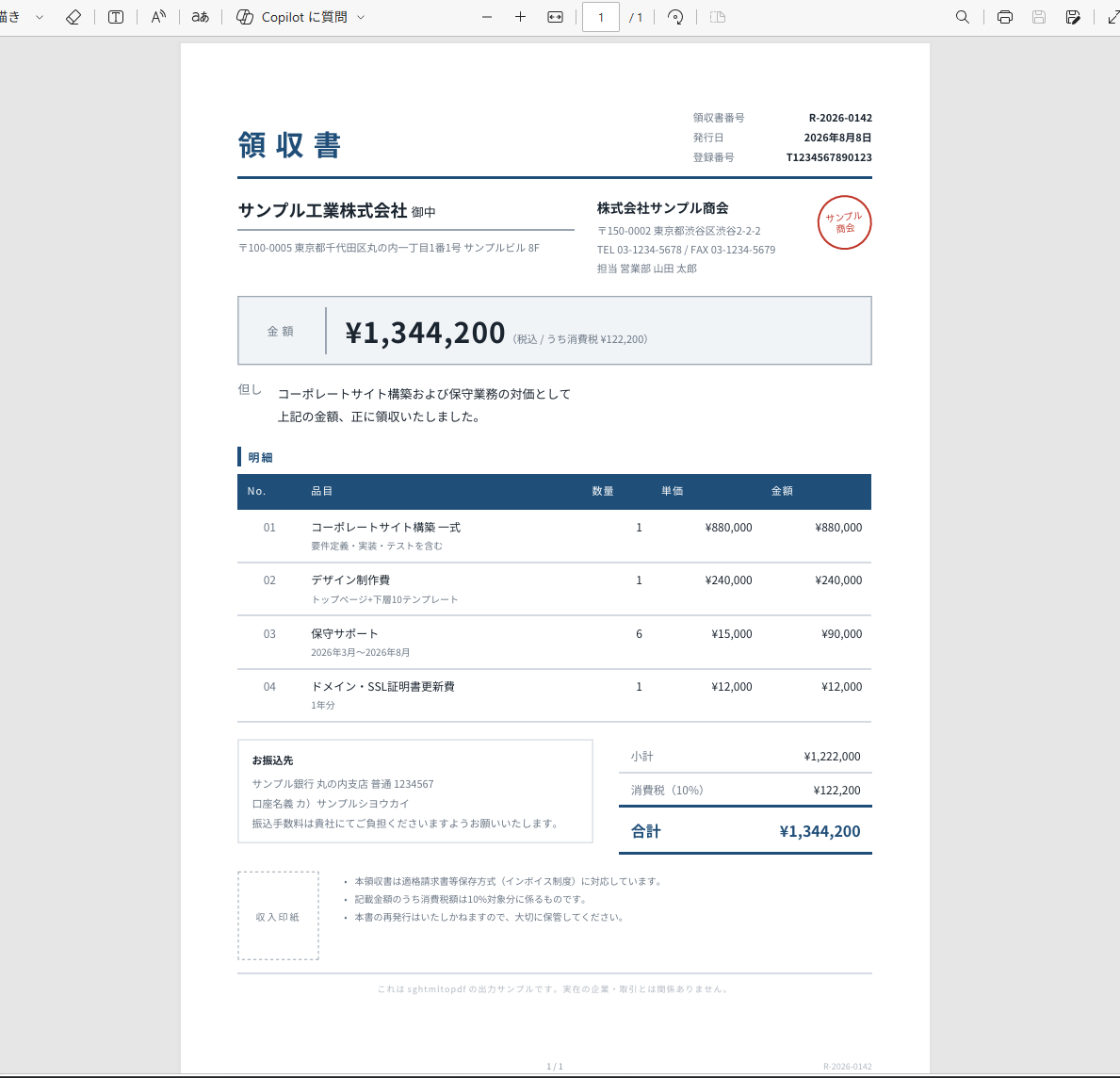
That receipt is examples/receipt.html plus examples/main.css, rendered with one command and no browser:
sghtmltopdf examples/receipt.html -o receipt.pdf
The result is committed as examples/receipt.pdf.
The stylesheet is ordinary CSS Flexbox, tables, custom properties, counter-increment for the row numbers, border-radius, and CJK text shaped from a system font.
The 1 / 1 and the document number along the bottom edge are margin boxes: @page { @bottom-center { content: counter(page) " / " counter(pages) } }.
Compared with the common headless-Chrome approach:
- No browser process. One binary, or a native extension living inside your Ruby process.
- Fonts are resolved during rendering. There is no
document.fonts.ready to wait for, so a PDF is never emitted with unresolved webfonts.
- Streaming. HTML is read in chunks and each page is written out as soon as its layout is final, so memory does not grow with document size (measured: 228MB → 28MB on a 60,000-element document).
- Page breaks are first class. CSS Fragmentation (
break-before, break-inside, orphans, widows) and @page are implemented directly.
What is actually rendering this
The layout engine is written for this project. HTML parsing is html5ever, CSS parsing is cssparser, and selector matching is the selectors crate all from Servo, and all of them battle-tested (Firefox ships the same selector engine through Stylo). Those give a DOM and computed styles. Everything after that box generation, line breaking, table layout, pagination, PDF writing—is code in this repository.
That is the whole reason for the trade-off in both directions. CSS coverage is a subset rather than everything a browser supports, because every property is implemented here rather than inherited. And in return, pagination is what the engine is built around instead of something bolted onto a screen-oriented layout: repeating table headers across page breaks, @page margin boxes, and streaming a page out the moment its layout is final are all things a browser cannot be asked to do.
Text shaping and font handling go through the usual Rust stack. No browser engine is embedded, and this is not a fork of anything.
Future-goals: executing JavaScript, pixel-perfect parity with browsers, and full CSS coverage. See what is not supported.
Where the name comes from
I was able to ship PDF output at all because wkhtmltopdf, and wicked_pdf that made it usable from Rails, were out there as open source.
The HTML templates I already knew how to write came back to me as a PDF, and that genuinely amazed me. Those two libraries had my deep respect.
wkhtmltopdf was archived in 2023.
I want the next programmer who is handed "make this print to PDF" to feel what I felt back then. This project is an attempt to carry that on, which is why the name starts with sg — Second Generation.
Usage
The command line, an HTTP server, a Ruby gem and a Rust crate all share the same engine and the same options.
# CLI
sghtmltopdf invoice.html -o invoice.pdf --page-size A4 --margin-top 20mm

# HTTP server
sghtmltopdf server --listen 127.0.0.1:8080
curl --data-binary @invoice.html 'http://127.0.0.1:8080/pdf?page-size=A4' -o invoice.pdf

# HTTP server, from the official image (Japanese fonts included, no arguments needed)
docker run --rm -p 8080:8080 ghcr.io/waka/sghtmltopdf
# Ruby (gem "sghtmltopdf")
pdf = Sghtmltopdf.render("<h1>Invoice</h1>", page_size: "A4")
Local references (<img src>, external CSS, @font-face) stay inside the base directory (--base-url, defaulting to the input HTML's own directory); a ../ that would escape it is an error, so untrusted HTML cannot read arbitrary files.
Pass --allow-path <DIR> to widen the boundary, or --disable-local-file-access to close it entirely (the HTTP server does the latter by default, and never lets a request loosen it).
The CLI flags are the ones you already know: most of them keep the same name and meaning as wkhtmltopdf (--page-size, --margin-top, --orientation, --header-html, --toc, …).
Flags that will not be implemented exit 1 with the reason and an alternative instead of being silently ignored — see the option table for the full list, and migrating from wkhtmltopdf for the cases where the same name behaves differently (CSS @page wins over the CLI, the default margin is 1in, cover and TOC are options rather than positional arguments).
Option names are the CLI long options without -- and with - replaced by _, so --page-size A4 becomes page_size: "A4".
The engine runs inside the same process through a native extension (magnus + rb-sys) no subprocess, no temporary files and releases the GVL while rendering, so other Puma threads keep running.
Rails
Add the gem and the Railtie wires everything up.
Nothing is loaded when Rails is absent, so plain Ruby and Sinatra are unaffected.
# Gemfile
gem "sghtmltopdf"
# config/initializers/sghtmltopdf.rb
Sghtmltopdf.configure do |c|
  c.page_size   = "A4"
  c.gothic_font = Rails.root.join("vendor/fonts/NotoSansJP-Regular.ttf")
end
A :pdf renderer is registered, in the spirit of wicked_pdf — the same keys, so an existing controller often needs no change at all:
class InvoicesController < ApplicationController
  def show
    render pdf: "invoice",              # filename; ".pdf" is appended
      template: "invoices/show",
      layout: "pdf",
      page_size: "A4", margin_top: "20mm"
  end
end
View-rendering keys (template, layout, locals, …) go to render_to_string, response keys (filename, disposition, status) go to send_data, show_as_html: true returns the HTML instead of a PDF, and everything else is passed to the converter.
The converter keys are flat CLI flag names, so wicked_pdf's nested margin: {top: 10} becomes margin_top: "10mm" (with the unit spelled out); migrating from wicked_pdf maps every key one by one.
PDF rendering does not go through the HTTP server, so /assets/… URLs are resolved as local files: the Railtie defaults base_url to Rails.root/public and restricts local reads to public/ and the asset pipeline load paths via allow_path.
That is enough for a precompiled production app; in development the digested /assets/… path names no file on disk, so these helpers look the asset up in the pipeline instead — the CSS expanded into a <style>, the image referenced by the path the engine can read:
<%= sghtmltopdf_stylesheet_link_tag "pdf" %>
<%= sghtmltopdf_image_tag "logo.png" %>
sghtmltopdf_stylesheet_link_tag does not copy the CSS verbatim: it points every url() at a file the engine can read and splices in every @import.
The asset pipeline rewrites url() through asset_path while precompiling, which turns a @font-face source into a digested /assets/… path, or into an absolute URL once asset_host is set — neither can be fetched while rendering, and a @font-face that fails to load falls back to the engine default rather than to the next font-family.
To send pages as soon as their layout is final, pass a block and use ActionController::Live this also makes Rack::Timeout and Thread#kill effective at chunk boundaries:
class InvoicesController < ApplicationController
  include ActionController::Live

  def show
    response.headers["Content-Type"] = "application/pdf"
    html = render_to_string(template: "invoices/show", layout: "pdf")
    Sghtmltopdf.render(html) { |bytes| response.stream.write(bytes) }
  ensure
    response.stream.close
  end
end
If the gem cannot run where your app runs (Windows) or you would rather not spend the app's CPU on rendering, set server_url and the same calls are delegated to a separate sghtmltopdf server process.
Sghtmltopdf.configure { |c| c.server_url = "http://{REMOTE_SERVER_URL}:8080" }
Everything else the full option reference, the HTTP API, CSS support tables, and migration guides from wkhtmltopdf and wicked_pdf lives in the documentation site (Ruby / Rails, Rust).
The Docker image (linux/amd64 and linux/arm64) bundles BIZ UDPGothic and BIZ UDPMincho, so Japanese documents render without supplying a font, and the same HTML always produces the same PDF regardless of the host's fonts.
ENTRYPOINT is the binary itself: no arguments starts the server, arguments run the CLI.
docker run --rm -v "$PWD:/work" -w /work --user "$(id -u):$(id -g)" \
    ghcr.io/waka/sghtmltopdf invoice.html -o invoice.pdf
To keep the server around next to your app, Compose is the shortest route the image needs no command, and inside the container it listens on 0.0.0.0:8080.
services:
  pdf:
    image: ghcr.io/waka/sghtmltopdf:0.1
    ports: ["8080:8080"]
    healthcheck:
      test: ["CMD", "sghtmltopdf", "--version"]
      interval: 30s
curl is not in the image, so the health check uses --version; hit GET /healthz from the outside (a load balancer, say) if you want the server itself checked.
Point the Ruby side at it with Sghtmltopdf.configure { |c| c.server_url = "http://pdf:8080" }, and add --font and a mounted volume to the service's command if you need fonts other than the bundled ones.
Rust
The engine is published on crates.io as sghtmltopdf, the same crate that builds the binary (API docs).
cargo add sghtmltopdf
Converter takes the same options as the command, so everything in the option reference works unchanged:
use sghtmltopdf::{with_render_stack, Converter};

let converter = Converter::from_args(["--page-size", "A4", "--margin-top", "20mm"])?;
let html = std::fs::File::open("invoice.html")?;
let pdf = with_render_stack(|| converter.render_to_vec(html))?;
std::fs::write("invoice.pdf", pdf)?;
Options are validated once by from_args, and the same Converter can render any number of documents.
Errors come back as ConvertError — Usage, Input, Render or Timeout, the same classes as the command's exit codes.
Rendering recurses as deep as the document, so run it on a thread with a large enough stack; with_render_stack does that for you.
To stream pages out as soon as their layout is final, pass your own Sink to render instead of collecting into memory.
The engine calls write in order, once or more per completed page, and finish exactly once at the end:
use std::io::{self, Write};
use sghtmltopdf::{with_render_stack, Converter, Sink};

struct WriterSink<W: Write>(W);

impl<W: Write> Sink for WriterSink<W> {
    type Output = W;
    type Error = io::Error;

    fn write(&mut self, bytes: &[u8]) -> io::Result<()> {
        self.0.write_all(bytes)
    }

    fn finish(mut self) -> io::Result<W> {
        self.0.flush()?;
        Ok(self.0)
    }
}

let converter = Converter::from_args(["--page-size", "A4"])?;
let html = std::fs::File::open("invoice.html")?;
let socket = std::net::TcpStream::connect("127.0.0.1:9000")?;
with_render_stack(|| converter.render(html, WriterSink(socket)))?;
FileSink (writes to a temporary file and renames it on success), StdoutSink, MemorySink and BufferedSink (hands over fixed-size parts, for S3 multipart uploads) are provided.
The lower-level Engine takes EngineOptions and HTML fed in chunks (feed, then finish); prefer Converter unless you need to assemble the options yourself.
| Feature |
Default |
|
cli |
yes |
The sghtmltopdf binary and Converter (clap) |
server |
yes |
sghtmltopdf server (tiny_http) |
svg |
yes |
SVG images embedded as vectors (svg2pdf) |
svg-text |
no |
<text> inside SVG images |
For library use, default-features = false, features = ["cli", "svg"] drops the HTTP server and keeps everything else.
Architecture
CLI, HTTP server mode, and the Ruby binding (native extension, or delegating to an HTTP server) are four different doors into the same option parser (cli/options.rs) and the same engine (sghtmltopdf). What differs is how the call comes in, and where the resulting PDF bytes are written (the Sink).
flowchart TD
    subgraph Entry["Entry points (core/src)"]
        CLI["CLI<br/>sghtmltopdf"]
        Server["HTTP server mode<br/>sghtmltopdf server<br/>(tiny_http)"]
        FFI["Ruby native extension<br/>(magnus + rb-sys)<br/>in-process FFI call"]
    end

    CallCLI["Shell / CI"] --> CLI
    CallHTTP["Any language (curl, ...)"] -->|"POST /pdf?options"| Server
    CallRuby["Ruby app / Rails<br/>(gem sghtmltopdf)"] -->|"Sghtmltopdf.render"| FFI
    CallRuby -->|"when server_url is set"| Delegate["ServerClient"]
    Delegate -->|"POST /pdf?options<br/>(HTTP, separate process/host)"| Server

    Options["Shared option parser<br/>cli/options.rs (clap)"]
    CLI --> Options
    Server --> Options
    FFI --> Options

    Engine["sghtmltopdf Engine<br/>parse HTML → cascade styles → layout → paginate → write PDF"]
    Options --> Engine

    Engine -->|"FileSink / StdoutSink"| OutCLI["PDF file / stdout"]
    Engine -->|"MemorySink"| OutServer["HTTP response<br/>(chunked with ?stream=1)"]
    Engine -->|"MemorySink / FileSink / CallbackSink"| OutFFI["PDF bytes / file / streamed to a Ruby block"]
The native extension does not spawn a subprocess it runs inside the same process as your app (Puma worker, etc.) as FFI, releasing the GVL while rendering so other threads keep going. Delegation to an HTTP server only happens when server_url is configured, and that server can be a sibling process on the same host or a remote one.
Guide for developer
Layout
core/           # Rust engine + CLI + HTTP server (no Ruby dependency)
bindings/ruby/  # Ruby binding (magnus + rb-sys) and the Rails integration
docs/           # Documentation site (mdbook, ja + en)
bindings/ruby is excluded from the root Cargo workspace, so a plain cargo build works without a Ruby toolchain.
Rust
cargo build --release                                   # binary at target/release/sghtmltopdf
cargo test --workspace
cargo fmt --all --check
cargo clippy --workspace --all-targets -- -D warnings
Feature flags: cli (argument parsing) and server (HTTP server) are on by default. Build the library alone with --no-default-features.
Ruby gem
Requires a Rust toolchain and libclang (for rb-sys).
cd bindings/ruby
bundle install
bundle exec rake            # compile, then run specs
bundle exec rake compile
Some specs compare gem output with the CLI byte for byte, and are skipped unless target/release/sghtmltopdf exists run cargo build --release first.
Documentation site
cargo install mdbook mdbook-mermaid mdbook-i18n-helpers

cd docs
mdbook serve                                        # Japanese (the source language)
MDBOOK_BOOK__LANGUAGE=en mdbook serve -d book/en    # English
Markdown under docs/src is written in Japanese; the English version is a gettext catalog at docs/po/en.po.
After editing the Japanese text, refresh the catalog (requires the gettext package):
MDBOOK_OUTPUT='{"xgettext": {}}' mdbook build -d po
msgmerge --update po/en.po po/messages.pot
Entries whose source changed are marked fuzzy review and update those, then remove the marker.
Pushing to main builds both languages and deploys to GitHub Pages.
License
MIT License (LICENSE).

 sghtmltopdf — это конвертер HTML в PDF на Rust, «второе поколение» и наследник wkhtmltopdf и wicked_pdf, созданный без зависимости от Chromium, WebKit или Gecko. Он рассчитан на структурированные документы с потоком сверху вниз и явными разрывами — счета, отчёты и т.п., а не на произвольные веб-страницы.