
fq README

The project's README from github.com/wader/fq. As one markdown file: README.md.

fq

Tool, language and decoders for working with binary formats.

fq demo

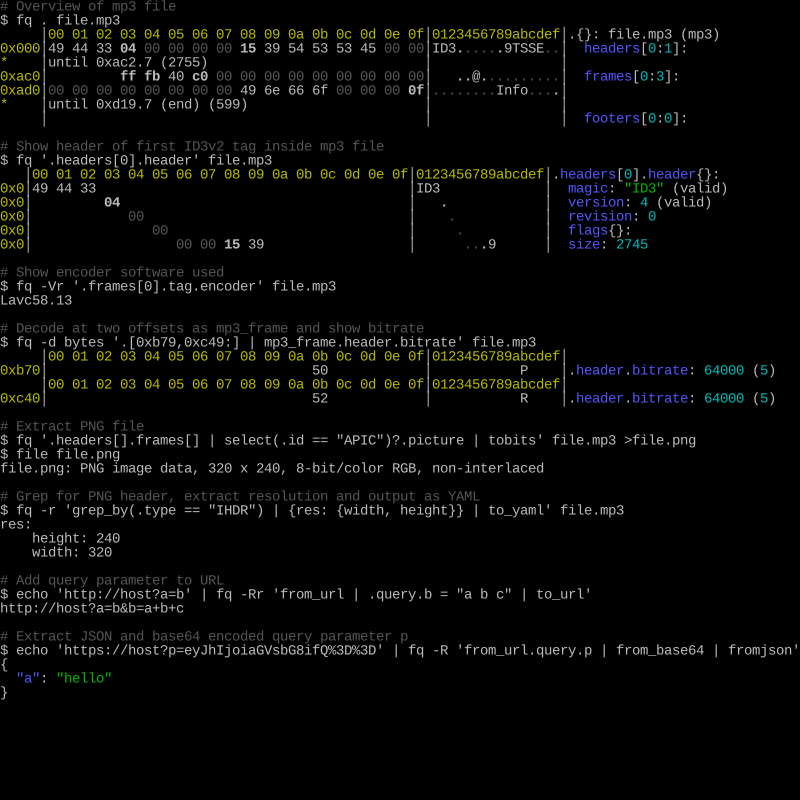
Basic usage is fq . file, fq d file or fq 'some query' file ....

For details see the manual, also available as man fq and as AsciiDoc.

Background

fq is a tool, language, and decoders for working with binary formats and data. In most cases it behaves and feels similar to jq and it also uses the same expression language. To get the most out of fq it's recommended to learn more about jq.

It features a structural hex viewer, nested format decoding, slicing and concatenating binary data, bit-level decoding and an interactive REPL with auto-completion.

Goals

Hopes

Supported formats

aac_frame, adts, adts_frame, aiff, amf0, apev2, apple_bookmark, ar, asn1_ber, av1_ccr, av1_frame, av1_obu, avc_annexb, avc_au, avc_dcr, avc_nalu, avc_pps, avc_sei, avc_sps, avi, avro_ocf, bencode, bitcoin_blkdat, bitcoin_block, bitcoin_script, bitcoin_transaction, bits, bplist, bsd_loopback_frame, bson, bytes, bzip2, caff, cbor, csv, dns, dns_tcp, elf, ether8023_frame, exif, fairplay_spc, fit, flac, flac_frame, flac_metadatablock, flac_metadatablocks, flac_picture, flac_streaminfo, gif, gzip, heif, hevc_annexb, hevc_au, hevc_dcr, hevc_nalu, hevc_pps, hevc_sps, hevc_vps, html, icc_profile, icmp, icmpv6, id3v1, id3v11, id3v2, ipv4_packet, ipv6_packet, jp2c, jpeg, json, jsonl, leveldb_descriptor, leveldb_log, leveldb_table, luajit, macho, macho_fat, markdown, matroska, midi, moc3, mosaic, mp3, mp3_frame, mp3_frame_vbri, mp3_frame_xing, mp4, mpeg_asc, mpeg_es, mpeg_pes, mpeg_pes_packet, mpeg_spu, mpeg_ts, msgpack, negentropy, nes, ogg, ogg_page, opentimestamps, opus_packet, pcap, pcapng, pg_btree, pg_control, pg_heap, png, prores_frame, protobuf, protobuf_widevine, pssh_playready, rtmp, safetensors, sll2_packet, sll_packet, stl, tap, tar, tcp_segment, tiff, tls, toml, tzif, tzx, udp_datagram, vorbis_comment, vorbis_packet, vp8_frame, vp9_cfm, vp9_frame, vpx_ccr, wasm, wav, webp, xml, yaml, zip

It can also work with some common text formats like URLs, hex, base64, PEM etc and for some serialization formats like XML, YAML, etc. it can transform both from and to jq values.

For details see the manual.

Presentations and media

Install

Use one of the methods listed below or download a pre-built release for macOS, Linux or Windows. Unarchive it and move the executable to PATH etc.

On macOS if you don't install using one of the method below then you might have to manually allow the binary to run. This can be done by trying to run the binary, ignore the warning and then go into security preference and allow it. Same can be done with these commands:

xattr -d com.apple.quarantine fq
# for macOS version before Sequoia you might need this also
spctl --add fq

Homebrew (macOS)

brew install wader/tap/fq

MacPorts

On macOS, fq can also be installed via MacPorts. More details here.

sudo port install fq

Windows

fq can be installed via scoop.

scoop install fq

Arch Linux

fq can be installed from the extra repository using pacman:

pacman -S fq

You can also build and install the development (VCS) package using an AUR helper:

paru -S fq-git

Gentoo

fq can be installed from the Gentoo package repository using emerge:

emerge dev-util/fq

Guix

guix shell fq -- fq --help # in develompen shell
guix install fq            # into current profile

Nix

nix-shell -p fq

FreeBSD

Use the fq port.

Alpine

Currently in edge testing but should work fine in stable also.

apk add -X http://dl-cdn.alpinelinux.org/alpine/edge/testing fq

Build from source

Make sure you have go 1.22 or later installed.

To install directly from git repository (no git clone needed):

# build and install latest release
go install github.com/wader/fq@latest

# build and install latest master
go install github.com/wader/fq@master

# copy binary to $PATH if needed
cp "$(go env GOPATH)/bin/fq" /usr/local/bin

To build, run and test from source:

# build and run
go run .
# build and run with arguments
go run . -d mp3 . file.mp3
# just build
go build -o fq .
# run all tests and build binary
make test fq

Development and adding a new decoder

See dev.md

This project would not have been possible without itchyny's jq implementation gojq. I also want to thank HexFiend for inspiration and ideas and stedolan for inventing the jq language.

Tools

Projects and Standards

TODO and ideas

See TODO.md

License

fq is distributed under the terms of the MIT License.

See the LICENSE file for license details.

Licenses of direct dependencies:

fq (wader/fq)

Searching Database…

10.6K ·GitHub
这是什么东西?fq 是一个命令行工具、一门语言,以及一组用于处理二进制格式的解码器——常被称作二进制数据版的 jq。你可以查看文件的结构,对它运行 jq 风格的查询,还可以在交互式 REPL 里浏览结果。
那它是一个图形界面软件、一个代码库,还是我在终端里运行的工具?它是一个用 Go 编写的独立命令行工具,还带一个支持自动补全的交互式 REPL。你只需安装一个可执行文件,就能直接在终端里对文件运行查询。
我该怎么安装它,第一次怎么查看一个文件?在 macOS 上可以通过 Homebrew 安装,Windows 上用 scoop,Arch 上有 pacman 或 AUR,Gentoo、Guix、Nix、FreeBSD 和 Alpine 也有软件包,或者直接下载 macOS、Linux 或 Windows 的预编译发布版二进制文件。然后运行 fq . file 查看文件结构,或运行 fq 'some query' file 进行过滤。
我需要懂 jq 才能用好它吗?懂 jq 会有帮助:fq 使用和 jq 相同的表达式语言,README 也建议学习 jq 以便充分发挥这个工具的作用。从源码构建还需要 Go 1.22 或更高版本;预编译的二进制文件则没有这个要求。
安装时有什么需要注意的坑吗?在 macOS 上,手动下载的二进制文件首次运行时可能会被系统拦截——你需要到“安全性”偏好设置里允许它运行(README 里给出了具体命令)。除此之外,在 macOS、Linux 和 Windows 上的安装都很简单。
它能解码哪些类型的文件?它的解码器列表涵盖媒体文件(mp4、mp3、flac、jpeg、png、gif、webp、wav)、可执行文件(elf、macho)、压缩包(zip、tar)、网络抓包和协议(pcap、pcapng、DNS、TLS、IPv4/IPv6)、序列化格式(protobuf、bson、cbor、msgpack)等等。它也能处理 URL、hex、base64 和 PEM 这类文本,并可以在 XML、YAML 和 jq 值之间互相转换。
打开一个文件之后,我能用它做什么?它提供一个带结构信息的 hex 查看器,能解码嵌套格式,支持对二进制数据进行切片和拼接以及位级别的解码,还提供带自动补全的交互式 REPL,方便你探索结果。
作者为什么要做这个项目?作者声称的目标是让二进制文件更容易访问、可查询、可切分,在一个快捷好用的命令行工具里支持嵌套格式和面向位的解码。该项目基于 itchyny 的 gojq 实现,并从 HexFiend 和 jq 语言中获得了启发。
它和 Wireshark、ImHex 或 HexFiend 相比怎么样?README 把它们列为相关但侧重不同的项目:HexFiend 是一款支持格式模板的 macOS hex 编辑器,ImHex 是面向逆向工程师的 hex 编辑器,Wireshark 用于解码网络流量,kaitai 做声明式的二进制格式解析。fq 的目标是把类似 jq 的查询语言、REPL 和丰富的解码器集合组合到一个命令行工具里。
What are similar projects?yq, brook, jq, scapy, grpcurl, liteparse, zenc, fx
Creator
wader
Size
53.2 MB
Stars
10.6K
Age
5y
Commits · 90 Days