Что это такое?
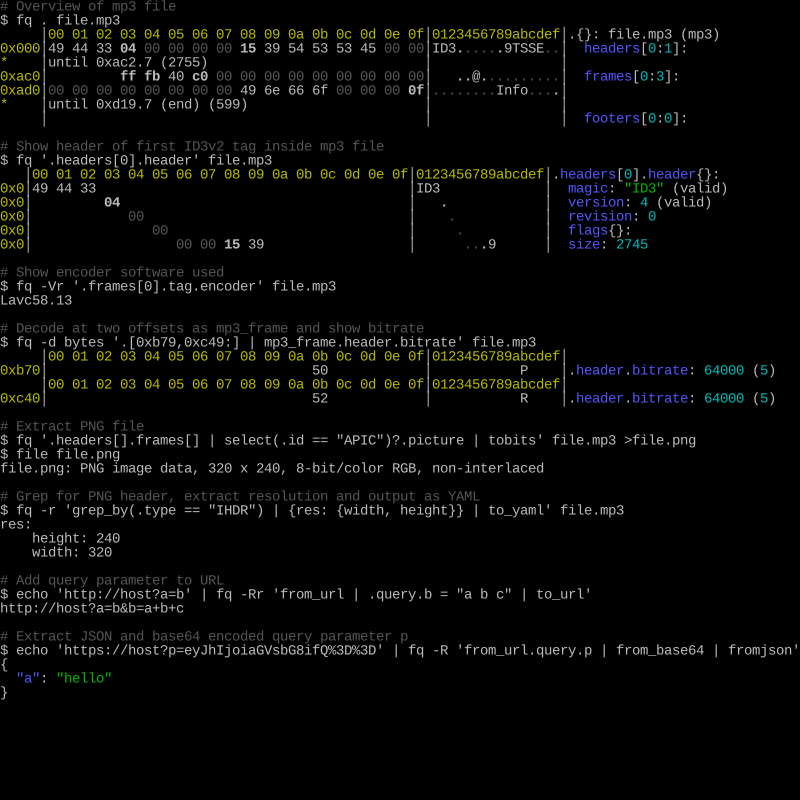
 fq — это инструмент командной строки, язык и набор декодеров для работы с бинарными форматами; его часто описывают как jq для бинарных данных. Можно вывести структуру файла, выполнять запросы в стиле jq и изучать результаты в интерактивном REPL.
fq — это инструмент командной строки, язык и набор декодеров для работы с бинарными форматами; его часто описывают как jq для бинарных данных. Можно вывести структуру файла, выполнять запросы в стиле jq и изучать результаты в интерактивном REPL.Так это программа с интерфейсом, библиотека для кода или то, что запускают в терминале?Это самостоятельный CLI-инструмент, написанный на Go, с интерактивным REPL и автодополнением. Вы устанавливаете один исполняемый файл и прямо из терминала выполняете запросы к файлам.
Это самостоятельный CLI-инструмент, написанный на Go, с интерактивным REPL и автодополнением. Вы устанавливаете один исполняемый файл и прямо из терминала выполняете запросы к файлам.Как его установить и впервые посмотреть на файл?Установите через Homebrew на macOS, scoop на Windows, pacman или AUR на Arch, пакеты есть в Gentoo, Guix, Nix, FreeBSD и Alpine, либо скачайте готовый бинарник из релизов для macOS, Linux или Windows. Затем выполните fq . file, чтобы вывести структуру файла, или fq 'some query' file, чтобы отфильтровать.
Установите через Homebrew на macOS, scoop на Windows, pacman или AUR на Arch, пакеты есть в Gentoo, Guix, Nix, FreeBSD и Alpine, либо скачайте готовый бинарник из релизов для macOS, Linux или Windows. Затем выполните fq . file, чтобы вывести структуру файла, или fq 'some query' file, чтобы отфильтровать.Нужно ли знать jq, чтобы было от этого толк?Помогает: fq использует тот же язык выражений, что и jq, и в README советуют изучить jq, чтобы раскрыть инструмент полностью. Для сборки из исходников нужен Go 1.22 или новее; готовым бинарникам это не требуется.
Помогает: fq использует тот же язык выражений, что и jq, и в README советуют изучить jq, чтобы раскрыть инструмент полностью. Для сборки из исходников нужен Go 1.22 или новее; готовым бинарникам это не требуется.Есть ли подводные камни при установке?На macOS вручную скачанный бинарник может быть заблокирован при первом запуске — нужно разрешить его в настройках безопасности (в README приведены точные команды). В остальном установка проходит без проблем на macOS, Linux и Windows.
На macOS вручную скачанный бинарник может быть заблокирован при первом запуске — нужно разрешить его в настройках безопасности (в README приведены точные команды). В остальном установка проходит без проблем на macOS, Linux и Windows.Какие файлы он умеет декодировать?Список декодеров охватывает медиа (mp4, mp3, flac, jpeg, png, gif, webp, wav), исполняемые файлы (elf, macho), архивы (zip, tar), дампы сети и сетевые протоколы (pcap, pcapng, DNS, TLS, IPv4/IPv6), форматы сериализации (protobuf, bson, cbor, msgpack) и многое другое. Работает и с текстовыми данными вроде URL, hex, base64 и PEM, а также умеет преобразовывать XML и YAML в значения jq и обратно.
Список декодеров охватывает медиа (mp4, mp3, flac, jpeg, png, gif, webp, wav), исполняемые файлы (elf, macho), архивы (zip, tar), дампы сети и сетевые протоколы (pcap, pcapng, DNS, TLS, IPv4/IPv6), форматы сериализации (protobuf, bson, cbor, msgpack) и многое другое. Работает и с текстовыми данными вроде URL, hex, base64 и PEM, а также умеет преобразовывать XML и YAML в значения jq и обратно.Что можно делать с открытым файлом?Он показывает структурированный hex-просмотрщик, декодирует вложенные форматы, поддерживает нарезку и склейку бинарных данных, декодирование на уровне битов и интерактивный REPL с автодополнением для изучения результатов.
Он показывает структурированный hex-просмотрщик, декодирует вложенные форматы, поддерживает нарезку и склейку бинарных данных, декодирование на уровне битов и интерактивный REPL с автодополнением для изучения результатов.Зачем автор его создал?Заявленные цели — сделать бинарные файлы доступнее, пригодными для запросов и нарезки, со вложенными форматами и побитовым декодированием в быстром и удобном CLI-инструменте. Проект построен на реализации gojq от itchyny и вдохновлён HexFiend и языком jq.
Заявленные цели — сделать бинарные файлы доступнее, пригодными для запросов и нарезки, со вложенными форматами и побитовым декодированием в быстром и удобном CLI-инструменте. Проект построен на реализации gojq от itchyny и вдохновлён HexFiend и языком jq.Чем он отличается от Wireshark, ImHex или HexFiend?В README они перечислены как родственные проекты с другим фокусом: HexFiend — hex-редактор для macOS с поддержкой шаблонов форматов, ImHex — hex-редактор для реверс-инженеров, Wireshark декодирует сетевой трафик, а kaitai выполняет декларативный разбор бинарных форматов. fq стремится объединить язык запросов в духе jq, REPL и широкий набор декодеров в одном CLI-инструменте.
В README они перечислены как родственные проекты с другим фокусом: HexFiend — hex-редактор для macOS с поддержкой шаблонов форматов, ImHex — hex-редактор для реверс-инженеров, Wireshark декодирует сетевой трафик, а kaitai выполняет декларативный разбор бинарных форматов. fq стремится объединить язык запросов в духе jq, REPL и широкий набор декодеров в одном CLI-инструменте.Which topics is it in?packet-capture, repl, codec, xml, media, parsing, binary-analysis, parser, protocol, tls, reverse-engineering, json
packet-capture, repl, codec, xml, media, parsing, binary-analysis, parser, protocol, tls, reverse-engineering, json