
explainroo README

The project's README from github.com/vincentsch/explainroo. As one markdown file: README.md.

explainroo

Explainer videos made by your AI agent.
Free and open source. The voice, the timing and the rendering run on your computer.

Website  ·  Example videos  ·  Docs  ·  AGENTS.md

https://github.com/user-attachments/assets/6dd5dc32-c975-4e0e-8cd4-2ef3ccc11e61

A coding agent made this video with explainroo. You can also watch it on explainroo.com.

Make a video

[!TIP] Give your coding agent this repo and tell it what the video should explain. It works with Claude Code, Codex, Pi and other coding agents. Right now it works best with Claude Code and Opus 5.5.

Copy this into your agent and put your topic in place of the brackets:

Make me a short explainer video about [your topic].
Use explainroo for it: clone https://github.com/vincentsch/explainroo,
read its AGENTS.md and follow the steps.

The agent sets up explainroo, makes the video and checks it. You get an MP4 file.

How does it work?

An explainer video is a short video where a voice explains a topic and drawings appear while it speaks. For explainroo, the agent writes two files. script.md has the words the voice says. scenes.js draws the pictures with a bit of JavaScript, and each drawing can appear on a word from the script. explainroo does the rest:

An agent can't watch a video, so explainroo gives it other ways to check its work. It saves stills of the scenes and a sheet of small frames for the whole video. A layout check finds text that is cut off or overlaps, and a speech check finds words the voice got wrong.

None of this leaves your computer, and it costs nothing. Your coding agent is a separate service with its own terms and prices. If you want, the agent can also make illustrations with an AI image model through OpenRouter, and you pay for each image.

Looks

There are five looks: paper, clean, chalk, blueprint and midnight. You change a video's look with one setting in video.json. Here is one frame in each look, from the example videos.

Frames from five example videos, one in each look: paper, clean, chalk, blueprint and midnight

Sizes

You pick the size for the place the video goes. YouTube videos are wide, and Shorts, TikTok and Reels are tall. Instagram and LinkedIn posts use 4:5, and there is a square size too. Shorts, TikTok and Reels put their own buttons over the video, and explainroo keeps your text out of those spots.

Frames from example videos in four sizes: YouTube 16:9, TikTok 9:16, LinkedIn 4:5 and square

Tall, 4:5 and square videos get captions that light up word by word.

Pace

"pace": 1.2 in a video's video.json makes the voice, the pauses and the animations 20% quicker. The music gets a little quicker too. Pace goes from 0.7 to 1.6, and 1 is normal.

Product demos

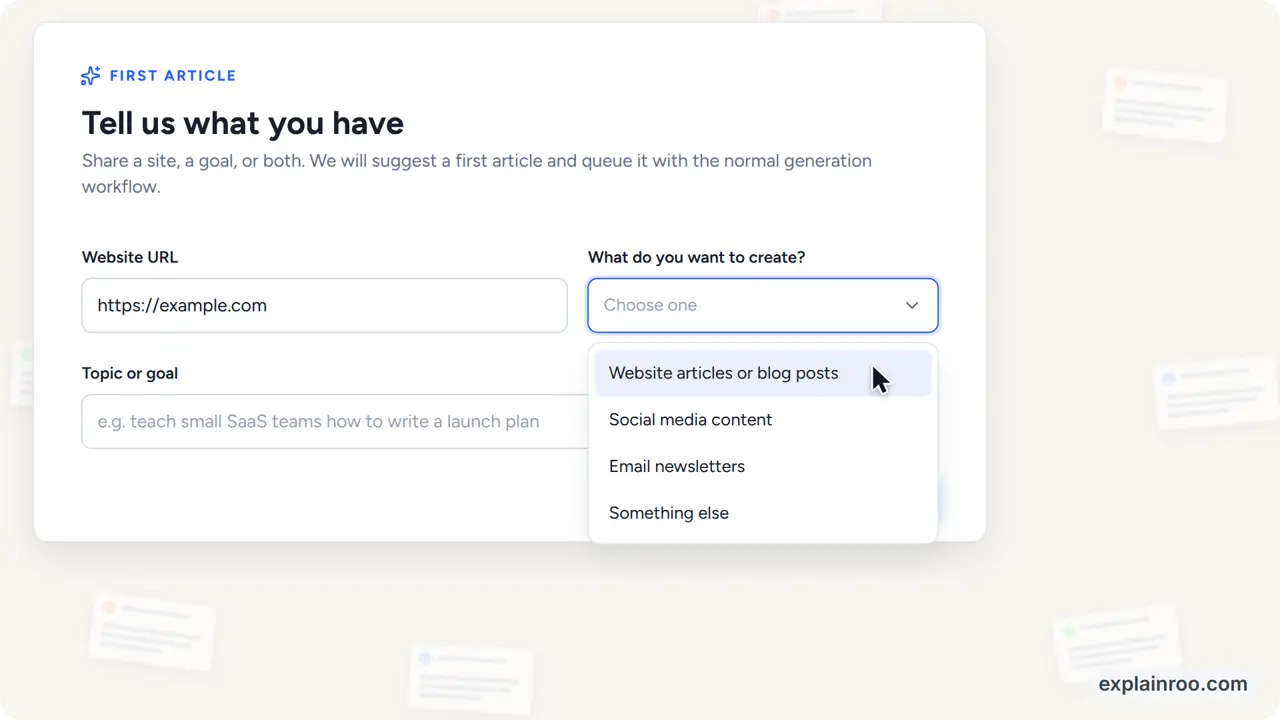
explainroo can also make product demos, the videos software companies make to show their app. The agent rebuilds the app's screens from its code or its website, with the same colors, fonts and button labels. A mouse pointer then clicks through the screens and types into the fields. Tell your agent which product it is and where to find its code or website.

A frame from the Unspar product demo: a form with a website field and an open dropdown

Here are the demos for Unspar and Vroni, two of my own products. The files for the Unspar demo are in examples/unspar-demo. explainroo.com also has unofficial demos of Gmail, ChatGPT and Claude.

Install it yourself

You need Node.js 20.11 or newer, ffmpeg, and Chrome or Chromium. The first setup downloads the voice and timing models once, about 400 MB together. You don't need a graphics card. I develop and test explainroo on Linux. It should work on macOS and Windows, but I have tested it less there.

git clone https://github.com/vincentsch/explainroo.git
cd explainroo
npm install
node bin/explainroo.js doctor --fetch

Then start your agent in the explainroo folder and ask for a video, for example "Make a 60 second video about how HTTPS keeps a password secret." The agent follows AGENTS.md and saves the video as videos/<name>/out/video.mp4. The example videos are in examples/, and the full documentation is on explainroo.com.

The watermark

Each video has a small "explainroo.com" in one corner. "watermark": false in video.json turns it off. Please keep it if you can, because that is how other people find explainroo.

Credits and license

explainroo is MIT licensed. The voice comes from Kokoro, and the word timing from Whisper through Transformers.js. The drawings use Rough.js and Lucide icons. Playwright runs Chrome, and ffmpeg makes the video file. The fonts are under the SIL Open Font License.

explainroo (vincentsch/explainroo)

Searching Database…

这是什么?explainroo 让编程智能体把一段脚本变成带旁白的讲解视频或产品演示。它使用本地语音模型生成旁白,用 Whisper 计算单词时间点,用画布渲染器绘制同步的插图,最后由 ffmpeg 把所有内容合成为 MP4。
这是我自己使用的视频编辑器,还是由我的编程智能体替我运行的工具?这是一个由你的编程智能体操作的工具:智能体编写描述视频的 script.md 和 scenes.js 文件,explainroo 则自动处理语音、时间点、绘制和渲染。你不需要自己直接剪辑视频。
怎么用它制作视频?给你的编程智能体(Claude Code、Codex、Pi 等)这个仓库,并用提示词描述主题,例如“制作一个 60 秒的视频,讲讲 HTTPS 如何保护密码安全”。智能体会安装好 explainroo、生成视频、进行检查,并把结果保存为 videos//out/video.mp4。
它支持哪些编程智能体?我需要安装什么?它可以与 Claude Code、Codex、Pi 等编程智能体配合使用,目前在 Claude Code 和 Opus 5.5 上效果最好。你还需要安装 Node.js 20.11+、ffmpeg 以及 Chrome 或 Chromium;首次安装会下载约 400 MB 的语音和时间对齐模型。
它是否在 macOS 和 Windows 上测试过,还是只在 Linux 上?作者主要在 Linux 上开发和测试 explainroo;它应该也能在 macOS 和 Windows 上运行,但在这两个平台上测试较少。
制作视频时,我的数据会离开我的电脑吗?不会——语音生成、单词时间点计算和渲染全部在本地运行,任何数据都不会离开你的电脑(你的编程智能体本身是另一项服务,有自己的服务条款)。
有哪五种视觉风格?视频可以使用五种风格之一——paper、clean、chalk、blueprint 和 midnight——只需修改 video.json 中的一项设置即可切换。
它支持哪些视频尺寸和宽高比?它支持宽屏(YouTube)、竖屏(Shorts/TikTok/Reels)、4:5(Instagram/LinkedIn)和正方形格式,竖屏/4:5/正方形视频带有逐词字幕,并且文字会避开平台 UI 覆盖层。
它能制作产品演示,而不只是讲解视频吗?可以——智能体会根据应用的代码或网站重建其界面,使用相同的颜色、字体和标签,然后通过 Playwright 驱动的 Chrome,由模拟的鼠标指针在演示中进行点击和输入。
水印是什么?我能去掉它吗?每个视频都会在一个角落显示小小的“explainroo.com”标记,可以通过在 video.json 中设置 watermark: false 将其禁用,不过作者请求用户保留它,以便其他人能发现这个项目。
Creator
vincentsch
Size
5.3 MB
Stars
579
Age
22d
Commits · 90 Days