



Что это такое?
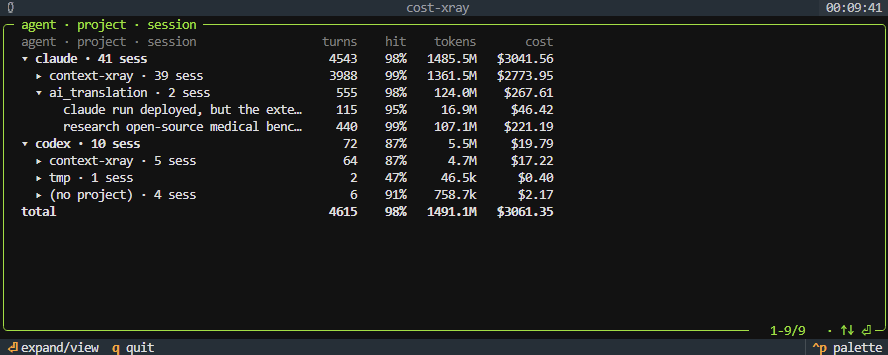
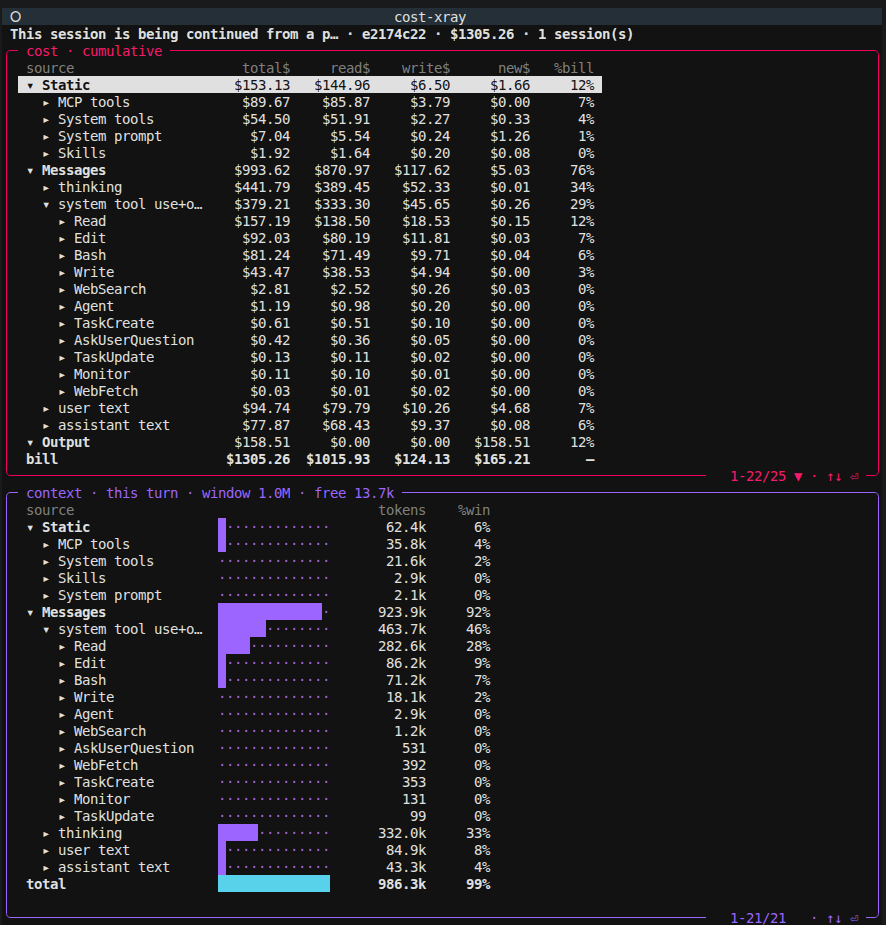
 cost-xray — локальный инструмент, который перехватывает сырой API-трафик между Claude Code или Codex и их провайдерами, а затем в деталях раскладывает, что входит в каждый запрос и сколько стоит каждая его часть: системные промпты, схемы инструментов, блоки MCP, кешированные и свежие токены и многое другое.
cost-xray — локальный инструмент, который перехватывает сырой API-трафик между Claude Code или Codex и их провайдерами, а затем в деталях раскладывает, что входит в каждый запрос и сколько стоит каждая его часть: системные промпты, схемы инструментов, блоки MCP, кешированные и свежие токены и многое другое.Это дашборд по логам вроде ccusage или нечто иное?Это отличается от инструментов на логах: вместо чтения локальных транскриптов после окончания сессии он поднимает локальный прокси, перехватывающий реальные API-запросы, поэтому видит скрытые части вроде системных промптов и внедрённых схем инструментов, которых в транскрипте никогда нет.
Это отличается от инструментов на логах: вместо чтения локальных транскриптов после окончания сессии он поднимает локальный прокси, перехватывающий реальные API-запросы, поэтому видит скрытые части вроде системных промптов и внедрённых схем инструментов, которых в транскрипте никогда нет.Как его запустить?Запустите установщик (curl ... | bash, или ./install.sh, если репозиторий уже склонирован); он спросит, каких агентов перехватывать — Claude Code, Codex или оба. После этого просто откройте новый терминал и запустите claude или codex как обычно; перехват автоматически стартует как фоновый сервис.
Запустите установщик (curl ... | bash, или ./install.sh, если репозиторий уже склонирован); он спросит, каких агентов перехватывать — Claude Code, Codex или оба. После этого просто откройте новый терминал и запустите claude или codex как обычно; перехват автоматически стартует как фоновый сервис.Нужен ли API-ключ или изменение конфигурации агента?Нет — не нужны ни API-ключи, ни аккаунт, ни изменения конфигурации Claude Code или Codex; перехват — это всего лишь прозрачный локальный прокси на пути трафика. Нужен лишь уже установленный поддерживаемый агент, на macOS или Linux.
Нет — не нужны ни API-ключи, ни аккаунт, ни изменения конфигурации Claude Code или Codex; перехват — это всего лишь прозрачный локальный прокси на пути трафика. Нужен лишь уже установленный поддерживаемый агент, на macOS или Linux.Он подхватывает сессии, которые уже были запущены?Нет, он работает только на будущее — перехватываются лишь сессии, запущенные в новом терминале после установки, а не прошлая история. Учтите также, что у Claude закрытый токенизатор, поэтому разбиение токенов по источникам оценивается (калибруется по реальным суммам), а не является точным.
Нет, он работает только на будущее — перехватываются лишь сессии, запущенные в новом терминале после установки, а не прошлая история. Учтите также, что у Claude закрытый токенизатор, поэтому разбиение токенов по источникам оценивается (калибруется по реальным суммам), а не является точным.Он работает на Windows?Про Windows не сказано — в списке поддерживаемых только macOS и Linux, причём GUI-агентам вроде Cursor нужна ручная настройка base-URL.
Про Windows не сказано — в списке поддерживаемых только macOS и Linux, причём GUI-агентам вроде Cursor нужна ручная настройка base-URL.Что происходит с моими API-ключами и секретами при прохождении через прокси перехвата?Они вычищаются до того, как что-либо попадёт на диск: заголовки Authorization, API-ключи, cookies и похожие на секреты поля тела вырезаются. Прокси слушает только 127.0.0.1, не отправляет телеметрию, и всё хранится локально в ~/.cost-xray/, пока вы это не удалите.
Они вычищаются до того, как что-либо попадёт на диск: заголовки Authorization, API-ключи, cookies и похожие на секреты поля тела вырезаются. Прокси слушает только 127.0.0.1, не отправляет телеметрию, и всё хранится локально в ~/.cost-xray/, пока вы это не удалите.Что показывает обзор заполнения окна контекста?Он раскладывает по частям, чем сейчас заполнено контекстное окно модели: системный промпт, каждая схема инструментов, MCP-серверы, сообщения и вывод, — так что видно, что чего вытесняет, даже когда благодаря кешированию это дёшево.
Он раскладывает по частям, чем сейчас заполнено контекстное окно модели: системный промпт, каждая схема инструментов, MCP-серверы, сообщения и вывод, — так что видно, что чего вытесняет, даже когда благодаря кешированию это дёшево.Может ли он сказать, что MCP-сервер — напрасная трата ресурсов?Да — он помечает настроенные MCP-серверы или инструменты, чьи схемы внедряются в префикс каждого запроса, но которые реально ни разу не вызываются, обнажая мёртвый груз, за который вы платите на каждом ходу.
Да — он помечает настроенные MCP-серверы или инструменты, чьи схемы внедряются в префикс каждого запроса, но которые реально ни разу не вызываются, обнажая мёртвый груз, за который вы платите на каждом ходу.Что будет, если прокси перехвата упадёт?Обёртка для каждого агента самовосстанавливается: если прокси падает, она его перезапускает и маршрутизирует через него, а если подключиться всё равно не удаётся, агент просто работает напрямую — перехват никогда не ломает ваш агент.
Обёртка для каждого агента самовосстанавливается: если прокси падает, она его перезапускает и маршрутизирует через него, а если подключиться всё равно не удаётся, агент просто работает напрямую — перехват никогда не ломает ваш агент.Почему бы просто не взять инструмент на логах вроде ccusage?Читатели логов видят транскрипт только постфактум и упускают системный промпт, внедрённые схемы инструментов и блоки MCP, собираемые в момент запроса, — а это примерно половина контекста и больше; cost-xray вместо этого читает сырой сетевой трафик.
Читатели логов видят транскрипт только постфактум и упускают системный промпт, внедрённые схемы инструментов и блоки MCP, собираемые в момент запроса, — а это примерно половина контекста и больше; cost-xray вместо этого читает сырой сетевой трафик.What are similar projects?ThinkWatch-Lite, casbin-gateway, pxpipe, tokscale, codeburn, lean-ctx, headroom, billion-context
ThinkWatch-Lite, casbin-gateway, pxpipe, tokscale, codeburn, lean-ctx, headroom, billion-contextWhich topics is it in?prompt-caching, llm-observability, cost-optimization, cost-tracking, ai-coding-agent, token-usage, codex-cli, reverse-proxy, tui, observability, proxy, anthropic
prompt-caching, llm-observability, cost-optimization, cost-tracking, ai-coding-agent, token-usage, codex-cli, reverse-proxy, tui, observability, proxy, anthropic