AirPods for Omarchy
Battery for each pod and the case, the listening modes, adaptive noise level, Conversation Awareness, One-Bud ANC and ear detection, drawn in Omarchy's own panel idiom.


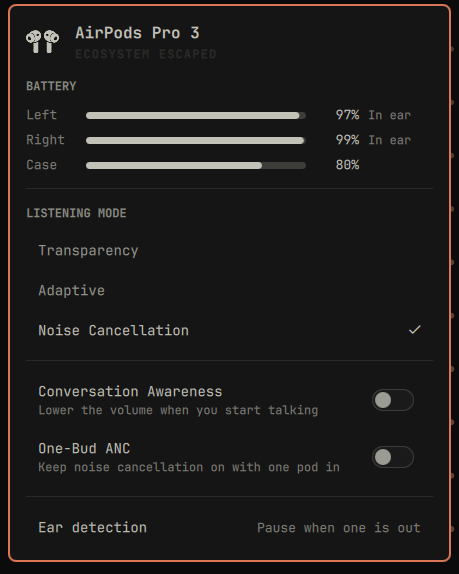
What it shows
- Battery for the left pod, the right pod and the case, each with a charging
and in-ear hint. Nothing else on a Linux box knows these numbers: BlueZ does
not expose
org.bluez.Battery1 for AirPods.
- Listening mode, and only the modes the device actually has. AirPods 1, 2, 3
and the plain AirPods 4 get no section at all, AirPods Pro 3 dropped Off, and
Adaptive needs an H2 part that also has noise cancellation, so the panel asks
the daemon rather than assuming four rows.
- Adaptive noise level, shown only while Adaptive is the active mode.
- Conversation Awareness on the same models that have Adaptive, and
One-Bud ANC on the ones with a second bud, which is why an AirPods Max 2
shows the first and not the second.
- Ear detection: pause when one pod is out, pause when both are out, or
never pause.
- Case lid, when the case has broadcast its state. Lid state comes from BLE
advertisements, and the daemon pauses that discovery while the control link is
up, because discovery running alongside a live link is what the crackle in issue
26 tracks. So lid state holds its last value for as long as the pods stay
connected, and the case level may keep refreshing over the control link, as it
does here, or hold like the lid, as the issue 26 reporter saw. Per-pod battery, ANC and ear detection keep updating
throughout.
- A mark that matches the hardware: stemmed buds, AirPods Pro or AirPods Max,
chosen from the model the daemon reports. AirPods Max carry no case, so their
panel drops the case row and shows a single headphone battery.
Deliberately absent
- Volume and output device live in the stock Audio panel, which already
switches PipeWire sinks. Press
Tab in this panel to walk to it.
- Connect, disconnect and forget live in the stock Bluetooth panel, and in
omarchy bluetooth device.
- Spatial Audio has no renderer on Linux, so there is nothing to draw and
no row for it.
- Mic mode is not an AirPods control. macOS applies Voice Isolation to the
input stream itself, for any microphone, and the AAP protocol carries no mic
packet. Input mute and input device live in the stock Audio panel.
Screenshots
The panel is built from the capability keys the daemon publishes, so three
different AirPods give three different panels. Same plugin, same build, nothing
configured differently between them.
|
|
|
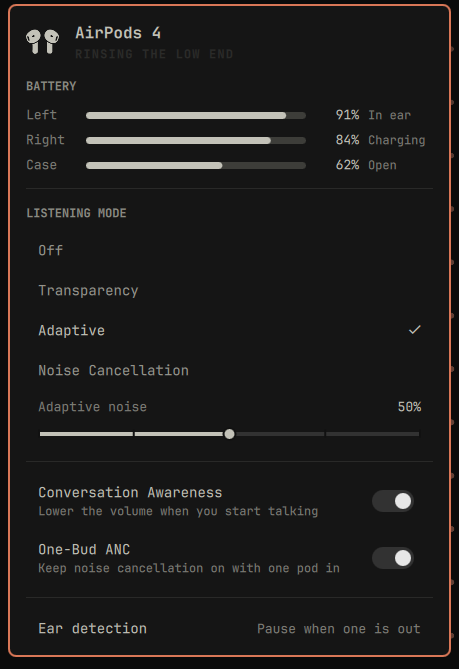
AirPods 4 with ANC
all four modes, and One-Bud ANC to hold them with one pod in |
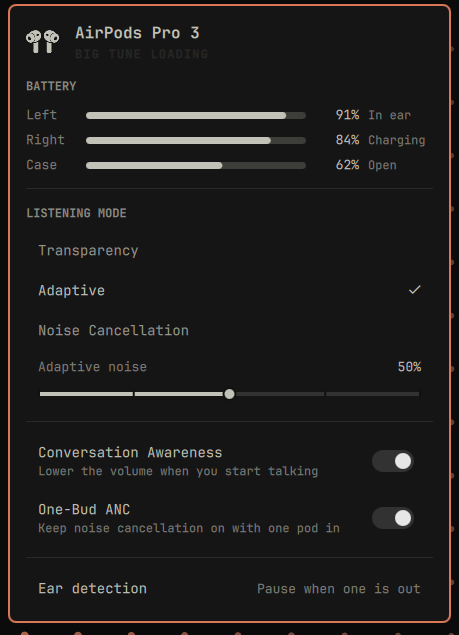
AirPods Pro 3
no Off row: the Pro 3 dropped it |
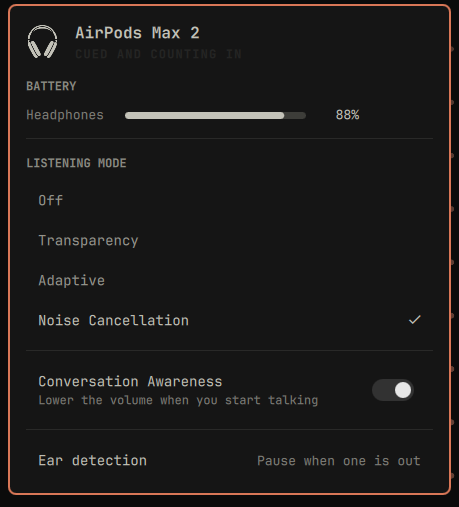
AirPods Max 2
one battery, no case, and no One-Bud ANC to offer |
Both AirPods 4 variants say AirPods 4 in the title, because the name is the
family and the rows underneath are what the unit can actually do. The plain
AirPods 4 has no listening modes at all, so it gets no listening section.
Every screenshot in this section, the Pro 3 included, was made by writing one
status line by hand and photographing the panel that came back. An AirPods Pro 3
is the only pair on hand here, and it would not have posed for all of these
anyway. It works because the panel reads that file and nothing else.
States
|
|
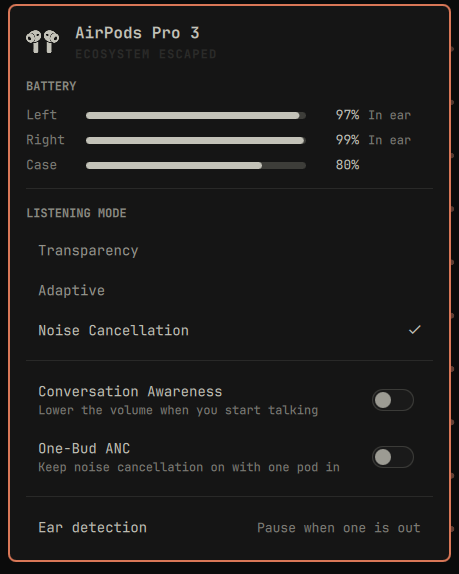
Noise Cancellation, both pods in |
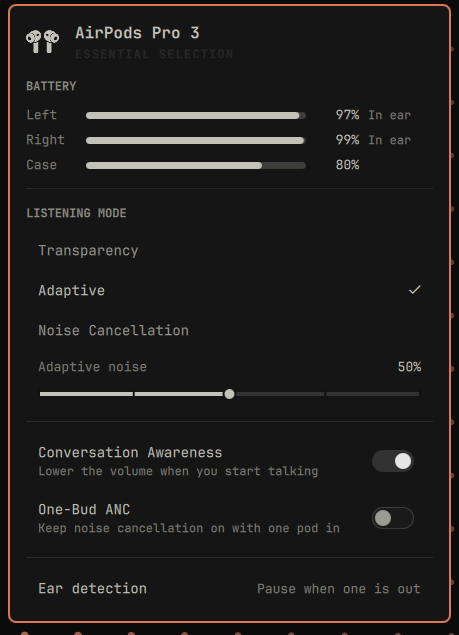
Adaptive, with the noise level and Conversation Awareness on |
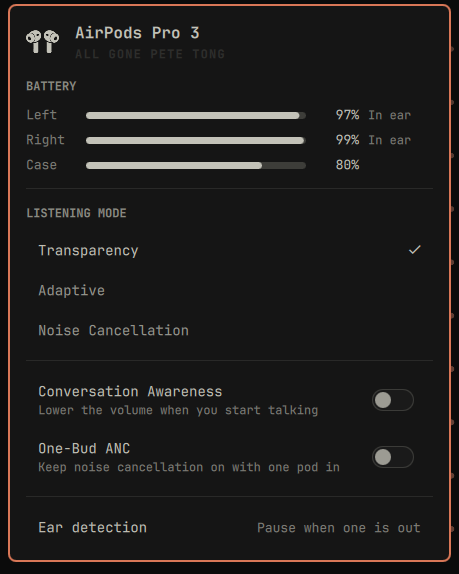
Transparency |
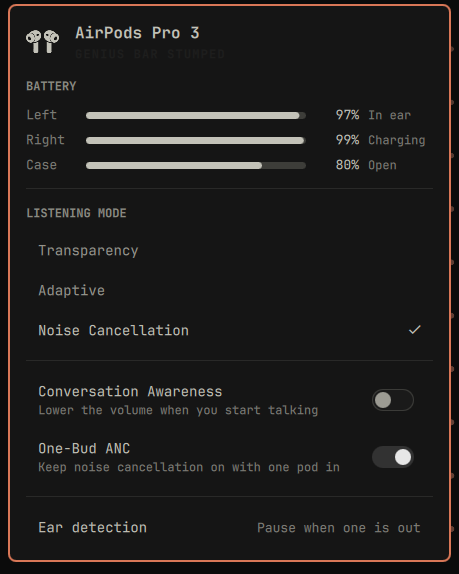
One pod in the case, lid open, One-Bud ANC on |
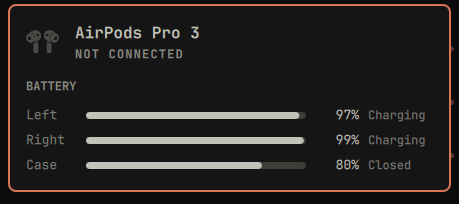
Both pods charging, lid closed |
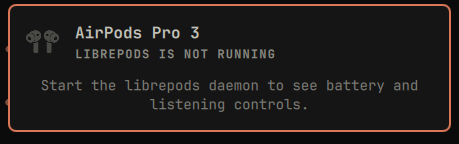
librepods not running |
Requirements
- The daemon in
daemon/, built and running. It ships in this
repository because nothing packaged will do: upstream librepods and every AUR
package built from it carry no state file, no status verb, none of the
ca:, onebud: or adaptive: verbs, and a model map that stops before
AirPods Pro 3, so the panel would stay hidden forever. The copy here carries
every model number Apple lists as of August 2026, up to the 2026 AirPods
Max 2, and what each of those models can actually do. See daemon/UPSTREAM.md
for what it is, who wrote it and what was changed. omarchy plugin add only
clones the plugin; setup builds the daemon.
- AirPods paired to the machine through the usual Bluetooth flow.
How it works
The plugin does not poll. The daemon writes its status to
$XDG_STATE_HOME/librepods/status.json whenever that status changes, and
removes the file when it stops. The panel watches it, so an idle desktop runs no
processes at all on its behalf. librepods-ctl is used only when you actually
change something.
The plugin never talks to Bluetooth itself. If librepods-ctl is missing or
the daemon is not running, the panel says so in one line instead of drawing an
empty surface.
The output codec, and what the microphone costs
The daemon always selects the highest-bitrate playback profile the card offers,
which is SBC-XQ at 453 kbps ahead of SBC at 328 and AAC at 256. That is the
default, and it is re-applied every time the daemon activates the card, because
PipeWire's own profile priority puts AAC first and would otherwise win.
Selecting the AirPods as a microphone gives that up. Over the standard
Bluetooth profiles, two-way voice runs on a separate low-bandwidth channel, so
the only profiles exposing a source are headset-head-unit at 16 kHz mSBC and
headset-head-unit-cvsd at 8 kHz, and each one replaces the playback profile
rather than joining it. A card cannot offer a high-quality sink and a microphone
at the same time. macOS is bound by the same profiles and simply negotiates a
better voice codec on them.
So take the microphone from another device and leave the AirPods on SBC-XQ. The
daemon helps here: it defers its activation ladder while a capture is live, so it
will not pull a live call off the headset profile mid-sentence.
If the headset profiles are missing from the card altogether, so that nothing can
offer the AirPods microphone at all, BlueZ has no HFP connection to the device.
The card carries those two profiles only while that connection is up, which is
why nothing logs an error: no profile is malformed, one is simply not connected.
Reconnecting that one profile brings them back within a few seconds and leaves
A2DP playing:
busctl call org.bluez /org/bluez/hci0/dev_<MAC> org.bluez.Device1 \
  ConnectProfile s 0000111e-0000-1000-8000-00805f9b34fb
Disconnecting and reconnecting the whole device also works, at the cost of the
playback link. This daemon registers no Bluetooth profile, so that list is
BlueZ's and PipeWire's to produce.
There is a route around all of this that uses no audio profile at all: the AirPods
can send a high-resolution microphone stream over the same AACP channel this
daemon already uses for battery and controls, which leaves A2DP playback running
untouched. Upstream librepods has an implementation of it for its Rust rewrite in
PR 655, unmerged at the time
of writing. Nothing in this daemon does that today.
Install
omarchy plugin add https://github.com/thisisgm/omarchy-pods --enable
~/.config/omarchy/plugins/io.github.thisisgm.omapods/setup
--enable already places the widget on the right of the bar. The
marketplace listing
installs to the same place.
setup installs cmake, ninja, qt6-connectivity, qt6-tools,
qt6-declarative, pkgconf and libpulse if they are missing, builds the
daemon into ~/.local, and enables librepods.service. The icon stays hidden
until AirPods are connected (hideWhenDisconnected). To keep it visible:
omarchy bar set io.github.thisisgm.omapods hideWhenDisconnected false --json
To build the daemon by hand instead of running setup:
omarchy pkg add cmake ninja qt6-connectivity qt6-tools qt6-declarative pkgconf libpulse
cd ~/.config/omarchy/plugins/io.github.thisisgm.omapods/daemon
cmake -B build -G Ninja -DBUILD_TESTING=OFF && cmake --build build
cmake --install build --prefix ~/.local
systemctl --user daemon-reload
systemctl --user enable librepods.service
systemctl --user restart librepods.service
~/.local is the prefix the unit expects, because it runs
%h/.local/bin/librepods, and Omarchy already puts ~/.local/bin on PATH,
which is where the panel finds librepods-ctl. The unit is bound to
graphical-session.target, so the daemon comes back after a reboot.
Remove
systemctl --user disable --now librepods.service
xargs rm -f < ~/.config/omarchy/plugins/io.github.thisisgm.omapods/daemon/build/install_manifest.txt
rm -rf ~/.config/AirPodsTrayApp ~/.local/state/librepods
omarchy plugin remove io.github.thisisgm.omapods
The daemon installs into ~/.local, so it outlives the plugin. CMake lists what it
put there in install_manifest.txt, which lives in the build tree, so that line has
to run before the plugin directory goes.
~/.config/AirPodsTrayApp holds the paired device's name and its magicAccIRK and
magicAccEncKey, which are pairing secrets, so the directory and the file are created
owner only and both go with the plugin. ~/.local/state/librepods/status.json is the
published status line the panel reads, and it goes too.
Keyboard
| Key |
Action |
j / k, ↓ / ↑ |
move between rows |
enter / space |
activate the current row |
← / → |
adjust the adaptive noise level |
o |
Off, on the models that have it |
t |
Transparency |
a |
Adaptive |
n |
Noise Cancellation |
c |
toggle Conversation Awareness |
b |
toggle One-Bud ANC |
e |
cycle ear detection |
r |
refresh |
tab |
move to the next panel |
esc |
close |
Every listening key is ignored on a device the daemon says lacks the mode, so
a does nothing on an AirPods Pro 1 and the four mode keys do nothing on an
AirPods 3. A daemon older than the capability keys cannot say, and the panel
falls back to what it gated on before.
Left click opens the panel. Right click cycles the listening mode without
opening anything.
Settings
| Setting |
Default |
Notes |
| Hide when disconnected |
on |
Leaves the bar entirely rather than sitting there with nothing to say. |
| Path to librepods-ctl |
empty |
Leave empty to find it on PATH. |
Tests
Model.js holds the parsing and formatting, with no QML imports, so it runs
outside the shell. The suite covers the shapes that bite: the objects the daemon
omits entirely, a pod it has stopped hearing from, an empty file, a line that is
not JSON, and a schema newer than this panel reads.
deno run --allow-read tests/model.test.js
Contributing
Bug reports and pull requests are welcome. CONTRIBUTING.md
covers the build, what review will ask you to prove, and the house style;
AGENTS.md adds the traps coding agents hit in this tree.
Credits
The hard part is not this panel. It is
librepods by Kavish Devar, which
reverse-engineered Apple's AAP protocol over L2CAP and the BLE advertisement
path that carries battery, in-ear and case lid state. The daemon in daemon/ is
a modified copy of his work, and this panel is a display for it.
Support
If this saved you an afternoon, you can
buy me a coffee.
Licence
Two programs live here, and they are licensed separately because they are
separate works that talk over a state file and a command line.
| Path |
Licence |
|
| repository root, the bar widget |
MIT |
LICENSE |
daemon/, a modified copy of librepods |
GPL-3.0 |
daemon/LICENSE |
Shipping both in one repository is aggregation, not combination, so the widget
stays MIT and the daemon stays GPL-3.0. What was modified, and the upstream
commit it was forked from, are recorded in
daemon/UPSTREAM.md.
The three product outlines in AirPodsIcon.qml are Apple's, taken from the
chapter navigation on apple.com/airpods so the
bar shows the hardware you actually own. AirPods, AirPods Pro and AirPods Max are
trademarks of Apple Inc., which does not sponsor or endorse this plugin. Those
outlines are not this project's to license, so the MIT grant above does not reach
them and nothing here gives you permission to reuse them.

 这是一个 Omarchy 状态栏插件,以状态栏自身的视觉风格显示 AirPods 每只耳机和充电盒的电量、当前聆听模式、自适应降噪等级、对话感知、单耳 ANC 和佩戴检测。