
spank
English | 简体中文
Slap your MacBook, it yells back.
"this is the most amazing thing i've ever seen" — @kenwheeler
"I just ran sexy mode with my wife sitting next to me...We died laughing" — @duncanthedev
"peak engineering" — @tylertaewook
Uses the Apple Silicon accelerometer (Bosch BMI286 IMU via IOKit HID) to detect physical hits on your laptop and plays audio responses. Single binary, no dependencies.
Requirements
- macOS on Apple Silicon (any M-series chip M2 or greater, or the M1 Pro SKU specifically, no other M1/A-series chips!)
sudo (for IOKit HID accelerometer access)- Go 1.26+ (if building from source)
Install
Download from the latest release.
Or build from source:
go install github.com/taigrr/spank@latest
Note: go install places the binary in $GOBIN (if set) or $(go env GOPATH)/bin (which defaults to ~/go/bin). Copy it to a system path so sudo spank works. For example, with the default Go settings:
sudo cp "$(go env GOPATH)/bin/spank" /usr/local/bin/spank
Usage
# Normal mode — says "ow!" when slapped
sudo spank

# Sexy mode — escalating responses based on slap frequency
sudo spank --sexy

# Halo mode — plays Halo death sounds when slapped
sudo spank --halo

# Fast mode — faster polling and shorter cooldown
sudo spank --fast
sudo spank --sexy --fast

# Custom mode — plays your own MP3 files from a directory
sudo spank --custom /path/to/mp3s

# Adjust sensitivity with amplitude threshold (lower = more sensitive)
sudo spank --min-amplitude 0.1   # more sensitive
sudo spank --min-amplitude 0.25  # less sensitive
sudo spank --sexy --min-amplitude 0.2

# Set cooldown period in millisecond (default: 750)
sudo spank --cooldown 600

# Set playback speed multiplier (default: 1.0)
sudo spank --speed 0.7   # slower and deeper
sudo spank --speed 1.5   # faster
sudo spank --sexy --speed 0.6
Modes
Pain mode (default): Randomly plays from 10 pain/protest audio clips when a slap is detected.
Sexy mode (--sexy): Tracks slaps within a rolling 5-minute window. The more you slap, the more intense the audio response. 60 levels of escalation.
Halo mode (--halo): Randomly plays from death sound effects from the Halo video game series when a slap is detected.
Custom mode (--custom): Randomly plays MP3 files from a custom directory you specify.
Detection tuning
Use --fast for a more responsive profile with faster polling (4ms vs 10ms), shorter cooldown (350ms vs 750ms), higher sensitivity (0.18 vs 0.05 threshold), and larger sample batch (320 vs 200).
You can still override individual values with --min-amplitude and --cooldown when needed.
Sensitivity
Control detection sensitivity with --min-amplitude (default: 0.05):
- Lower values (e.g., 0.05-0.10): Very sensitive, detects light taps
- Medium values (e.g., 0.15-0.30): Balanced sensitivity
- Higher values (e.g., 0.30-0.50): Only strong impacts trigger sounds
The value represents the minimum acceleration amplitude (in g-force) required to trigger a sound.
Running as a Service
To have spank start automatically at boot, create a launchd plist. Pick your mode:
Pain mode (default)
sudo tee /Library/LaunchDaemons/com.taigrr.spank.plist > /dev/null << 'EOF'
<?xml version="1.0" encoding="UTF-8"?>
<!DOCTYPE plist PUBLIC "-//Apple//DTD PLIST 1.0//EN"
  "http://www.apple.com/DTDs/PropertyList-1.0.dtd">
<plist version="1.0">
<dict>
    <key>Label</key>
    <string>com.taigrr.spank</string>
    <key>ProgramArguments</key>
    <array>
        <string>/usr/local/bin/spank</string>
    </array>
    <key>RunAtLoad</key>
    <true/>
    <key>KeepAlive</key>
    <true/>
    <key>StandardOutPath</key>
    <string>/tmp/spank.log</string>
    <key>StandardErrorPath</key>
    <string>/tmp/spank.err</string>
</dict>
</plist>
EOF
Sexy mode
sudo tee /Library/LaunchDaemons/com.taigrr.spank.plist > /dev/null << 'EOF'
<?xml version="1.0" encoding="UTF-8"?>
<!DOCTYPE plist PUBLIC "-//Apple//DTD PLIST 1.0//EN"
  "http://www.apple.com/DTDs/PropertyList-1.0.dtd">
<plist version="1.0">
<dict>
    <key>Label</key>
    <string>com.taigrr.spank</string>
    <key>ProgramArguments</key>
    <array>
        <string>/usr/local/bin/spank</string>
        <string>--sexy</string>
    </array>
    <key>RunAtLoad</key>
    <true/>
    <key>KeepAlive</key>
    <true/>
    <key>StandardOutPath</key>
    <string>/tmp/spank.log</string>
    <key>StandardErrorPath</key>
    <string>/tmp/spank.err</string>
</dict>
</plist>
EOF
Halo mode
sudo tee /Library/LaunchDaemons/com.taigrr.spank.plist > /dev/null << 'EOF'
<?xml version="1.0" encoding="UTF-8"?>
<!DOCTYPE plist PUBLIC "-//Apple//DTD PLIST 1.0//EN"
  "http://www.apple.com/DTDs/PropertyList-1.0.dtd">
<plist version="1.0">
<dict>
    <key>Label</key>
    <string>com.taigrr.spank</string>
    <key>ProgramArguments</key>
    <array>
        <string>/usr/local/bin/spank</string>
        <string>--halo</string>
    </array>
    <key>RunAtLoad</key>
    <true/>
    <key>KeepAlive</key>
    <true/>
    <key>StandardOutPath</key>
    <string>/tmp/spank.log</string>
    <key>StandardErrorPath</key>
    <string>/tmp/spank.err</string>
</dict>
</plist>
EOF
Note: Update the path to spank if you installed it elsewhere (e.g. ~/go/bin/spank).
Load and start the service:
sudo launchctl load /Library/LaunchDaemons/com.taigrr.spank.plist
Since the plist lives in /Library/LaunchDaemons and no UserName key is set, launchd runs it as root — no sudo needed.
To stop or unload:
sudo launchctl unload /Library/LaunchDaemons/com.taigrr.spank.plist
How it works
- Reads raw accelerometer data directly via IOKit HID (Apple SPU sensor)
- Runs vibration detection (STA/LTA, CUSUM, kurtosis, peak/MAD)
- When a significant impact is detected, plays an embedded MP3 response
- Optional volume scaling (
--volume-scaling) — light taps play quietly, hard slaps play at full volume
- Optional speed control (
--speed) — adjusts playback speed and pitch (0.5 = half speed, 2.0 = double speed)
- 750ms cooldown between responses to prevent rapid-fire, adjustable with
--cooldown
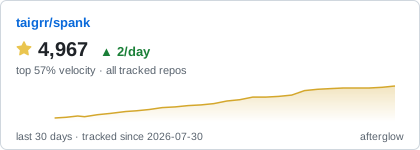
Star History
Credits
Sensor reading and vibration detection ported from olvvier/apple-silicon-accelerometer.
License
MIT

 Spank 是一个恶搞用的命令行工具,它利用你 MacBook 的 Apple Silicon 加速度计检测笔记本上的拍击,并播放搞笑的音效回应(疼痛叫声、逐级升温的“sexy mode”呻吟、《Halo》死亡音效,或你自己的 MP3)。