







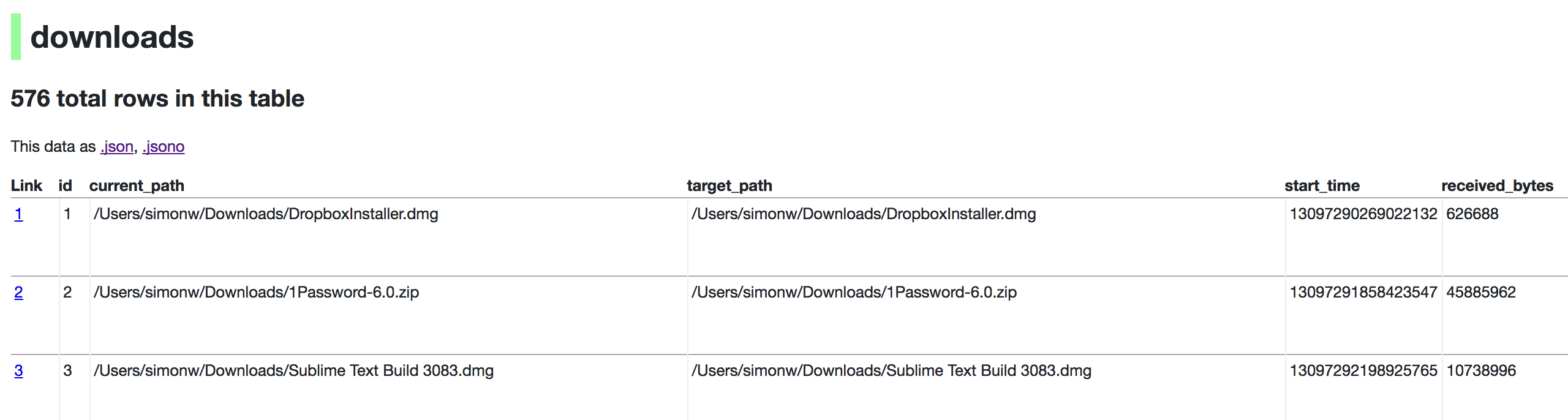
这是什么?
 Datasette 是一个开源的多功能工具,用于探索和发布数据:只需指向一个 SQLite 数据库,它就能把数据变成可交互、可浏览的网站,并附带一个 JSON API。
Datasette 是一个开源的多功能工具,用于探索和发布数据:只需指向一个 SQLite 数据库,它就能把数据变成可交互、可浏览的网站,并附带一个 JSON API。这是命令行工具、网页应用,还是两者都是?它是一个在本地运行的命令行工具,执行 `datasette serve path/to/database.db` 后会启动一个 Web 服务器,为该数据库同时提供可浏览的界面和 JSON API。
它是一个在本地运行的命令行工具,执行 `datasette serve path/to/database.db` 后会启动一个 Web 服务器,为该数据库同时提供可浏览的界面和 JSON API。我该如何安装并启动数据库?在 Mac 上可以运行 `brew install datasette`,其他系统则可用 `pip install datasette` 或 pipx 安装,然后执行 `datasette serve path/to/database.db`,即可在本地 Web 服务器上浏览数据。
在 Mac 上可以运行 `brew install datasette`,其他系统则可用 `pip install datasette` 或 pipx 安装,然后执行 `datasette serve path/to/database.db`,即可在本地 Web 服务器上浏览数据。我需要先安装 Python 吗?需要。如果通过 pip 或 pipx 安装,Datasette 要求 Python 3.8 或更高版本(通过 Homebrew 和 Docker 安装时已自动包含该环境)。
需要。如果通过 pip 或 pipx 安装,Datasette 要求 Python 3.8 或更高版本(通过 Homebrew 和 Docker 安装时已自动包含该环境)。它支持任何数据库,还是只支持 SQLite?Datasette 是专门围绕 SQLite 数据库构建的,你需要指向 `.db` 文件,而不是连接 Postgres 或 MySQL 服务器。
Datasette 是专门围绕 SQLite 数据库构建的,你需要指向 `.db` 文件,而不是连接 Postgres 或 MySQL 服务器。它面向哪些人群?它面向数据新闻记者、博物馆策展人、档案管理人员、地方政府、科学家、研究人员,以及任何希望公开分享数据的人。
它面向数据新闻记者、博物馆策展人、档案管理人员、地方政府、科学家、研究人员,以及任何希望公开分享数据的人。我怎样把数据发布到互联网上,而不只是在本地运行?`datasette publish` 命令可以把包含 Datasette 和你的 SQLite 文件的 Docker 镜像,只用一条命令部署到 Heroku 或 Google Cloud Run,并获得一个在线网址和 API。
`datasette publish` 命令可以把包含 Datasette 和你的 SQLite 文件的 Docker 镜像,只用一条命令部署到 Heroku 或 Google Cloud Run,并获得一个在线网址和 API。什么是 Datasette Lite?它是编译为 WebAssembly 的 Datasette,可以完全在浏览器中运行,无需任何 Python 服务器。
它是编译为 WebAssembly 的 Datasette,可以完全在浏览器中运行,无需任何 Python 服务器。如何为已发布的网站添加许可和来源署名?创建一个 metadata.json 文件,其中包含 title、license、licenseurl、source 和 sourceurl 字段,并通过 `-m metadata.json` 传入;这些信息会显示在网站的页脚以及 API 输出中。
创建一个 metadata.json 文件,其中包含 title、license、licenseurl、source 和 sourceurl 字段,并通过 `-m metadata.json` 传入;这些信息会显示在网站的页脚以及 API 输出中。我可以用自己已有的数据,比如浏览器历史记录,来试试吗?可以。例如,你可以运行 `datasette ~/Library/Application Support/Google/Chrome/Default/History --nolock`,把自己的 Chrome 浏览历史当作示例数据来浏览。
可以。例如,你可以运行 `datasette ~/Library/Application Support/Google/Chrome/Default/History --nolock`,把自己的 Chrome 浏览历史当作示例数据来浏览。What are similar projects?nocodb, postgrest, duckdb, prediction-market-analysis, q, visidata, redash, capcut-mate
nocodb, postgrest, duckdb, prediction-market-analysis, q, visidata, redash, capcut-mateWhich topics is it in?asgi, automatic-api, datasets, csv, wasm, sql, data-science, json, sqlite, rest-api, database, command-line-tool
asgi, automatic-api, datasets, csv, wasm, sql, data-science, json, sqlite, rest-api, database, command-line-tool