






Что это такое?
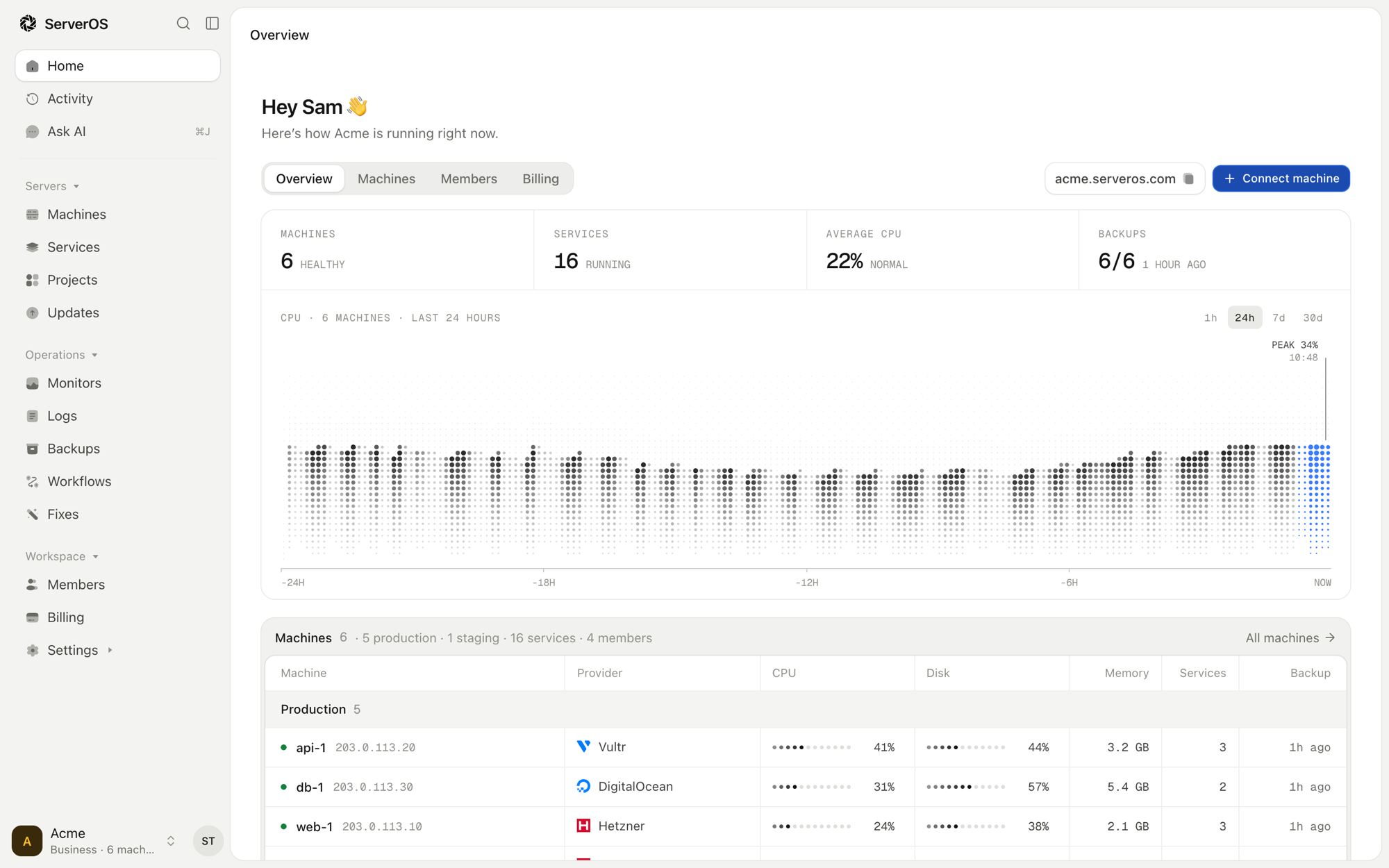
 Веб-панель управления для Linux-серверов, которые у вас уже есть. Подключите сервер одной командой, затем разворачивайте приложения и сайты, делайте их резервные копии, следите за ними и исправляйте всё из браузера, не работая в терминале.
Это фреймворк, библиотека или приложение?Это приложение: веб-панель на PHP (Laravel), в которую входите вы и ваша команда, плюс небольшой демон с открытым исходным кодом serverosd, который работает на каждом подключённом сервере.
Это приложение: веб-панель на PHP (Laravel), в которую входите вы и ваша команда, плюс небольшой демон с открытым исходным кодом serverosd, который работает на каждом подключённом сервере.Как это запустить?На Linux-сервере с Docker откройте порты 80, 443 и 8443 и направьте на него две DNS-записи типа A: одну для panel.example.com и одну для её поддоменов. Затем запустите установщик из README. Он при необходимости установит Docker, запустит официальный образ и выведет код настройки.
На Linux-сервере с Docker откройте порты 80, 443 и 8443 и направьте на него две DNS-записи типа A: одну для panel.example.com и одну для её поддоменов. Затем запустите установщик из README. Он при необходимости установит Docker, запустит официальный образ и выведет код настройки.Что нужно, прежде чем начать?Linux-сервер под вашим управлением с Docker, открытые порты 80, 443 и 8443 и домен, который можно направить на этот сервер. Чтобы самостоятельно разрабатывать панель, нужны PHP 8.4, Composer, Node 22 и npm; SQLite работает сразу из коробки.
Linux-сервер под вашим управлением с Docker, открытые порты 80, 443 и 8443 и домен, который можно направить на этот сервер. Чтобы самостоятельно разрабатывать панель, нужны PHP 8.4, Composer, Node 22 и npm; SQLite работает сразу из коробки.Есть ли подвох?DNS и порты должны быть готовы до установки. Единый вход (SSO), SCIM, пользовательские роли и собственные домены включаются только с лицензионным ключом; без него официальный образ работает как версия Community.
DNS и порты должны быть готовы до установки. Единый вход (SSO), SCIM, пользовательские роли и собственные домены включаются только с лицензионным ключом; без него официальный образ работает как версия Community.Отправляет ли она данные о себе?По умолчанию раз в день отправляется анонимный пинг. В docs/self-hosting.md объясняется, как его отключить.
По умолчанию раз в день отправляется анонимный пинг. В docs/self-hosting.md объясняется, как его отключить.Что я могу делать с ней каждый день?Следить за загрузкой процессора, памяти и диска, устанавливать обновления, развёртывать проекты из Git или по шаблону с доменами и HTTPS и копировать проект в тестовую среду до выхода в эксплуатацию.
Следить за загрузкой процессора, памяти и диска, устанавливать обновления, развёртывать проекты из Git или по шаблону с доменами и HTTPS и копировать проект в тестовую среду до выхода в эксплуатацию.Могут ли мои ИИ-ассистенты ею пользоваться?Да. В панель встроены MCP-сервер и API, так что ваши собственные инструменты и ассистенты могут работать с вашими серверами.
Да. В панель встроены MCP-сервер и API, так что ваши собственные инструменты и ассистенты могут работать с вашими серверами.Может ли команда пользоваться ею вместе?Да. Участники, роли, двухфакторный вход и журнал действий уже встроены, а рабочие процессы можно запускать по расписанию, при отправке изменений или вручную для таких шагов, как развёртывание, проверка и продвижение версии.
Да. Участники, роли, двухфакторный вход и журнал действий уже встроены, а рабочие процессы можно запускать по расписанию, при отправке изменений или вручную для таких шагов, как развёртывание, проверка и продвижение версии.Какие есть похожие проекты?cachet, Termix, hivepaas, coolify, komodo, labtether, azerioid-stack-manager, Pi.Alert
cachet, Termix, hivepaas, coolify, komodo, labtether, azerioid-stack-manager, Pi.AlertВ каких он темах?team-collaboration, 2fa, laravel, vps, self-hosting, deployment, backup, php, sysadmin, agpl, devops, monitoring
team-collaboration, 2fa, laravel, vps, self-hosting, deployment, backup, php, sysadmin, agpl, devops, monitoring- Автор
- serveroshq
- Размер
- 7 MB
- Звёзды
- 1.1K
- Обновлён
- КоммитNov 17Релизv1.8.0Nov 17
- Возраст
- 9 д
- Коммиты · 90 дней