skillshare README

项目的 README,来自 github.com/runkids/skillshare。合并为一个 markdown 文件:README.md。

skillshare

skillshare

English · Deutsch · Español · Français · 日本語 · 한국어 · Português · 简体中文 · 繁體中文

Website License: MIT Release Downloads Platform Ask DeepWiki Support skillshare on Ko-fi

Star on GitHub

runkids%2Fskillshare | Trendshift runkids%2Fskillshare | Trendshift

Your AI coding setup, everywhere.
Manage skills, agents, rules, MCP connections and hooks in one place.
For Claude Code, Codex, Pi, OpenCode and more.

Website • Install • Quick Start • Highlights • Screenshots • Desktop App • Docs

skillshare demo

[!NOTE] Latest: v0.30.11 — Share your Pi packages from the dashboard: Share on the Plugins page now lists the npm packages Pi installed, after your plugins, and copies one command that adds them all, such as skillshare plugin add npm:<package> --target pi -g --no-tui. The Hooks in targets dialog can also edit or remove Antigravity and Copilot hooks without importing them. Plugins guide → · All releases →

Why skillshare

Switching AI tools should not mean rebuilding your setup. skillshare gives your skills and other AI resources a home you control.

One teammate uses Claude Code, another uses Codex. Keep their shared code-review checklist in .skillshare/ alongside the project. New teammates install the declared skills and sync to the configured tools instead of copying instructions from chat. Team onboarding →

Use the desktop app or CLI to manage everything locally, audit skills before use, and choose what each tool receives.

Coming from another tool? Migration Guide · Comparison

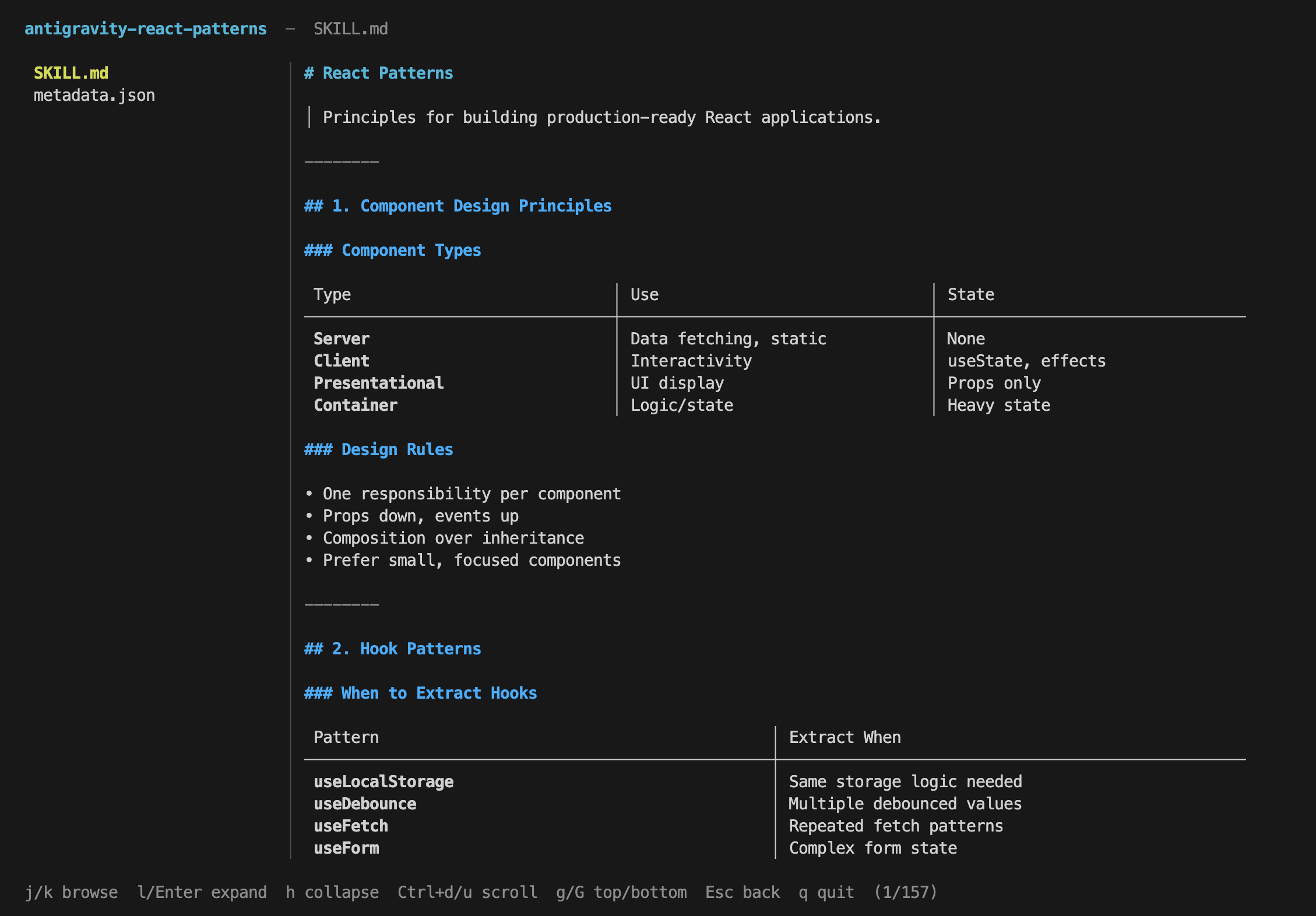
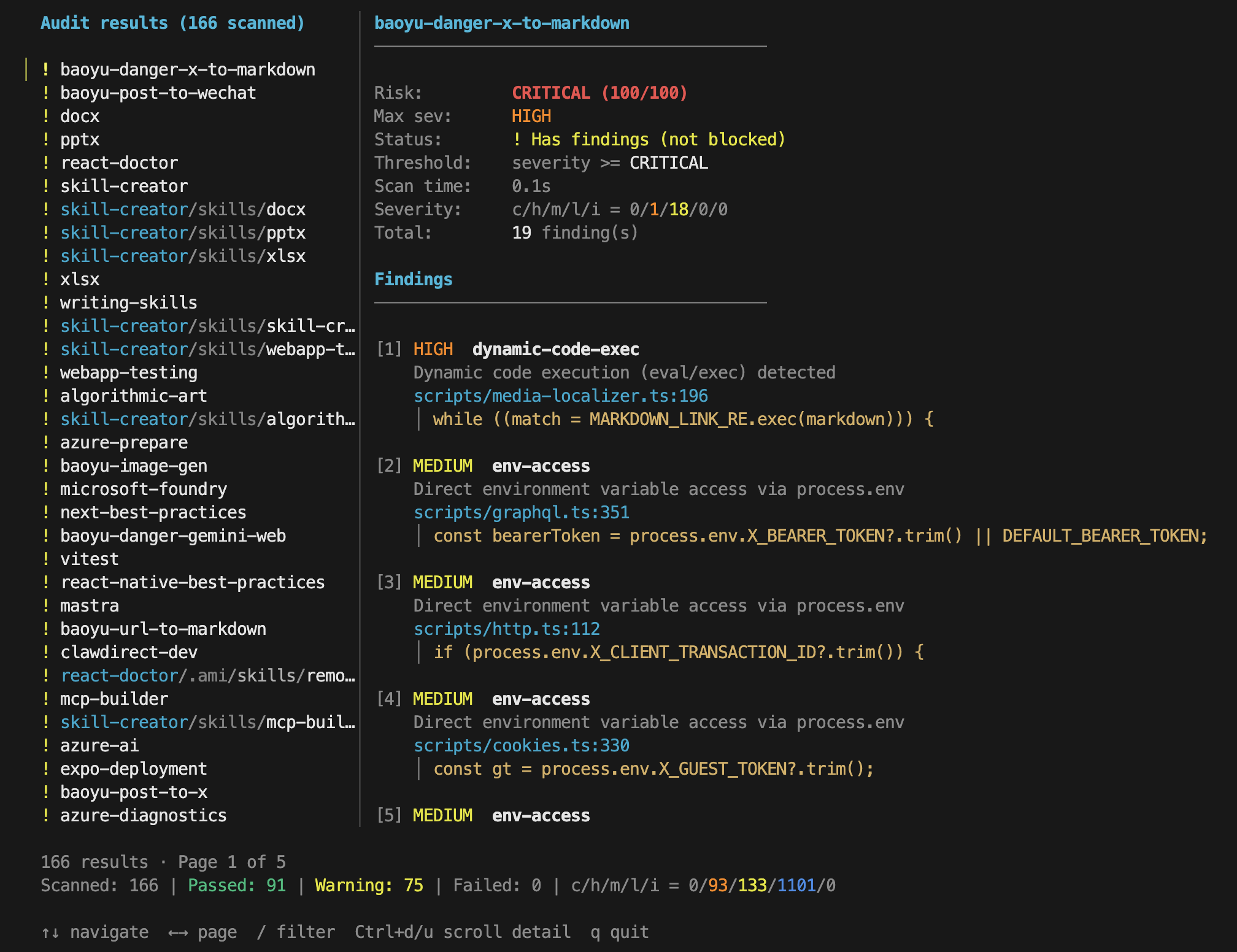
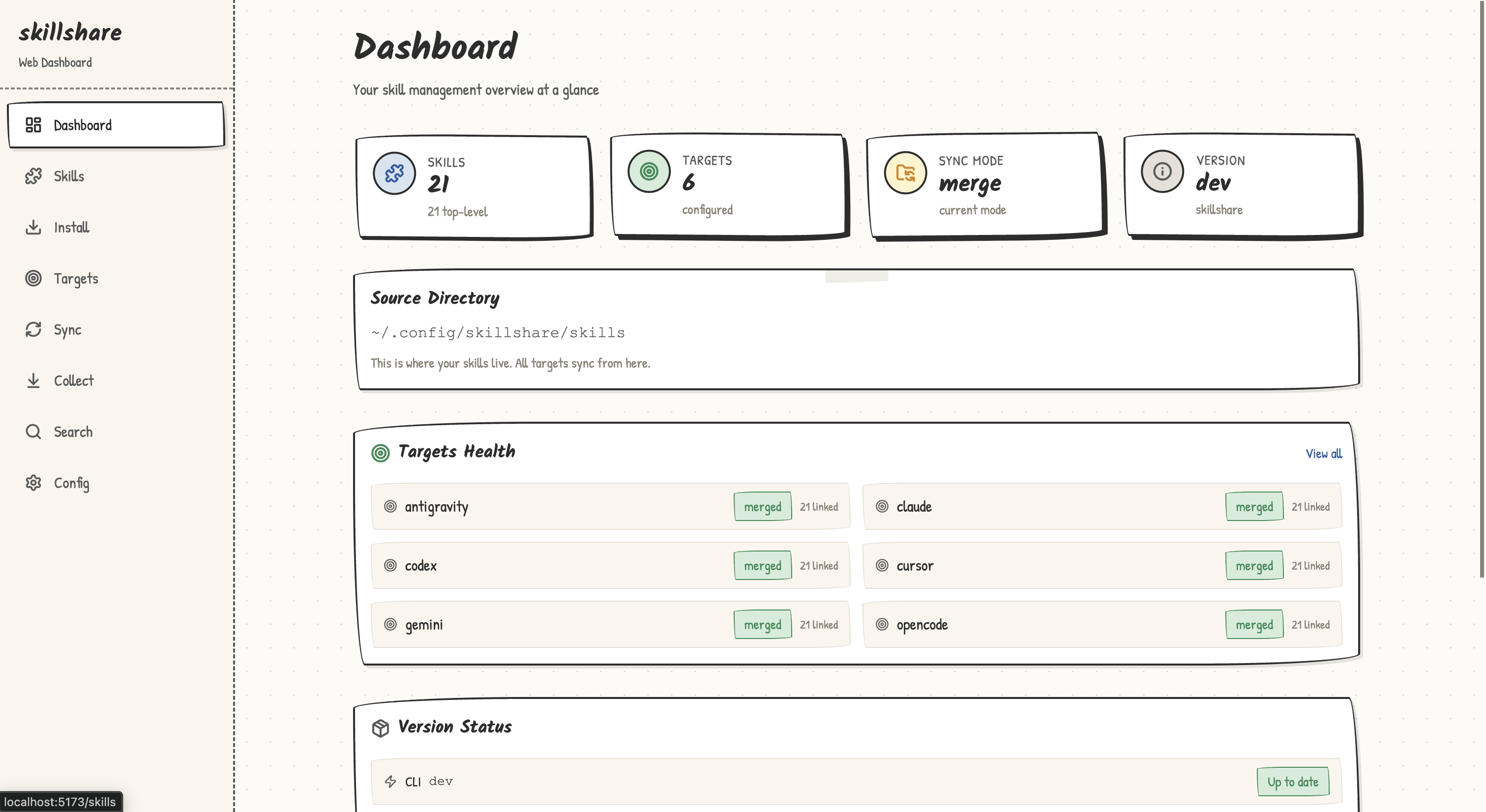
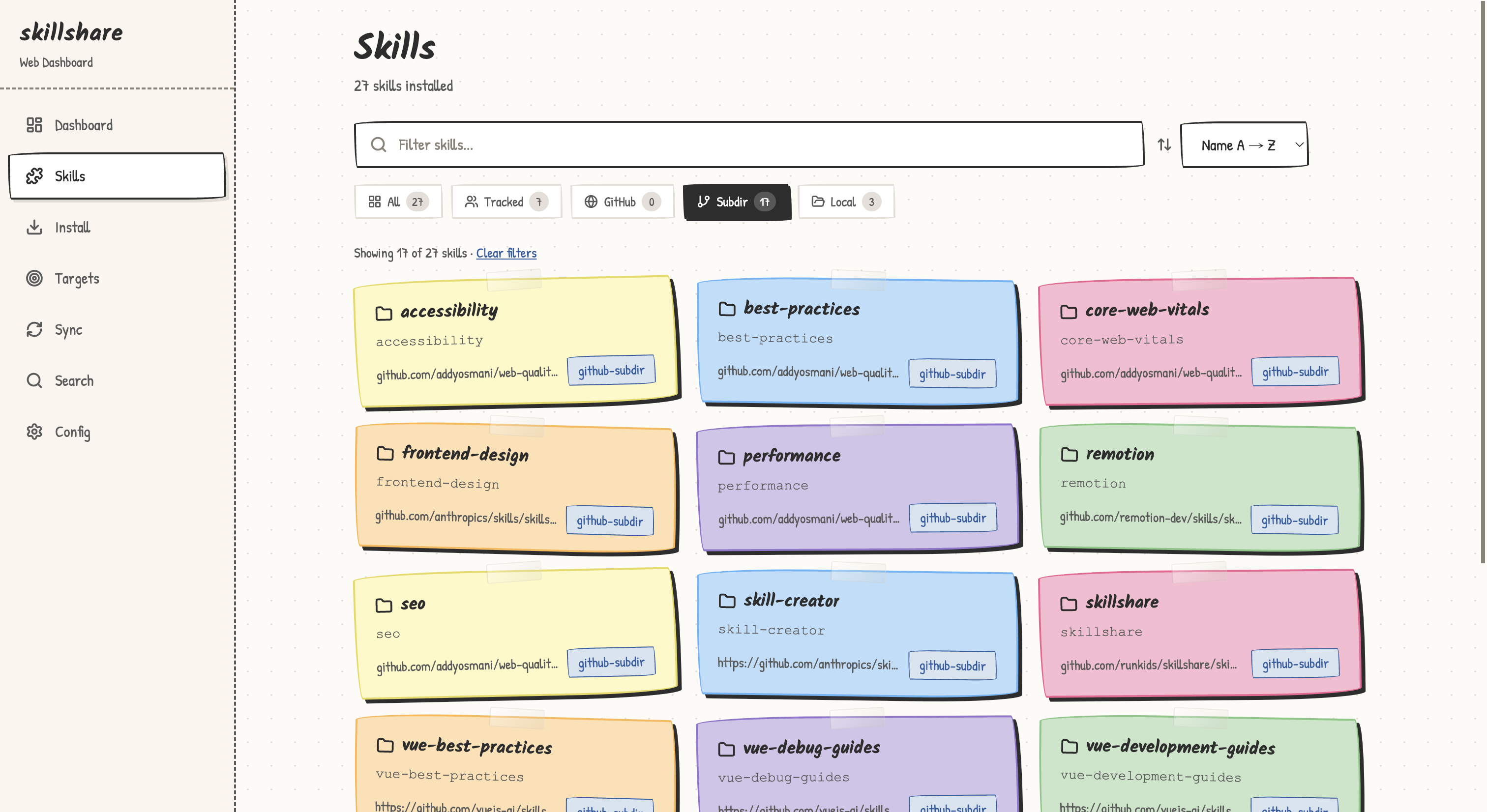
CLI and UI Preview

Skill Detail Security Audit
CLI sync output CLI install with security audit
UI Dashboard UI Skills
Web dashboard overview Web UI skills page

Installation

[!TIP] Use skillshare from your desktop. Get Skillshare App for macOS (Apple Silicon), Windows and Linux. First launch helps you install or locate the CLI, choose your AI tools and run your first sync. Installation guide.

Desktop App — visual setup and daily management

Skillshare App puts skills, agents, MCP and hooks in a desktop window. Install the app, open it, and follow first-launch setup.

macOS (Apple Silicon), with Homebrew:

brew tap runkids/tap
brew install --cask skillshare-app

Windows / Linux, or a manual macOS install: Download the latest app installers. See the Desktop App guide for platform details.

CLI: macOS / Linux

curl -fsSL https://raw.githubusercontent.com/runkids/skillshare/main/install.sh | sh

The script installs to ~/.local/bin by default, so normal installs and updates do not need sudo. If the installer prints PATH setup instructions, follow them before running skillshare. Add the suggested line to your shell config (such as ~/.zshrc or ~/.bashrc) for future terminals. Set INSTALL_DIR to use another location.

Windows PowerShell

irm https://raw.githubusercontent.com/runkids/skillshare/main/install.ps1 | iex

CLI: Homebrew

brew install skillshare

Tip: Run skillshare upgrade to update to the latest version. It auto-detects your install method and handles the rest.

CLI: Nix

nix profile add github:runkids/skillshare

Update with nix profile upgrade skillshare. Requires Nix 2.30+ with flakes enabled; on older Nix or Lix, use nix profile install. NixOS and Home Manager configurations can use the flake's overlays.default.

GitHub Actions

- uses: runkids/setup-skillshare@v1
  with:
    source: ./skills
- run: skillshare sync

See setup-skillshare for all options (audit, project mode, version pinning).

Shorthand (Optional)

Add an alias to your shell config (~/.zshrc or ~/.bashrc):

alias ss='skillshare'

Quick Start

skillshare init            # Create config, source, and detected targets
skillshare sync            # Sync skills to all targets

How It Works

┌─────────────────────────────────────────────────────────────┐
│                    Source Directory                         │
│   ~/.config/skillshare/skills/    ← skills (SKILL.md)       │
│   ~/.config/skillshare/agents/    ← agents                  │
│   ~/.config/skillshare/extras/    ← rules, commands, etc.   │
└─────────────────────────────────────────────────────────────┘
                              │ sync
              ┌───────────────┼───────────────┐
              ▼               ▼               ▼
       ┌───────────┐   ┌───────────┐   ┌───────────┐
       │  Claude   │   │  OpenCode │   │ OpenClaw  │   ...
       └───────────┘   └───────────┘   └───────────┘
Platform Skills Source Agents Source Extras Source Link Type
macOS/Linux ~/.config/skillshare/skills/ ~/.config/skillshare/agents/ ~/.config/skillshare/extras/ Symlinks
Windows %AppData%\skillshare\skills\ %AppData%\skillshare\agents\ %AppData%\skillshare\extras\ NTFS Junctions for folders (no admin required); file symlinks need Developer Mode, otherwise copied
Imperative (install-per-command) Declarative (skillshare)
Source of truth Skills copied independently Single source → symlinks (or copies)
New machine setup Re-run every install manually git clone config + sync
Security audit None Built-in audit + auto-scan on install/update
Web dashboard None skillshare ui
Runtime dependency Node.js + npm None (single Go binary)

Full comparison →

Highlights

Install & update skills —from GitHub, GitLab, or any Git host

skillshare install github.com/reponame/skills
skillshare update --all
skillshare target claude --mode copy  # if symlinks don't work

Symlink issues? — switch to copy mode per target

skillshare target <name> --mode copy
skillshare sync

Security audit —scan before skills reach your agent

skillshare audit

Project skills —per-repo, committed with your code

skillshare init -p && skillshare sync

Agents —sync custom agents to agent-capable targets

skillshare sync agents            # sync agents only
skillshare sync --all             # sync skills + agents + extras + MCP + hooks together

Extras —manage rules, commands, prompts & more

skillshare extras init rules          # create a "rules" extra
skillshare sync --all                 # sync skills + agents + extras + MCP + hooks together
skillshare extras collect rules       # collect local files back to source

MCP connections —configure once for Claude Code, Codex, Pi, VS Code, OpenCode and more

skillshare mcp add                    # guided URL or JSON setup
skillshare sync mcp --dry-run         # preview native configuration changes
skillshare sync mcp                   # apply connection settings

Keep definitions in config.yaml or reference a separate mcp.yaml. See MCP setup for examples, environment references and importing existing connections.

Manage native hooks without executing them:

skillshare hooks add check --file ./check.yaml
skillshare hooks sync --dry-run
skillshare hooks sync

Plugins —install a complete plugin and pick which tools receive it

skillshare plugin add                 # guided: source, plugin, targets, review
skillshare plugin add owner/repo --target claude --target codex --no-tui
skillshare sync plugins --dry-run     # plugins sync separately from sync --all

Existing native installations can be adopted with plugin import. See Manage plugins across tools.

Shell completion —tab-complete commands, flags, and subcommands

skillshare completion bash --install   # also: zsh, fish, powershell, nushell

Local checkpoints — commit source changes without pushing

skillshare commit -m "Update review skill"
skillshare commit --dry-run

Web dashboard — visual control panel

skillshare ui

Herdr panel — skillshare beside your agents in Herdr: updates, sync, audited installs and the source repo in one panel

Set up the Herdr panel →

All commands & guides →

Contributing

Contributions welcome! Open an issue first, then submit a draft PR with tests. See CONTRIBUTING.md for setup details.

git clone https://github.com/runkids/skillshare.git && cd skillshare
make check  # format + lint + test

[!TIP] Not sure where to start? Browse open issues or try the Playground for a zero-setup dev environment.

Contributors

Thanks to everyone who helped shape skillshare.

leeeezx Vergil333 romanr xocasdashdash philippe-granet terranc benrfairless nerveband EarthChen gdm257 skovtunenko TyceHerrman 1am2syman thealokkr JasonLandbridge masonc15 richardwhatever reneleonhardt ndeybach hhh2210 leoarry salmonumbrella daylamtayari dstotijn ipruning massukio nathanvale LloydPowell771 kevincobain2000 StephenPAdams mk-imagine Curtion amdoi7 jessica-engel AlimuratYusup thor-shuang bishopmatthew chaosky iFwu ildunari vieGPT aestilog xarthurx m0cun bit3125 eekryuos Bongseop-Kim sophodex PeterTianbuhan dotned ismferd jblackburn21 jnhu76 jacobleft rhysmcneill druellan 12britz askpatrickw Almost42 Brett-Best isCopyman svob michal-grzelak shikbupt LeoYeAI TIR44 Ajaymamtora vishaldialpad kankan0829 dnabb thinhngotony skaurus jamesbraza 2BAB zdlldz elstiaan FaintFlower yantinglin21 chung1912 r-fynn cescox hhdebb Snurppa s0undt3ch danscheer 7zq12lvm-b DarkiT harisonw wuhaoyujerry star-nebula AdamMagued mbury 483218131 neilforest7 johnkattenhorn aleps001 jskswamy heyAidy trojanwk charitarthchugh servaasvdc tomerzcod7 ErykJakubik maciejniec jani-nieminen-framehaus endgame302


Support skillshare ❤️

skillshare is free and open source.

If skillshare saves you time, consider buying me a coffee. Every contribution helps with ongoing development, cross-platform testing, documentation, and maintenance.

☕ Buy me a coffee

You can also help by giving skillshare a ⭐ on GitHub!

Star History

Star History Chart

License

MIT

skillshare (runkids/skillshare)

正在搜索数据库…

这是什么?skillshare 是一个工具,能用一条命令把你的 AI 技能、智能体、MCP 连接、插件和钩子同步到你所有的 AI 编程工具(Claude Code、Codex、Pi、OpenCode 等),还能方便地把这套配置分享给团队。
它是命令行工具、桌面应用,还是两者都是?两者都是。它有一个单独的 Go 二进制命令行工具,还有适用于 macOS、Windows 和 Linux 的 Skillshare 桌面应用,并且可以通过 'skillshare ui' 使用网页仪表盘。
我该怎么让它跑起来?最简单的方法是使用桌面应用:安装后打开,按照首次启动的设置步骤操作。在 macOS/Linux 上使用命令行工具的话,可以运行安装脚本(它会安装到 ~/.local/bin,无需 sudo),也可以通过 Homebrew 使用 'brew install',或者使用 Nix。然后运行你的第一次同步。
我得先装 Node.js 或 Python 吗?不用。它是单个 Go 二进制文件,不依赖 Node.js 或 npm 这类运行时环境。
Windows 上安装有什么需要注意的坑吗?Windows 上的符号链接功能有限:文件夹使用 NTFS 连接点(不需要管理员权限),但文件符号链接需要开启开发者模式,否则会改为复制文件。
它适合团队用,还是只适合个人用?两者都适合。项目资源可以放在代码仓库的 .skillshare/ 目录下,共享的技能则通过被跟踪的仓库分发,新成员就能获得相同的配置。
支持哪些平台?桌面应用支持 macOS(Apple Silicon)、Windows 和 Linux;命令行工具可以通过 PowerShell 在 macOS、Linux 和 Windows 上安装。
在使用前,它会对技能做安全审计吗?会。它内置了安全审计功能,会在技能进入你的智能体之前进行扫描,并且在安装和更新时自动扫描。
我能把配置保存在 Git 里,再迁移到另一台机器上吗?可以。把你的源配置纳入 Git 版本管理,然后在新机器上克隆配置并运行同步,无需手动重新安装所有内容。
它和逐个安装技能有什么区别?命令式安装会把每个技能各自复制一份,并且需要手动重复执行。skillshare 则保留唯一的源头,并将其以符号链接(或复制)的方式分发到每个工具中。
Herdr 面板是什么?这是一个面板,可以把 skillshare 放在 Herdr 中你的智能体旁边,在同一个地方提供更新、同步、经过审计的安装以及源代码仓库。
作者
runkids
大小
137.4 MB
星标
3.2K
时长
10个月
提交 · 90 天