




Excelize
Introduction
Excelize is a library written in pure Go providing a set of functions that allow you to write to and read from XLAM / XLSM / XLSX / XLTM / XLTX files. Supports reading and writing spreadsheet documents generated by Microsoft Excel™ 2007 and later. Supports complex components by high compatibility, and provided streaming API for generating or reading data from a worksheet with huge amounts of data. This library needs Go version 1.25.0 or later. The full docs can be seen using go's built-in documentation tool, or online at go.dev and docs reference.
Basic Usage
Installation
go get github.com/xuri/excelize
- If your packages are managed using Go Modules, please install with following command.
go get github.com/xuri/excelize/v2
Create spreadsheet
Here is a minimal example usage that will create spreadsheet file.
package main

import (
    "fmt"

    "github.com/xuri/excelize/v2"
)

func main() {
    f := excelize.NewFile()
    defer func() {
        if err := f.Close(); err != nil {
            fmt.Println(err)
        }
    }()
    // Create a new sheet.
    index, err := f.NewSheet("Sheet2")
    if err != nil {
        fmt.Println(err)
        return
    }
    // Set value of a cell.
    f.SetCellValue("Sheet2", "A2", "Hello world.")
    f.SetCellValue("Sheet1", "B2", 100)
    // Set active sheet of the workbook.
    f.SetActiveSheet(index)
    // Save spreadsheet by the given path.
    if err := f.SaveAs("Book1.xlsx"); err != nil {
        fmt.Println(err)
    }
}
Reading spreadsheet
The following constitutes the bare to read a spreadsheet document.
package main

import (
    "fmt"

    "github.com/xuri/excelize/v2"
)

func main() {
    f, err := excelize.OpenFile("Book1.xlsx")
    if err != nil {
        fmt.Println(err)
        return
    }
    defer func() {
        // Close the spreadsheet.
        if err := f.Close(); err != nil {
            fmt.Println(err)
        }
    }()
    // Get value from cell by given worksheet name and cell reference.
    cell, err := f.GetCellValue("Sheet1", "B2")
    if err != nil {
        fmt.Println(err)
        return
    }
    fmt.Println(cell)
    // Get all the rows in the Sheet1.
    rows, err := f.GetRows("Sheet1")
    if err != nil {
        fmt.Println(err)
        return
    }
    for _, row := range rows {
        for _, colCell := range row {
            fmt.Print(colCell, "\t")
        }
        fmt.Println()
    }
}
Add chart to spreadsheet file
With Excelize chart generation and management is as easy as a few lines of code. You can build charts based on data in your worksheet or generate charts without any data in your worksheet at all.
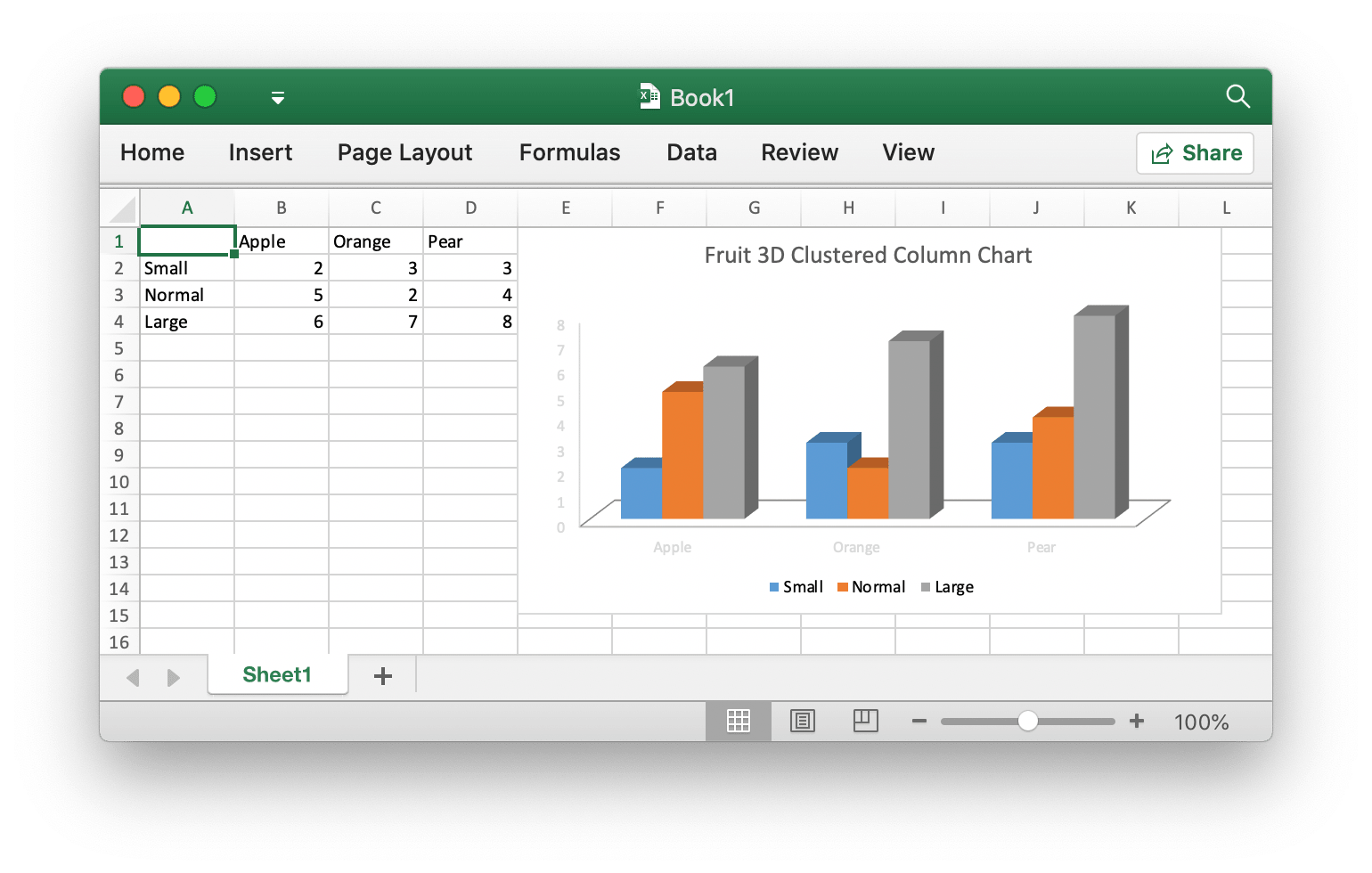
package main

import (
    "fmt"

    "github.com/xuri/excelize/v2"
)

func main() {
    f := excelize.NewFile()
    defer func() {
        if err := f.Close(); err != nil {
            fmt.Println(err)
        }
    }()
    for idx, row := range [][]interface{}{
        {nil, "Apple", "Orange", "Pear"}, {"Small", 2, 3, 3},
        {"Normal", 5, 2, 4}, {"Large", 6, 7, 8},
    } {
        cell, err := excelize.CoordinatesToCellName(1, idx+1)
        if err != nil {
            fmt.Println(err)
            return
        }
        f.SetSheetRow("Sheet1", cell, &row)
    }
    if err := f.AddChart("Sheet1", "E1", &excelize.Chart{
        Type: excelize.Col3DClustered,
        Series: []excelize.ChartSeries{
            {
                Name:       "Sheet1!$A$2",
                Categories: "Sheet1!$B$1:$D$1",
                Values:     "Sheet1!$B$2:$D$2",
            },
            {
                Name:       "Sheet1!$A$3",
                Categories: "Sheet1!$B$1:$D$1",
                Values:     "Sheet1!$B$3:$D$3",
            },
            {
                Name:       "Sheet1!$A$4",
                Categories: "Sheet1!$B$1:$D$1",
                Values:     "Sheet1!$B$4:$D$4",
            }},
        Title: excelize.ChartTitle{
            Paragraph: []excelize.RichTextRun{
                {
                    Text: "Fruit 3D Clustered Column Chart",
                },
            },
        },
    }); err != nil {
        fmt.Println(err)
        return
    }
    // Save spreadsheet by the given path.
    if err := f.SaveAs("Book1.xlsx"); err != nil {
        fmt.Println(err)
    }
}
Add picture to spreadsheet file
package main

import (
    "fmt"
    _ "image/gif"
    _ "image/jpeg"
    _ "image/png"

    "github.com/xuri/excelize/v2"
)

func main() {
    f, err := excelize.OpenFile("Book1.xlsx")
    if err != nil {
        fmt.Println(err)
        return
    }
    defer func() {
        // Close the spreadsheet.
        if err := f.Close(); err != nil {
            fmt.Println(err)
        }
    }()
    // Insert a picture.
    if err := f.AddPicture("Sheet1", "A2", "image.png", nil); err != nil {
        fmt.Println(err)
    }
    // Insert a picture to worksheet with scaling.
    if err := f.AddPicture("Sheet1", "D2", "image.jpg",
        &excelize.GraphicOptions{ScaleX: 0.5, ScaleY: 0.5}); err != nil {
        fmt.Println(err)
    }
    // Insert a picture offset in the cell with printing support.
    enable, disable := true, false
    if err := f.AddPicture("Sheet1", "H2", "image.gif",
        &excelize.GraphicOptions{
            PrintObject:     &enable,
            LockAspectRatio: false,
            OffsetX:         15,
            OffsetY:         10,
            Locked:          &disable,
        }); err != nil {
        fmt.Println(err)
    }
    // Save the spreadsheet with the origin path.
    if err = f.Save(); err != nil {
        fmt.Println(err)
    }
}
Contributing
Contributions are welcome! Open a pull request to fix a bug, or open an issue to discuss a new feature or change. XML is compliant with part 1 of the 5th edition of the ECMA-376 Standard for Office Open XML.
Licenses
This program is under the terms of the BSD 3-Clause License. See https://opensource.org/licenses/BSD-3-Clause.
The Excel logo is a trademark of Microsoft Corporation. This artwork is an adaptation.
The Go gopher was created by Renee French. Licensed under the Creative Commons 4.0 Attributions license.


 Excelize 是一个用纯 Go 编写的库,用于读写 XLAM、XLSM、XLSX、XLTM 和 XLTX 格式的 Microsoft Excel 表格文件。