
🍵 Matcha
Matcha is a daily digest generator for your RSS feeds and interested topics/keywords. By using any markdown file viewer (such as Obsidian) or directly from terminal (-t option), you can read your RSS articles whenever you want at your pace, thus avoiding FOMO throughout the day.
In Obsidian
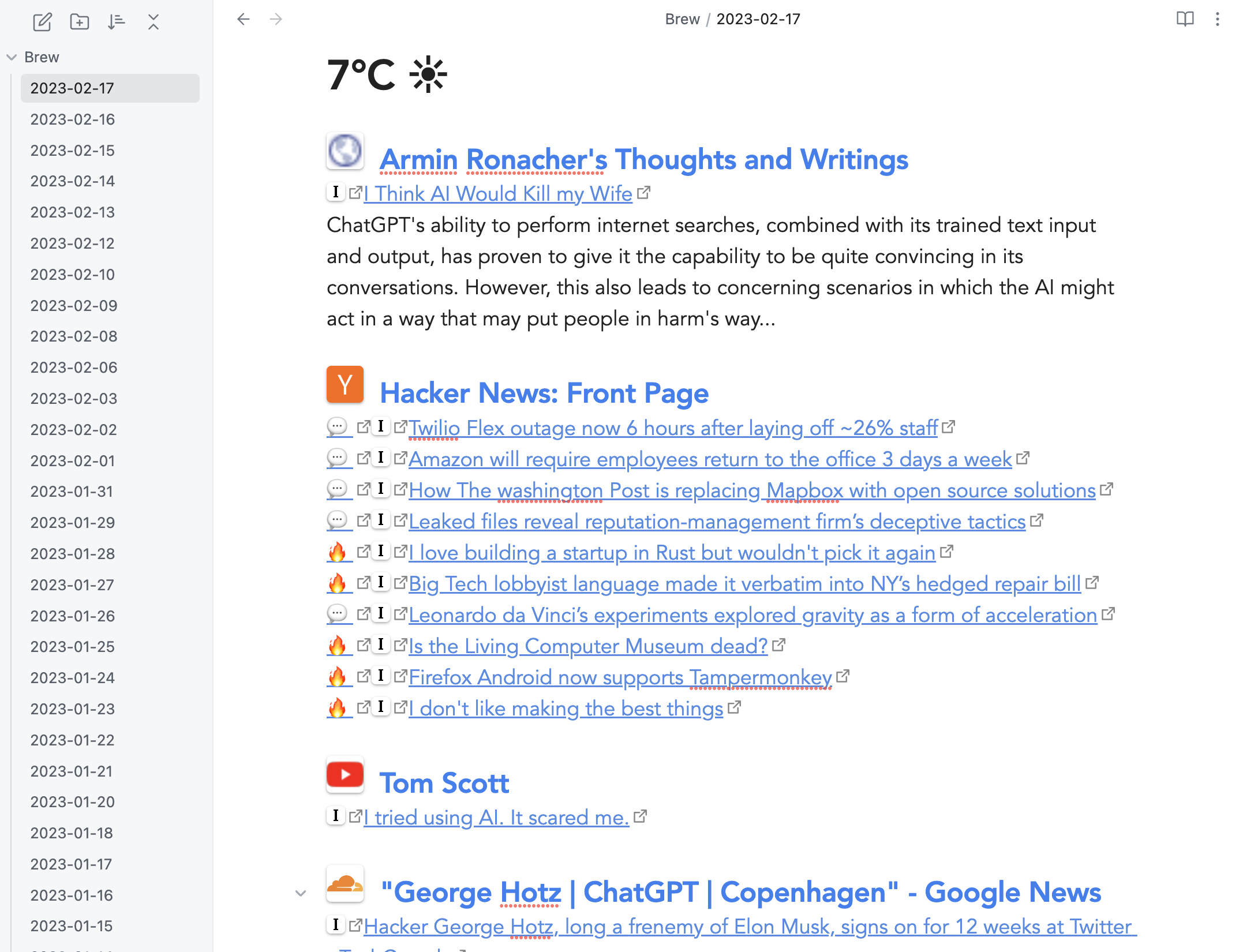
On the terminal
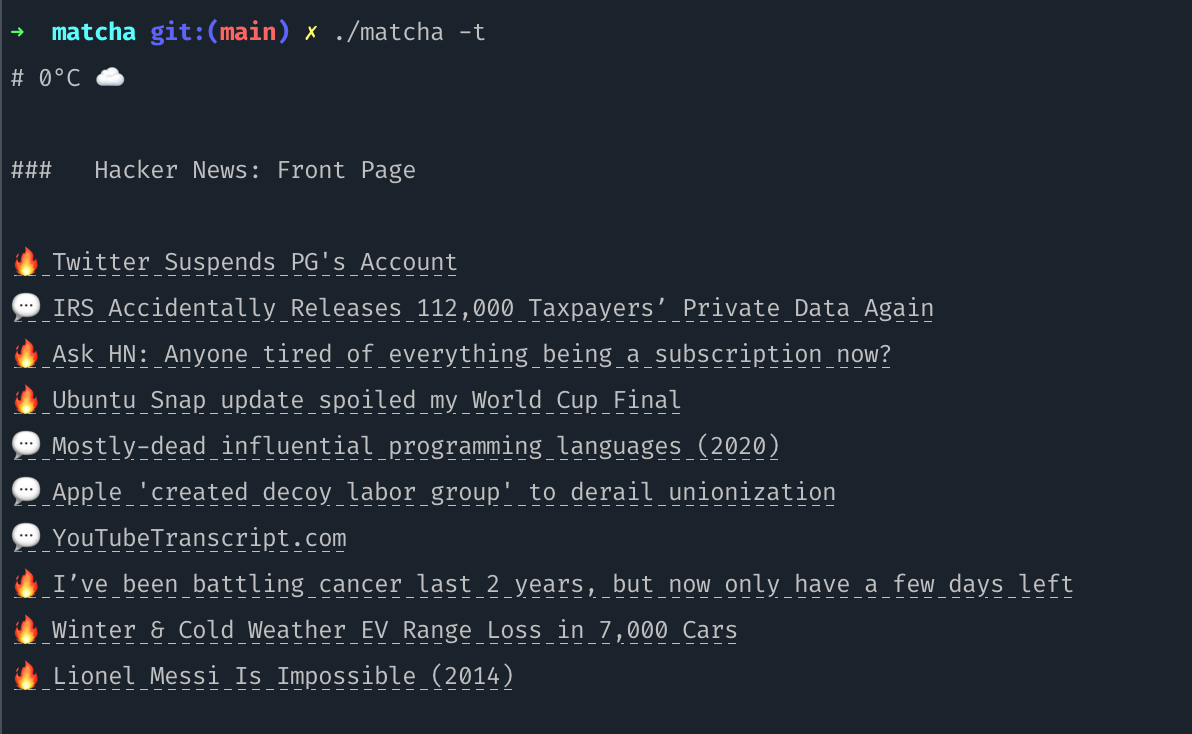
On the Web
Read more here how to setup the web version

Features
- RSS daily digest, it will show only articles not previously generated
- Optional summary of articles from OpenAI/Local LLM models for selected feeds
- Weather for the next 12 Hours (from YR)
- Quick bookmarking of articles to Instapaper
- Interested Topics/Keywords to follow (through Google News)
- Hacker News comments direct link and distinguishing mostly dicussed posts 🔥
- Terminal Mode by calling
./matcha -t
- LLM Notifications: get notified when your custom prompt is fulfilled (example: "Notify me when X company is sold")
- LLM Analyst: Performs an analysis of article titles and responds based on your prompt (example: "Tell me if you see any investment opportunity")
Installation & Usage
- Since Matcha generates markdown, any markdown reader should do the job. Currently it has been tested on Obsidian so you need a markdown reader before moving on, unless you will use terminal mode (-t option), then a markdown reader is not needed.
- Download the pre-built Matcha binary based on your OS and after executing (if on mac/linux run
chmod +x matcha-darwin-amd64 to make it executable), a sample config.yml will be generated, which you can add in your rss feeds, keywords and the markdown_dir_path where you want the markdown files to be generated (if left empty, it will generate the daily digest on current dir).
- You can either execute matcha on-demand (a terminal alias) or set a cron to run matcha as often as you want. Even if you set it to execute every hour, matcha will still generate daily digests, one file per day, and will add more articles to it if new articles are published throughout the day.
Other ways to install
Homebrew (macOS)
brew install matcha
Go devs
go install github.com/piqoni/matcha@latest
Configuration
On first execution, Matcha will generate the following config.yaml and a markdown file on the same directory as the application. Change the 'feeds' to your actual RSS feeds, and google_news_keywords to the keywords you are interested in. And if you want to change where the markdown files are generated, set the full directory path in markdown_dir_path.
markdown_dir_path:
feeds:
  - http://hnrss.org/best 10
  - https://waitbutwhy.com/feed
  - http://tonsky.me/blog/atom.xml
  - http://www.joelonsoftware.com/rss.xml
  - https://www.youtube.com/feeds/videos.xml?channel_id=UCHnyfMqiRRG1u-2MsSQLbXA
google_news_keywords: George Hotz,ChatGPT,Copenhagen
instapaper: true
weather_latitude: 37.77
weather_longitude: 122.41
terminal_mode: false
opml_file_path:
markdown_file_prefix:
markdown_file_suffix:
reading_time: false
sunrise_sunset: false
openai_api_key:
openai_base_url:
openai_model:
summary_feeds:
Analyst LLM Feature
The Analyst feature enables you to gather articles from specified feeds and analyze them using a prompt sent to a language model like GPT-4o (default). The result is included in the daily digest under an Analysis section. You write on your analyst_prompt setting what do you want the analyst to do on your behalf, for example picking relevant news to your liking (example: a cybersecurity expert interested only in certain type of attack), or having an investing analyst suggesting investment opportunities, etc.
Configuration Example of an analyst finding investment opportunities:
openai_api_key: sk-xxxxxxxxxxxxxxxxx
analyst_feeds:
  - https://feeds.bbci.co.uk/news/business/rss.xml
analyst_prompt: You are a world-class investing expert. Analyze the provided list of articles for potential investment opportunities. If no direct opportunities are found, identify industries, regions, or trends that could have indirect impacts on the investment landscape.
How it Works:
The RSS feeds specified in analyst_feeds are fetched, and the titles along with their rss descriptions are attached to the analyst_prompt to form a single input prompt.
Then the prompt is sent to the specified language model (analyst_model), and the response is included in the daily markdown file under the Analysis section.
Snippet of sample output (as an investment analyst):

Default model is OpenAI's gpt-4o but to override model add configuration:
analyst_model: o1-preview
Analyst Notifications
The analyst feature supports notifications (Slack hooks or ntfy.sh). See a working example below:
analyst_prompt: "Check the news titles below and if you see that airbus flights are returned to normal please respond with \"FLIGHTS BACK TO NORMAL\" and nothing else, no explanations."
analyst_feeds:
  - https://feeds.bbci.co.uk/news/business/rss.xml
analyst_model: qwen3:4b
openai_base_url: http://localhost: 11434/v1
notification_trigger: "FLIGHTS BACK TO NORMAL"
notification _webhook_url: https://ntfy.sh/myuniquetopic
Summarization of Articles using ChatGPT
In order to use the summarization feature, you'll first need to set up an OpenAI account. If you haven't already done so, you can sign up here. Once registered, you'll need to acquire an OpenAI API key which can be found here.
Alternatively, you may use LocalAI (see the "LocalAI Support" section below for more information).
Next, update the configuration file with the desired feeds you want to summarize. This can be done under the "summary_feeds" section. Here is an example configuration:
openai_api_key: sk-xxxxxxxxxxxxxxxxx
summary_feeds:
    - http://hnrss.org/best 10
Replace sk-xxxxxxxxxxxxxxxxx with your OpenAI API key and include the RSS feeds under summary_feeds for articles you're interested in summarizing.
You can also customize which model you use for summarization by changing the openai_model to one of the values here which defaults to 'gpt-3.5-turbo' for now. 'gpt-4' is also a valid model name.
openai_model: gpt-3.5-turbo
LocalAI Support
For those interested in using LocalAI for summarization, whether for cost-efficiency or privacy reasons, you'll first need to set it up and run it. For setup instructions, please visit the LocalAI repository on GitHub here.
After setting up LocalAI, you'll need to direct Matcha to the openai-compatible base URL of LocalAI. This is done by updating the "openai_base_url" in the configuration file. For instance, if your LocalAI server is running locally on port 8080, your configuration would look like this:
openai_base_url: http://localhost:8080/v1
openai_model: openllama-3b
In this case, 'http://localhost:8080/v1' represents the base URL where your LocalAI server is running. 'openai_model' could be any model compatible with LocalAI. You can also replace the openai_base_url with another hosted url like the Azure openai endpoint.
Please note in case of errors that you may need to change the openai_model to match the model you downloaded in LocalAI.
Command line Options
Run matcha with --help option to see current cli options:
  -c filepath
    	Config file path (if you want to override the current directory config.yaml)
  -o filepath
    	OPML file path to append feeds from opml files
  -t	Run Matcha in Terminal Mode, no markdown files will be created
OPML Import
To use OPML files (exported from other services), rename your file to config.opml and leave it in the directory where matcha is located. The other option is to run the command with -o option pointing to the opml filepath.


 Matcha 是一个每日摘要生成工具,它会把你的 RSS 订阅源以及基于关键词的 Google 新闻搜索结果汇总到一个 markdown 文件中,你可以用 markdown 阅读器或终端查看。