Open source · Free · v0.1.3 · For disposable databases, not production data
PGBoxDB is a database runtime for short-lived Postgres databases: agent
sandboxes, CI and per-PR databases, test and preview environments. One PGBoxDB
process holds many isolated databases. Each costs tens of kilobytes of
memory while idle, is created in milliseconds from a sealed template, and
is backed, on a copy-on-write storage backend such as ZFS, by a clone
that starts at a few megabytes whatever the template's size (on a
filesystem without block cloning a branch is a full copy).
PGBoxDB speaks the Postgres wire protocol and SQL dialect. Rails, Django,
Prisma, SQLAlchemy and node-postgres run their full migrate → test →
schema-change lifecycles on it unchanged.
PGBoxDB is the database engine behind PGRun branches.
A database should be cheap enough to allocate like an object, not
provision like a server.
Why PGBoxDB
Agent workflows, test suites, CI jobs and preview environments create
databases constantly and throw them away minutes or hours later. Giving
each one its own PostgreSQL server costs a process, tens of megabytes and
a cold start every time. PostgreSQL is built to keep one database running
for years; PGBoxDB is built to create one in milliseconds, use it briefly and
delete it.
1 PostgreSQL server → 1 database
1 PGBoxDB runtime       → hundreds or thousands of isolated databases
Immutable state is shared. Each database pays mainly for what makes it
different, and follows a lifecycle built for being thrown away:
sealed template
      ↓
   mint database        milliseconds, copy-on-write
      ↓
agent / CI / test       minutes or hours
      ↓
    discard             dropped a grace period after the last session
On Linux, ZFS block cloning lets a branch share every unchanged block with
its template, so a branch of a 10 GB database is ready in under a second
and starts at about 14 MB of its own storage. Every agent, every pull
request and every test run can have its own real Postgres-compatible
database.
Disposable by design
Postgres was built to run for years. An AI agent needs a database for two
minutes: create → migrate → test → destroy. Multiply that by 1,000 agents
running in parallel and you do not need 1,000 Postgres servers. You need
one runtime holding thousands of isolated, disposable databases, each
dropped the moment its agent, pull request or CI job is done.
Benchmarks
Measured on a 4 vCPU / 8 GB / $8.50-a-month VPS with ZFS block cloning. The
load generator ran on the same CPUs, so these are architecture numbers,
not capacity limits.
~6.2 ms      warm database mint, p50 (cold copy-on-write clone: 74 ms)
~70 KB       memory per untouched idle database (~128 KB once queried)
128–155 MB   one runtime holding 1,000 idle databases; 213 MB after all were used
111 MB       runtime memory after 30,000 create → use → drop lifecycles
~674 ms      copy-on-write branch of a 10 GB template, ~13.6 MB new storage
0            result differences on PostgreSQL's src/test/regress (219 / 231 byte-exact vs PG 18.6)
36 / 36      framework runs: Rails 8.1, Django 5.2, Prisma 6, SQLAlchemy 2, node-postgres
PGBoxDB is not trying to beat Postgres on single queries. Short statements are
about 0.05–0.15 ms slower than PostgreSQL 18, large single-threaded scans
1.5–2.2× slower, COPY and 4-client throughput equal; whole framework
lifecycles take 0–15 % longer. Transactional behaviour follows PostgreSQL,
including transactional DDL, savepoints and temporary tables.
These describe measured configurations and workloads, not a claim that
PGBoxDB is faster than PostgreSQL in general. The regression figure is
PostgreSQL's own test suite on one platform under the regress profile,
not a compatibility percentage for arbitrary SQL. Every figure has a
script and a committed raw result. The tables, the isolation results and
how to reproduce them: docs/pgboxdb/benchmarks.md.
The full report: docs/pgboxdb/linux-results.md.
Architecture
The central idea: share everything immutable, pay for divergence. It
applies to memory and to storage alike.
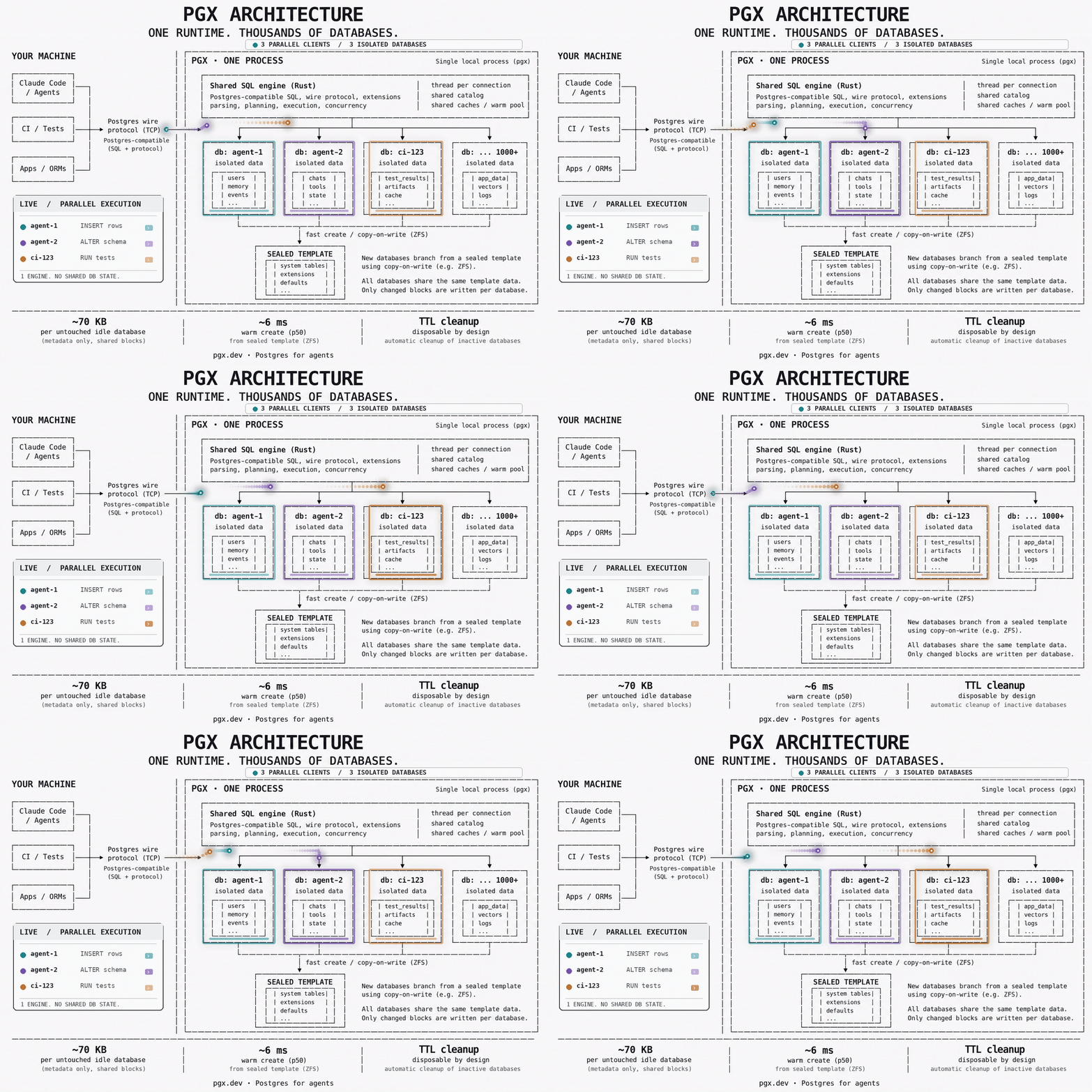
One process, one shared SQL engine, and one isolated database per client:
each agent, CI job or app connects over the ordinary Postgres wire protocol
and gets a database branched copy-on-write from a sealed template. The
engine, catalog, caches and warm pool are shared; only each database's own
changed blocks are written. Nothing is shared between databases.
1,000 databases, one PGBoxDB process
One idle PostgreSQL server: 16.6 MB. One idle PGBoxDB database: about 70 KB.
Databases are isolated by name, roles and limits inside one process with a
thread per connection. A database costs its catalog caches, not a server:
databases cloned from the same template share identical relation-cache
entries, and idle databases are skipped by autovacuum. Measured on a
4 vCPU / 8 GB VM:
one idle PostgreSQL 18 server        16.6 MB
one idle PGBoxDB database               ~70 KB     (~128 KB once it has been queried)
1,000 idle PGBoxDB databases          128–155 MB   in one process
1,000 databases, each queried once    213 MB
1,000 databases, 100 active           283 MB
Not a cluster, not Docker, not the cloud: PGBoxDB on a 16 GB M1 Pro, cloning a
31 MB app database 1,000 times with pgboxdb clone. All 1,000 clones in
46.6 s, 41 ms median per clone, 0 errors, and the engine idles at 20 MB
RSS with all 1,000 present. Under load it grows with the sessions, not the
databases: 340 MB at 100 concurrent readers, back to 20 MB when they
disconnect.
Mint-on-connect
Connecting to <prefix><template>__<token> creates that database from a
sealed template and connects you to it, in about 6 ms from a warm pool of
pre-created spares and 74 ms cold. A janitor drops it a grace period after
its last session ends, unless it is pinned.
psql -d tdb_tpl_app__agent42      # does not exist yet
                                  # → minted from tpl_app, 6.2 ms p50
psql -d tdb_tpl_app__agent43      # a second, isolated one
                                  # → 0 rows: it sees none of agent42's writes
   …last session ends…
                                  # → dropped after the grace period
file_copy_method = clone turns database creation into ZFS block clones.
A branch shares every unchanged block with its template, so its cost grows
with divergence: a branch of a 10 GB template is ready in 674 ms and starts
at 13.6 MB of its own storage. On a filesystem without block cloning a
branch is a full copy.
template (10 GB)
├── branch A → only changed blocks      674 ms, +13.6 MB
├── branch B → only changed blocks
└── branch C → only changed blocks

 1 GB template → 135 ms, +2.3 MB
 2 GB          → 198 ms, +3.7 MB
 5 GB          → 417 ms, +7.0 MB
10 GB          → 674 ms, +13.6 MB
Session, database and runtime memory limits inside the engine, connection
limits per database, and a Linux cgroup around the runtime. Memory-heavy
work fails with a PostgreSQL-style error (SQLSTATE 53200) instead of
taking the host down; the session stays usable and other databases see
0 errors. pgrust_runtime_status() returns the whole picture as JSON:
databases, sessions, memory against limits, warm-pool and mint counters.
session  →  database / runtime  →  Linux cgroup

ERROR:  out of memory                         SQLSTATE 53200
HINT:   The session reached pgrust.session_memory_limit.
        (transaction aborted; session stays connected; other databases: 0 errors)

SELECT pgrust_runtime_status();
{"memory":{"rss_bytes":…,"session_limit_mb":256,"database_limit_mb":512,"runtime_limit_mb":3072},
 "connections":42,
 "databases":{"total":1003,"ephemeral":998,"spares":8,"pinned":2},
 "janitor":{"prefix":"tdb_","pool_size":8,"pending_mints":0}}
The PGBoxDB Skill and pgboxdb agent put the lifecycle on hooks: each Claude Code
session gets its own branch with DATABASE_URL already set, extended while
the agent works and dropped after it stops, and every subagent gets a
branch of its own. Two agents never see each other's changes, and your
PostgreSQL is only ever read.
session start   →  pgboxdb branch myapp <session>   DATABASE_URL set
  subagent      →  pgboxdb branch myapp <subagent>  its own branch
  agent works   →  TTL extended
session end     →  branch dropped
PGBoxDB is at v0.1.3, an early release with known limitations listed in the
release notes. It
already powers PGBoxDB branches in PGRun, which adds the
control plane around it: safe masked copies of a source database, sealed
templates, one branch per agent, PR or CI job, routing, access and
automatic expiry. The current focus is PostgreSQL and application
compatibility, concurrency semantics, lifecycle correctness, predictable
resource containment and real agent workloads. If PGBoxDB behaves differently
from PostgreSQL for a supported workload, we want a reproducible test case
(see Contributing).
PGBoxDB v0.1 is for disposable databases: agent, CI, PR, test and preview
databases built from sanitized copies of production. Use it where losing
a branch is acceptable. It is not a production primary, a system of
record, or an HA or PITR database:
Not crash-safe. The PGBoxDB profile runs with fsync = off.
One process. A runtime is one crash domain.
No C extensions. Existing PostgreSQL C extensions cannot load; only
the built-in contrib modules exist, pgvector among them. PL/Python,
PL/Perl and PL/Tcl are not available.
Keep Postgres as the source of truth for data you can't afford to lose.
The full list is in docs/pgboxdb/v0.1-readiness.md.
Quickstart
One command installs PGBoxDB, starts it, creates an app database and prints its
connection URL. No Docker, Rust or system PostgreSQL; the native distribution
is self-contained and relocatable.
npx pgboxdb@latest
PGBoxDB is ready.

  postgres://postgres:…@127.0.0.1:5432/app
Point DATABASE_URL at that URL. npx pgboxdb with no arguments is pgboxdb run;
every other pgboxdb command works the same way through npx, and
npm install -g pgboxdb puts pgboxdb on your PATH for good:
pgboxdb url app                      # its connection URL
pgboxdb ls                           # databases, TTL, expiry, size
pgboxdb branch app agent-001         # a disposable 2-hour branch for one agent
pgboxdb clone app pr-123 --ttl 5m    # a 5-minute copy-on-write clone
pgboxdb create scratch --ttl 2h      # a throwaway database, gone in 2 hours
pgboxdb --json ls                    # machine-readable output for agents
pgboxdb stop
Without Node, curl -fsSL https://pgboxdb.com/install | sh does the same
install. Supported: Apple silicon Macs and Linux (arm64, x86-64); Intel
Macs are not supported yet. Any PostgreSQL client or ORM works against
pgboxdb url <db>.
Clones are copy-on-write on a backend with block cloning (such as ZFS), a
full copy elsewhere. pgboxdb branch is pgboxdb clone for agents: a 2-hour TTL by
default and the connection URL as the last line of output, so an agent can
be handed DATABASE_URL="$(pgboxdb branch myapp agent-1 | tail -1)". Databases
created without --ttl are permanent; a background supervisor drops each
temporary one shortly after its deadline and never touches permanent or
system databases (ttl.md).
The full CLI, install options, integrations (Rails, Node, Python, Go, psql),
storage model and troubleshooting are under
docs/pgboxdb/local-dev/. Building the engine yourself,
running a bare runtime and minting from a sealed template by hand:
build-from-source.md.
Every AI agent gets its own Postgres
Install the Skill, then ask your agent. In Claude Code, from inside a session:
/plugin marketplace add pgrundev/pgboxdb-plugin
/plugin install pgboxdb@pgboxdb-plugin
/pgboxdb:pgboxdb Set up isolated Postgres databases for this project.
For Cursor, Codex or several hosts at once, the Agent Skills CLI installs the
same Skill into the project:
npx skills add pgrundev/pgboxdb --skill pgboxdb
Use PGBoxDB to give this project isolated databases for coding agents. Set everything up.
The agent detects your database setup, installs PGBoxDB if needed, imports your
development database schema-only into a template (pgboxdb copy), writes a
committed .pgboxdb.toml, installs lifecycle hooks (pgboxdb agent setup) and
proves a branch. From then on each session gets its own branch with
DATABASE_URL already set, extended while the agent works and removed after
it stops, and every subagent gets a branch of its own; two agents never see
each other's changes and your PostgreSQL is never written. Installing the
Skill executes nothing by itself: the agent does the setup when the Skill is
activated and your permissions allow it.
Host
Automatic isolation
Status
Claude Code
yes, through hooks: one branch per session and one per subagent
verified live
Cursor
hooks installed; pgboxdb agent exec -- when PGBOXDB_ISOLATION is unset
env propagation pending live verification
Codex
pgboxdb agent exec -- codex (Codex hooks cannot set environment)
wrapper verified
Requires PGBoxDB 0.1.2 or newer; the Skill checks the installed version before it
does anything. pgrundev/pgboxdb-plugin
holds only the plugin (about 110 KB, generated from this repository), so
the install takes seconds; adding this repository itself as the marketplace
works too but clones about 2 GB. The lifecycle, security rules and host
differences: agents.md,
claude-plugin.md; the Skill
itself: skills/pgboxdb/SKILL.md.
One Git branch, one isolated Postgres
cd my-project
pgboxdb git init                      # main database, first main snapshot, Git hooks
git switch -c feature/auth        # ✓ PGBoxDB database ready: feature/auth (cloned from main in ~40 ms)
pgboxdb git exec -- bin/rails db:migrate
git switch main                   # main's database again; feature/auth keeps its migrations
pgboxdb git sync                      # publish main's new schema as the next immutable snapshot
git switch -c feature/billing     # starts from the latest validated main snapshot
pgboxdb git status
Plain git switch stays plain Git: the hooks create or reuse the branch's
copy-on-write database, worktrees get their own, main updates never replace
an existing branch database, and every AI agent session on a branch still
gets a private copy of that branch's database. A hook cannot change your
shell's environment, so commands run with pgboxdb git exec -- …, or
pgboxdb git install-shell refreshes DATABASE_URL at every prompt. Details:
git.md.
Watch every agent's database live
pgboxdb top            # project → Git branch → session → subagent, live connections, TTLs, lifecycle
pgboxdb top --demo     # try it without PGBoxDB: a simulated session with five agents
pgboxdb agent activity --state testing --task "Implement OAuth"   # what an agent reports shows in TASK
Read-only and native (a Ratatui terminal UI); pgboxdb --json top --snapshot
gives the same view as one JSON object. Details:
top.md.
Keep your Postgres, branch it in PGBoxDB (by hand)
The same thing without an agent. Copy PostgreSQL into PGBoxDB once, then give
every agent its own branch. The source is only read; PostgreSQL stays your
source of truth.
PGBOXDB_PORT=5433 npx pgboxdb@latest                 # PGBoxDB beside PostgreSQL on 5432

# Import PostgreSQL once (pg_dump → pg_restore, read-only on the source)
pgboxdb copy --from "$DATABASE_URL" --to myapp --schema-only

# Give each AI agent its own database (isolated, self-expiring after 2h)
pgboxdb branch myapp agent-1
pgboxdb branch myapp agent-2
pgboxdb agent exec -- bin/rails test               # or: any command in a branch of its own
--schema-only copies the structure without the rows (migration bookkeeping
such as schema_migrations is kept). The copy needs pg_dump/pg_restore
on the machine, refuses sources that use extensions PGBoxDB does not ship
(PostGIS, TimescaleDB, …) and never overwrites an existing database.
Details, limitations and measurements: copy.md.
Documentation
The documentation site is pgbox.dev/db; the files below are its source.
Upgrading an installation made before the rename to PGBoxDB: see
local-dev/upgrading.md (pgboxdb migrate).
PGBoxDB is early, and the most useful contribution is a concrete
compatibility case. If something works on PostgreSQL 18 and behaves
differently on PGBoxDB, open an issue with:
PostgreSQL version
PGBoxDB version
minimal SQL reproduction
expected result
actual result
The areas where a case helps most: MVCC, locking, deadlocks, isolation
levels, transactional DDL, ORMs (Rails, Django, Prisma, SQLAlchemy),
schema migrations and client compatibility. Every real compatibility bug
becomes a permanent regression test.
Origin
PGBoxDB is built on pgrust, a
PostgreSQL-compatible database written in Rust. We are grateful to the
pgrust project and its contributors for the foundation PGBoxDB builds on.
PGBoxDB narrows that foundation to one problem, high-density disposable
Postgres-compatible databases for agents and tests, and its own changes
concentrate on shared database state, lifecycle and churn, density,
memory containment, copy-on-write branching, fast minting and agent/test
compatibility.
License
PGBoxDB is licensed under AGPL-3.0. Portions derived from PostgreSQL
remain under the PostgreSQL License; see NOTICE.
Production PostgreSQL is optimized to live for years. PGBoxDB is optimized to
live for minutes.
One runtime. Thousands of isolated databases. Postgres for agents.
pgx (pgrundev/pgx)
Выберите тег — он появится здесь. Пока теги не выбраны, показаны все проекты каталога.
Ищем в базе…
Выберите тег — он появится здесь. Пока теги не выбраны, показаны все проекты каталога.
Что это такое?PGX — это среда выполнения баз данных на Rust для недолговечных баз PostgreSQL: песочниц для агентов, баз для CI и для каждого PR, тестовых и превью-окружений. Один процесс PGX одновременно держит тысячи изолированных баз данных.
Это может заменить мой боевой сервер PostgreSQL?Нет. PGX создан специально для одноразовых, недолговечных баз и прямо заявляет, что не является основной боевой базой, источником истины или базой с высокой доступностью и восстановлением на момент времени (HA/PITR). Данные, которые нельзя потерять, храните в обычном PostgreSQL.
Как установить PGX и начать им пользоваться?Установите автономный пакет PGX (системный PostgreSQL не нужен) и создайте свою первую базу данных. После этого к сгенерированному «pgx url» может подключиться любой клиент PostgreSQL или ORM.
Что будет, если мне нужна отказоустойчивость при сбоях или собственные расширения PostgreSQL?Профиль PGX работает с выключенным fsync, а каждая среда выполнения — это один домен сбоя, поэтому он не защищён от потери данных при аварийном отключении. Существующие расширения PostgreSQL на C не загружаются: доступны только встроенные модули contrib, например pgvector, а PL/Python, PL/Perl и PL/Tcl недоступны.
Работает ли он нативно на Mac и Linux, или мне нужен Docker?PGX работает нативно на Mac и Linux, Docker для этого не нужен.
Почему создание баз данных так быстрое?Каждая база создаётся из запечатанного шаблона через клонирование при записи (copy-on-write), например с помощью клонирования блоков ZFS, поэтому ветка базы на 10 ГБ готова меньше чем за секунду и занимает всего несколько мегабайт собственного места на диске.
Могут ли базы данных очищаться автоматически?Да, любую базу можно создать с параметром --ttl, и тогда фоновый супервизор удалит её вскоре после истечения срока. Базы, созданные без --ttl, являются постоянными и никогда не удаляются автоматически.
Как PGX связан с проектом PGRun?PGX — это базовый движок баз данных, а PGRun — отдельный проект, который добавляет над ним панель управления: оркестрацию, маршрутизацию, шаблоны, управление жизненным циклом и доступом для веток PGX.
Насколько он быстр под реальной нагрузкой по сравнению с обычным PostgreSQL?По результатам тестов, 1000 простаивающих баз занимают в сумме всего 128–155 МБ, новые базы из прогретого пула создаются примерно за 6 мс (медиана p50), а полные циклы жизни приложений на Rails, Django и Prisma укладываются в 0–15% от времени PostgreSQL 18.






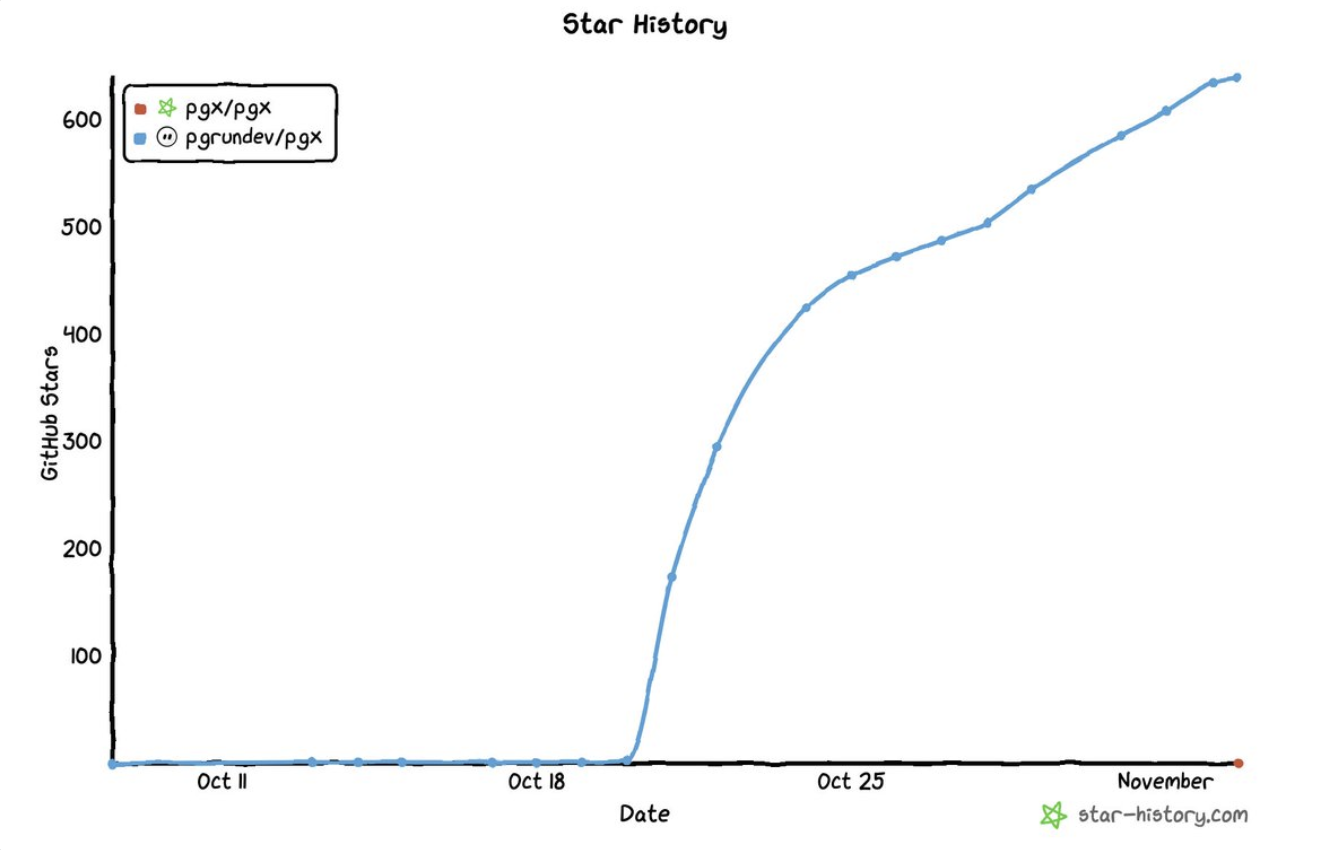

 PGX — это среда выполнения баз данных на Rust для недолговечных баз PostgreSQL: песочниц для агентов, баз для CI и для каждого PR, тестовых и превью-окружений. Один процесс PGX одновременно держит тысячи изолированных баз данных.