
toast
toast is a beautiful developer environment right in your terminal. vim, nvim, and emacs have you build your editor from scratch, while toast ships with managed LSPs, an integrated file tree, multiple file tabs, and themes out of the box. toast is for the developer who wants to stay in their terminal without spending hours getting it up to snuff.
⚠️ This project is in early development, you may encounter bugs. ⚠️
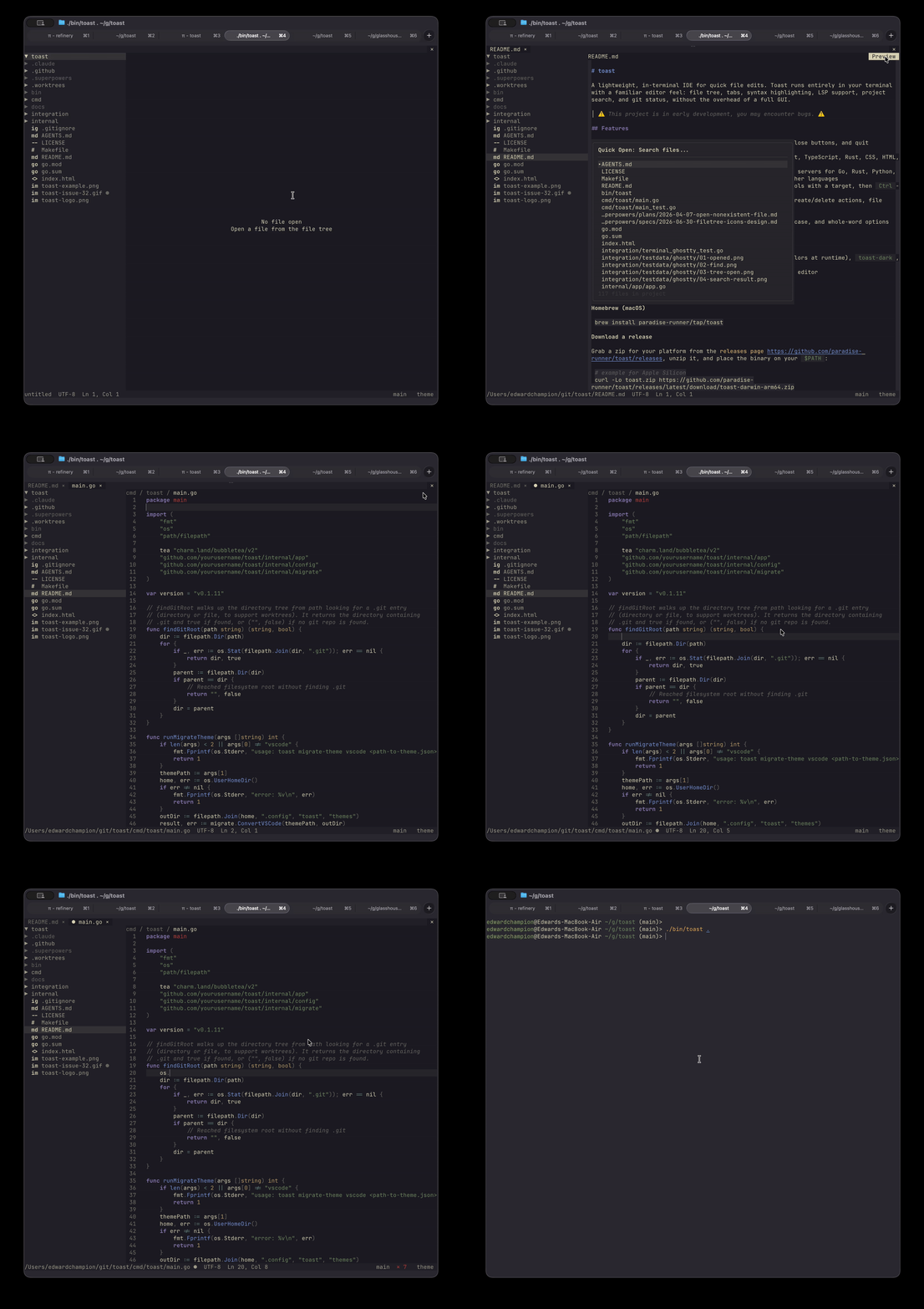
Quick Install
brew install paradise-runner/tap/toast
Features
| Editor |
No AI features |
No telemetry |
Built-in file tree |
Mouse support |
| toast |
✅ |
✅ |
✅ |
✅ |
| vim |
✅ |
✅ |
❌ |
❌ |
| emacs |
✅ |
✅ |
❌ |
❌ |
| vscode |
❌ |
❌ |
✅ |
✅ |
| zed |
❌ |
❌ |
✅ |
✅ |
- Multi-tab editing with unsaved-changes indicators, mouse-close buttons, and quit confirmation
- Syntax highlighting via tree-sitter (Go, Python, JavaScript, TypeScript, Rust, CSS, HTML, YAML, Bash, Markdown)
- Managed language servers — Toast offers to install missing servers for Go, Rust, Python, JavaScript, TypeScript, and Markdown (harper), with an extensible config for other languages
- Spell checking — misspelled words in Markdown and plain-text files are underlined in the theme's diagnostic color via harper
- Go to definition — hold
Ctrl and hover to underline symbols with a target, then Ctrl-click to jump to the exact definition
- File tree sidebar with git status, ignored-file dimming, create/delete actions, file watching, and draggable resizing
- Project-wide search powered by
rg (ripgrep)
- In-file find/replace with next/previous navigation, match-case, and whole-word options
- Command palette —
Ctrl+Shift+P fuzzy search over every action, with keybinding hints, live toggle state, MRU ordering, and a status-bar confirmation flash
- Markdown preview for
.md, .markdown, and .mdx files
- Theme system — built-in
system (derived from terminal colors at runtime), toast-dark, and toast-light, plus a VSCode theme importer
- Auto-save — dirty files are written to disk after a configurable inactivity delay (default 300 ms), with an optional manual-save mode
- Configurable via
~/.config/toast/config.json
Installation
Homebrew (macOS)
brew install paradise-runner/tap/toast
Download a release
Grab a zip for your platform from the releases page, unzip it, and place the binary on your $PATH:
# example for Apple Silicon
curl -Lo toast.zip https://github.com/paradise-runner/toast/releases/latest/download/toast-darwin-arm64.zip
unzip toast.zip
install -m755 toast-darwin-arm64 /usr/local/bin/toast
Standalone macOS app
⚠️ Experimental: this bundles toast inside a libghostty terminal window
and has more bugs than the terminal version. The TUI — Homebrew or the
release binary above — is the primary, best-tested way to run toast.
Prefer a native app over the terminal? Each release also ships Toast.app —
a complete desktop app with its own terminal window (libghostty), native menu
bar, and dock icon. No terminal, Homebrew, or Go required.
- Grab the zip for your Mac from the releases page:
toast-app-darwin-arm64.zip for Apple Silicon (M1/M2/M3/M4), toast-app-darwin-amd64.zip for Intel.
- Unzip it and drag Toast.app into your
Applications folder.
curl -LO https://github.com/paradise-runner/toast/releases/latest/download/toast-app-darwin-arm64.zip
unzip toast-app-darwin-arm64.zip
mv Toast.app /Applications/
First launch: the app is not code-signed or notarized yet, so macOS
Gatekeeper will block a plain double-click. Right-click Toast.app in
Finder and choose Open, then Open again — it launches fine from then
on. Or clear the quarantine flag once:
xattr -dr com.apple.quarantine /Applications/Toast.app
open -a Toast ~/src/foo.go
open -a Toast ~/src/myproject
Build from source
Requires Go 1.25.2+.
git clone https://github.com/paradise-runner/toast
cd toast
make build
# binary written to bin/toast
Usage
toast               # open current directory
toast path/to/dir   # open a specific directory
toast path/to/file  # open a file (auto-detects git root)
toast new/file.go   # open a new file buffer if the parent directory exists
toast --help
toast --version
Keybindings
All keybindings can be remapped in ~/.config/toast/config.json (see Configuration).
| Key |
Action |
Ctrl+Q |
Quit |
Ctrl+S / Cmd+S |
Save |
Ctrl+W / Cmd+W |
Close tab |
Ctrl+P |
Quick-open file search (fuzzy) |
Ctrl+Shift+P / Cmd+Shift+P |
Command palette |
Ctrl+Alt+Right |
Next tab |
Ctrl+Alt+Left |
Previous tab |
Ctrl+B |
Toggle sidebar |
Ctrl+Shift+E |
Toggle focus between editor and file tree |
Ctrl+Shift+F |
Search |
Ctrl+F / Cmd+F |
Find and replace in the current file |
Ctrl+G / Cmd+L |
Go to line |
Ctrl+Shift+M |
Toggle Markdown preview |
Ctrl+Z / Cmd+Z |
Undo |
Ctrl+Y / Ctrl+Shift+Z / Cmd+Y / Cmd+Shift+Z |
Redo |
Ctrl+Space / Cmd+Space |
Trigger completion |
Ctrl+Shift+K |
Show hover |
Ctrl+hover / Ctrl-click |
Check for and follow a definition |
F12 |
Go to the definition at the cursor |
Configuration
Toast reads ~/.config/toast/config.json on startup. Missing keys fall back to defaults.
{
  "theme": "toast-dark",
  "editor": {
    "tab_width": 4,
    "auto_indent": true,
    "trim_trailing_whitespace_on_save": true,
    "insert_final_newline_on_save": true,
    "auto_save": "auto",
    "auto_save_delay_ms": 300,
    "bottom_padding": 3
  },
  "sidebar": {
    "visible": true,
    "width": 30,
    "confirm_delete": true,
    "file_icons": {
      "enabled": true,
      "color_mode": "accent"
    }
  },
  "ignored_patterns": [".git", "node_modules", "__pycache__", ".DS_Store"]
}
auto_save selects the save mode: "auto" (default) writes dirty buffers to
disk after auto_save_delay_ms milliseconds of inactivity, while "manual"
requires an explicit save (ctrl+s / super+s).
Keybindings
All default keybindings can be overridden with the keybindings object. Each action accepts a list of key strings (supports ctrl, alt, shift, super modifiers). An empty list unbinds the action.
{
  "keybindings": {
    "save": ["ctrl+s"],
    "quick_open": ["ctrl+o"],
    "next_tab": ["ctrl+tab"],
    "prev_tab": ["ctrl+shift+tab"],
    "quit": []
  }
}
Available actions: quit, toggle_sidebar, save, new_file, close_tab, undo, redo, next_tab, prev_tab, search, find_replace, quick_open, command_palette, theme_picker, go_to_line, go_to_definition, toggle_focus, markdown_preview, show_hover, trigger_completion.
Omit lsp to use Toast's managed defaults for Go, Rust, Python, JavaScript, TypeScript, and Markdown; set "lsp": {} to disable all language servers.
{
  "lsp": {
    "zig": {
      "command": "zls",
      "args": [],
      "extensions": [".zig"]
    }
  }
}
Themes
Built-in themes: system, toast-dark, toast-light. Custom themes live in ~/.config/toast/themes/.
Import a VSCode theme:
toast migrate-theme vscode path/to/theme.json
# writes ~/.config/toast/themes/<theme-name>.json
Then set "theme": "<theme-name>" in your config.
Feedback & Issues
Found a bug or have a feature request? We'd love to hear from you! Please open an issue on GitHub with as much detail as possible. Your feedback helps make Toast better.
Development
make build             # compile
make run               # go run ./cmd/toast .
make test              # go test ./...
make test-integration  # run opt-in Ghostty/tmux terminal integration tests
make test-integration-update  # refresh golden screenshots

 Toast 是一个用 Go 编写、开箱即用的终端 IDE:自带语言服务器管理、集成的文件树、多文件标签页和主题,装好就能用。