
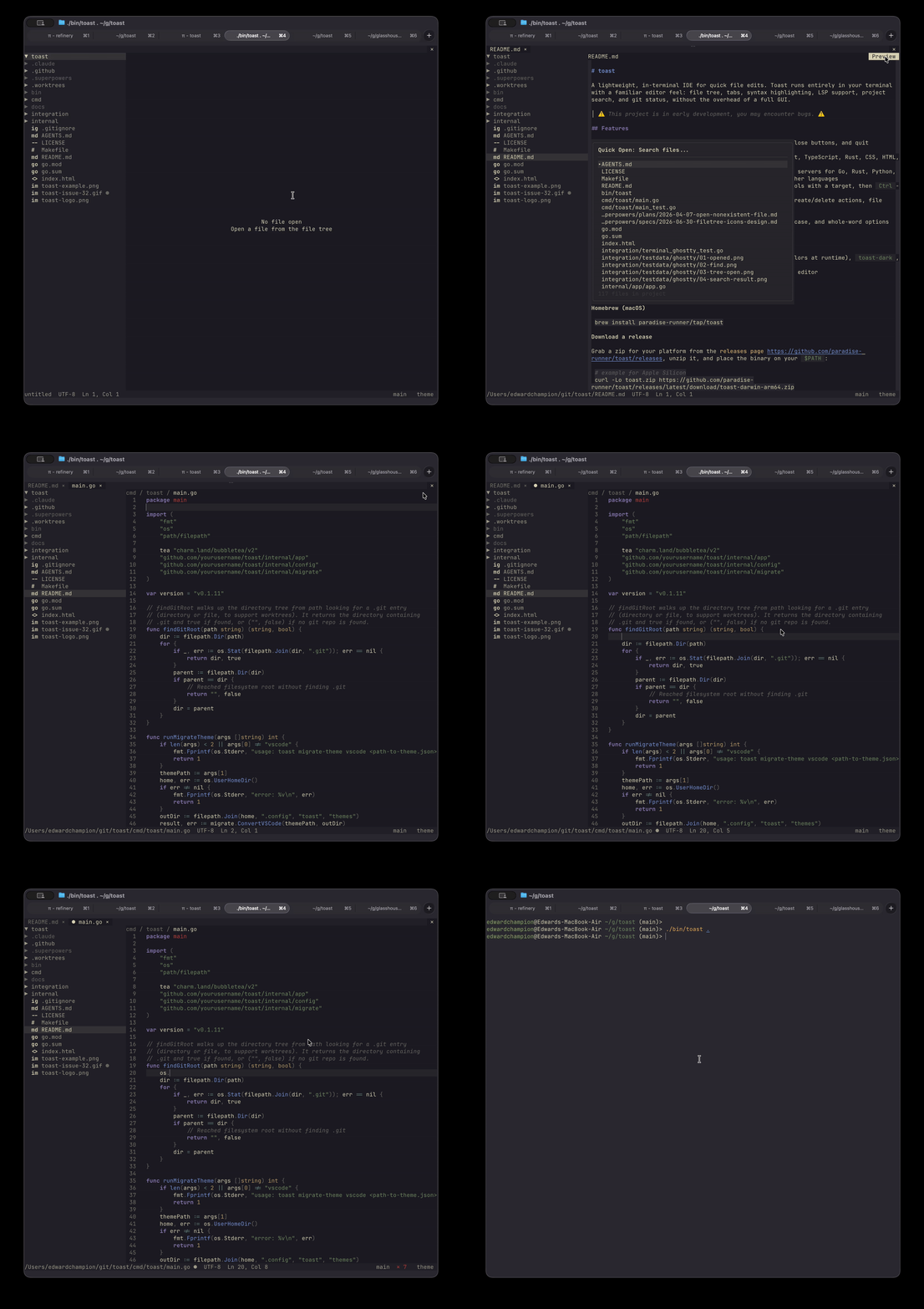
Что это такое?
 Toast — это IDE «всё в одном», которая работает прямо в терминале и написана на Go: из коробки есть управление серверами языков, встроенное дерево файлов, несколько вкладок с файлами и темы оформления.
Toast — это IDE «всё в одном», которая работает прямо в терминале и написана на Go: из коробки есть управление серверами языков, встроенное дерево файлов, несколько вкладок с файлами и темы оформления.Чем это отличается от обычного vim или emacs?В отличие от vim, nvim или emacs, где редактор собирается вручную через конфиги, Toast — это один бинарник, который работает сразу, и он рассчитан на разработчиков, которые не хотят тратить часы на настройку перед написанием кода.
В отличие от vim, nvim или emacs, где редактор собирается вручную через конфиги, Toast — это один бинарник, который работает сразу, и он рассчитан на разработчиков, которые не хотят тратить часы на настройку перед написанием кода.Как его запустить?На macOS установите через Homebrew, либо скачайте zip-архив для своей платформы со страницы релизов, распакуйте его и положите бинарник в директорию из $PATH. Сборка из исходников требует Go 1.25.2+.
На macOS установите через Homebrew, либо скачайте zip-архив для своей платформы со страницы релизов, распакуйте его и положите бинарник в директорию из $PATH. Сборка из исходников требует Go 1.25.2+.Мне нужно самому предварительно ставить серверы языков или ripgrep?Настраивать LSP вручную не нужно: Toast сам предлагает доустановить недостающие серверы для Go, Rust, Python, JavaScript, TypeScript и Markdown, а для других языков есть расширяемый конфиг. Поиск по всему проекту работает на ripgrep.
Настраивать LSP вручную не нужно: Toast сам предлагает доустановить недостающие серверы для Go, Rust, Python, JavaScript, TypeScript и Markdown, а для других языков есть расширяемый конфиг. Поиск по всему проекту работает на ripgrep.Он достаточно стабилен для повседневной работы?Стоит ожидать багов — проект ещё на ранней стадии разработки. Терминальная версия — основной и лучше всего протестированный способ запуска Toast; встроенное приложение для macOS экспериментальное и работает с бо́льшим количеством багов.
Стоит ожидать багов — проект ещё на ранней стадии разработки. Терминальная версия — основной и лучше всего протестированный способ запуска Toast; встроенное приложение для macOS экспериментальное и работает с бо́льшим количеством багов.Он запустится на Linux и Windows или только на macOS?Терминальная версия кроссплатформенная — релизы поставляются отдельным zip-архивом для каждой платформы. На macOS дополнительно доступны Homebrew и отдельное приложение Toast.app, которое собирается отдельно для Apple Silicon и Intel.
Терминальная версия кроссплатформенная — релизы поставляются отдельным zip-архивом для каждой платформы. На macOS дополнительно доступны Homebrew и отдельное приложение Toast.app, которое собирается отдельно для Apple Silicon и Intel.Там есть функции с ИИ или телеметрия, которая отправляет данные наружу?Ни того, ни другого — в сравнительной таблице README у Toast стоят галочки «Нет ИИ-функций» и «Нет телеметрии», в отличие от vscode и zed.
Ни того, ни другого — в сравнительной таблице README у Toast стоят галочки «Нет ИИ-функций» и «Нет телеметрии», в отличие от vscode и zed.Для каких языков есть подсветка синтаксиса и умные подсказки от сервера языков?Подсветка синтаксиса на Tree-sitter охватывает Go, Python, JavaScript, TypeScript, Rust, CSS, HTML, YAML, Bash и Markdown. Управляемые серверы языков (устанавливаются по запросу) покрывают Go, Rust, Python, JavaScript, TypeScript и Markdown через harper, а другие языки можно добавить через конфиг.
Подсветка синтаксиса на Tree-sitter охватывает Go, Python, JavaScript, TypeScript, Rust, CSS, HTML, YAML, Bash и Markdown. Управляемые серверы языков (устанавливаются по запросу) покрывают Go, Rust, Python, JavaScript, TypeScript и Markdown через harper, а другие языки можно добавить через конфиг.Я не хочу жить в терминале — есть настольное приложение?Да: в релизах для macOS идёт Toast.app, который запускает toast внутри собственного окна терминала libghostty с нативной строкой меню и иконкой в доке — терминал, Homebrew и Go не нужны. Приложение пока не подписано кодовой подписью, поэтому при первом запуске нужно открыть его через правый клик и «Открыть» в Finder или снять флаг карантина с помощью xattr.
Да: в релизах для macOS идёт Toast.app, который запускает toast внутри собственного окна терминала libghostty с нативной строкой меню и иконкой в доке — терминал, Homebrew и Go не нужны. Приложение пока не подписано кодовой подписью, поэтому при первом запуске нужно открыть его через правый клик и «Открыть» в Finder или снять флаг карантина с помощью xattr.Насколько это можно настраивать — горячие клавиши, темы, автосохранение?Довольно сильно, и всё через ~/.config/toast/config.json: любую горячую клавишу по умолчанию можно переопределить, автосохранение переключается между автоматическим режимом (по умолчанию запись через 300 мс бездействия) и ручным сохранением, а среди тем есть system, toast-dark и toast-light, плюс импортёр тем из VSCode и поддержка собственных файлов тем.
Довольно сильно, и всё через ~/.config/toast/config.json: любую горячую клавишу по умолчанию можно переопределить, автосохранение переключается между автоматическим режимом (по умолчанию запись через 300 мс бездействия) и ручным сохранением, а среди тем есть system, toast-dark и toast-light, плюс импортёр тем из VSCode и поддержка собственных файлов тем.Как ориентироваться в кодовой базе в Toast?Ctrl+P открывает файлы с нечётким поиском, Ctrl+Shift+F запускает поиск по всему проекту через ripgrep, а Ctrl+F делает поиск и замену внутри файла с опциями учёта регистра и поиска по целым словам. Для навигации зажмите Ctrl и наведите курсор на символ, чтобы он подчеркнулся, затем Ctrl+клик (или F12) — и вы перейдёте к его определению.
Ctrl+P открывает файлы с нечётким поиском, Ctrl+Shift+F запускает поиск по всему проекту через ripgrep, а Ctrl+F делает поиск и замену внутри файла с опциями учёта регистра и поиска по целым словам. Для навигации зажмите Ctrl и наведите курсор на символ, чтобы он подчеркнулся, затем Ctrl+клик (или F12) — и вы перейдёте к его определению.What are similar projects?gitlogue, telescope.nvim, helix, micro, NvChad, awesome-neovim, atom, monaco-editor
gitlogue, telescope.nvim, helix, micro, NvChad, awesome-neovim, atom, monaco-editorWhich topics is it in?terminal-app, terminal-ui, fuzzy-search, autocomplete, tree-sitter, code-editor, lsp, text-editor, syntax-highlighting, themes, ide, homebrew
terminal-app, terminal-ui, fuzzy-search, autocomplete, tree-sitter, code-editor, lsp, text-editor, syntax-highlighting, themes, ide, homebrew