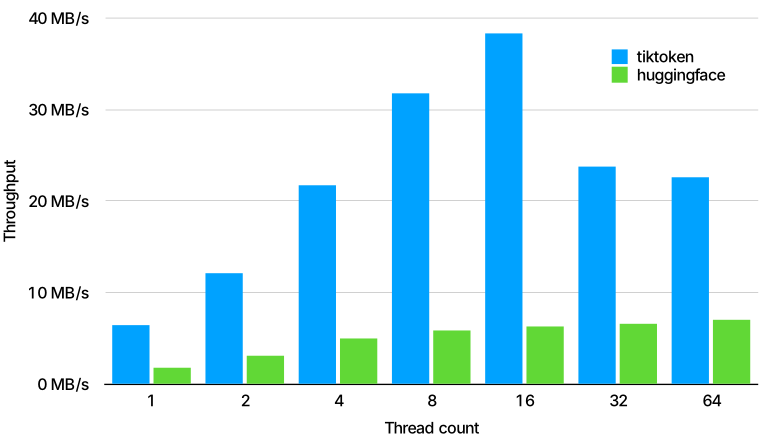
What is this?
 tiktoken is a fast byte pair encoding (BPE) tokenizer built for use with OpenAI's models, converting text into tokens and back again.
tiktoken is a fast byte pair encoding (BPE) tokenizer built for use with OpenAI's models, converting text into tokens and back again.Is this a standalone app or a Python library?It is a Python library you import into your code (with a performance-critical core), not a standalone application.
It is a Python library you import into your code (with a performance-critical core), not a standalone application.How do I install and use it?Install the open source version from PyPI, then use the API documented in tiktoken/core.py; example usage is shown in the OpenAI Cookbook.
Install the open source version from PyPI, then use the API documented in tiktoken/core.py; example usage is shown in the OpenAI Cookbook.Any pitfalls when adding custom encodings?If you extend tiktoken with custom encodings via the tiktokenext plugin mechanism, you must omit the tiktokenext/__init__.py file and cannot use an editable install.
If you extend tiktoken with custom encodings via the tiktokenext plugin mechanism, you must omit the tiktokenext/__init__.py file and cannot use an editable install.What is BPE and why does it matter for language models?Byte pair encoding (BPE) converts text into tokens in a way that is reversible, lossless, works on any text, compresses it (about 4 bytes per token on average), and lets models see common subwords so they generalize better.
Byte pair encoding (BPE) converts text into tokens in a way that is reversible, lossless, works on any text, compresses it (about 4 bytes per token on average), and lets models see common subwords so they generalize better.Can I add my own custom tokenizer encodings?Yes, you can either build your own Encoding object directly, or register it through the tiktokenext namespace package plugin mechanism so tiktoken.get_encoding can find it.
Yes, you can either build your own Encoding object directly, or register it through the tiktokenext namespace package plugin mechanism so tiktoken.get_encoding can find it.Does tiktoken include tools to learn how BPE works?Yes, it ships an educational submodule aimed at people who want to understand BPE internals, including code to visualize the encoding procedure.
Yes, it ships an educational submodule aimed at people who want to understand BPE internals, including code to visualize the encoding procedure.What are similar projects?gigatoken, spaCy, minbpe, nltk, minGPT, airllm, llama3-from-scratch, sentencepiece
gigatoken, spaCy, minbpe, nltk, minGPT, airllm, llama3-from-scratch, sentencepieceWhich topics is it in?encoding, tokenization, text-processing, python-library, large-language-models, nlp, artificial-intelligence, openai, performance, rust, machine-learning, api
encoding, tokenization, text-processing, python-library, large-language-models, nlp, artificial-intelligence, openai, performance, rust, machine-learning, api