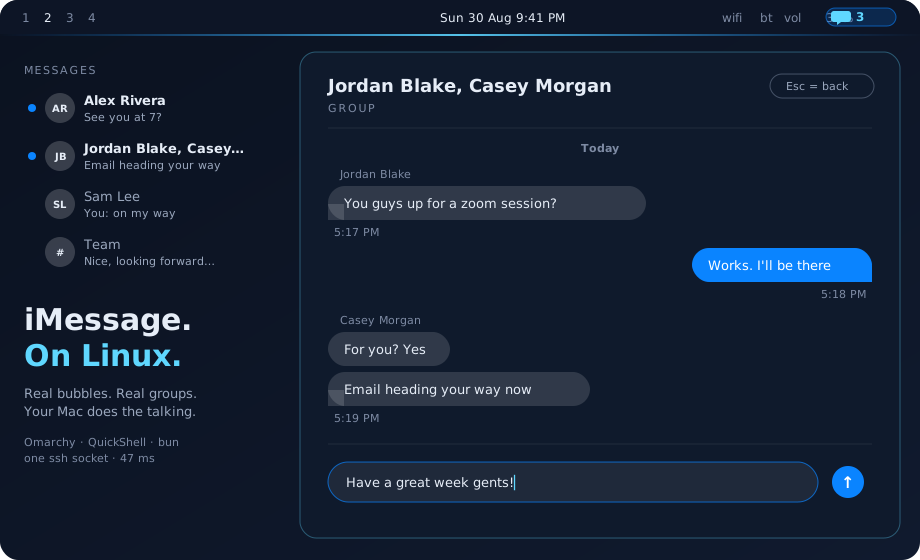
Blip
iMessage. On Linux. For real.
Read, send, group chats, blue dots, desktop toasts — from an Omarchy bar widget.
Your Mac does the talking. Your Linux box does the living.






⚠️ You need a Mac. That is the whole trick.
Blip does not reimplement iMessage. Apple's protocol only runs on Apple
hardware, so Blip uses a Mac you already own — any Mac signed into your
Apple ID, awake and reachable over SSH — as the gateway. The Linux side is a
thin client. No Mac, no Blip. When the Mac sleeps, Blip dims and waits.
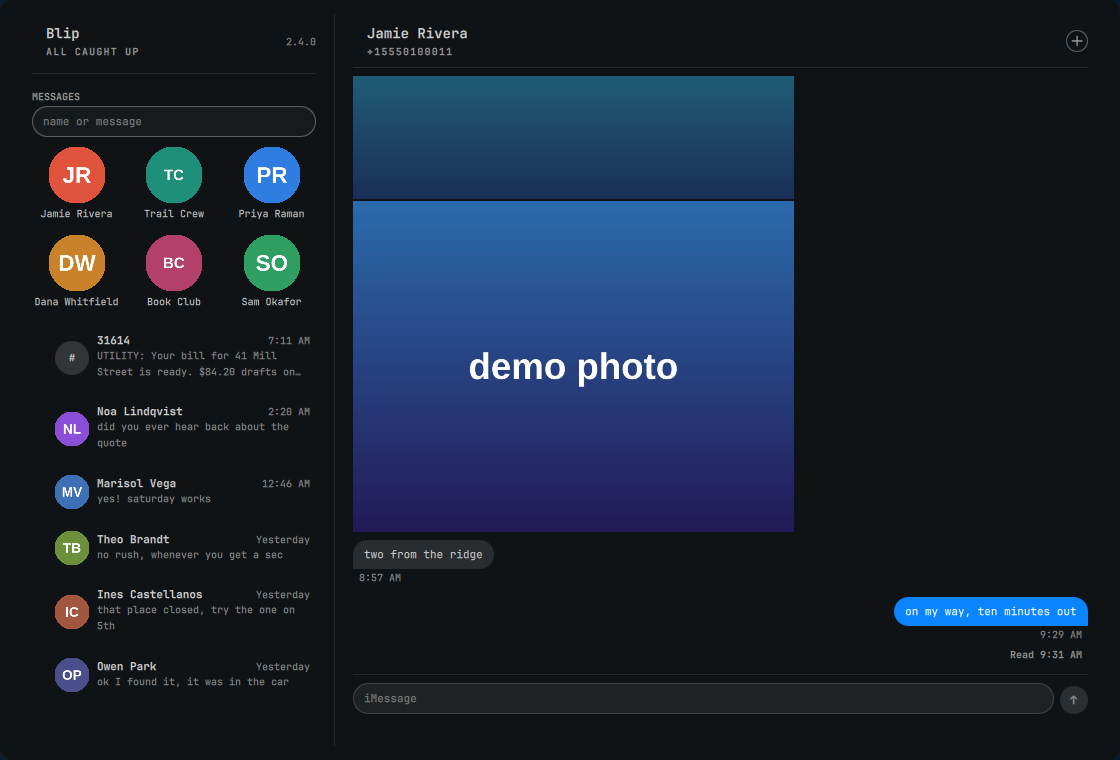
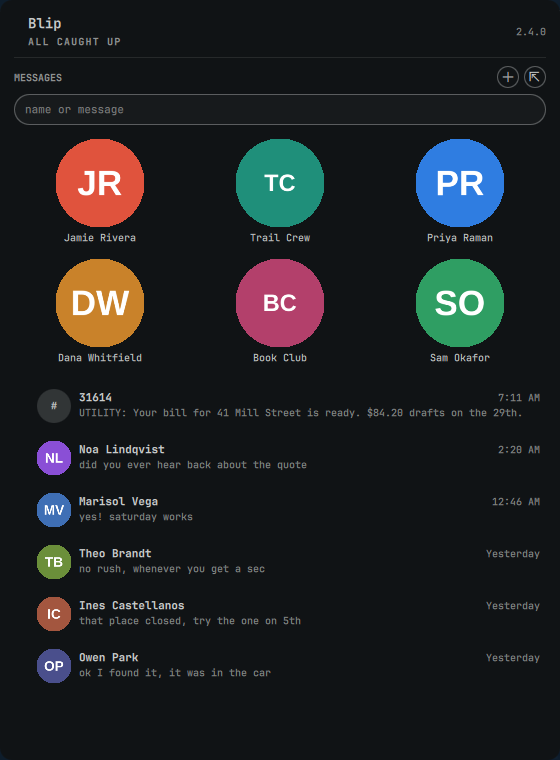
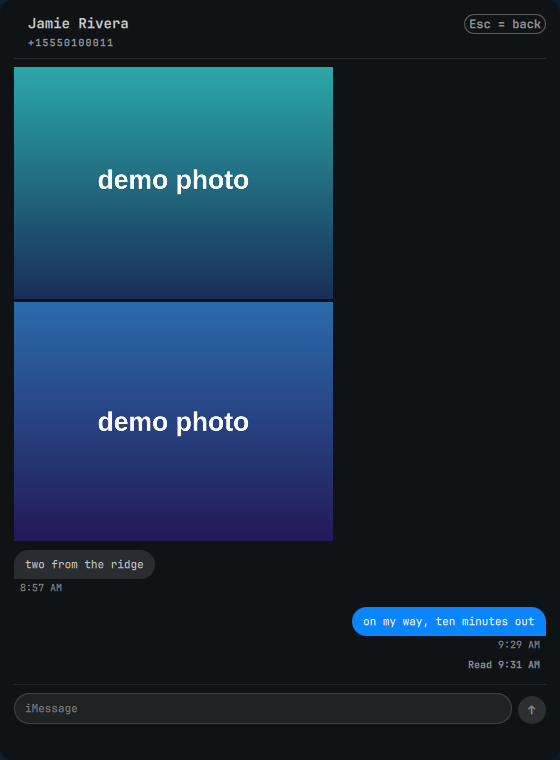
Every screenshot is the real client rendered against invented people —
scripts/demo/blip-shots points the shipping code at a fake bridge, so
nothing here is anyone's conversation. Numbers are in the 555-0100 range
reserved for fiction. The link card is a real fetch of a real public page.
Blip 2.3
Blip went public on 2026-08-31 and has moved fast since, much of it from
people who showed up with pull requests. What is in it now:
- The app. A Messages-style window — sidebar of every conversation, the
open thread, compose — next to the bar popout.
SUPER+M, the ⇱ button in
the panel header, double-click the bar icon, or qs ipc … app. Remembers
size and whether it was open across shell restarts.
- Pinned conversations, mirrored from Messages on the Mac, in the same
order, as avatar tiles above the list. Read-only: Blip never re-pins.
- The font Messages uses. Omarchy renders everything in monospace, and that
one thing is most of what makes a screenshot read as not Messages. Blip
picks the first of SF Pro (Apple's own, what Messages ships with),
Inter (open licence,
pacman -S inter-font), then your theme font — so
nothing changes for anyone who has installed neither. blip-setup offers to
install Inter; ui_font=theme in bridge.conf opts out. ui_font_size=14
(9–24) is bubble text in pixels so Blip can be larger than the rest of the
shell.
Blip ships no fonts. SF Pro is Apple's and its licence forbids
redistribution, so it is never carried in this repo — if you want the exact
Messages face, get it from Apple.
See Fonts.
- Contact photos from the Mac's Contacts, and group photos — a group
wears its own picture, never whichever member happened to speak last.
- Link cards for every URL. Messages decorates some links and leaves most
bare; for the bare ones Blip fetches the page and builds the card from its
Open Graph tags. Right-click any link for a share sheet: open, copy, a QR
code your phone can scan, or send it to another device with LocalSend.
- Real-time push — messages land in ~2 s via a watcher on the Mac.
- Attachments both ways — photos inline and upright (EXIF orientation is
baked in, so they are not sideways in your viewer either), files as chips,
send by Ctrl+V / drag-and-drop /
/attach, with captions.
- SMS and RCS send on their own service instead of failing as iMessage,
and short-code senders (banks, utilities, 2FA) open like any other thread.
- Search conversations by name, then messages; new conversation from a
contact search; reply from a toast; failed-delivery flags.
- One source. The Mac-side tools ship in this repo;
blip-setup installs
everything including a dedicated ssh key the Mac confines to the five
bridge tools.
- Audited. A full security + privacy audit, every finding fixed or
documented — docs/SECURITY.md, docs/PRIVACY.md.
Message text never touches argv or disk on either machine.
Full history: CHANGELOG.md.
Why this exists
iMessage is macOS-only. Everyone who lives on Linux and owns an iPhone knows the
dance: pick up the phone, unlock it, type on glass, put it down, lose the
thread. BlueBubbles wants SIP off. AirMessage wants a server and a prayer.
Blip does something simpler. The Mac you already own is the gateway. It
holds chat.db and it can drive Messages.app with AppleScript. Everything else
is one multiplexed SSH socket and a bar widget that looks like it belongs.
No SIP disabled. No daemon on the Mac. No private API. No message cache on the
Linux side. If the Mac is asleep, the widget dims and says so.
What you get
|
In the bar
- unread count across every thread
- dims with a slashed glyph when the Mac is unreachable
- left-click panel · double-click opens the app window · middle-click refresh · right-click mark all read
Thread list
- contact photo (from the Mac's Contacts), a group's own photo from Messages when it has one, or initials · name, preview, time
- pinned conversations mirrored from Messages on the Mac, kept in the same order at the top (read-only)
- blue dot that stays until you open that conversation — iMessage semantics, not "I glanced at the list"
- groups titled the way Messages.app titles them: the group's name, else its members
|
Conversation
- real bubbles — yours blue on the right, theirs grey on the left
- grouped into runs with one timestamp per run, day dividers, squared "tail" corner
- sender names above each run in a group
- tapbacks — ❤️👍😂 pills on the bubble corner, custom emoji included
- "Read 4:42 PM" under the last message of yours they've read. Reading in Blip does not send a receipt; mark all read asks the Mac to mark everything read, and then your Messages read-receipt setting applies (
push_read=off in bridge.conf keeps the Mac out of it)
- inline replies quoted above the bubble · Edited tags · "unsent a message" tombstones
- link cards — URL messages show the preview image, title, and host, like Messages. Apple only decorates some links; for the rest Blip fetches the page's own Open Graph card itself, so a bare URL still gets its picture. Click opens the link, right-click opens the share sheet (open · copy · QR for your phone · send to a device via LocalSend, Omarchy's share).
link_previews=off in bridge.conf disables the fetching
- iMessage-app cards read as text — Ask to Buy, Fitness sharing, Find My: the sentence Messages shows for them, instead of a replacement character
- photos render inline — images ≤5MB auto-fetch over SSH (HEIC converted on the Mac); click opens full-size. PDFs/videos are chips — click fetches and opens them
- send files — Ctrl+V an image into the compose box, type
/attach <path>, or drag-and-drop; a caption rides along
- select text and Ctrl+C · right-click a bubble to copy it whole · right-click a link in a bubble for the share sheet
- the share sheet opens itself for a link you send, and for one that arrives while Blip is open
- compose box at the bottom, Enter sends — DMs and groups
Toasts
- desktop notification only for senders on your allowlist
- everything else still counts and still shows; it just doesn't interrupt you
Toast actions
- click a toast and the panel opens ON that conversation with the compose
box focused (the Omarchy daemon renders no action buttons, so click IS
the reply path)
Hotkey for the panel
omarchy-shell shell toggle nixfred.blip opens and closes the panel the way
Omarchy's own panels do, so a stock binding in ~/.config/hypr/bindings.lua
is all it takes — o.bind("SUPER + CTRL + M", "Blip", "omarchy-shell shell toggle nixfred.blip").
(The bar finds a widget's panel through open(), close() and an opened
property; without the last one every panel hotkey silently skips the plugin.)
Omarchy's SUPER+CTRL+<n> (panel n in the bar's right section) reaches
it too. On a multi-monitor bar the panel lives on the first screen's copy.
The app
- double-click the bar icon, press
SUPER+M, or IPC app for a
Messages-style window (IPC window is a plain toggle). For the keybind, add
this to ~/.config/hypr/bindings.lua — it asks Hyprland where the
window is (front → close, elsewhere → focus, none → create) instead of
the plugin, because after an Omarchy plugin update the plugin's IPC can
answer from a stale instance until the shell restarts:o.bind("SUPER + M", "Blip messages", [[sh -c '
blip() { hyprctl clients -j | jq -r ".[] | select(.title | startswith(\"Blip\")) | .address" | head -1; }
a=$(blip)
if [ -z "$a" ]; then
qs -p /usr/share/omarchy/shell ipc call nixfred.blip app >/dev/null
for i in 1 2 3 4 5 6 7 8 9 10 11 12; do a=$(blip); [ -n "$a" ] && break; sleep 0.15; done
[ -n "$a" ] && hyprctl dispatch "hl.dsp.focus({ window = \"address:$a\" })"
elif [ "$(hyprctl activewindow -j | jq -r .address)" = "$a" ]; then
hyprctl dispatch "hl.dsp.window.close({ window = \"address:$a\" })"
else
hyprctl dispatch "hl.dsp.focus({ window = \"address:$a\" })"
fi']])
sidebar of every conversation + the open thread + compose, tiled by
Hyprland like any app, sharing the bar widget's live data; the title
carries the unread count (Blip (3))
Real-time
- a push watcher on the Mac pings when chat.db changes — messages land in
~2 s, the open conversation refreshes itself, and the poll drops to a
60 s safety net (
status shows watch=true)
|
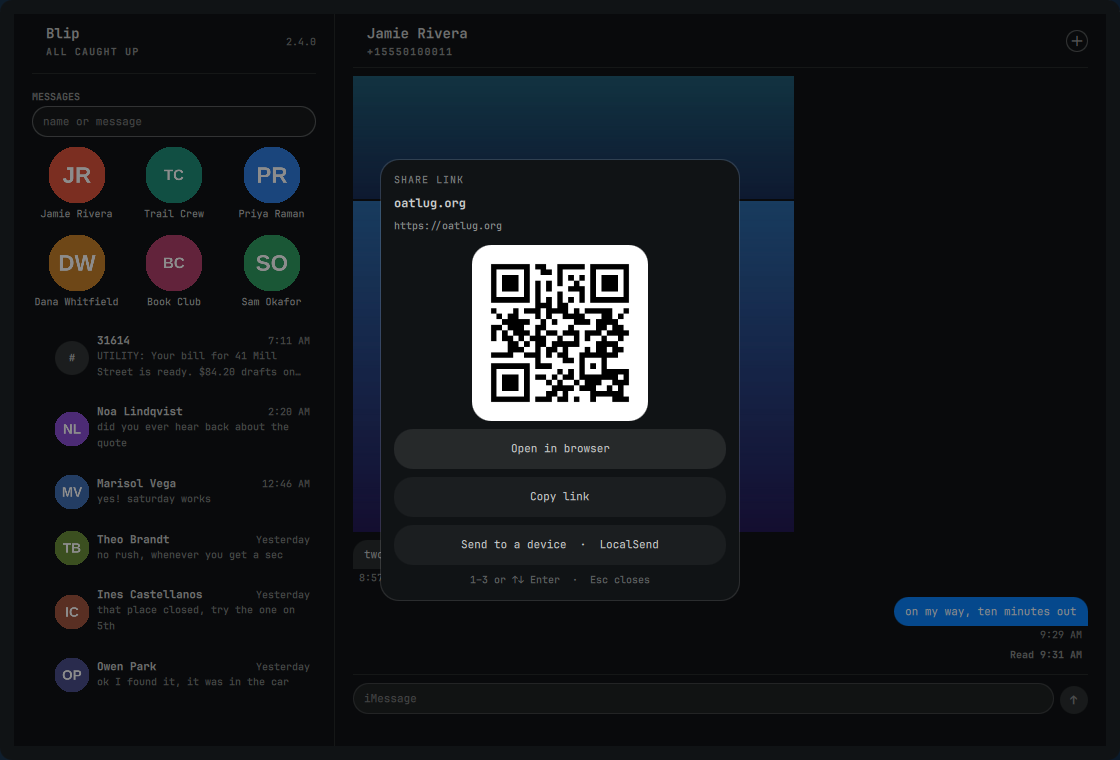
Right-click any link — or just send or receive one — and the share sheet comes up on it.
Privacy
No server, no telemetry, no accounts. Everything between the two machines
travels inside ssh — message text, attachment bytes, the push ping — on a
dedicated key the Mac confines to Blip's bridge tools — and, over Tailscale,
to this machine's address; nothing is ever sent in the clear. The full
inventory of what touches disk on both machines is in
docs/PRIVACY.md — short
version: message text never lands on disk; only attachments in conversations
you open are cached (inline images ≤ 5 MB and link previews fetch when the
thread does). The threat model and the findings of the 2026-08-31 security audit
are in docs/SECURITY.md.
How it works
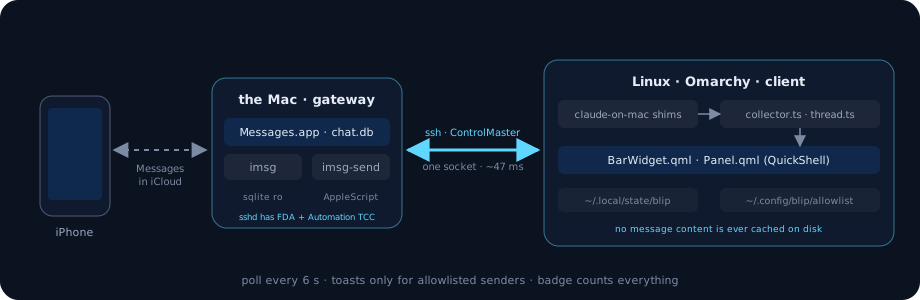
Linux                                         Mac
─────                                         ───
BarWidget.qml  ── push/poll ──▶ collector.ts ──▶ ssh ──▶ imsg --json recent 150+
                                                          (sqlite, read-only)
BlipView.qml   ── open thread ─▶ thread.ts   ──▶ ssh ──▶ imsg --json thread <id> 80
BlipView.qml   ── Enter ─────(body on stdin)──▶ ssh ──▶ imsg-send --to <id> --yes --text-stdin
                                                          imsg-send --chat-id "any;+;<guid>" …
                                                          (AppleScript → Messages.app)
The trick that makes it possible: sshd on macOS inherits both Full Disk
Access and Automation consent. cron gets neither. So a plain SSH session can
read chat.db and tell Messages.app to send, where every scheduled approach
dies at a TCC prompt nobody is there to click.
With ControlMaster in ~/.ssh/config, a round trip is ~47 ms warm. Fast
enough to poll, fast enough that the panel feels local.
Install
Blip is one source: the Mac-side tools ride along in bridge/mac/
(vendored from claude-on-mac,
pinned in bridge/BRIDGE-VERSION), and blip-setup wires everything.
Fonts
Blip renders in the first of these it finds, so it is optional either way:
blip-setup offers to install Inter if you have neither. ui_font=theme in
bridge.conf always uses the Omarchy family. ui_font_size=14 (9–24) sets
bubble text in pixels so Blip can be larger than the rest of the shell;
unset, it follows Omarchy's type size.
Blip ships no fonts. SF Pro is Apple's and its licence forbids
redistribution, so it is not carried in this repo — note that even the AUR
package fetches it from Apple rather than mirroring it.
Requirements
- A Mac on macOS 13 Ventura or newer (the Recently-Deleted table Blip
filters on arrived there; Sequoia is what it is developed on), signed into
Messages with your Apple ID, reachable from the Linux box over SSH with
key auth — Tailscale recommended. Messages in iCloud on, so its
chat.db
mirrors your phone. Xcode Command Line Tools installed (xcode-select --install) — python3 on a fresh Mac is a stub until then.
- A "Mac mini in a closet" works after the one-time grants: the two
permission prompts and the first Automation approval need a screen (or
Screen Sharing) once. After that it must stay in a logged-in desktop
session with Messages able to run — enable auto-login, keep FileVault
from prompting at boot (or accept a trip to the keyboard after every
macOS update), and disable sleep (see Keeping the Mac awake).
A Mac parked at the login window can
read
chat.db but cannot send.
- Linux: Omarchy (Hyprland + the Omarchy shell), and on
the box:
bun, jq, openssh, libnotify, wl-clipboard, xdg-utils.
blip-setup checks for each and prints the pacman line for what's missing.
Honest note on dependencies. Blip is not a drop-in marketplace plugin
the way a clock widget is: it needs bun on the Linux side, a Mac you own
with two manual permission grants, and an ssh key between them. The
plugin files install like any other; the bridge is what blip-setup
exists for. Budget ten minutes and a trip to the Mac's System Settings.
If you are a human: budget ten minutes, keep the Mac's screen reachable
for two permission prompts, and use your own number for the first test
message. Nothing below sends anything until you press Enter in a
conversation.
If you are an AI agent installing this for someone: run exactly the
commands below, in order, and stop at step 3 until the human confirms the
two grants on the Mac. Never send a test message to anyone but the user's
own number. Do not edit ~/.ssh/config beyond what blip-setup writes.
Verify with blip-check, not by reading chat.db yourself. Before
changing code, read AGENTS.md and CLAUDE.md.
1. Install the plugin (Omarchy's plugin manager clones it into
~/.config/omarchy/plugins/nixfred.blip and adds the bar widget)
omarchy plugin add https://github.com/nixfred/blip.git --enable
(Manual alternative: git clone https://github.com/nixfred/blip ~/.config/omarchy/plugins/nixfred.blip, then step 4.)
2. Run the wizard (idempotent — re-run any time; it prints the
pacman line for any missing Linux dependency and stops)
~/.config/omarchy/plugins/nixfred.blip/scripts/blip-setup you@your-mac
It writes ~/.config/blip/bridge.conf, adds an ssh ControlMaster block
(polling costs 50 ms instead of a handshake), installs the bridge shim as
`/bin/imsg, /bin/imsg-send, /bin/contacts, copies the Mac tools to /.blip/binon the Mac and runsinstall.sh there, generates a **dedicated ssh key** (/.ssh/blip_ed25519) that the Mac confines to the bridge tools and nothing else, then smoke-tests the bridge without printing any message content. Over Tailscale the key is also pinned to this machine's addresses (from=), so a copy of the key file is useless from anywhere else; over a LAN, where an address can change, it is not pinned — [docs/SECURITY.md](docs/SECURITY.md) shows the one-line manual pin. Re-run blip-setup` if the machine's Tailscale address ever changes.
3. Two grants on the Mac (macOS won't let a script do these — the
wizard pauses here and re-checks when you press Enter)
- Full Disk Access → System Settings → Privacy & Security → Full Disk
Access → add
/usr/libexec/sshd-keygen-wrapper (⌘⇧G in the file picker).
That is what lets an ssh session read chat.db.
- Automation → Messages → the first send from ssh pops an Allow prompt on
the Mac's screen; click it once — within about two minutes, at the Mac.
An unanswered prompt is recorded by macOS as a denial (
auth_reason 9,
"Prompt Timeout"), and on macOS 26 the switch under System Settings →
Privacy & Security → Automation → sshd-keygen-wrapper → Messages may then
refuse to turn on: you enter the password and it drops back off (#36).
Recovery, SIP intact, no database edits: on the Mac run
tccutil reset AppleEvents — Apple's own tool; it clears every app's
Automation grants (each simply asks again next time), because a
path-identified client like sshd-keygen-wrapper cannot be reset on its own —
then re-run blip-setup and sit at the Mac's screen for the prompt.
ssh your-mac 'python3 "$HOME/.blip/bin/blip-check"' shows ✅/❌ per grant at any
time, with the fix for each ❌. It does not test the optional read-push grant
unless you add --markread, because that probe pops an Automation prompt of its
own and you should only be asked for a permission you actually want.
4. Bar widget. omarchy plugin add --enable already placed it. If you
cloned by hand: omarchy plugin enable nixfred.blip --section right, or add
{ "id": "nixfred.blip" } to bar.layout.right in
~/.config/omarchy/shell.json. Then omarchy-restart-shell — the speech
bubble is in your bar.
Clock and dates. Out of the box the time follows your locale — 9:08 PM
or 21:08 — and dates read the way Messages writes them: Aug 28, or
Aug 28, 2025 for another year. To change either, put Qt format strings on
the same entry, exactl

 Blip brings iMessage to Linux by using a Mac you already own as the gateway: the Mac holds chat.db and drives Messages.app over SSH, while a thin client on an Omarchy/Hyprland desktop shows a bar widget and app window for reading, sending, group chats, and blue dots.