


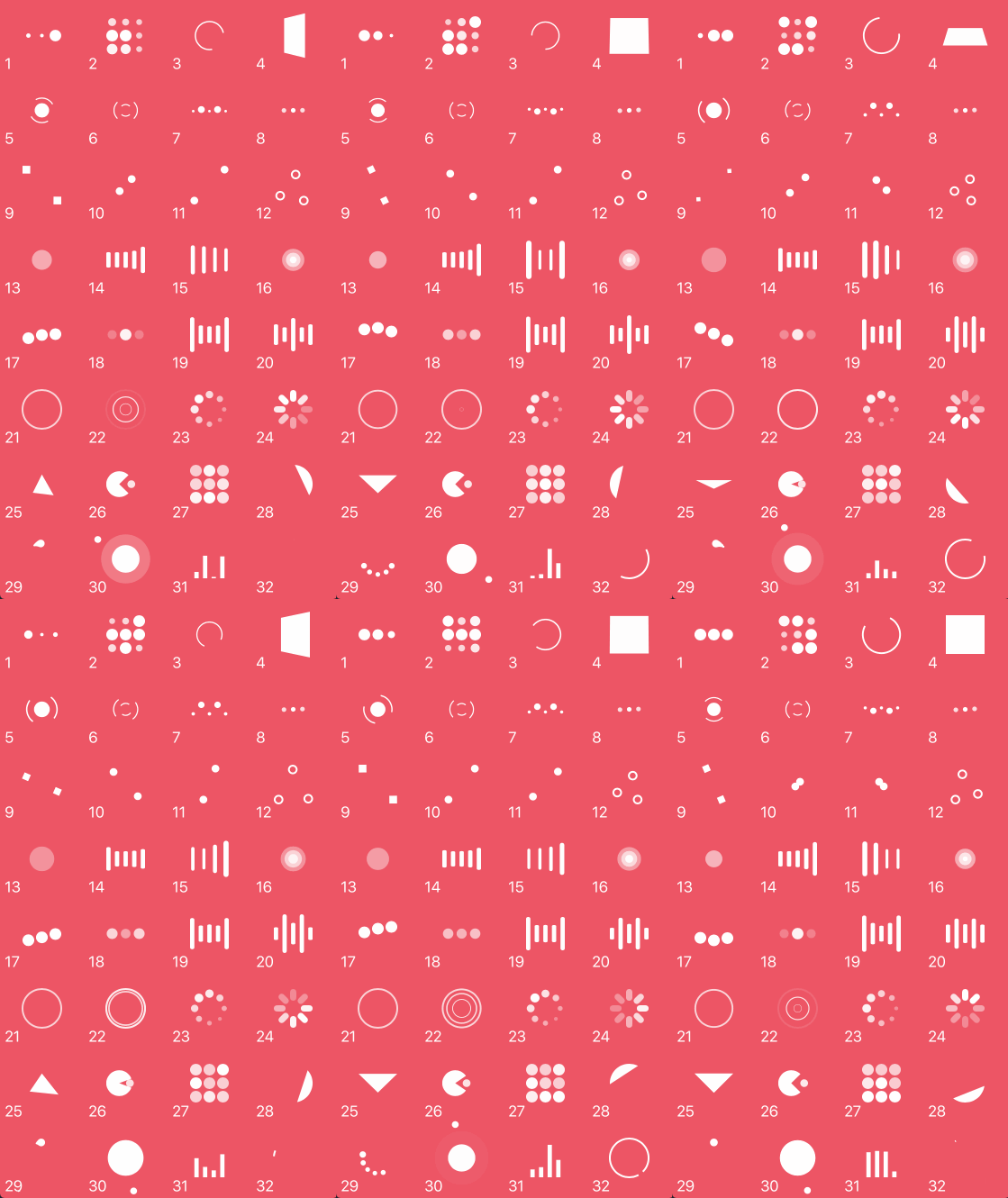
这是什么?
 NVActivityIndicatorView 是一套为 iOS 应用准备的 30 多种现成加载动画,以即插即用的 UIView 子类形式实现。
NVActivityIndicatorView 是一套为 iOS 应用准备的 30 多种现成加载动画,以即插即用的 UIView 子类形式实现。它是 UIKit 视图还是 SwiftUI 组件?它是基于 UIKit 的组件:一个自定义的 UIView 子类,可以拖进故事板使用,也可以在代码中创建。如果需要 SwiftUI 版本,作者推荐另一个名为 LoaderUI 的项目。
它是基于 UIKit 的组件:一个自定义的 UIView 子类,可以拖进故事板使用,也可以在代码中创建。如果需要 SwiftUI 版本,作者推荐另一个名为 LoaderUI 的项目。我该如何把它添加到项目中?通过 CocoaPods、Carthage 或 Swift Package Manager 安装,分别在 Podfile、Cartfile 或 Package.swift 依赖中添加它,然后在代码中导入 NVActivityIndicatorView。
通过 CocoaPods、Carthage 或 Swift Package Manager 安装,分别在 Podfile、Cartfile 或 Package.swift 依赖中添加它,然后在代码中导入 NVActivityIndicatorView。使用前还需要先安装其他工具或库吗?除了你选择的包管理器(CocoaPods、Carthage 或 SPM)用来拉取 Swift 框架之外,不需要其他外部运行时依赖。
除了你选择的包管理器(CocoaPods、Carthage 或 SPM)用来拉取 Swift 框架之外,不需要其他外部运行时依赖。升级版本或在 Interface Builder 中使用时有什么需要注意的坑吗?5.0.0 版本引入了不兼容的改动,升级前请先查看发布说明。通过故事板使用时,必须把视图的 Module 设置为 NVActivityIndicatorView,否则无法正常渲染。
5.0.0 版本引入了不兼容的改动,升级前请先查看发布说明。通过故事板使用时,必须把视图的 Module 设置为 NVActivityIndicatorView,否则无法正常渲染。设置好之后,我该如何启动和停止动画?调用 startAnimating() 开始动画,调用 stopAnimating() 结束动画,还可以通过 isAnimating 查询其状态;任何属性更改都必须在调用 startAnimating() 之前完成。
调用 startAnimating() 开始动画,调用 stopAnimating() 结束动画,还可以通过 isAnimating 查询其状态;任何属性更改都必须在调用 startAnimating() 之前完成。包含多少种动画样式?共 32 种不同的类型,例如 ballPulse、squareSpin、pacman、orbit 和 circleStrokeSpin,均可通过名称选择。
共 32 种不同的类型,例如 ballPulse、squareSpin、pacman、orbit 和 circleStrokeSpin,均可通过名称选择。我能否在 Interface Builder 中自定义动画的外观?可以,所有属性(颜色、类型名称、线宽等)都可以在 Attributes 检查器中设置,其中 Type Name 需与预定义的动画类型值之一相匹配(不区分大小写)。
可以,所有属性(颜色、类型名称、线宽等)都可以在 Attributes 检查器中设置,其中 Type Name 需与预定义的动画类型值之一相匹配(不区分大小写)。为什么不自己写一个加载动画,而要用它?它内置了几十种精心制作的现成加载动画(灵感来自 Loaders.css 和 DGActivityIndicatorView),你无需从零设计和制作自己的加载指示器。
它内置了几十种精心制作的现成加载动画(灵感来自 Loaders.css 和 DGActivityIndicatorView),你无需从零设计和制作自己的加载指示器。What are similar projects?Hero, Eureka, SkeletonView, Spring, SwifterSwift, lottie-ios, SDWebImage, FSCalendar
Hero, Eureka, SkeletonView, Spring, SwifterSwift, lottie-ios, SDWebImage, FSCalendarWhich topics is it in?ios-swift, ios-animation, swift-library, carthage, uikit, cocoapods, component-library, swift, animation, ios, cross-platform, mit
ios-swift, ios-animation, swift-library, carthage, uikit, cocoapods, component-library, swift, animation, ios, cross-platform, mit