


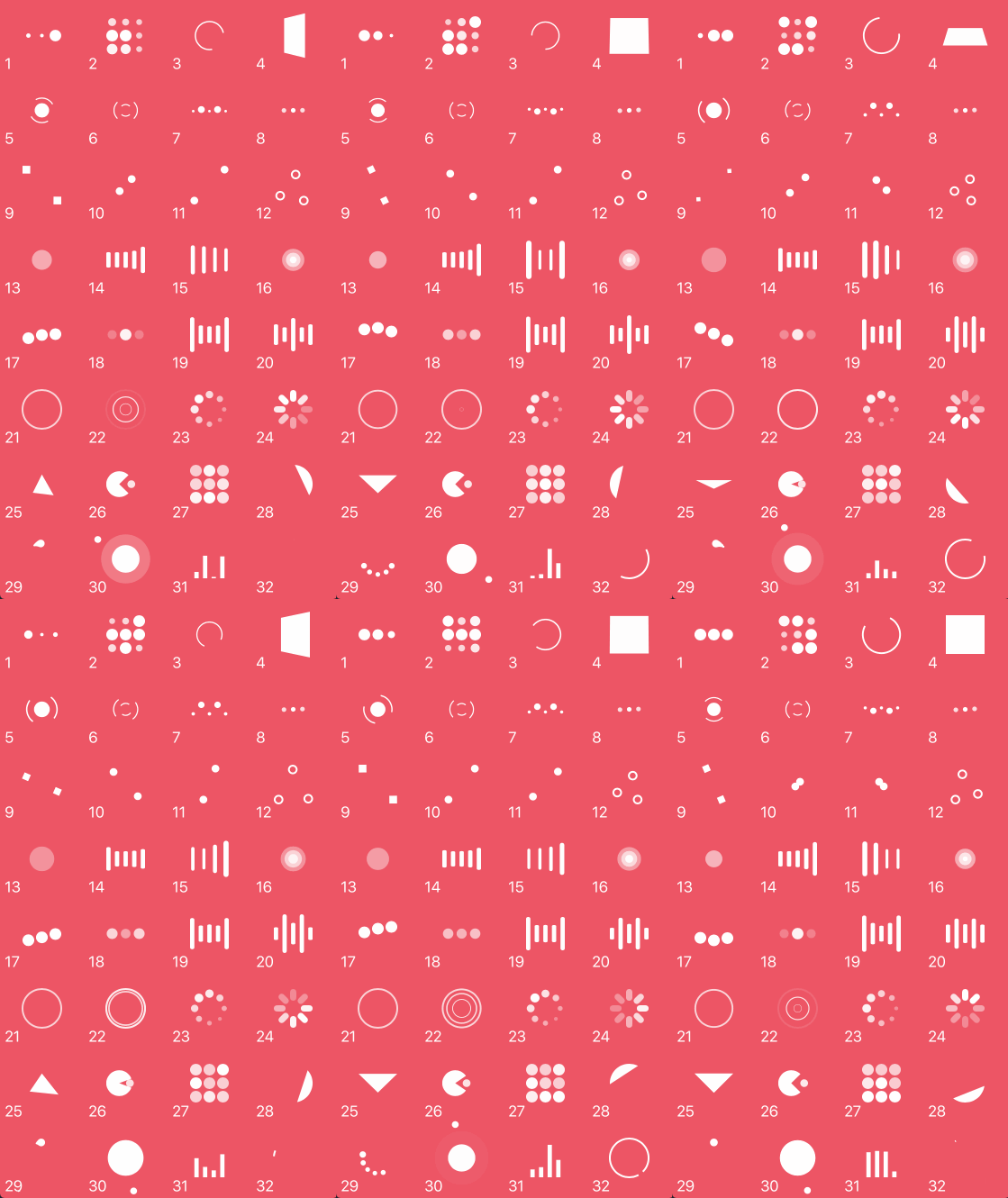
What is this?
 NVActivityIndicatorView is a collection of over 30 ready-made loading animations for iOS apps, implemented as a drop-in UIView subclass.
NVActivityIndicatorView is a collection of over 30 ready-made loading animations for iOS apps, implemented as a drop-in UIView subclass.Is it a UIKit view or a SwiftUI component?It is a UIKit-based component: a custom UIView subclass you drop into storyboards or create in code. For SwiftUI, the author points to a separate project called LoaderUI.
It is a UIKit-based component: a custom UIView subclass you drop into storyboards or create in code. For SwiftUI, the author points to a separate project called LoaderUI.How do I add it to my project?Install via CocoaPods, Carthage, or the Swift Package Manager by adding it to your Podfile, Cartfile, or Package.swift dependencies respectively, then import NVActivityIndicatorView in your code.
Install via CocoaPods, Carthage, or the Swift Package Manager by adding it to your Podfile, Cartfile, or Package.swift dependencies respectively, then import NVActivityIndicatorView in your code.Do I need any extra tools or libraries first?No external runtime dependencies beyond the package manager you choose (CocoaPods, Carthage, or SPM) to pull in the Swift framework.
No external runtime dependencies beyond the package manager you choose (CocoaPods, Carthage, or SPM) to pull in the Swift framework.Any pitfalls when upgrading or using it in Interface Builder?Version 5.0.0 introduced breaking changes, so check the release notes before upgrading. When used via storyboard, you must set the view's Module to NVActivityIndicatorView or it won't render correctly.
Version 5.0.0 introduced breaking changes, so check the release notes before upgrading. When used via storyboard, you must set the view's Module to NVActivityIndicatorView or it won't render correctly.How do I start and stop an animation once it's set up?You call startAnimating() to begin and stopAnimating() to end, and can check isAnimating to query its state; any property changes must be made before calling startAnimating().
You call startAnimating() to begin and stopAnimating() to end, and can check isAnimating to query its state; any property changes must be made before calling startAnimating().How many animation styles are included?32 distinct types, such as ballPulse, squareSpin, pacman, orbit, and circleStrokeSpin, each selectable by name.
32 distinct types, such as ballPulse, squareSpin, pacman, orbit, and circleStrokeSpin, each selectable by name.Can I customize an animation's appearance in Interface Builder?Yes, all properties (color, type name, line width, etc.) can be set in the Attributes inspector tab, with the Type Name matching one of the predefined animation type values (case-insensitive).
Yes, all properties (color, type name, line width, etc.) can be set in the Attributes inspector tab, with the Type Name matching one of the predefined animation type values (case-insensitive).Why would I use this instead of writing my own spinner?It bundles dozens of polished, pre-built loading animations (inspired by Loaders.css and DGActivityIndicatorView) so you don't have to design and animate your own loading indicator from scratch.
It bundles dozens of polished, pre-built loading animations (inspired by Loaders.css and DGActivityIndicatorView) so you don't have to design and animate your own loading indicator from scratch.What are similar projects?Hero, Eureka, SkeletonView, Spring, SwifterSwift, lottie-ios, SDWebImage, FSCalendar
Hero, Eureka, SkeletonView, Spring, SwifterSwift, lottie-ios, SDWebImage, FSCalendarWhich topics is it in?ios-swift, ios-animation, swift-library, carthage, uikit, cocoapods, component-library, swift, animation, ios, cross-platform, mit
ios-swift, ios-animation, swift-library, carthage, uikit, cocoapods, component-library, swift, animation, ios, cross-platform, mit