VidBee is a free, open-source desktop app that turns video and audio into an organized, searchable library. Download media from 1000+ supported sites or import local files. Create transcripts on your computer with speaker labels and timestamped playback, then summarize, translate, or ask questions with the AI provider and prompts you choose. Download queues, RSS subscriptions, flexible exports, and metadata controls keep the whole workflow in one place.
👋🏻 Getting Started
VidBee is currently under active development, and feedback is welcome for any issue encountered.
📥 Download VidBee | 📚 Documentation
[!IMPORTANT]
Star Us, You will receive all release notifications from GitHub without any delay ~
If VidBee is useful to you, sharing it is one of the best ways to support the project.
[!IMPORTANT]
When you post about VidBee on X or Threads, please mention @nexmoe so I can see it and help amplify it:
✨ Features
📝 Transcribe locally with the model that fits your computer
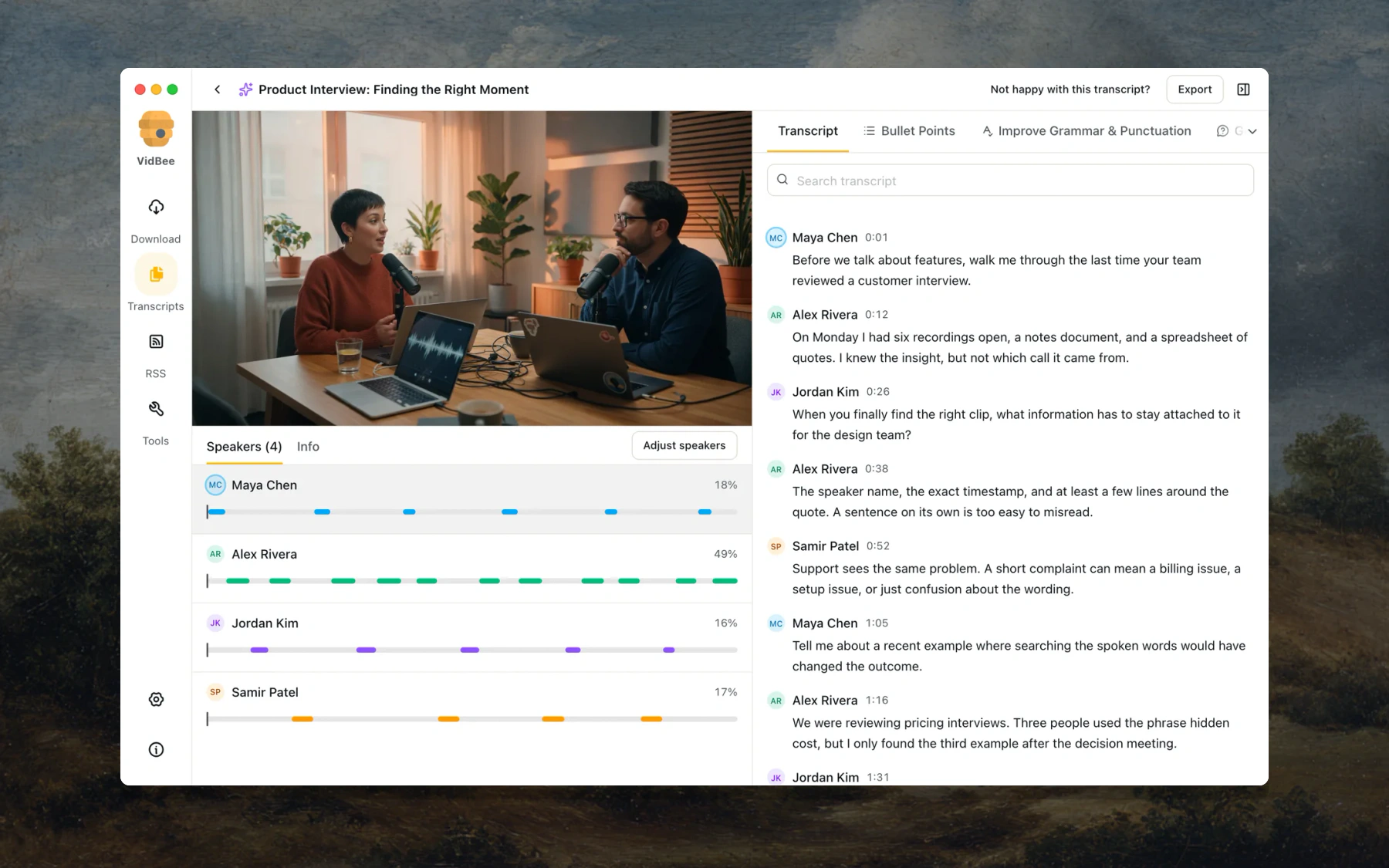
Create a transcript from a finished download, or import a local audio or video file. Speech recognition runs on your computer, so the media does not need to be uploaded to a transcription service.
- Choose from local Whisper, SenseVoice, Parakeet, and Qwen3-ASR model families. VidBee can recommend a model for your computer and language, and you can download or switch models from Settings.
- Start transcription automatically after a download and set how many transcript jobs may run at once.
- Use source captions when available, or run local speech recognition when you need a new transcript.
- Detect speakers automatically, or set a fixed speaker count and re-label the conversation without changing the recognized words.
- Search spoken text or speaker names, click a timestamp, and continue playback from that exact moment.
- Copy the transcript, export plain text or Markdown, or create a new video with selectable or burned-in captions.
[!NOTE]
Local transcription, provider-controlled AI. Speech recognition runs on your computer. When you run an AI prompt, the prompt and transcript content go to the provider you selected. Choose Ollama, LM Studio, or another local endpoint to keep the AI step on your computer too.
🧠 Ask AI with the provider and prompts you choose
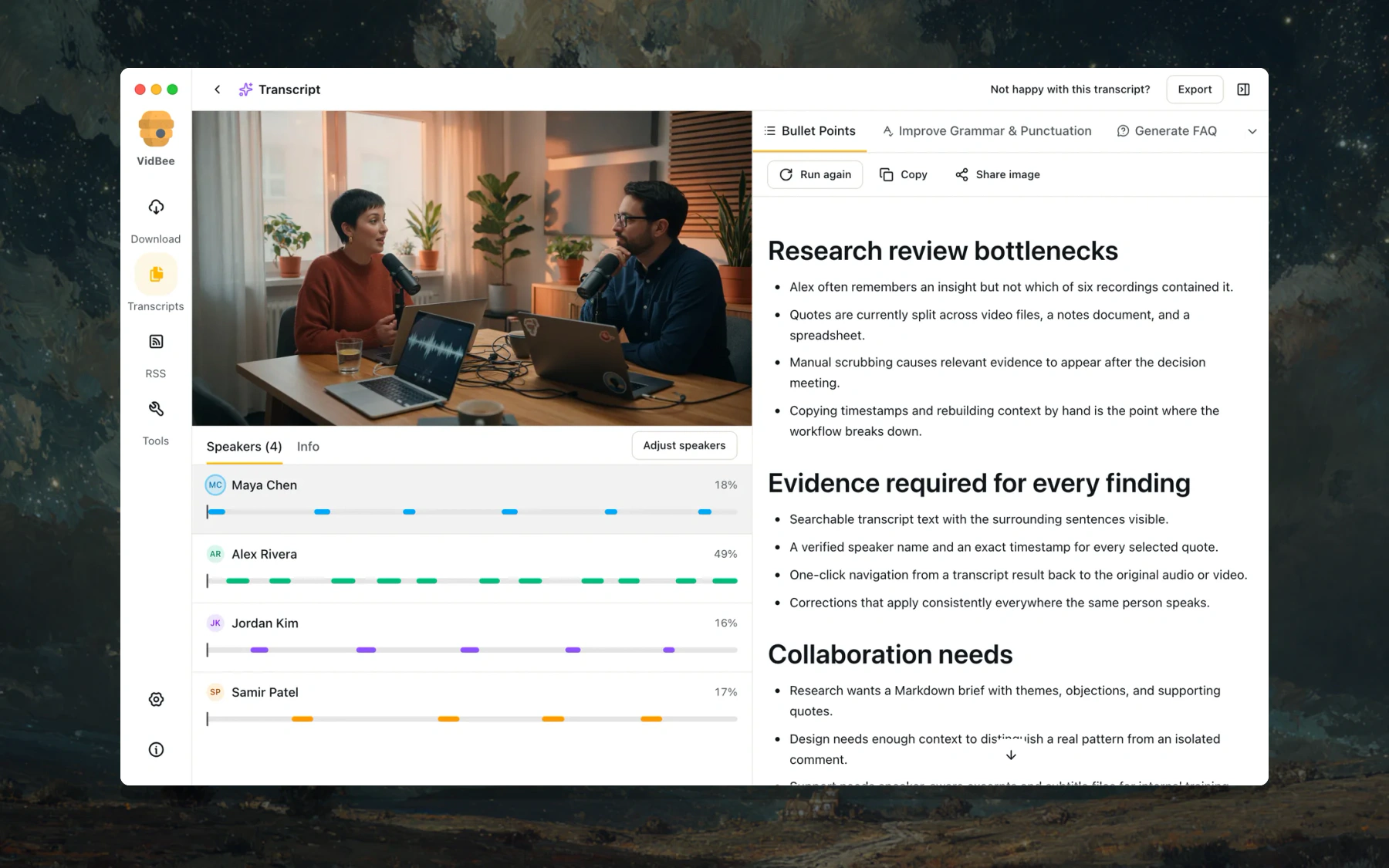
Run AI prompts against the transcript without leaving VidBee. Built-in prompts can create bullet summaries, clean up grammar, generate FAQs, extract statistics, build mind maps, paraphrase text, or translate the transcript.
- Connect OpenAI, Anthropic, Google, DeepSeek, Groq, Azure, Hugging Face, OpenRouter, xAI, Ollama, or LM Studio.
- Add a custom provider with your own name, Base URL, model ID, and API key, then test the connection before using it.
- Create your own prompts with a title, icon, and instructions. Edit the built-in prompts, test them with a sample transcript, or restore the defaults.
- Switch the active provider without changing your prompt library. API keys are stored on your computer.
📥 Download and organize video or audio
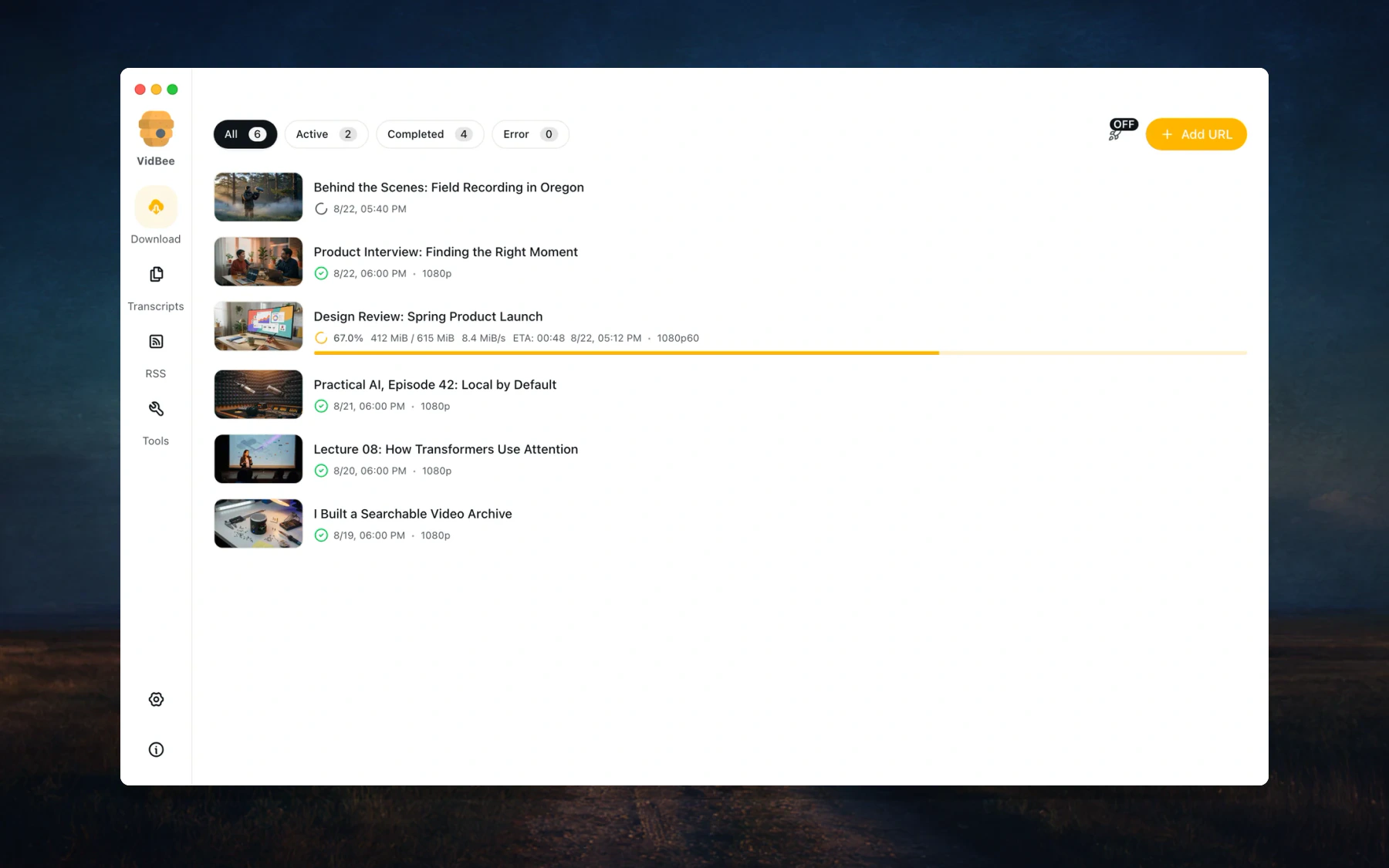
Save video, audio, playlists, and channels from 1000+ supported sites. Paste one link or add a batch, then manage everything from the same desktop queue.
- Track active, completed, and failed downloads in one place.
- See live progress, speed, file size, and the format being saved.
- Pause, resume, retry, or remove tasks without rebuilding the queue.
- Use one-click defaults when you want a fast download, or choose formats for a specific item.
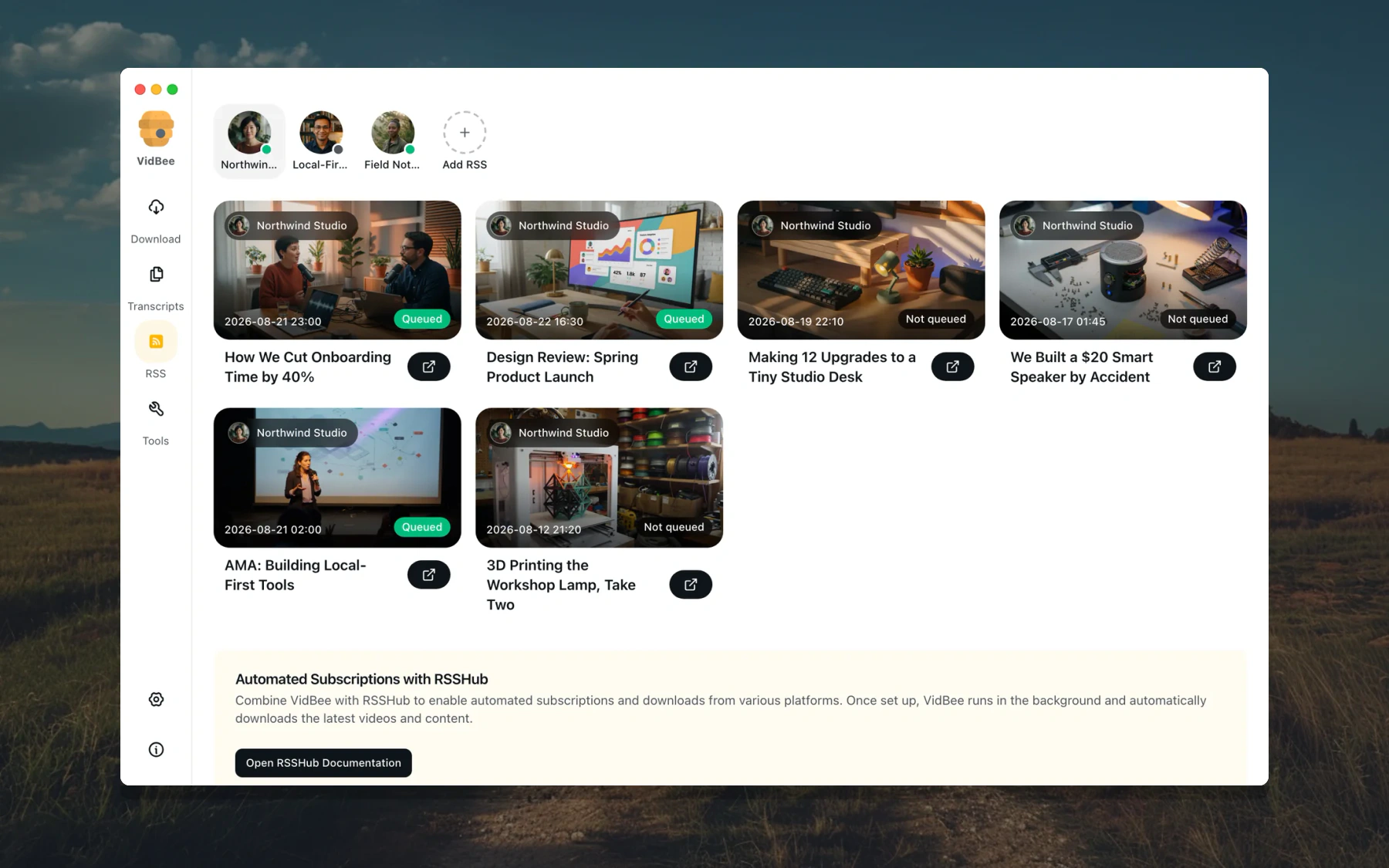
Subscribe to RSS feeds and let VidBee check for new items and add them to your download queue. Each subscription can use its own rules, so regular releases do not need the same manual setup every time.
- Turn automatic downloads on or keep new items ready for manual review.
- Filter feed items by keywords, add automatic tags, and download only the latest item when you do not want the backlog.
- Choose a custom directory and filename template for each subscription.
- See whether each feed item is queued, downloading, completed, failed, or still waiting.
Choose Auto (MP4/MKV), MP4, MKV, WebM, or Original for video downloads, or save audio separately. VidBee also lets you control what is written into the finished file.
- Embed the source title, artist, and other available metadata.
- Add the thumbnail as cover art, keep chapter markers, and include source or automatically generated subtitles when available.
- Choose a filename style, decide whether to use channel subfolders, and set the default download location.
- Keep simple defaults for everyday downloads while using custom filename templates for playlists or RSS subscriptions.
See Formats & Containers for details.
| Working with |
VidBee helps you |
| Interviews |
Separate speakers, find a quote, jump back to its timestamp, and export the transcript. |
| Podcasts |
Create a searchable episode transcript, summarize the discussion, and use RSS to keep new episodes organized. |
| Lectures |
Search for an explanation, translate the transcript, and turn a long recording into structured notes. |
| YouTube and saved videos |
Download from a supported page or import a local file, preserve available captions and metadata, and manage everything in one queue. |
🌐 Supported Sites
VidBee works with 1000+ supported video and audio sites. Browse the current list at vidbee.org/supported-sites.
🧱 Web + API (Docker-ready)
This monorepo now includes:
packages/downloader-core: Shared yt-dlp/ffmpeg download coreapps/api: Fastify API server with oRPC and SSE eventsapps/web: TanStack Start web client using oRPC
Run locally:
pnpm run start:web
This command starts apps/api and apps/web together.
Run with Docker:
docker compose up -d --build
Run with GitHub Container Registry images:
services:
  api:
    image: ghcr.io/nexmoe/vidbee-api:latest
    environment:
      VIDBEE_API_HOST: 0.0.0.0
      VIDBEE_API_PORT: 3100
      VIDBEE_DOWNLOAD_DIR: /data/downloads
      VIDBEE_HISTORY_STORE_PATH: /data/vidbee/vidbee.db
    ports:
      - "3100:3100"
    volumes:
      # Replace the named volume with /path/on/your/NAS:/data/downloads
      # when downloaded files must be directly visible on the host.
      - vidbee-downloads:/data/downloads
      - vidbee-data:/data/vidbee
    restart: unless-stopped

  web:
    image: ghcr.io/nexmoe/vidbee-web:latest
    depends_on:
      - api
    ports:
      - "3000:3000"
    restart: unless-stopped

volumes:
  vidbee-downloads:
  vidbee-data:
Stop services:
docker compose down
Optional env vars (via .env):
VIDBEE_API_PORT=3100
VIDBEE_WEB_PORT=3000
# Optional host or NAS bind mount. The named volume remains the default.
VIDBEE_DOWNLOAD_DIR_HOST=/path/on/your/NAS/downloads
🤝 Contributing
You are welcome to join the open source community to build together. For more details, check out:
📄 License
This project is distributed under the MIT License. See LICENSE for details.
🙏 Thanks
- yt-dlp - The powerful video downloader engine
- FFmpeg - The multimedia framework for video and audio processing
- Electron - Build cross-platform desktop apps
- React - The UI library
- Vite - Next generation frontend tooling
- Tailwind CSS - Utility-first CSS framework
- shadcn/ui - Beautifully designed components







 一款免费开源的桌面应用,可以从 1000 多个网站下载视频和音频,也可以导入本地文件,在你自己的电脑上完成转录,还能用你选择的 AI 服务对内容进行总结、翻译或提问。