


netboot.xyz README

The project's README from github.com/netbootxyz/netboot.xyz. As one markdown file: README.md.

netboot.xyz Tweet

Your favorite operating systems in one place!

Build Status Discord Release GitHub all releases

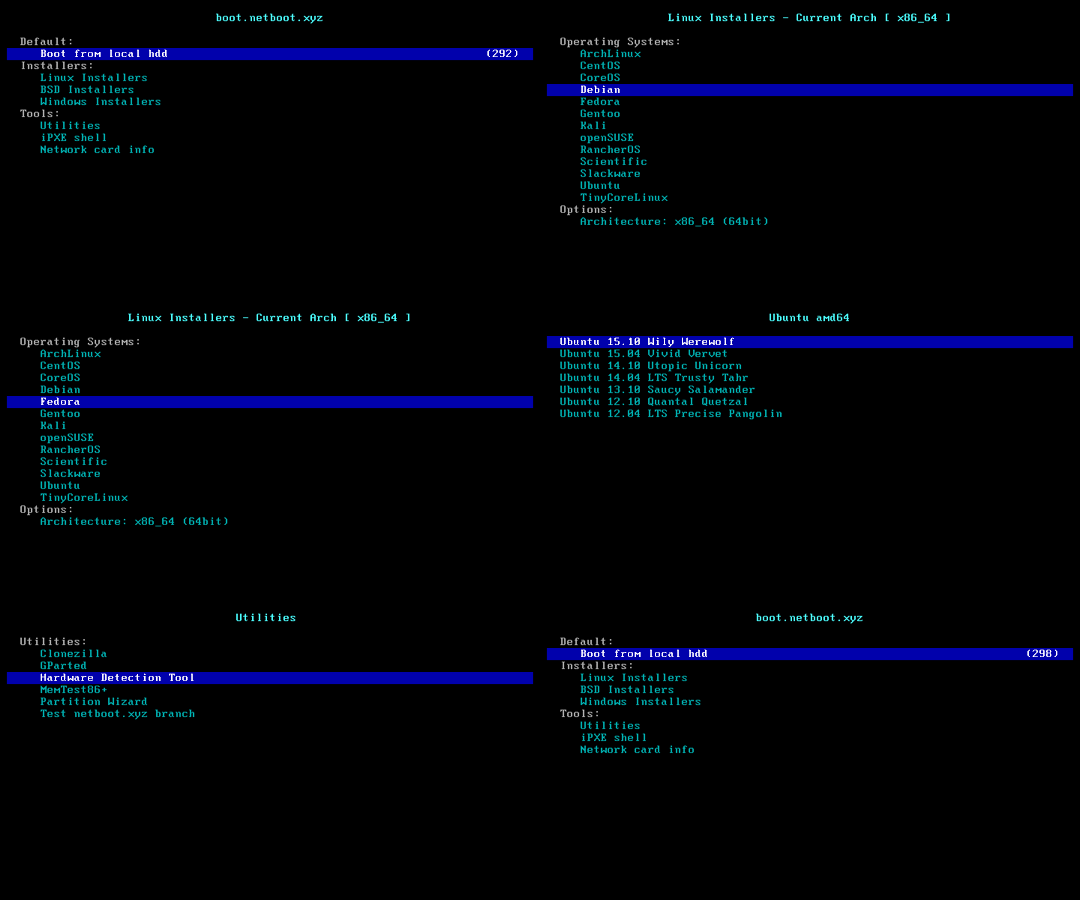
netboot.xyz menu

Bootloader Downloads

Combined Legacy and UEFI iPXE Bootloaders

Type Bootloader Description
ISO netboot.xyz.iso Used for CD/DVD, Virtual CDs, DRAC/iLO, VMware, Virtual Box
USB netboot.xyz.img Used for creation of USB Keys

Legacy (PCBIOS) iPXE Bootloaders

Type Bootloader Description
Kernel netboot.xyz.lkrn Used for booting from GRUB/EXTLINUX
Floppy netboot.xyz.dsk Virtual floppy disk for DRAC/iLO, VMware, Virtual Box, etc
Padded Floppy netboot.xyz.pdsk Padded Virtual floppy disk for DRAC/iLO, VMware, Virtual Box, etc
DHCP netboot.xyz.kpxe DHCP boot image file, uses built-in iPXE NIC drivers
DHCP-undionly netboot.xyz-undionly.kpxe DHCP boot image file, use if you have NIC issues

UEFI iPXE Bootloaders

Type Bootloader Description
DHCP netboot.xyz.efi DHCP boot image file, uses built-in iPXE NIC drivers
DHCP-snp netboot.xyz-snp.efi EFI w/ Simple Network Protocol, attempts to boot all net devices
DHCP-snponly netboot.xyz-snponly.efi EFI w/ Simple Network Protocol, only boots from device chained from

Legacy USB iPXE Bootloaders

These bootloaders use the legacy iPXE driver set which excludes USB NIC drivers. Use these if your USB keyboard does not work with the standard bootloaders, as USB NIC drivers in standard iPXE builds disable the BIOS SMM-based USB legacy support that emulates a PS/2 keyboard.

Type Bootloader Description
ISO netboot.xyz-legacy.iso Legacy USB combined ISO for CD/DVD, Virtual CDs
USB netboot.xyz-legacy.img Legacy USB combined IMG for USB Keys
Kernel netboot.xyz-legacy.lkrn Legacy USB Kernel for booting from GRUB/EXTLINUX
Floppy netboot.xyz-legacy.dsk Legacy USB Virtual floppy disk
Padded Floppy netboot.xyz-legacy.pdsk Legacy USB Padded Virtual floppy disk
DHCP netboot.xyz-legacy.kpxe Legacy USB DHCP boot image file
DHCP-efi netboot.xyz-legacy.efi Legacy USB DHCP EFI boot image file

ARM64 iPXE Bootloaders

Type Bootloader Description
DHCP netboot.xyz-arm64.efi DHCP boot image file, uses built-in iPXE NIC drivers
DHCP-snp netboot.xyz-arm64-snp.efi EFI w/ Simple Network Protocol, attempts to boot all net devices
DHCP-snponly netboot.xyz-arm64-snponly.efi EFI w/ Simple Network Protocol, only boots from device chained from

Raspberry Pi iPXE Bootloaders

Type Bootloader Description
USB/SD Card netboot.xyz-rpi4-sdcard.img Raspberry Pi 4 - USB/SD Card Image
DHCP-snp netboot.xyz-rpi4-snp.efi Raspberry Pi 4 - EFI Image

SHA256 checksums are generated during each build of iPXE and are located here. You can also view the scripts that are embedded into the images here.

What is netboot.xyz?

netboot.xyz is a convenient place to boot into any type of operating system or utility disk without the need of having to go spend time retrieving the ISO just to run it. iPXE is used to provide a user friendly menu from within the BIOS that lets you easily choose the operating system you want along with any specific types of versions or bootable flags.

If you already have iPXE up and running on the network, you can hit netboot.xyz at anytime by typing for Legacy (PCBIOS) mode:

chain --autofree http://boot.netboot.xyz/ipxe/netboot.xyz.lkrn

or when in UEFI mode:

chain --autofree http://boot.netboot.xyz/ipxe/netboot.xyz.efi

You can also load using HTTPS, but by default builds of iPXE do not have HTTPS support compiled in. This will load the appropriate netboot.xyz kernel with all of the proper options enabled.

Documentation

See netboot.xyz for all documentation. Some links to get started with are:

If you'd like to contribute to the documentation, the netboot.xyz documentation is located at netboot.xyz-docs.

Self Hosting netboot.xyz

For those users who want to deploy their own netboot.xyz environment, you can leverage the same scripts that are used to deploy the hosted environment. The source scripts are all Ansible templates and can be generated and customized to your preference.

Please see the self-hosting docs for more information but in short:

Deploying using Ansible

To generate, run:

ansible-playbook site.yml

The build output will be located in /var/www/html by default.

Deploying with Docker

docker build -t localbuild --platform=linux/amd64 -f Dockerfile .
docker run --rm -it --platform=linux/amd64 -v $(pwd):/buildout localbuild

The build output will be in the generated folder buildout

Local Overrides

Ansible will handle source generation as well as iPXE disk generation with your settings. It will generate Legacy (PCBIOS) and UEFI iPXE disks that can be used to load into your netboot.xyz environment. If you want to override the defaults, you can put overrides in user_overrides.yml. See user_overrides.yml for examples.

Using the overrides file, you can override all of the settings from the defaults/main.yml so that you can easily change the boot mirror URLs when the menus are rendered. If you prefer to do this after the fact, you can also edit the boot.cfg to make changes, but keep in mind those changes will not be saved when you redeploy the menu.

Self Hosted Custom Options

In addition to being able to host netboot.xyz locally, you can also create your own custom templates for custom menus within netboot.xyz. Please see Custom User Menus for more information.

What Operating Systems are currently available on netboot.xyz?

Operating Systems

Name URL Installer Kernel Live OS
AlmaLinux https://almalinux.org/ Yes No
Alpine Linux https://alpinelinux.org Yes No
Arch Linux https://www.archlinux.org Yes No
Backbox https://www.backbox.org No Yes
BlackArch Linux https://blackarch.org Yes Yes
Bluestar Linux https://sourceforge.net/projects/bluestarlinux No Yes
Bodhi Linux https://www.bodhilinux.com No Yes
CachyOS https://cachyos.org No Yes
CentOS https://centos.org Yes No
CentOS Stream CoreOS https://centos.org Yes No
Debian https://debian.org Yes Yes
Devuan https://devuan.org Yes No
Elementary OS https://elementary.io No Yes
EndeavourOS https://endeavouros.com No Yes
Fatdog64 https://distro.ibiblio.org/fatdog/web/ No Yes
Fedora https://fedoraproject.org Yes Yes
Fedora CoreOS https://getfedora.org/en/coreos?stream=stable Yes No
Feren OS https://ferenos.weebly.com/ Yes No
Flatcar Container Linux https://www.flatcar.org Yes No
FreeBSD https://freebsd.org Yes, disk image No
FreeDOS https://www.freedos.org ISO - Memdisk No
Garuda Linux https://garudalinux.org/ No Yes
Gentoo https://gentoo.org Yes Yes
Harvester https://harvesterhci.io Yes No
hrmpf https://github.com/leahneukirchen/hrmpf/ No Yes
IPFire https://www.ipfire.org Yes No
K3OS https://k3os.io/ Yes Yes
Kairos https://kairos.io/ Yes No
Kali Linux https://www.kali.org Yes Yes
KDE Neon https://neon.kde.org No Yes
Kodachi https://www.digi77.com/linux-kodachi/ No Yes
Linux Lite https://www.linuxliteos.com No Yes
LXLE https://lxle.net/ No Yes
Mageia https://www.mageia.org Yes No
Manjaro https://manjaro.org No Yes
Mint https://linuxmint.com No Yes
Microsoft Windows https://www.microsoft.com User supplied media No
MirOS http://www.mirbsd.org Yes No
Nitrux https://nxos.org/ No Yes
NixOS https://nixos.org Yes No
Omarchy https://omarchy.org No Yes
OpenBSD https://openbsd.org Yes No
openEuler https://openeuler.org Yes No
openSUSE https://opensuse.org Yes No
Oracle Linux https://www.oracle.com/linux/ Yes Installer
Parrot Security https://www.parrotsec.org No Yes
Peppermint https://peppermintos.com No Yes
Pop OS https://system76.com/pop No Yes
Proxmox Open Source Products https://www.proxmox.com/ Yes No
Q4OS https://q4os.org No Yes
Raizo https://sourceforge.net/projects/live-raizo/ No Yes
Red Hat Enterprise Linux https://www.redhat.com User supplied media No
Red Hat Enterprise Linux CoreOS https://openshift.com Yes No
Regolith https://regolith-linux.org No Yes
Rocky Linux https://rockylinux.org/ Yes No
Septor https://septor.sourceforge.io No Yes
Slackware https://www.slackware.com Yes No
SmartOS https://www.smartos.org/ Yes No
SparkyLinux https://sparkylinux.org/ No Yes
Tails https://tails.net No Yes
Talos https://www.talos.dev/ Yes No
Tiny Core Linux https://tinycorelinux.net Yes Yes
Ubuntu https://www.ubuntu.com Yes Yes
VMware https://www.vmware.com User supplied media No
VMware Photon https://vmware.github.io/photon/ Yes No
Vanilla OS https://vanillaos.org No Yes
Voyager https://voyagerlive.org No Yes
VyOS https://vyos.io Yes No
Zen Installer https://sourceforge.net/projects/revenge-installer Yes No
Zorin OS https://zorin.com No Yes

Utilities

Name URL Type
4MLinux https://4mlinux.com/ Kernel/Initrd
Boot Repair CD https://sourceforge.net/projects/boot-repair-cd/ LiveCD
Breakin https://www.advancedclustering.com/products/software/breakin/ Kernel/Initrd
CAINE https://www.caine-live.net/ LiveCD
Clonezilla https://www.clonezilla.org/ LiveCD
DBAN https://www.dban.org/ Kernel
GParted https://gparted.org LiveCD
Grml https://grml.org LiveCD
Kaspersky Rescue Disk https://support.kaspersky.com/krd18 LiveCD
Memtest https://www.memtest.org/ Kernel
MemTest86 Free https://www.memtest86.com USB Img
Redo Rescue http://redorescue.com/ LiveCD
Rescatux https://www.supergrubdisk.org/rescatux/ LiveCD
Rescuezilla https://rescuezilla.com/ LiveCD
ShredOS https://github.com/PartialVolume/shredos.x86_64 Kernel
Super Grub2 Disk https://www.supergrubdisk.org ISO - Memdisk
System Rescue https://system-rescue.org/ LiveCD
Ultimate Boot CD https://www.ultimatebootcd.com ISO - Memdisk
ZFSBootMenu https://docs.zfsbootmenu.org/ Kernel

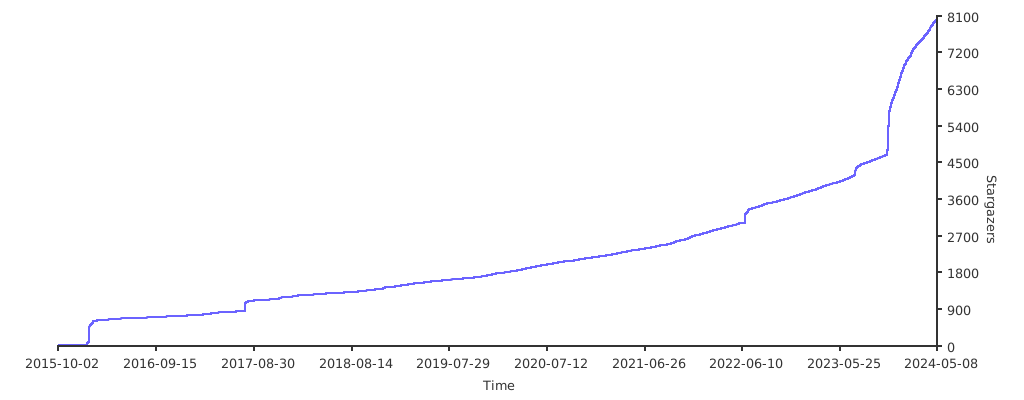
Stargazers over time

Stargazers over time

Feedback

Feel free to open up an issue on Github or ping us on Discord. Follow us on Twitter and like us on Facebook!

netboot.xyz (netbootxyz/netboot.xyz)

Searching Database…

这是干什么用的?netboot.xyz 是一个基于 iPXE 的网络启动菜单:用一个小小的引导镜像启动电脑,就能在菜单里选择几乎任何操作系统或工具盘,不需要提前下载 ISO 镜像。
这是要安装到电脑上的软件吗?它到底是怎么工作的?它不是桌面应用,而是一个引导加载程序。把一个小 ISO 或 U 盘镜像写入(或者用作 DHCP/PXE 启动文件),用它启动目标电脑,iPXE 就会直接在 BIOS 里显示操作系统菜单,并通过网络拉取安装程序。
我该怎么开始使用它?从 Downloads 页面下载一个引导加载程序——光盘和虚拟介质用 netboot.xyz.iso,U 盘用 netboot.xyz.img——然后用它启动。如果你的网络里已经在跑 iPXE,随时可以用 chain --autofree 加载菜单。
我需要自己搭 PXE 服务器或做其他特殊配置吗?日常使用只需要一台能从 U 盘或 ISO 启动的电脑,其余的东西由 netboot.xyz 上的托管菜单提供。如果想自己托管一份,需要用 Ansible 或 Docker 生成文件,再加上自己的网页服务器(输出默认放在 /var/www/html)。
它能安装所有操作系统吗?有什么限制?有几个条目需要你自己提供安装介质——Microsoft Windows、Red Hat Enterprise Linux 和 VMware。另外,标准的 iPXE 构建没有编译进 HTTPS 支持,所以菜单默认是通过普通 HTTP 链式加载的。
它能在 UEFI 机器和 ARM 开发板上启动吗,还是只支持老式 BIOS 电脑?两种启动方式都支持——有 Legacy(PCBIOS)和 UEFI 合二为一的引导加载程序,也有单独的 UEFI EFI 镜像、ARM64 构建,以及 Raspberry Pi 4 的 USB/SD 卡镜像。
没有网络它还能用吗?不能——它本身就是网络启动:菜单和它启动的安装程序都要通过网络获取,所以电脑必须联网才能使用。
我能启动哪些操作系统和工具?几十种——Ubuntu、Debian、Fedora、Arch、NixOS、Alpine、openSUSE、Kali、Tails、FreeBSD、OpenBSD 等等,大多数提供安装镜像或 live 镜像。工具区还收录了 Clonezilla、GParted、DBAN、Memtest、Rescuezilla 之类的恢复工具。
我能把菜单托管在自己的网络里,而不用官方托管的那个吗?可以——仓库里自带构建托管环境用的同一套 Ansible 脚本。可以用 Ansible 部署(构建输出默认放在 /var/www/html),也可以用 Docker,并通过 useroverrides.yml 调整启动镜像源地址等设置。
如果我的 USB 键盘在启动菜单里不好用怎么办?改用 -legacy 引导加载程序(netboot.xyz-legacy.iso 或 .img)。在标准构建里,USB 网卡驱动会禁用 BIOS 中基于 SMM、用来模拟 PS/2 键盘的 USB legacy 支持;legacy 镜像则绕开了这个问题。
我可以往里面添加自己的自定义菜单吗?可以,在自行托管的部署中,你可以创建自己的自定义模板,它们会作为自定义菜单出现在 netboot.xyz 里——具体设置见 Custom User Menus 文档。
Creator
netbootxyz
Size
4.6 MB
Stars
12.5K
Age
11y
Commits · 90 Days
