






What is this?
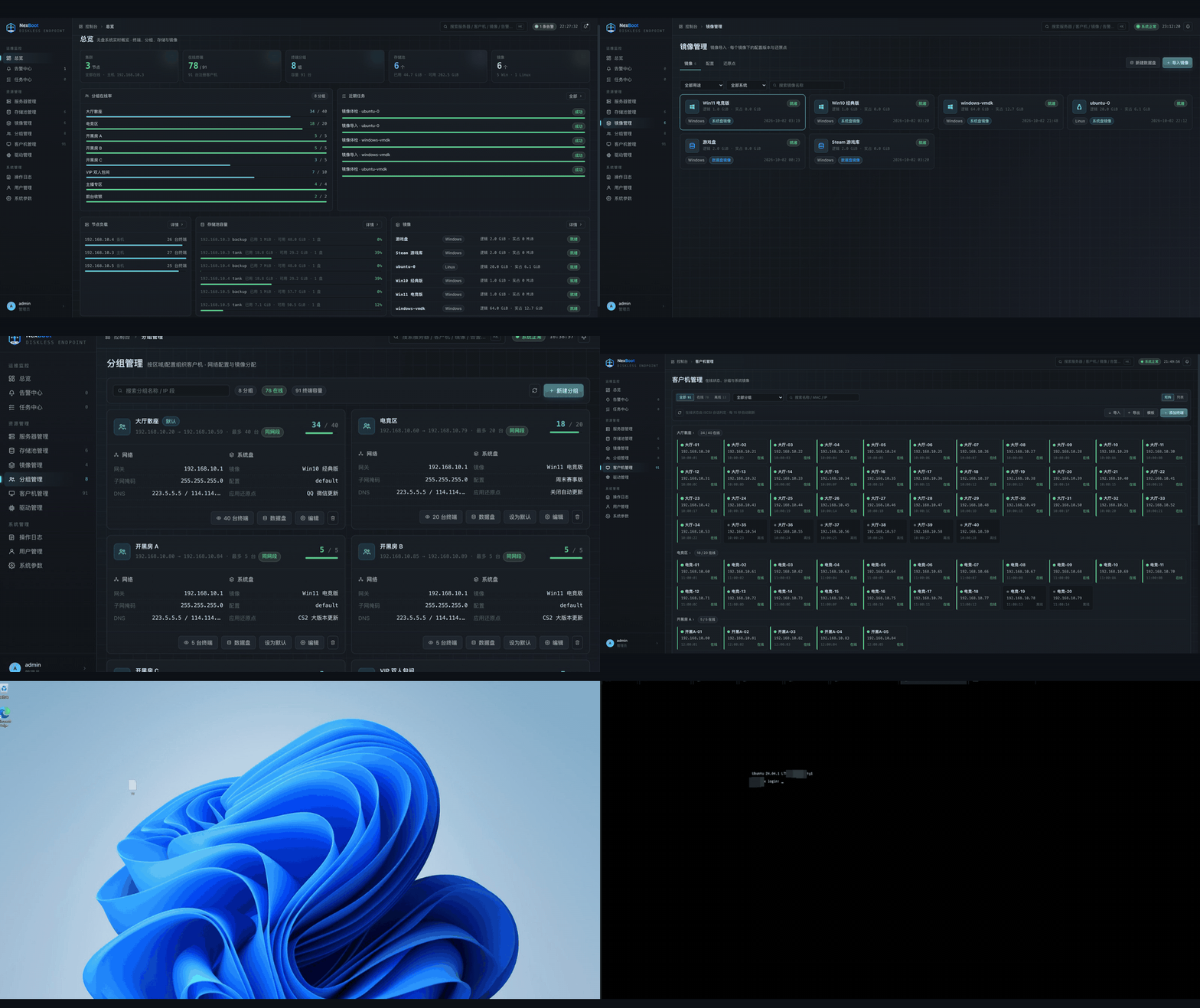
 NexBoot is a self-hosted diskless boot platform written in Go that combines PXE network boot, iSCSI and ZFS storage so a whole internet cafe, LAN center or computer lab can boot many PCs from one master image, managed through a web console.
NexBoot is a self-hosted diskless boot platform written in Go that combines PXE network boot, iSCSI and ZFS storage so a whole internet cafe, LAN center or computer lab can boot many PCs from one master image, managed through a web console.Is this something I install on a central server, or does each PC need its own install?It is a server-side platform: you install a single Go binary on a Linux server, and client PCs boot entirely over the network with no local OS install, each getting a writable ZFS clone of the master image on every boot.
It is a server-side platform: you install a single Go binary on a Linux server, and client PCs boot entirely over the network with no local OS install, each getting a writable ZFS clone of the master image on every boot.How do I get it running?Install it on an Ubuntu 22.04/24.04 server with a spare disk for the ZFS pool, then open the web UI, sign in as admin and run the setup wizard: pick the client-facing NIC, create a storage pool, import a Windows/Ubuntu image (.vmdk/.vhdx/.qcow2/.raw/.zfs), create a group, and register clients by MAC address.
Install it on an Ubuntu 22.04/24.04 server with a spare disk for the ZFS pool, then open the web UI, sign in as admin and run the setup wizard: pick the client-facing NIC, create a storage pool, import a Windows/Ubuntu image (.vmdk/.vhdx/.qcow2/.raw/.zfs), create a group, and register clients by MAC address.What does the server need before I start?A dedicated Linux (Ubuntu) server with a static IP, at least one spare disk besides the system disk for the ZFS pool, 8GB+ RAM, and packages dnsmasq, qemu-utils, targetcli-fb, zfsutils-linux and keepalived, which are bundled into the .deb and offline installer.
A dedicated Linux (Ubuntu) server with a static IP, at least one spare disk besides the system disk for the ZFS pool, 8GB+ RAM, and packages dnsmasq, qemu-utils, targetcli-fb, zfsutils-linux and keepalived, which are bundled into the .deb and offline installer.Does it work with any client OS?Only Windows (BIOS and UEFI, with Windows 11 24H2/25H2 needing build 26100.7705+ for a known iSCSI boot fix) and Ubuntu are officially supported; CentOS/RHEL/Rocky are untested. Client images must also use DHCP, since a static IP baked into the image would be claimed by every PC at once.
Only Windows (BIOS and UEFI, with Windows 11 24H2/25H2 needing build 26100.7705+ for a known iSCSI boot fix) and Ubuntu are officially supported; CentOS/RHEL/Rocky are untested. Client images must also use DHCP, since a static IP baked into the image would be claimed by every PC at once.Do I need a cluster of servers, or does one server work fine?A single node runs everything standalone; you can later turn it into a multi-node cluster from the UI without reinstalling, and failover moves the virtual IP in about a second while affected clients just reboot once onto another node.
A single node runs everything standalone; you can later turn it into a multi-node cluster from the UI without reinstalling, and failover moves the virtual IP in about a second while affected clients just reboot once onto another node.What's the catch with the AGPL license?It's free to use, study and modify, even commercially in your own internet cafe or school, but if you distribute a modified version or run it as a network service for others, you must publish the full modified source under AGPL; the NexBoot name/logo and bundled third-party components keep their own terms.
It's free to use, study and modify, even commercially in your own internet cafe or school, but if you distribute a modified version or run it as a network service for others, you must publish the full modified source under AGPL; the NexBoot name/logo and bundled third-party components keep their own terms.How does a broken PC get fixed without reinstalling?Every PC boots from a copy-on-write ZFS clone of a restore point, so a plain reboot discards any local changes and returns the machine to the clean saved state; you can also roll back to an earlier restore point in one click.
Every PC boots from a copy-on-write ZFS clone of a restore point, so a plain reboot discards any local changes and returns the machine to the clean saved state; you can also roll back to an earlier restore point in one click.Can NexBoot be deployed at a site without internet access?Yes, there's an offline bundle (for example nexboot-offline-ubuntu24.04-amd64.tar.gz) that packages all required dependencies so you can run sudo ./install.sh without needing internet access.
Yes, there's an offline bundle (for example nexboot-offline-ubuntu24.04-amd64.tar.gz) that packages all required dependencies so you can run sudo ./install.sh without needing internet access.What is the 'super machine' feature?It lets you boot one client in an editable mode, install updates or drivers inside it, shut it down, and save the result as a new restore point that other PCs on that config can then apply.
It lets you boot one client in an editable mode, install updates or drivers inside it, shut it down, and save the result as a new restore point that other PCs on that config can then apply.Does client traffic get proxied through a central server?No, DHCP, boot files and iSCSI traffic for each PC are served directly by the node hosting it; nothing is routed through a central controller, even when running as a cluster.
No, DHCP, boot files and iSCSI traffic for each PC are served directly by the node hosting it; nothing is routed through a central controller, even when running as a cluster.What are similar projects?ceph, thanos, netboot.xyz, consul, automq, node_exporter, nezha, nodelume
ceph, thanos, netboot.xyz, consul, automq, node_exporter, nezha, nodelumeWhich topics is it in?ubuntu, high-availability, bilingual, driver, audit-log, storage, infrastructure, backup, agplv3, sysadmin, distributed-systems, monitoring
ubuntu, high-availability, bilingual, driver, audit-log, storage, infrastructure, backup, agplv3, sysadmin, distributed-systems, monitoring