Why mgrep?
- Natural-language search that feels as immediate as
grep.
- Semantic, multilingual & multimodal (audio, video support coming soon!)
- Web search built-in — query the web alongside your local files with
--web.
- Smooth background indexing via
mgrep watch, designed to detect and keep up-to-date everything that matters inside any git repository.
- Friendly device-login flow and first-class coding agent integrations.
- Built for agents and humans alike, and designed to be a helpful tool, not a restrictive harness: quiet output, thoughtful defaults, and escape hatches everywhere.
- Reduces the token usage of your agent by 2x while maintaining superior performance
# index once
mgrep watch

# then ask your repo things in natural language
mgrep "where do we set up auth?"
Quick Start
Install
npm install -g @mixedbread/mgrep # or pnpm / bun
Sign in once
mgrep login
A browser window (or verification URL) guides you through Mixedbread authentication.
Alternative: API Key Authentication
For CI/CD or headless environments, set the MXBAI_API_KEY environment variable:
export MXBAI_API_KEY=your_api_key_here
This bypasses the browser login flow entirely.
Index a project
cd path/to/repo
mgrep watch
watch performs an initial sync, respects .gitignore, then keeps the Mixedbread store updated as files change.
Search anything
mgrep "where do we set up auth?" src/lib
mgrep -m 25 "store schema"
Searches default to the current working directory unless you pass a path.
Today, mgrep works great on: code, text, PDFs, images.
Coming soon: audio & video.
Using it with Coding Agents
[!CAUTION]
Background Sync Enabled: When installed with a coding agent, mgrep runs a
background process that syncs your files to enable semantic search. This
process starts automatically when you begin a session and stops when your
session ends. You can see your current usage in the Mixedbread
platform.
[!NOTE]
Default Limits: mgrep enforces default limits to ensure optimal performance:
- Maximum file size: 1MB per file
- Maximum file count: 1,000 files per directory
These limits can be customized via CLI flags (--max-file-size, --max-file-count),
environment variables, or config files. See the Configuration section for details.
If you prefer to manually start the file watcher instead of relying on the agent's
automatic background sync, you can run:
mgrep watch /path/to/your/project
This gives you explicit control over when indexing occurs and which directories are watched.
mgrep supports assisted installation commands for many agents:
mgrep install-claude-code for Claude Codemgrep install-opencode for OpenCodemgrep install-codex for Codexmgrep install-droid for Factory Droid
These commands sign you in (if needed) and add Mixedbread mgrep support to the
agent. After that you only have to start the agent in your project folder, thats
it.
More Agents Coming Soon
More agents (Cursor, Windsurf, etc.) are on the way—this section will grow as soon as each integration lands.
Making your agent smarter
We plugged mgrep into Claude Code and ran a benchmark of 50 QA tasks to evaluate the economics of mgrep against grep.
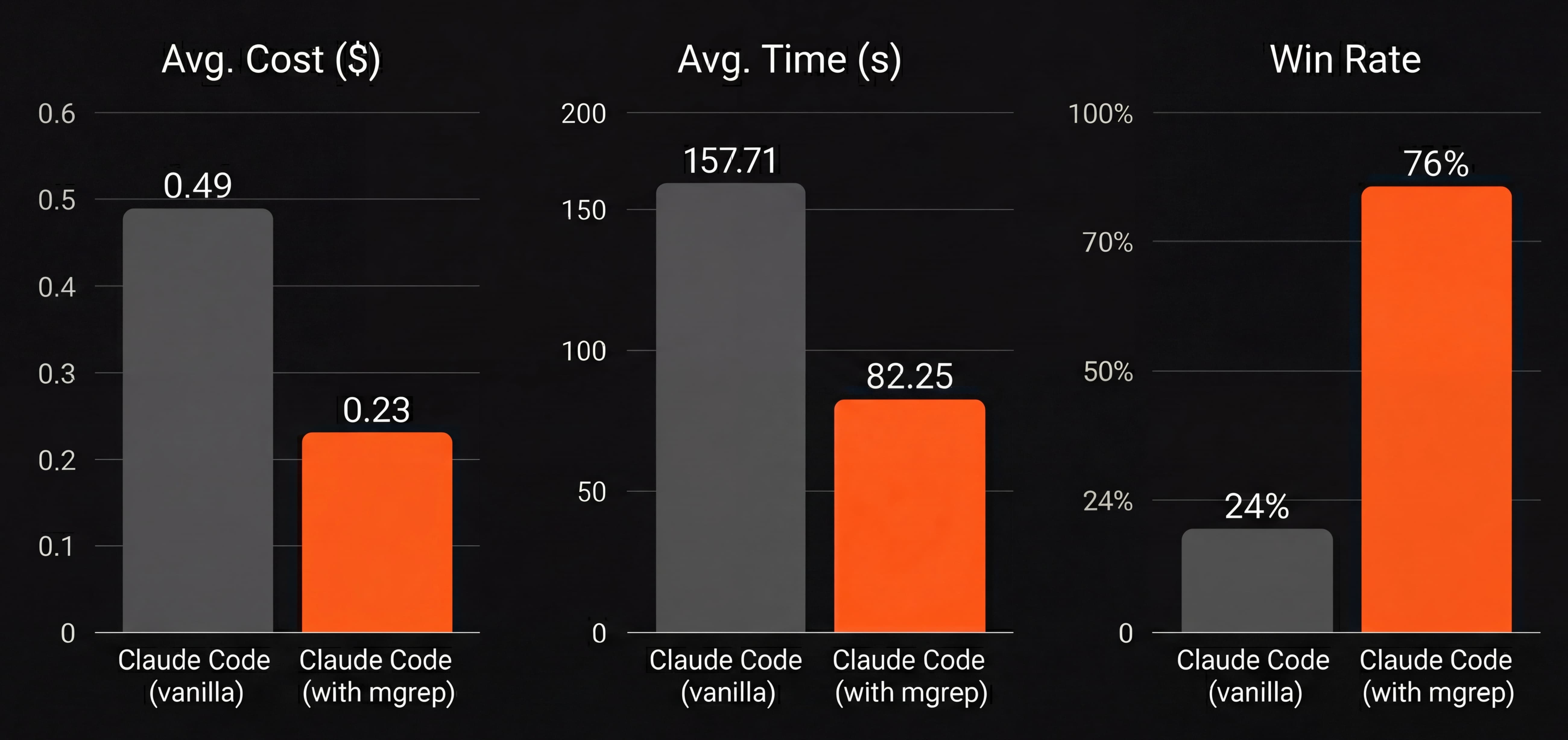
In our 50-task benchmark, mgrep+Claude Code used ~2x fewer tokens than grep-based workflows at similar or better judged quality.
mgrep finds the relevant snippets in a few semantic queries first, and the model spends its capacity on reasoning instead of scanning through irrelevant code from endless grep attempts. You can Try it yourself.
Note: Win Rate (%) was calculated by using an LLM as a judge.
Why we built mgrep
grep is an amazing tool. It's lightweight, compatible with just about every machine on the planet, and will reliably surface any potential match within any target folder.
But grep is from 1973, and it carries the limitations of its era: you need exact patterns and it slows down considerably in the cases where you need it most, on large codebases.
Worst of all, if you're looking for deeply-buried critical business logic, you cannot describe it: you have to be able to accurately guess what kind of naming patterns would have been used by the previous generations of engineers at your workplace for grep to find it. This will often result in watching a coding agent desperately try hundreds of patterns, filling its token window, and your upcoming invoice, with thousands of tokens.
But it doesn't have to be this way. Everything else in our toolkit is increasingly tailored to understand us, and so should our search tools. mgrep is our way to bring grep to 2025, integrating all of the advances in semantic understanding and code-search, without sacrificing anything that has made grep such a useful tool.
Under the hood, mgrep is powered by Mixedbread Search, our full-featured search solution. It combines state-of-the-art semantic retrieval models with context-aware parsing and optimized inference methods to provide you with a natural language companion to grep. We believe both tools belong in your toolkit: use grep for exact matches, mgrep for semantic understanding and intent.
When to use what
We designed mgrep to complement grep, not replace it. The best code search combines mgrep with grep.
Use grep (or ripgrep) for... |
Use mgrep for... |
| Exact Matches |
Intent Search |
| Symbol tracing, Refactoring, Regex |
Code exploration, Feature discovery, Onboarding |
Web Search
mgrep can also search the web alongside your local files. This is useful when
you need to find documentation, tutorials, or answers to programming questions
without leaving your terminal.
# Search the web and get a summarized answer
mgrep --web --answer "How do I integrate a JavaScript runtime into Deno?"

# Get the urls of the search
mgrep --web "best practices for error handling in TypeScript"
Web search queries the mixedbread/web store in addition to your local store, merging results based on relevance. Use --answer (or -a) to get a concise summary instead of raw results.
mgrep as Subagent
For complex questions that require information from multiple sources, mgrep can act as a subagent that automatically refines queries and performs multiple searches to find the best answer.
# Enable agentic search for complex multi-part questions
mgrep --agentic "What are the yearly numbers for 2020, 2021, 2022, 2023, 2024?"

# Combine with --answer for a synthesized response from multiple sources
mgrep --agentic -a "How does authentication work and where is it configured?"
When --agentic is enabled, mgrep will:
- Automatically break down complex queries into sub-queries
- Perform multiple searches as needed to gather comprehensive results
- Combine findings from different parts of your codebase
This is particularly useful for questions that span multiple files or concepts, where a single search might miss important context.
Commands at a Glance
| Command |
Purpose |
mgrep / mgrep search <pattern> [path] |
Natural-language search with many grep-style flags (-i, -r, -m...). |
mgrep watch |
Index current repo and keep the Mixedbread store in sync via file watchers. |
mgrep login & mgrep logout |
Manage device-based authentication with Mixedbread. |
mgrep install-claude-code |
Authenticate, add the Mixedbread mgrep plugin to Claude Code. |
mgrep install-opencode |
Authenticate and add the Mixedbread mgrep to OpenCode. |
mgrep install-codex |
Authenticate and add the Mixedbread mgrep to Codex. |
mgrep install-droid |
Authenticate and add the Mixedbread mgrep hooks/skills to Factory Droid. |
mgrep search
mgrep search is the default command. It can be used to search the current
directory for a pattern.
| Option |
Description |
-m <max_count> |
The maximum number of results to return |
-c, --content |
Show content of the results |
-a, --answer |
Generate an answer to the question based on the results |
-w, --web |
Include web search results alongside local files |
--agentic |
Enable agentic search to automatically refine queries and perform multiple searches |
-s, --sync |
Sync the local files to the store before searching |
-d, --dry-run |
Dry run the search process (no actual file syncing) |
--no-rerank |
Disable reranking of search results |
--max-file-size <bytes> |
Maximum file size in bytes to upload (overrides config) |
--max-file-count <count> |
Maximum number of files to upload (overrides config) |
All search options can also be configured via environment variables (see
Environment Variables section below).
Examples:
mgrep "What code parsers are available?"  # search in the current directory
mgrep "How are chunks defined?" src/models  # search in the src/models directory
mgrep -m 10 "What is the maximum number of concurrent workers in the code parser?"  # limit the number of results to 10
mgrep -a "What code parsers are available?"  # generate an answer to the question based on the results
mgrep --web --answer "How do I integrate a JavaScript runtime into Deno?"  # search the web and get a summarized answer
mgrep watch
mgrep watch is used to index the current repository and keep the Mixedbread
store in sync via file watchers.
It respects the current .gitignore, as well as a .mgrepignore file in the
root of the repository. The .mgrepignore file follows the same syntax as the
.gitignore file.
| Option |
Description |
-d, --dry-run |
Dry run the watch process (no actual file syncing) |
--max-file-size <bytes> |
Maximum file size in bytes to upload (overrides config) |
--max-file-count <count> |
Maximum number of files to upload (overrides config) |
Examples:
mgrep watch  # index the current repository and keep the Mixedbread store in sync via file watchers
mgrep watch --max-file-size 1048576  # limit uploads to files under 1MB
mgrep watch --max-file-count 5000  # limit sync to 5000 changed files or fewer
Mixedbread under the hood
- Every file is pushed into a Mixedbread Store using the same SDK your apps get.
- Searches request top-k matches with Mixedbread reranking enabled by default
for tighter relevance (can be disabled with
--no-rerank or
MGREP_RERANK=0).
- Results include relative paths plus contextual hints (line ranges for text, page numbers for PDFs, etc.) for a skim-friendly experience.
- Because stores are cloud-backed, agents and teammates can query the same corpus without re-uploading.
Configuration
mgrep can be configured via config files, environment variables, or CLI flags.
Config File
Create a .mgreprc.yaml (or .mgreprc.yml) in your project root for local configuration, or ~/.config/mgrep/config.yaml (or config.yml) for global configuration.
# Maximum file size in bytes to upload (default: 1MB)
maxFileSize: 5242880

# Maximum number of files to sync (upload/delete) per operation (default: 1000)
maxFileCount: 5000
Configuration precedence (highest to lowest):
- CLI flags (
--max-file-size, --max-file-count)
- Environment variables (
MGREP_MAX_FILE_SIZE, MGREP_MAX_FILE_COUNT)
- Local config file (
.mgreprc.yaml in project directory)
- Global config file (
~/.config/mgrep/config.yaml)
- Default values
Configuration Tips
--store <name> lets you isolate workspaces (per repo, per team, per experiment). Stores are created on demand if they do not exist yet.- Ignore rules come straight from git, so temp files, build outputs, and vendored deps stay out of your embeddings.
watch reports progress (processed / uploaded) as it scans; leave it running in a terminal tab to keep your store fresh.search accepts most grep-style switches, and politely ignores anything it cannot support, so existing muscle memory still works.
Environment Variables
All search options can be configured via environment variables, which is
especially useful for CI/CD pipelines or when you want to set defaults for all
searches.
Authentication & Store
MXBAI_API_KEY: Set this to authenticate without browser login (ideal for CI/CD)MXBAI_STORE: Override the default store name (default: mgrep)
Search Options
MGREP_MAX_COUNT: Maximum number of results to return (default: 10)MGREP_CONTENT: Show content of the results (set to 1 or true to enable)MGREP_ANSWER: Generate an answer based on the results (set to 1 or true to enable)MGREP_WEB: Include web search results (set to 1 or true to enable)MGREP_AGENTIC: Enable agentic search for complex multi-source queries (set to 1 or true to enable)MGREP_SYNC: Sync files before searching (set to 1 or true to enable)MGREP_DRY_RUN: Enable dry run mode (set to 1 or true to enable)MGREP_RERANK: Enable reranking of search results (set to 0 or false to disable, default: enabled)
Sync Options
MGREP_MAX_FILE_SIZE: Maximum file size in bytes to upload (default: 1048576 / 1MB)MGREP_MAX_FILE_COUNT: Maximum number of files to sync per operation (default: 1000)
Examples:
# Set default max results to 25
export MGREP_MAX_COUNT=25
mgrep "search query"

# Always show content in results
export MGREP_CONTENT=1
mgrep "search query"

# Disable reranking globally
export MGREP_RERANK=0
mgrep "search query"

# Use multiple options together
export MGREP_MAX_COUNT=20
export MGREP_CONTENT=1
export MGREP_ANSWER=1
mgrep "search query"
Note: Command-line options always override environment variables.
Development
pnpm install
pnpm build        # or pnpm dev for a quick compile + run
pnpm format       # biome formatting + linting
- The executable lives at
dist/index.js (built from TypeScript via tsc).
- Husky is wired via
pnpx husky init (run npx husky init once after cloning).
- Tests are not wired up yet—
pnpm typecheck is your best friend before
publishing.
- To connect to a local Mixedbread api set the
export NODE_ENV=development.
Testing
pnpm test
The tests are written using bats.
Troubleshooting
- Login keeps reopening: run
mgrep logout to clear cached tokens, then try mgrep login again.
- Watcher feels noisy: set
MXBAI_STORE or pass --store to separate experiments, or pause the watcher and restart after large refactors.
- Need a fresh store: delete it from the Mixedbread dashboard, then run
mgrep watch. It will auto-create a new one.
Support
For usage questions, feedback, or other support, please reach out on the Mixedbread Slack.
License
Apache-2.0. See the LICENSE file for details.






 mgrep is a CLI tool that lets you semantically search your code, PDFs, images, and text using natural language, instead of relying on exact grep-style patterns.