


17.4K ·GitHub
Что это такое?
 Фреймворк от Microsoft для создания нативных Windows-приложений на JavaScript и React. Он расширяет React Native от Meta на все устройства, которые поддерживает Windows 10 SDK: ПК, планшеты, трансформеры 2-в-1, Xbox и устройства смешанной реальности.
Фреймворк от Microsoft для создания нативных Windows-приложений на JavaScript и React. Он расширяет React Native от Meta на все устройства, которые поддерживает Windows 10 SDK: ПК, планшеты, трансформеры 2-в-1, Xbox и устройства смешанной реальности.Это тот же React Native, что я бы использовал для iOS и Android — то есть писать я всё равно буду на JavaScript?Да — тот же опыт разработки, что и в React Native от Meta: интерфейс собирается на JavaScript и React («выучи один раз, пиши где угодно»). Этот репозиторий добавляет сам нативный рантайм для Windows — поэтому большая часть его кода написана на C++.
Да — тот же опыт разработки, что и в React Native от Meta: интерфейс собирается на JavaScript и React («выучи один раз, пиши где угодно»). Этот репозиторий добавляет сам нативный рантайм для Windows — поэтому большая часть его кода написана на C++.Как собрать с его помощью своё первое приложение?Пройдите руководство Getting Started на официальном сайте React Native for Windows + macOS — его CLI разворачивает готовое приложение-образец, которое можно сразу редактировать. Больше примеров лежит в репозитории samples и в RNTester.
Пройдите руководство Getting Started на официальном сайте React Native for Windows + macOS — его CLI разворачивает готовое приложение-образец, которое можно сразу редактировать. Больше примеров лежит в репозитории samples и в RNTester.Что мне нужно для разработки и где будет работать моё приложение?Разработка ведётся на Windows с Windows 10 SDK; полный чек-лист настройки есть в документе System Requirements на сайте. Готовые приложения работают только на устройствах, которые поддерживает этот SDK.
Разработка ведётся на Windows с Windows 10 SDK; полный чек-лист настройки есть в документе System Requirements на сайте. Готовые приложения работают только на устройствах, которые поддерживает этот SDK.Моё приложение получится как UWP или как обычное настольное Win32-приложение?Это зависит от поколения архитектуры: старый рендерер Paper построен на UWP XAML, а приложения на новой архитектуре Fabric по умолчанию получают WinAppSDK Win32 — именно этого стоит ожидать от новых проектов.
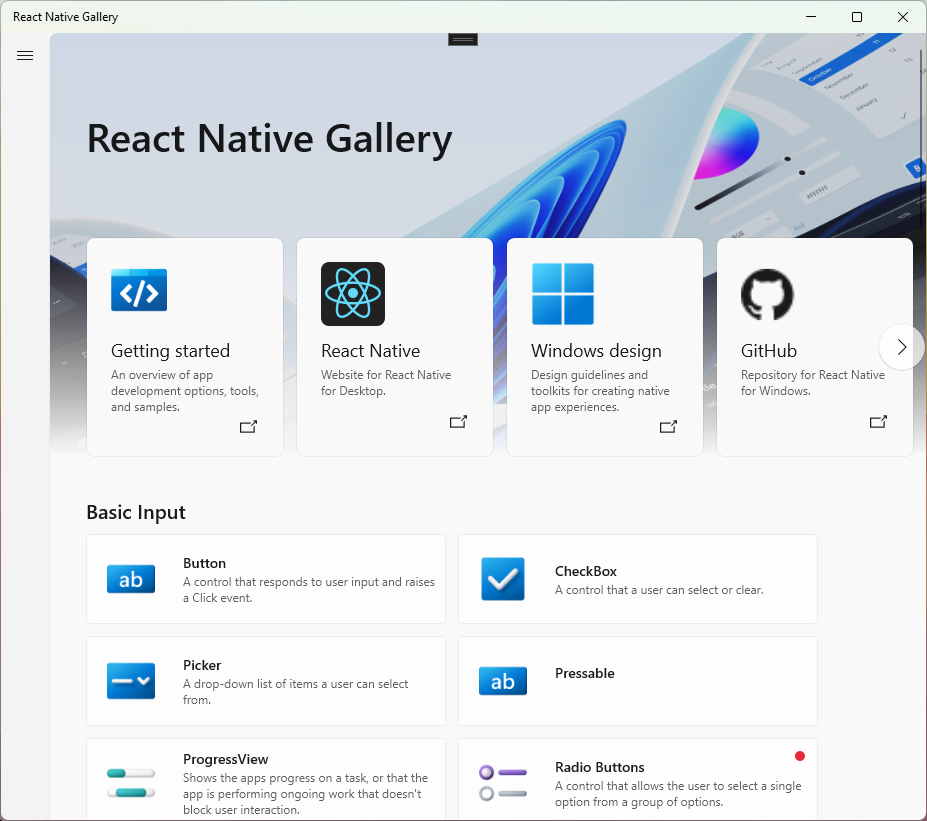
Это зависит от поколения архитектуры: старый рендерер Paper построен на UWP XAML, а приложения на новой архитектуре Fabric по умолчанию получают WinAppSDK Win32 — именно этого стоит ожидать от новых проектов.Можно ли до старта проекта почувствовать, что вообще возможно?Да — откройте React Native Gallery, интерактивное приложение-образец, показывающее возможности React Native for Windows, либо посмотрите RNTester и отдельный репозиторий с примерами.
Да — откройте React Native Gallery, интерактивное приложение-образец, показывающее возможности React Native for Windows, либо посмотрите RNTester и отдельный репозиторий с примерами.Означает ли macOS в названии проекта, что мои приложения смогут работать и на Mac?Проект охватывает обе настольные платформы: на общем сайте есть отдельная документация по платформенным API для Windows и macOS, а также обновления в блоге. Этот репозиторий — Windows-часть этой работы.
Проект охватывает обе настольные платформы: на общем сайте есть отдельная документация по платформенным API для Windows и macOS, а также обновления в блоге. Этот репозиторий — Windows-часть этой работы.Что такое рендереры Paper и Fabric?Paper — текущий рендерер, а Fabric — новая система отрисовки, спроектированная так, чтобы делить больше логики между платформами: она изначально нацелена на Composition и умеет встраивать островки XAML для продвинутых нативных элементов управления.
Paper — текущий рендерер, а Fabric — новая система отрисовки, спроектированная так, чтобы делить больше логики между платформами: она изначально нацелена на Composition и умеет встраивать островки XAML для продвинутых нативных элементов управления.Почему выбрать это, а не написать нативное Windows-приложение напрямую?Главный аргумент — эффективность разработки: интерфейс собирается на JavaScript и React с единым и предсказуемым опытом разработки, вместо того чтобы вручную писать нативный слой интерфейса под каждую платформу.
Главный аргумент — эффективность разработки: интерфейс собирается на JavaScript и React с единым и предсказуемым опытом разработки, вместо того чтобы вручную писать нативный слой интерфейса под каждую платформу.Проект ещё активно развивается?Да — это репозиторий под поддержкой Microsoft с более чем 17 000 звёзд. Планы развития и новости о статусе публикуются в React Native Developer Blog, а CI гоняет сборки, линтер, тесты производительности и проверки зависимостей.
Да — это репозиторий под поддержкой Microsoft с более чем 17 000 звёзд. Планы развития и новости о статусе публикуются в React Native Developer Blog, а CI гоняет сборки, линтер, тесты производительности и проверки зависимостей.What are similar projects?reactotron, uno, Avalonia, Magpie, react-native, styled-components, NanaZip, calculator
reactotron, uno, Avalonia, Magpie, react-native, styled-components, NanaZip, calculatorWhich topics is it in?react-native, dotnet, windows-app, c++, developers, ui, desktop, framework, gui, react, desktop-app, frontend
react-native, dotnet, windows-app, c++, developers, ui, desktop, framework, gui, react, desktop-app, frontend