


17.4K ·GitHub
What is this?
 Microsoft's framework for building native Windows apps with JavaScript and React. It extends Meta's React Native to every device the Windows 10 SDK supports: PCs, tablets, 2-in-1s, Xbox and Mixed Reality devices.
Microsoft's framework for building native Windows apps with JavaScript and React. It extends Meta's React Native to every device the Windows 10 SDK supports: PCs, tablets, 2-in-1s, Xbox and Mixed Reality devices.Is it the same React Native I'd use for iOS and Android — do I still write JavaScript?Yes — same developer experience as Meta's React Native: you build the UI in JavaScript and React ('learn once, write anywhere'). This repo adds the native Windows runtime itself, which is why its code is largely C++.
Yes — same developer experience as Meta's React Native: you build the UI in JavaScript and React ('learn once, write anywhere'). This repo adds the native Windows runtime itself, which is why its code is largely C++.How do I build my first app with it?Follow the Getting Started Guide on the official React Native for Windows + macOS website — its CLI scaffolds a complete sample app you can start editing right away. More examples live in the samples repo and RNTester.
Follow the Getting Started Guide on the official React Native for Windows + macOS website — its CLI scaffolds a complete sample app you can start editing right away. More examples live in the samples repo and RNTester.What do I need to develop, and where will my app run?You develop on Windows with the Windows 10 SDK; the full setup checklist lives in the System Requirements docs on the website. Finished apps run only on devices that SDK supports.
You develop on Windows with the Windows 10 SDK; the full setup checklist lives in the System Requirements docs on the website. Finished apps run only on devices that SDK supports.Will my app come out as a UWP app or a regular desktop Win32 app?It depends on the architecture generation: the older Paper renderer is built on UWP XAML, while apps on the new Fabric architecture are WinAppSDK Win32 by default — that's the path new projects should expect.
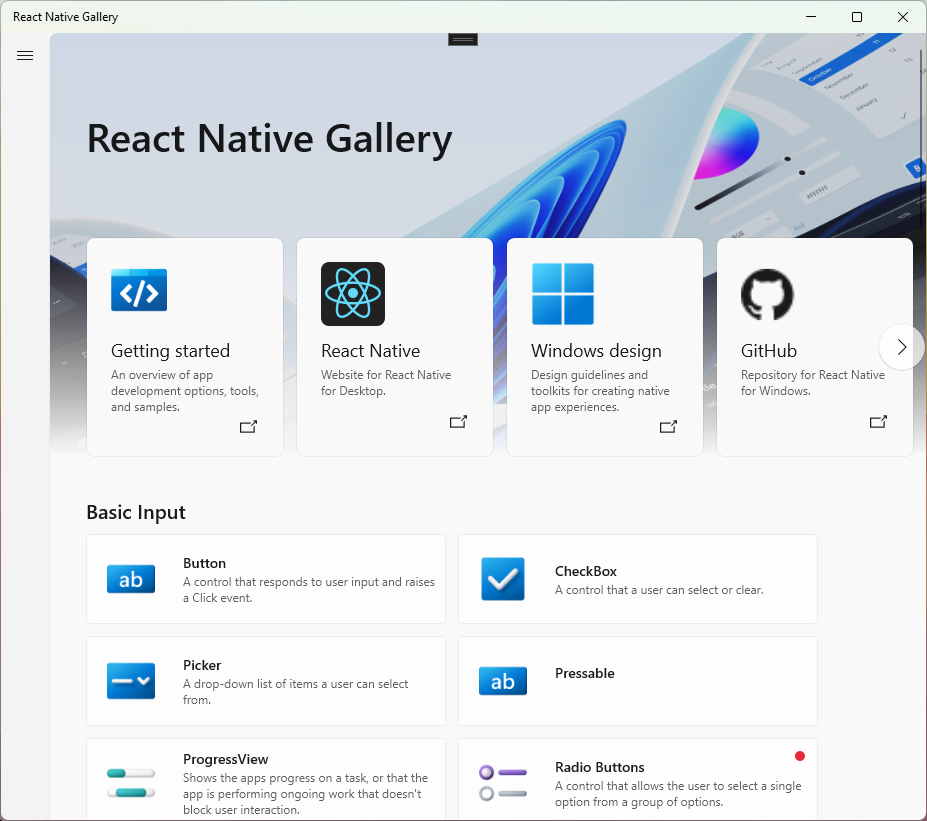
It depends on the architecture generation: the older Paper renderer is built on UWP XAML, while apps on the new Fabric architecture are WinAppSDK Win32 by default — that's the path new projects should expect.Can I get a feel for what's possible before starting a project?Yes — open the React Native Gallery, an interactive sample app showing what you can do with React Native for Windows, or browse RNTester and the standalone samples repo.
Yes — open the React Native Gallery, an interactive sample app showing what you can do with React Native for Windows, or browse RNTester and the standalone samples repo.Does the macOS in the project name mean my apps can target Mac too?The effort spans both desktops: the shared website carries separate Windows and macOS documentation for platform APIs and blog updates. This repository is the Windows side of that work.
The effort spans both desktops: the shared website carries separate Windows and macOS documentation for platform APIs and blog updates. This repository is the Windows side of that work.What are the Paper and Fabric renderers?Paper is the current renderer, while Fabric is the new rendering system designed to share more logic cross-platform: it targets Composition from the start and can host islands of XAML for advanced native controls.
Paper is the current renderer, while Fabric is the new rendering system designed to share more logic cross-platform: it targets Composition from the start and can host islands of XAML for advanced native controls.Why pick this over writing a native Windows app directly?Developer efficiency is the pitch: you build the UI in JavaScript and React with one consistent developer experience instead of hand-writing the native UI layer for each platform.
Developer efficiency is the pitch: you build the UI in JavaScript and React with one consistent developer experience instead of hand-writing the native UI layer for each platform.Is the project still actively developed?Yes — it's a Microsoft-maintained repo with over 17,000 stars. Roadmaps and status updates are published on the React Native Developer Blog, and CI runs builds, lint, performance tests and dependency checks.
Yes — it's a Microsoft-maintained repo with over 17,000 stars. Roadmaps and status updates are published on the React Native Developer Blog, and CI runs builds, lint, performance tests and dependency checks.What are similar projects?reactotron, uno, Avalonia, Magpie, react-native, styled-components, NanaZip, calculator
reactotron, uno, Avalonia, Magpie, react-native, styled-components, NanaZip, calculatorWhich topics is it in?react-native, dotnet, windows-app, c++, developers, ui, desktop, framework, gui, react, desktop-app, frontend
react-native, dotnet, windows-app, c++, developers, ui, desktop, framework, gui, react, desktop-app, frontend