Updates
- 2026-07-22 — Fara1.5 released! A family of native computer use
agents at three scales (Fara1.5-4B, Fara1.5-9B, Fara1.5-27B) built on
Qwen3.5 and trained on data from the FaraGen1.5 pipeline. All three models have weights available on Hugging Face and can be hosted through Microsoft Foundry (Fara1.5-4B, Fara1.5-9B, Fara1.5-27B).
Fara1.5-9B
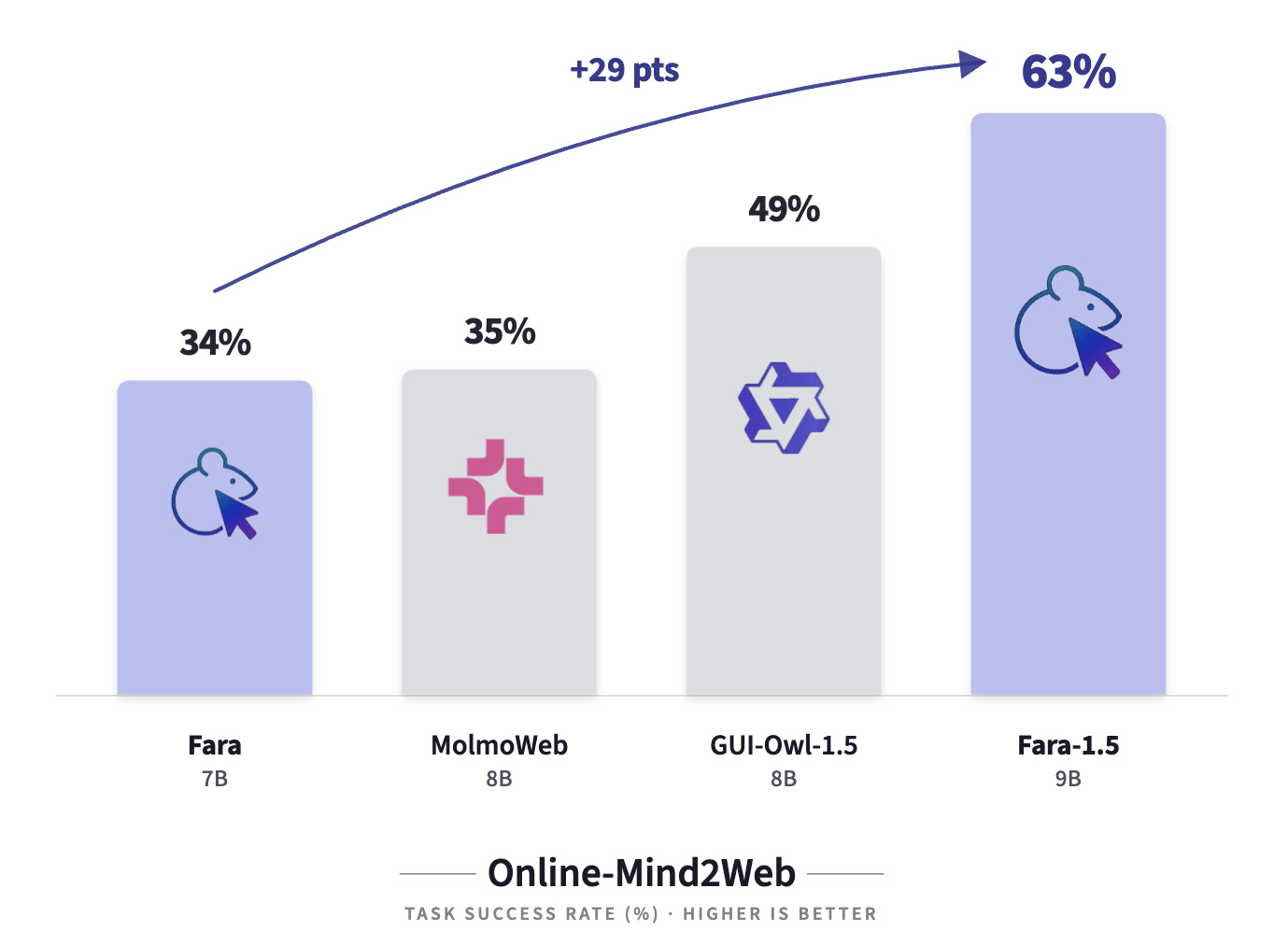
reaches 63.4% on Online-Mind2Web and 86.6% on WebVoyager, a new state of
the art for its size class; Fara1.5-27B achieves 72.3% on Online-Mind2Web,
outperforming much larger proprietary systems. Read the
paper and the
blog post.
- 2026-05-12 — WebTailBench is now a first-class benchmark in this
repo: the loader auto-downloads tasks and rubrics from
microsoft/WebTailBench
(use the refreshed test_v2 split; a V1↔V2 diff is hosted
here),
the Universal Verifier (MMRubricAgent) is the official judge, and the
reproducibility CLI lives in webeval/scripts/webtailbench.py (stand-alone
re-scoring via webeval/scripts/verify_trajectories.py).
- 2026-04-19 — Released CUAVerifierBench,
a human-annotated benchmark for evaluating CUA verifiers (i.e. judges that
score agent trajectories). Two splits —
fara7b_om2w_browserbase (106
Fara-7B Online-Mind2Web/Browserbase trajectories, ~2 reviewers each) and
internal (154 trajectories from a heldout aurora-v2 task suite) —
with per-judge UV-blind / UV-informed labels, Universal Verifier
outputs, and legacy verifier outputs side-by-side. The build script
that produced the dataset lives alongside the data on Hugging Face.
Overview
Fara1.5 is a family of native Computer Use Agents (CUAs) at three scales — Fara1.5-4B, Fara1.5-9B, and Fara1.5-27B — built on Qwen3.5 and trained with supervised finetuning on data from FaraGen1.5, our scalable data pipeline of environments, solvers, and verifiers. Each model sets a new state of the art for its size class on browser-use benchmarks, and Fara1.5-27B outperforms much larger proprietary systems such as OpenAI Operator and Gemini 2.5 Computer Use on Online-Mind2Web.
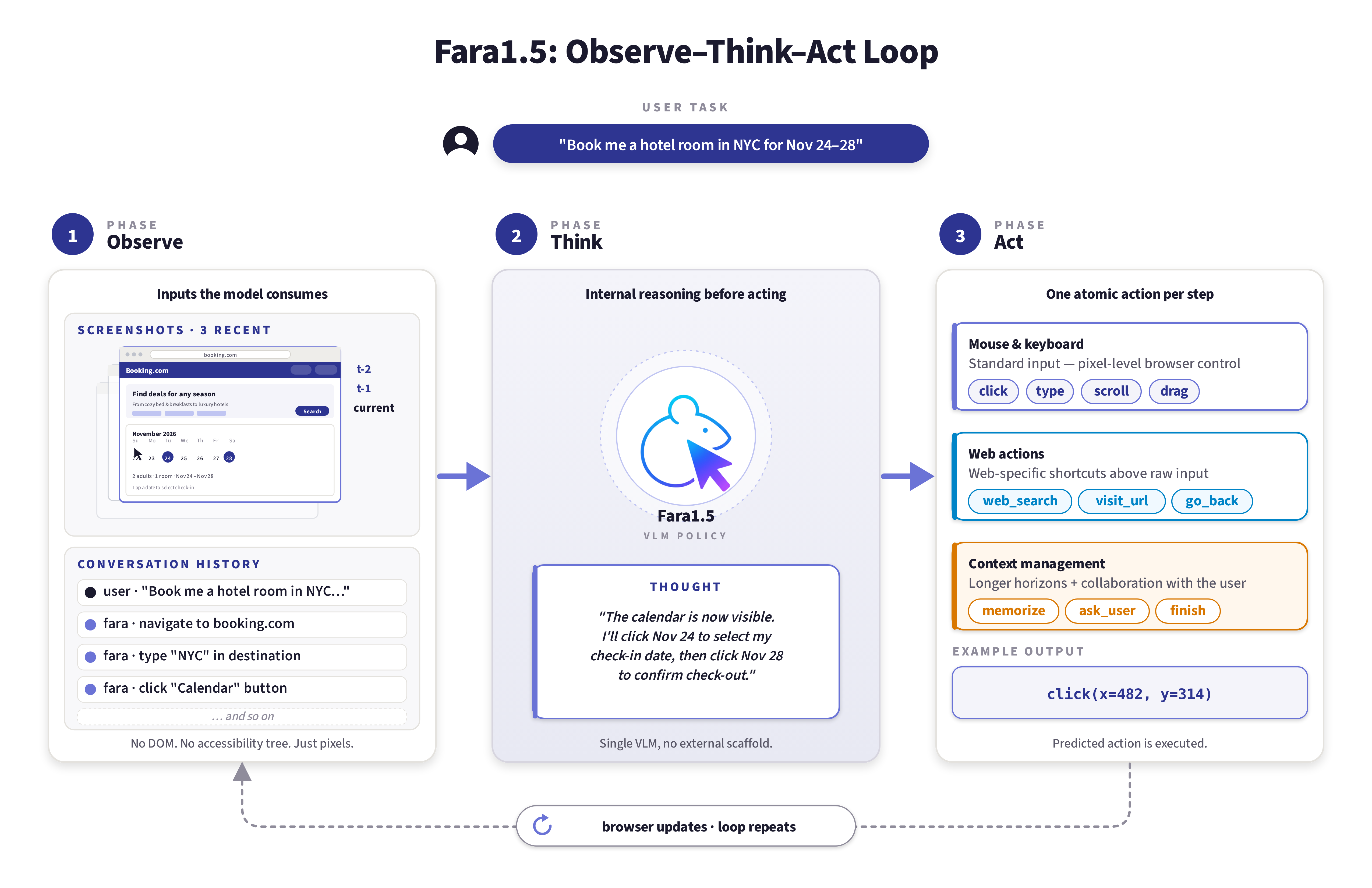
Fara1.5 models operate through an observe-think-act loop: given a screenshot of the browser and the conversation history, the model reasons about the state of the task and outputs an action — mouse and keyboard inputs on directly predicted coordinates, web searches, or context management operations — with no accessibility trees or separate parsing models.
All three models are available on Microsoft Foundry: Fara1.5-4B, Fara1.5-9B, and Fara1.5-27B.
Try Fara1.5-9B as follows (see Installation for detailed instructions):
# 1. Clone repository
git clone https://github.com/microsoft/fara.git
cd fara

# 2. Setup environment
python3 -m venv .venv
source .venv/bin/activate
pip install -e .
playwright install
Deploy Fara1.5-9B from the Microsoft Foundry catalog and put your endpoint in a config JSON (e.g. azure_foundry_config.json):
{
    "model": "Fara1.5-9B",
    "base_url": "https://your-endpoint.inference.ml.azure.com/",
    "api_key": "YOUR_API_KEY_HERE"
}
Then you can iteratively query it with:
fara-cli --task "whats the weather in new york now" --endpoint_config azure_foundry_config.json
To try Fara inside Magentic-UI — a sandboxed browser environment with auditable action logging and user prompts at critical points — follow the instructions in the Magentic-UI repo. You will need a model endpoint as before, but instead of fara-cli you can use Magentic-UI which has a nice UI (see video demos below).
Note: If you're using Windows, we highly recommend using WSL2 (Windows Subsystem for Linux). Please see the Windows instructions in the Installation section.
What Makes Fara1.5 Unique
Unlike traditional chat models that generate text-based responses, Fara1.5 leverages computer interfaces—mouse and keyboard—to perform multi-step tasks on behalf of users. The models:
- Operate visually by perceiving webpages and taking actions like scrolling, typing, and clicking on directly predicted coordinates without accessibility trees or separate parsing models
- Enable efficient deployment thanks to their compact sizes (4B/9B/27B), resulting in reduced latency and improved privacy
- Interact with users: trained with a user simulator on multi-turn rollouts, Fara1.5 can ask for missing information, flag ambiguous tasks, and pause for approval before irreversible actions
- Remain a research preview: safety measures include refusing harmful tasks based on responsible AI policies, prompting users at critical interaction points, and auditable action logging through Magentic-UI's sandboxed browser environment
FaraGen1.5: Scalable Learning Environments
Collecting computer use data from human demonstrations is expensive and slow. FaraGen1.5 is a scalable data pipeline composed of three modular components:
- Environments — open-internet tasks on live websites plus six synthetic FaraEnvs (Mail, Calendar, Stream, ML, Stay, Scheduler): functional UI clones that faithfully simulate domains gated by authentication or requiring irreversible actions, and unlock execution-based, ground-truth verification
- Solvers — a solver harness that can be powered by multiple models, including strong frontier models such as GPT-5.4, paired with a user simulator to enable multi-turn rollouts
- Verifiers — three complementary filters covering task correctness (the Universal Verifier LLM-judge), efficiency (scoring redundant actions), and critical-point adherence / user interaction (missing information, ambiguous tasks, unapproved irreversible actions)
The resulting training mix contains roughly 2M samples: ~60% web trajectories, 12.8% synthetic environments, 12.5% form filling, 8.8% grounding, 4.9% VQA, and 0.8% GUI drag tasks.
Key Capabilities
Fara1.5 can automate everyday web tasks including:
- Searching for information and summarizing results
- Filling out forms and managing accounts
- Booking travel, movie tickets, and restaurant reservations
- Shopping and comparing prices across retailers
- Finding job postings and real estate listings
Each Fara1.5 model sets a new state of the art for its size class. Fara1.5-9B improves over Fara-7B by +29.3 points on Online-Mind2Web, +13.1 points on WebVoyager, and +8.2 points on WebTailBench outcome success:
| Model |
Size |
WebVoyager |
Online-Mind2Web |
WebTailBench v1.5 (Process) |
WebTailBench v1.5 (Outcome) |
| Larger and proprietary agents |
|
|
|
|
|
| o3 SoM |
- |
79.3 |
55.4 |
69.5 |
35.0 |
| GPT-5 SoM |
- |
90.6 |
57.7 |
69.2 |
45.1 |
| Gemini 2.5 Computer Use† |
- |
- |
57.3 |
- |
- |
| OpenAI Operator† |
- |
87.0 |
58.3 |
- |
- |
| Yutori Navigator (n1)† |
- |
- |
64.7 |
- |
- |
| GUI-Owl-1.5† |
32B |
82.0 |
- |
- |
- |
| Holo2† |
30B-A3B |
83.0 |
- |
- |
- |
| Similarly sized agents |
|
|
|
|
|
| Fara-7B |
7B |
73.5 |
34.1 |
48.8 |
24.1 |
| MolmoWeb† |
8B |
78.2 |
35.3 |
- |
- |
| Holo2† |
8B |
80.2 |
- |
- |
- |
| GUI-Owl-1.5† |
8B |
78.1 |
48.6 |
- |
- |
| Fara1.5 family (ours) |
|
|
|
|
|
| Fara1.5-4B |
4B |
80.8 |
57.3 |
60.3 |
27.4 |
| Fara1.5-9B |
9B |
86.6 |
63.4 |
64.5 |
32.3 |
| Fara1.5-27B |
27B |
89.3 |
72.3 |
72.9 |
40.2 |
| FaraGen1.5 Solver (GPT-5.4) |
- |
93.4 |
83.4 |
79.6 |
57.4 |
Table: Task success rate (%) on WebVoyager, Online-Mind2Web, and WebTailBench v1.5. For WebTailBench v1.5 we report both Process Success (correct intermediate steps) and Outcome Success (final task state correct). All Fara1.5 and Fara-7B numbers are averaged over three independent runs. The GPT-5.4-based FaraGen1.5 solver is an upper-bound reference for the SFT-based distillation. † denotes numbers sourced from the model's official release or leaderboard rather than re-run by us.
WebTailBench: Evaluating Real-World Web Tasks
WebTailBench is our evaluation benchmark focusing on 11 real-world task types that are underrepresented or missing in existing benchmarks. The benchmark includes 609 tasks across diverse categories, with the first 8 segments testing single skills or objectives (usually on a single website), and the remaining 3 evaluating more difficult multi-step or cross-site tasks (shopping lists, comparison shopping, and compositional tasks). Tasks and precomputed rubrics are on Hugging Face (use the refreshed test_v2 split), the Universal Verifier (MMRubricAgent) is the official judge, and the reproducibility CLI lives in webeval/scripts/webtailbench.py.
CUAVerifierBench: Evaluating the Verifiers Themselves
While WebTailBench measures agents, CUAVerifierBench measures the judges that score those agents. Each row pairs a Fara agent trajectory (instruction, screenshots, web_surfer log, final answer) with one human reviewer's verdict, plus the verdicts produced by the Universal Verifier (MMRubricAgent) and several legacy verifiers — so researchers can compute verifier–human agreement (Cohen's κ, accuracy, F1) on a fixed corpus and iterate on new judge prompts / architectures against a frozen ground-truth set.
The dataset is exposed as two Hugging Face configs joinable on task_id:
| Config |
Granularity |
Contents |
trajectories |
one row per task |
instruction, screenshots, web_surfer log, verifier outputs, task-level human aggregates |
annotations |
one row per (task, judge) |
per-reviewer outcome / process labels and free-text justifications |
Two splits ship today:
| Split |
Source |
Trajectories |
Annotation rows |
fara7b_om2w_browserbase |
Fara-7B trajectories on Online-Mind2Web tasks executed via Browserbase |
106 |
215 (≈2 reviewers/task; UV-blind and UV-informed stages) |
internal |
Heldout aurora-v2 task suite scored with the same WebSurfer + verifier stack |
154 |
154 (1 reviewer/task; UV-blind only) |
Reviewer identities are anonymized as Judge1 … JudgeN using a single shared map across both splits. The build script that produced the dataset (with full schema + provenance) ships alongside the data on Hugging Face at microsoft/CUAVerifierBench; see the dataset README for the full column list.
from datasets import load_dataset

trajs = load_dataset("microsoft/CUAVerifierBench", "trajectories",
                     split="fara7b_om2w_browserbase")
anns  = load_dataset("microsoft/CUAVerifierBench", "annotations",
                     split="fara7b_om2w_browserbase")
Evaluation Infrastructure
Our evaluation setup leverages:
- Playwright - A cross-browser automation framework that replicates browser environments
- Abstract Web Agent Interface - Allows integration of any model from any source into the evaluation environment
- Fara-Agent Class - Reference implementation for running the Fara models
Note: Fara1.5 is a research preview designed to invite hands-on exploration and feedback from the community. We recommend running it in a sandboxed environment, monitoring its execution, and avoiding sensitive data or high-risk domains.
Installation
Linux
The following instructions are for Linux systems, see the Windows section below for Windows instructions.
Install the package using pip and set up the environment with Playwright:
# 1. Clone repository
git clone https://github.com/microsoft/fara.git
cd fara

# 2. Setup environment
python3 -m venv .venv
source .venv/bin/activate
pip install -e .[vllm]
playwright install
Note: If you plan on hosting with Microsoft Foundry only, you can skip the [vllm] and just do pip install -e .
Windows
For Windows, we highly recommend using WSL2 (Windows Subsystem for Linux) to provide a Linux-like environment. However, if you prefer to run natively on Windows, follow these steps:
# 1. Clone repository
git clone https://github.com/microsoft/fara.git
cd fara

# 2. Setup environment
python3 -m venv .venv
.venv\Scripts\activate
pip install -e .
python3 -m playwright install
Hosting the Model
Recommended: The easiest way to get started is using Microsoft Foundry hosting, which requires no GPU hardware or model downloads. All three Fara1.5 models are available on Foundry.
Microsoft Foundry Hosting
Deploy Fara1.5 models from the Microsoft Foundry catalog (Fara1.5-4B, Fara1.5-9B, Fara1.5-27B) without needing to download weights or manage GPU infrastructure.
Setup:
- Deploy the model on Microsoft Foundry and obtain your endpoint URL and API key
Then create a endpoint configuration JSON file (e.g., azure_foundry_config.json):
{
    "model": "Fara1.5-9B",
    "base_url": "https://your-endpoint.inference.ml.azure.com/",
    "api_key": "YOUR_API_KEY_HERE"
}
- Run the Fara agent:
fara-cli --task "how many pages does wikipedia have" --endpoint_config azure_foundry_config.json [--headful]
Note: you can also specify the endpoint config with the args --base_url [your_base_url] --api_key [your_api_key] --model [your_model_name] instead of using a config JSON file.
Note: If you see an error that the fara-cli command is not found, then try:
python -m fara.run_fara --task "what is the weather in new york now"
That's it! No GPU or model downloads required.
Self-hosting with vLLM
If you have access to GPU resources, you can download the model weights from Hugging Face, self-host Fara models with vLLM, and point fara-cli at the resulting OpenAI-compatible endpoint:
vllm serve <model> --port 5000 --dtype auto
The previous-generation Fara-7B weights remain available on Hugging Face (with GGUF variants for LM Studio / Ollama). Pass --fara-7b to run the Fara-7B agent instead of Fara1.5:
fara-cli --fara-7b --task "how many pages does wikipedia have" --endpoint_config fara7b_config.json
If you didn't use vLLM to host, specify --base_url [your_base_url] --api_key [your_api_key] --model [your_model_name] when running fara-cli. Please ensure that context length is set to at least 15000 tokens and temperature to 0 for best results.
Runs save a full trajectory — per-step screenshots and a data_point.json (task, actions, observations, and outcome) — to the folder passed via --output_folder.
Reproducibility
Instructions to reproduce our benchmark results (WebVoyager, Online-Mind2Web, WebTailBench) with the webeval/ framework — including installation, the per-benchmark CLIs, BrowserBase setup, and result analysis — live in docs/eval_reproducibility.md.
Note: the webeval pipeline documented there produced the previous-generation (Fara-7B) numbers and is being updated for the Fara1.5 evaluation stack.
Citation
If you use Fara1.5 in your research, please use the following BibTeX entry.
@article{fara152026,
  title={Fara1.5: Scalable Learning Environments for Computer Use Agents},
  author={Awadallah, Ahmed and Gupta, Sahil and Lara, Yash and Lu, Yadong and Mozannar, Hussein and Nambi, Akshay and Nussbaum, Zach and Pandya, Yash and Rajeswaran, Aravind and Rosset, Corby and Taymanov, Alexey and do Valle, Luiz and Vineet, Vibhav and Whitehead, Spencer and Zhao, Andrew},
  journal={arXiv:2606.20785},
  year={2026}
}
For the previous generation, Fara-7B:
@article{fara7b2025,
  title={Fara-7B: An Efficient Agentic Model for Computer Use},
  author={Awadallah, Ahmed and Lara, Yash and Magazine, Raghav and Mozannar, Hussein and Nambi, Akshay and Pandya, Yash and Rajeswaran, Aravind and Rosset, Corby and Taymanov, Alexey and Vineet, Vibhav and Whitehead, Spencer and Zhao, Andrew},
  journal={arXiv:2511.19663},
  year={2025}
}









 这是一系列开放权重计算机操作(computer-use)智能体模型——Fara1.5-4B、9B 和 27B,基于 Qwen3.5 构建——它们能像人一样控制鼠标和键盘,替你完成多步骤的网页任务。