WhisperX
Recall.ai - Meeting Transcription API
If you’re looking for a transcription API for meetings, consider checking out Recall.ai's Meeting Transcription API, an API that works with Zoom, Google Meet, Microsoft Teams, and more. Recall.ai diarizes by pulling the speaker data and separate audio streams from the meeting platforms, which means 100% accurate speaker diarization with actual speaker names.





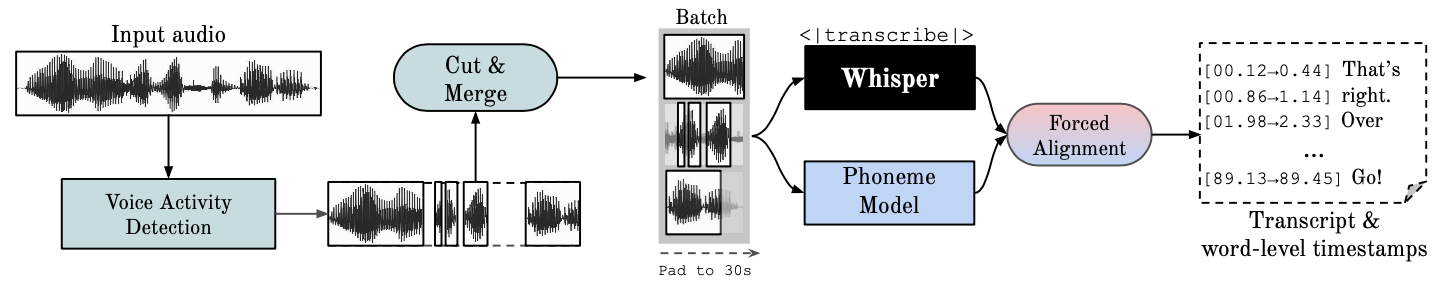
This repository provides fast automatic speech recognition (70x realtime with large-v2) with word-level timestamps and speaker diarization.
- ⚡️ Batched inference for 70x realtime transcription using whisper large-v2
- 🪶 faster-whisper backend, requires <8GB gpu memory for large-v2 with beam_size=5
- 🎯 Accurate word-level timestamps using wav2vec2 alignment
- 👯♂️ Multispeaker ASR using speaker diarization from pyannote-audio (speaker ID labels)
- 🗣️ VAD preprocessing, reduces hallucination & batching with no WER degradation
Whisper is an ASR model developed by OpenAI, trained on a large dataset of diverse audio. Whilst it does produces highly accurate transcriptions, the corresponding timestamps are at the utterance-level, not per word, and can be inaccurate by several seconds. OpenAI's whisper does not natively support batching.
Phoneme-Based ASR A suite of models finetuned to recognise the smallest unit of speech distinguishing one word from another, e.g. the element p in "tap". A popular example model is wav2vec2.0.
Forced Alignment refers to the process by which orthographic transcriptions are aligned to audio recordings to automatically generate phone level segmentation.
Voice Activity Detection (VAD) is the detection of the presence or absence of human speech.
Speaker Diarization is the process of partitioning an audio stream containing human speech into homogeneous segments according to the identity of each speaker.
New🚨
- 1st place at Ego4d transcription challenge 🏆
- WhisperX accepted at INTERSPEECH 2023
- v3 transcript segment-per-sentence: using nltk sent_tokenize for better subtitlting & better diarization
- v3 released, 70x speed-up open-sourced. Using batched whisper with faster-whisper backend!
- v2 released, code cleanup, imports whisper library VAD filtering is now turned on by default, as in the paper.
- Paper drop🎓👨🏫! Please see our ArxiV preprint for benchmarking and details of WhisperX. We also introduce more efficient batch inference resulting in large-v2 with *60-70x REAL TIME speed.
Setup ⚙️
0. CUDA Installation
To use WhisperX with GPU acceleration, install the CUDA toolkit 12.8 before WhisperX. Skip this step if using only the CPU.
1. Simple Installation (Recommended)
The easiest way to install WhisperX is through PyPi:
pip install whisperx
Or if using uvx:
uvx whisperx
2. Advanced Installation Options
These installation methods are for developers or users with specific needs. If you're not sure, stick with the simple installation above.
Option A: Install from GitHub
To install directly from the GitHub repository:
uvx git+https://github.com/m-bain/whisperX.git
Option B: Developer Installation
If you want to modify the code or contribute to the project:
git clone https://github.com/m-bain/whisperX.git
cd whisperX
uv sync --all-extras --dev
Note: The development version may contain experimental features and bugs. Use the stable PyPI release for production environments.
You may also need to install ffmpeg, rust etc. Follow openAI instructions here https://github.com/openai/whisper#setup.
Speaker Diarization
To enable Speaker Diarization, include your Hugging Face access token (read) that you can generate from Here after the --hf_token argument and accept the user agreement for the speaker-diarization-community-1 model.
Usage 💬 (command line)
English
Run whisper on example segment (using default params, whisper small) add --highlight_words True to visualise word timings in the .srt file.
whisperx path/to/audio.wav
Result using WhisperX with forced alignment to wav2vec2.0 large:
https://user-images.githubusercontent.com/36994049/208253969-7e35fe2a-7541-434a-ae91-8e919540555d.mp4
Compare this to original whisper out the box, where many transcriptions are out of sync:
https://user-images.githubusercontent.com/36994049/207743923-b4f0d537-29ae-4be2-b404-bb941db73652.mov
For increased timestamp accuracy, at the cost of higher gpu mem, use bigger models (bigger alignment model not found to be that helpful, see paper) e.g.
whisperx path/to/audio.wav --model large-v2 --align_model WAV2VEC2_ASR_LARGE_LV60K_960H --batch_size 4
To label the transcript with speaker ID's (set number of speakers if known e.g. --min_speakers 2 --max_speakers 2):
whisperx path/to/audio.wav --model large-v2 --diarize --highlight_words True
To run on CPU instead of GPU (and for running on Mac OS X):
whisperx path/to/audio.wav --compute_type int8 --device cpu
Other languages
The phoneme ASR alignment model is language-specific, for tested languages these models are automatically picked from torchaudio pipelines or huggingface.
Just pass in the --language code, and use the whisper --model large.
Currently default models provided for {en, fr, de, es, it} via torchaudio pipelines and many other languages via Hugging Face. Please find the list of currently supported languages under DEFAULT_ALIGN_MODELS_HF on alignment.py. If the detected language is not in this list, you need to find a phoneme-based ASR model from huggingface model hub and test it on your data.
E.g. German
whisperx --model large-v2 --language de path/to/audio.wav
https://user-images.githubusercontent.com/36994049/208298811-e36002ba-3698-4731-97d4-0aebd07e0eb3.mov
See more examples in other languages here.
Python usage 🐍
import whisperx
import gc
from whisperx.diarize import DiarizationPipeline

device = "cuda"
audio_file = "audio.mp3"
batch_size = 16 # reduce if low on GPU mem
compute_type = "float16" # change to "int8" if low on GPU mem (may reduce accuracy)

# 1. Transcribe with original whisper (batched)
model = whisperx.load_model("large-v2", device, compute_type=compute_type)

# save model to local path (optional)
# model_dir = "/path/"
# model = whisperx.load_model("large-v2", device, compute_type=compute_type, download_root=model_dir)

audio = whisperx.load_audio(audio_file)
result = model.transcribe(audio, batch_size=batch_size)
print(result["segments"]) # before alignment

# delete model if low on GPU resources
# import gc; import torch; gc.collect(); torch.cuda.empty_cache(); del model

# 2. Align whisper output
model_a, metadata = whisperx.load_align_model(language_code=result["language"], device=device)
result = whisperx.align(result["segments"], model_a, metadata, audio, device, return_char_alignments=False)

print(result["segments"]) # after alignment

# delete model if low on GPU resources
# import gc; import torch; gc.collect(); torch.cuda.empty_cache(); del model_a

# 3. Assign speaker labels
diarize_model = DiarizationPipeline(token=YOUR_HF_TOKEN, device=device)

# add min/max number of speakers if known
diarize_segments = diarize_model(audio)
# diarize_model(audio, min_speakers=min_speakers, max_speakers=max_speakers)

result = whisperx.assign_word_speakers(diarize_segments, result)
print(diarize_segments)
print(result["segments"]) # segments are now assigned speaker IDs
Demos 🚀



If you don't have access to your own GPUs, use the links above to try out WhisperX.
Technical Details 👷♂️
For specific details on the batching and alignment, the effect of VAD, as well as the chosen alignment model, see the preprint paper.
To reduce GPU memory requirements, try any of the following (2. & 3. can affect quality):
- reduce batch size, e.g.
--batch_size 4
- use a smaller ASR model
--model base
- Use lighter compute type
--compute_type int8
Transcription differences from openai's whisper:
- Transcription without timestamps. To enable single pass batching, whisper inference is performed
--without_timestamps True, this ensures 1 forward pass per sample in the batch. However, this can cause discrepancies the default whisper output.
- VAD-based segment transcription, unlike the buffered transcription of openai's. In the WhisperX paper we show this reduces WER, and enables accurate batched inference
--condition_on_prev_text is set to False by default (reduces hallucination)
Limitations ⚠️
- Transcript words which do not contain characters in the alignment models dictionary e.g. "2014." or "£13.60" cannot be aligned and therefore are not given a timing.
- Overlapping speech is not handled particularly well by whisper nor whisperx
- Diarization is far from perfect
- Language specific wav2vec2 model is needed
Contribute 🧑🏫
If you are multilingual, a major way you can contribute to this project is to find phoneme models on huggingface (or train your own) and test them on speech for the target language. If the results look good send a pull request and some examples showing its success.
Bug finding and pull requests are also highly appreciated to keep this project going, since it's already diverging from the original research scope.
TODO 🗓
Multilingual init
Automatic align model selection based on language detection
Python usage
Incorporating speaker diarization
Model flush, for low gpu mem resources
Faster-whisper backend
Add max-line etc. see (openai's whisper utils.py)
Sentence-level segments (nltk toolbox)
Improve alignment logic
update examples with diarization and word highlighting
Subtitle .ass output <- bring this back (removed in v3)
Add benchmarking code (TEDLIUM for spd/WER & word segmentation)
Allow silero-vad as alternative VAD option
Improve diarization (word level). Harder than first thought...
Contact [email protected] for queries.

Acknowledgements 🙏
This work, and my PhD, is supported by the VGG (Visual Geometry Group) and the University of Oxford.
Of course, this is builds on openAI's whisper.
Borrows important alignment code from PyTorch tutorial on forced alignment
And uses the wonderful pyannote VAD / Diarization https://github.com/pyannote/pyannote-audio
Valuable VAD & Diarization Models from:
Great backend from faster-whisper and CTranslate2
Those who have supported this work financially 🙏
Finally, thanks to the OS contributors of this project, keeping it going and identifying bugs.
Citation
If you use this in your research, please cite the paper:
@article{bain2022whisperx,
  title={WhisperX: Time-Accurate Speech Transcription of Long-Form Audio},
  author={Bain, Max and Huh, Jaesung and Han, Tengda and Zisserman, Andrew},
  journal={INTERSPEECH 2023},
  year={2023}
}

 WhisperX 是一个开源语音识别工具,可以把音频转写成文字,并提供精确到每个词的时间戳,还可以选择区分不同的说话人。它基于 OpenAI 的 Whisper 构建,源自牛津大学的博士研究项目。