


Что это?
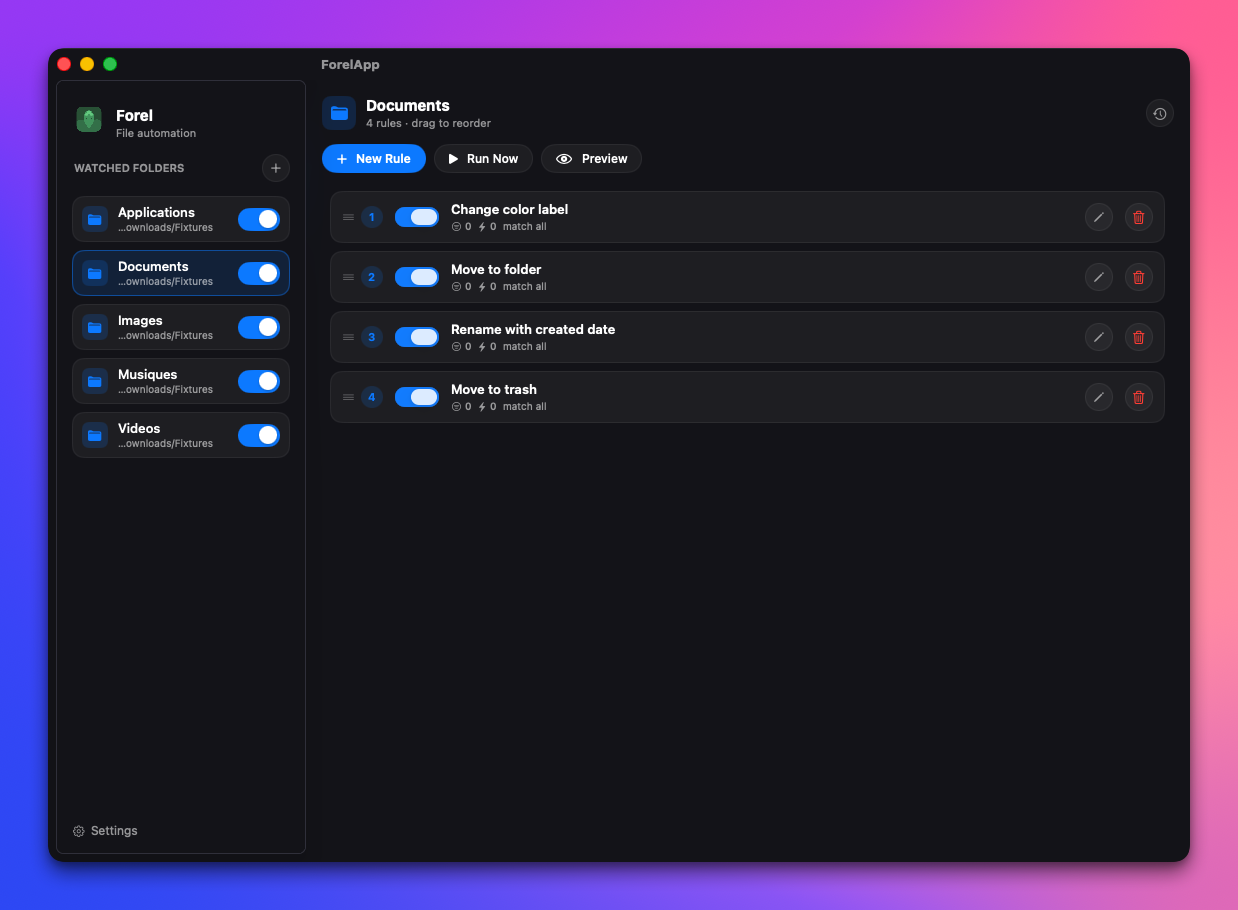
 Forel — открытое приложение для macOS, ориентированное на приватность и автоматизацию работы с файлами: оно следит за папками и автоматически перемещает, переименовывает, помечает тегами или цветными метками файлы по заданным вами правилам — это созданная сообществом альтернатива платному приложению Hazel.
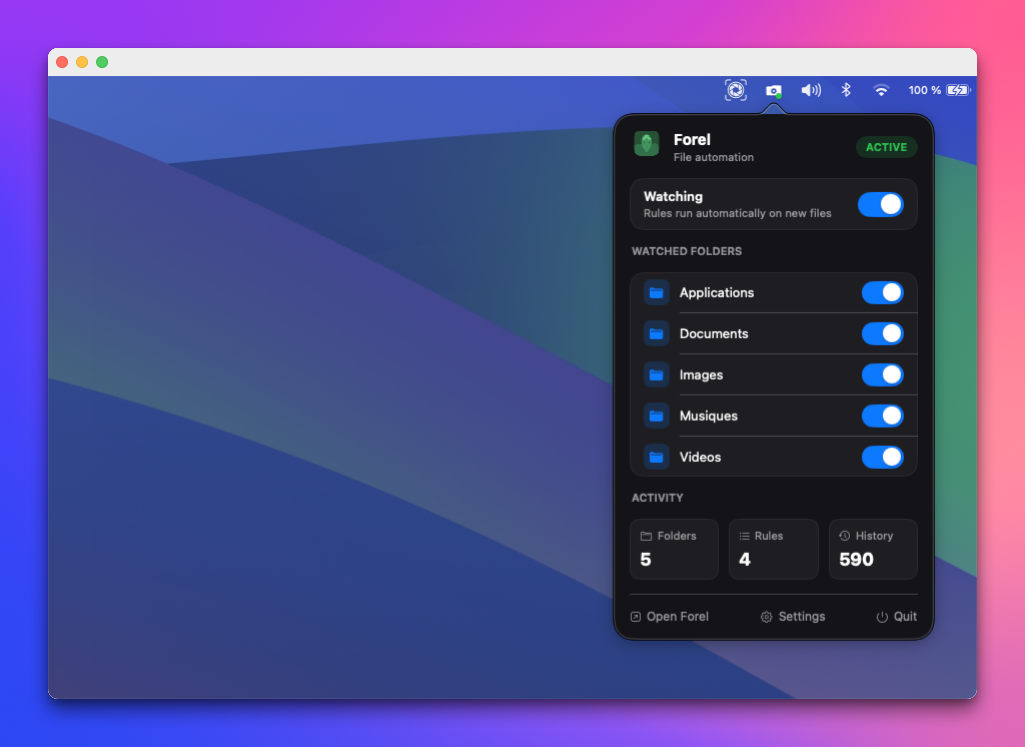
Forel — открытое приложение для macOS, ориентированное на приватность и автоматизацию работы с файлами: оно следит за папками и автоматически перемещает, переименовывает, помечает тегами или цветными метками файлы по заданным вами правилам — это созданная сообществом альтернатива платному приложению Hazel.Forel — это фоновая служба или окно, которое держишь открытым?Это нативное приложение в строке меню на SwiftUI/AppKit, которое тихо работает в фоне. Включать и выключать правила можно прямо из строки меню, вообще не открывая главное окно.
Это нативное приложение в строке меню на SwiftUI/AppKit, которое тихо работает в фоне. Включать и выключать правила можно прямо из строки меню, вообще не открывая главное окно.Нужно ли что-то помимо самой macOS, чтобы им пользоваться?Для работы приложения не нужны ни аккаунты, ни API-ключи, ни облачные сервисы. Для сборки из исходников требуются Swift 6 и macOS 13 (Ventura) или новее.
Для работы приложения не нужны ни аккаунты, ни API-ключи, ни облачные сервисы. Для сборки из исходников требуются Swift 6 и macOS 13 (Ventura) или новее.Может ли он при сопоставлении искать внутри файлов любого типа?Поиск по содержимому читает текст локально из многих форматов (PDF, Word, Excel, iWork, изображения через OCR на устройстве), но у каждого есть ограничения по размеру/числу страниц, а часть старых форматов (.xls, .ppt, .epub) обрабатывается через macOS Spotlight, который поддерживает только поиск по вхождению и работает, лишь если файл уже проиндексирован.
Поиск по содержимому читает текст локально из многих форматов (PDF, Word, Excel, iWork, изображения через OCR на устройстве), но у каждого есть ограничения по размеру/числу страниц, а часть старых форматов (.xls, .ppt, .epub) обрабатывается через macOS Spotlight, который поддерживает только поиск по вхождению и работает, лишь если файл уже проиндексирован.Покидают ли мои файловые данные Mac?Нет — Forel создан работать целиком на устройстве, без аккаунта и телеметрии, и всё сканирование содержимого, включая OCR, происходит локально.
Нет — Forel создан работать целиком на устройстве, без аккаунта и телеметрии, и всё сканирование содержимого, включая OCR, происходит локально.Есть ли подвох в лицензии GPL?Исходный код — под GPL-3.0-or-later, его можно свободно использовать и форкать, но имя Forel, логотип и внешний вид явно исключены и защищены отдельно от лицензии на код.
Исходный код — под GPL-3.0-or-later, его можно свободно использовать и форкать, но имя Forel, логотип и внешний вид явно исключены и защищены отдельно от лицензии на код.Какие действия правило может выполнять с файлом?Правила могут перемещать, копировать, переименовывать, помечать тегами, добавлять цветную метку, отправлять в корзину, удалять, распаковывать или запускать пользовательский сценарий над найденными файлами, с нативными уведомлениями при срабатывании.
Правила могут перемещать, копировать, переименовывать, помечать тегами, добавлять цветную метку, отправлять в корзину, удалять, распаковывать или запускать пользовательский сценарий над найденными файлами, с нативными уведомлениями при срабатывании.Почему Forel, а не Hazel?Hazel — известный инструмент автоматизации для macOS, но он закрытый и платный; Forel предлагает похожую автоматизацию папок по правилам, оставаясь бесплатным, открытым (GPLv3) и полностью локальным, без телеметрии.
Hazel — известный инструмент автоматизации для macOS, но он закрытый и платный; Forel предлагает похожую автоматизацию папок по правилам, оставаясь бесплатным, открытым (GPLv3) и полностью локальным, без телеметрии.Как Forel замечает новые файлы в отслеживаемой папке?Он использует нативную обёртку вокруг macOS FSEvents для мониторинга папок с низкой задержкой и бережным расходом батареи, так что правила срабатывают в реальном времени даже при закрытом окне.
Он использует нативную обёртку вокруг macOS FSEvents для мониторинга папок с низкой задержкой и бережным расходом батареи, так что правила срабатывают в реальном времени даже при закрытом окне.Чего в Forel ещё не хватает и что запланировано?В дорожной карте значатся незавершённые пункты вроде экспорта/импорта правил, переключения показа скрытых расширений файлов, действий сжатия/синхронизации/загрузки и AI-функций, тогда как ключевые вещи — движок правил, действия, хранение в SQLite и автообновления — уже сделаны.
В дорожной карте значатся незавершённые пункты вроде экспорта/импорта правил, переключения показа скрытых расширений файлов, действий сжатия/синхронизации/загрузки и AI-функций, тогда как ключевые вещи — движок правил, действия, хранение в SQLite и автообновления — уже сделаны.What are similar projects?dimble, tendedero, MacPacker, OpenYoink, FinderSearch, gyotaku, macos-sysdata, rooms
dimble, tendedero, MacPacker, OpenYoink, FinderSearch, gyotaku, macos-sysdata, roomsWhich topics is it in?open-source-alternative, file-manager, menu-bar, offline-first, native, ocr, document-processing, macos-app, homebrew, workflow-automation, swift, pdf
open-source-alternative, file-manager, menu-bar, offline-first, native, ocr, document-processing, macos-app, homebrew, workflow-automation, swift, pdf