


ffmpeg-python README

The project's README from github.com/kkroening/ffmpeg-python. As one markdown file: README.md.

ffmpeg-python: Python bindings for FFmpeg

CI

ffmpeg-python logo

Overview

There are tons of Python FFmpeg wrappers out there but they seem to lack complex filter support. ffmpeg-python works well for simple as well as complex signal graphs.

Quickstart

Flip a video horizontally:

import ffmpeg
stream = ffmpeg.input('input.mp4')
stream = ffmpeg.hflip(stream)
stream = ffmpeg.output(stream, 'output.mp4')
ffmpeg.run(stream)

Or if you prefer a fluent interface:

import ffmpeg
(
    ffmpeg
    .input('input.mp4')
    .hflip()
    .output('output.mp4')
    .run()
)

API reference

Complex filter graphs

FFmpeg is extremely powerful, but its command-line interface gets really complicated rather quickly - especially when working with signal graphs and doing anything more than trivial.

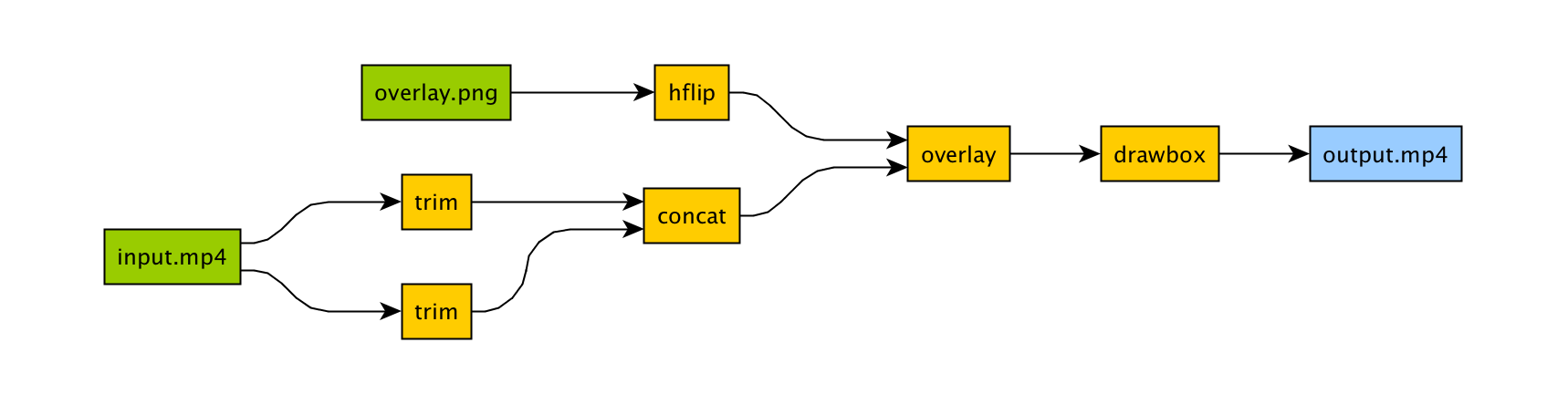
Take for example a signal graph that looks like this:

Signal graph

The corresponding command-line arguments are pretty gnarly:

ffmpeg -i input.mp4 -i overlay.png -filter_complex "[0]trim=start_frame=10:end_frame=20[v0];\
    [0]trim=start_frame=30:end_frame=40[v1];[v0][v1]concat=n=2[v2];[1]hflip[v3];\
    [v2][v3]overlay=eof_action=repeat[v4];[v4]drawbox=50:50:120:120:red:t=5[v5]"\
    -map [v5] output.mp4

Maybe this looks great to you, but if you're not an FFmpeg command-line expert, it probably looks alien.

If you're like me and find Python to be powerful and readable, it's easier with ffmpeg-python:

import ffmpeg

in_file = ffmpeg.input('input.mp4')
overlay_file = ffmpeg.input('overlay.png')
(
    ffmpeg
    .concat(
        in_file.trim(start_frame=10, end_frame=20),
        in_file.trim(start_frame=30, end_frame=40),
    )
    .overlay(overlay_file.hflip())
    .drawbox(50, 50, 120, 120, color='red', thickness=5)
    .output('out.mp4')
    .run()
)

ffmpeg-python takes care of running ffmpeg with the command-line arguments that correspond to the above filter diagram, in familiar Python terms.

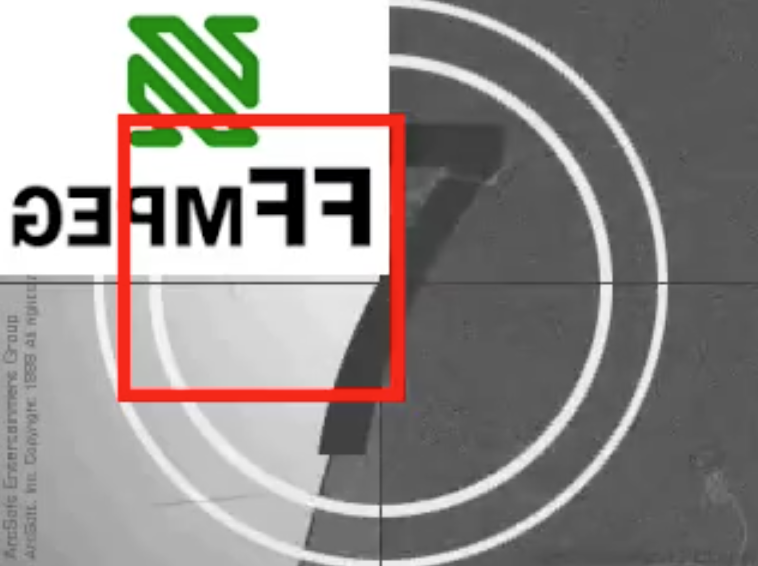
Screenshot

Real-world signal graphs can get a heck of a lot more complex, but ffmpeg-python handles arbitrarily large (directed-acyclic) signal graphs.

Installation

Installing ffmpeg-python

The latest version of ffmpeg-python can be acquired via a typical pip install:

pip install ffmpeg-python

Or the source can be cloned and installed from locally:

git clone [email protected]:kkroening/ffmpeg-python.git
pip install -e ./ffmpeg-python

Note: ffmpeg-python makes no attempt to download/install FFmpeg, as ffmpeg-python is merely a pure-Python wrapper - whereas FFmpeg installation is platform-dependent/environment-specific, and is thus the responsibility of the user, as described below.

Installing FFmpeg

Before using ffmpeg-python, FFmpeg must be installed and accessible via the $PATH environment variable.

There are a variety of ways to install FFmpeg, such as the official download links, or using your package manager of choice (e.g. sudo apt install ffmpeg on Debian/Ubuntu, brew install ffmpeg on OS X, etc.).

Regardless of how FFmpeg is installed, you can check if your environment path is set correctly by running the ffmpeg command from the terminal, in which case the version information should appear, as in the following example (truncated for brevity):

$ ffmpeg
ffmpeg version 4.2.4-1ubuntu0.1 Copyright (c) 2000-2020 the FFmpeg developers
  built with gcc 9 (Ubuntu 9.3.0-10ubuntu2)

Note: The actual version information displayed here may vary from one system to another; but if a message such as ffmpeg: command not found appears instead of the version information, FFmpeg is not properly installed.

Examples

When in doubt, take a look at the examples to see if there's something that's close to whatever you're trying to do.

Here are a few:

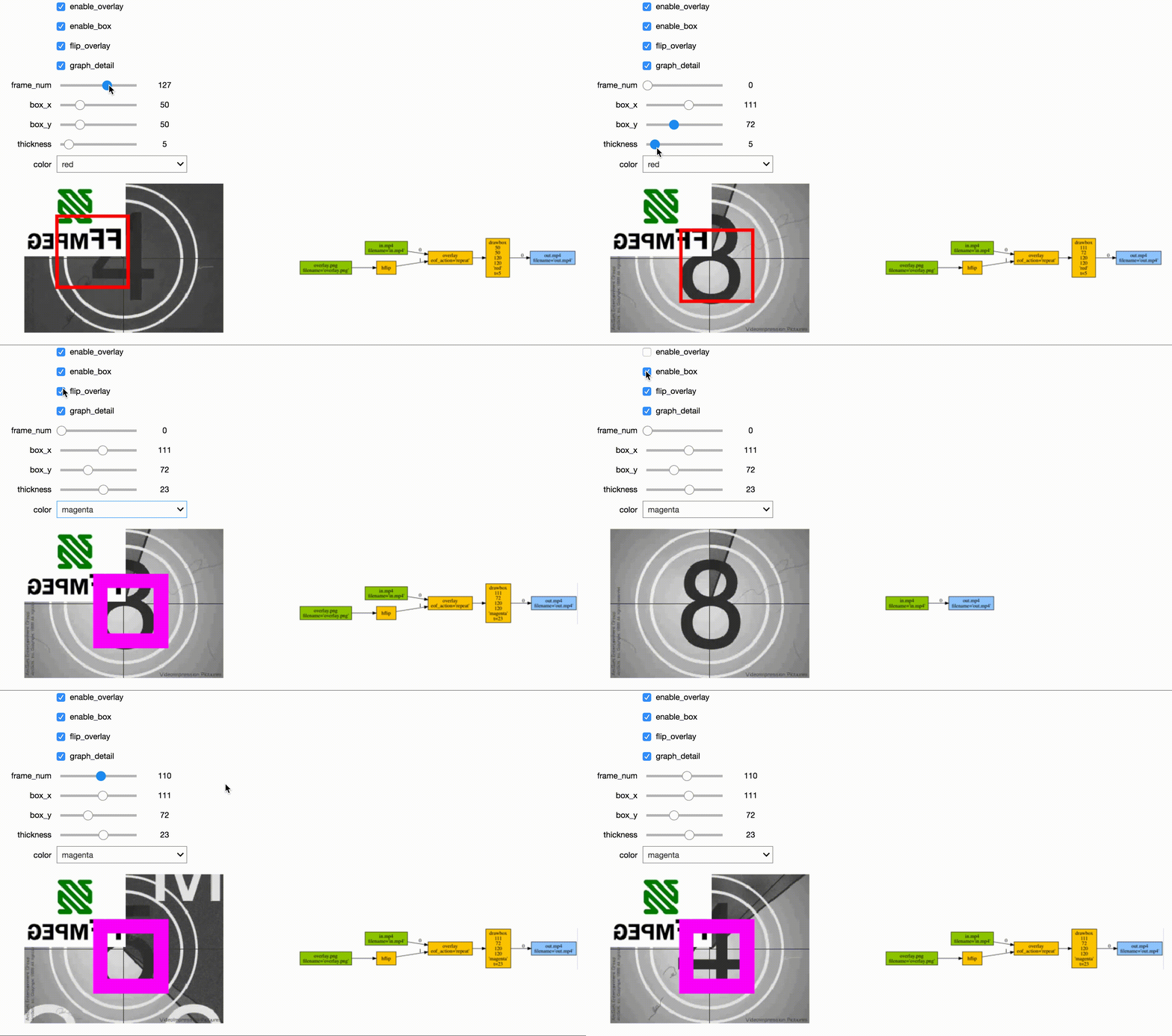
jupyter demo deep dream streaming

See the Examples README for additional examples.

Custom Filters

Don't see the filter you're looking for? While ffmpeg-python includes shorthand notation for some of the most commonly used filters (such as concat), all filters can be referenced via the .filter operator:

stream = ffmpeg.input('dummy.mp4')
stream = ffmpeg.filter(stream, 'fps', fps=25, round='up')
stream = ffmpeg.output(stream, 'dummy2.mp4')
ffmpeg.run(stream)

Or fluently:

(
    ffmpeg
    .input('dummy.mp4')
    .filter('fps', fps=25, round='up')
    .output('dummy2.mp4')
    .run()
)

Special option names:

Arguments with special names such as -qscale:v (variable bitrate), -b:v (constant bitrate), etc. can be specified as a keyword-args dictionary as follows:

(
    ffmpeg
    .input('in.mp4')
    .output('out.mp4', **{'qscale:v': 3})
    .run()
)

Multiple inputs:

Filters that take multiple input streams can be used by passing the input streams as an array to ffmpeg.filter:

main = ffmpeg.input('main.mp4')
logo = ffmpeg.input('logo.png')
(
    ffmpeg
    .filter([main, logo], 'overlay', 10, 10)
    .output('out.mp4')
    .run()
)

Multiple outputs:

Filters that produce multiple outputs can be used with .filter_multi_output:

split = (
    ffmpeg
    .input('in.mp4')
    .filter_multi_output('split')  # or `.split()`
)
(
    ffmpeg
    .concat(split[0], split[1].reverse())
    .output('out.mp4')
    .run()
)

(In this particular case, .split() is the equivalent shorthand, but the general approach works for other multi-output filters)

String expressions:

Expressions to be interpreted by ffmpeg can be included as string parameters and reference any special ffmpeg variable names:

(
    ffmpeg
    .input('in.mp4')
    .filter('crop', 'in_w-2*10', 'in_h-2*20')
    .input('out.mp4')
)

When in doubt, refer to the existing filters, examples, and/or the official ffmpeg documentation.

Frequently asked questions

Why do I get an import/attribute/etc. error from import ffmpeg?

Make sure you ran pip install ffmpeg-python and not pip install ffmpeg (wrong) or pip install python-ffmpeg (also wrong).

Why did my audio stream get dropped?

Some ffmpeg filters drop audio streams, and care must be taken to preserve the audio in the final output. The .audio and .video operators can be used to reference the audio/video portions of a stream so that they can be processed separately and then re-combined later in the pipeline.

This dilemma is intrinsic to ffmpeg, and ffmpeg-python tries to stay out of the way while users may refer to the official ffmpeg documentation as to why certain filters drop audio.

As usual, take a look at the examples (Audio/video pipeline in particular).

How can I find out the used command line arguments?

You can run stream.get_args() before stream.run() to retrieve the command line arguments that will be passed to ffmpeg. You can also run stream.compile() that also includes the ffmpeg executable as the first argument.

How do I do XYZ?

Take a look at each of the links in the Additional Resources section at the end of this README. If you look everywhere and can't find what you're looking for and have a question that may be relevant to other users, you may open an issue asking how to do it, while providing a thorough explanation of what you're trying to do and what you've tried so far.

Issues not directly related to ffmpeg-python or issues asking others to write your code for you or how to do the work of solving a complex signal processing problem for you that's not relevant to other users will be closed.

That said, we hope to continue improving our documentation and provide a community of support for people using ffmpeg-python to do cool and exciting things.

Contributing

ffmpeg-python logo

One of the best things you can do to help make ffmpeg-python better is to answer open questions in the issue tracker. The questions that are answered will be tagged and incorporated into the documentation, examples, and other learning resources.

If you notice things that could be better in the documentation or overall development experience, please say so in the issue tracker. And of course, feel free to report any bugs or submit feature requests.

Pull requests are welcome as well, but it wouldn't hurt to touch base in the issue tracker or hop on the Matrix chat channel first.

Anyone who fixes any of the open bugs or implements requested enhancements is a hero, but changes should include passing tests.

Running tests

git clone [email protected]:kkroening/ffmpeg-python.git
cd ffmpeg-python
virtualenv venv
. venv/bin/activate  # (OS X / Linux)
venv\bin\activate    # (Windows)
pip install -e .[dev]
pytest

Special thanks

Additional Resources

ffmpeg-python (kkroening/ffmpeg-python)

Searching Database…

Что это такое?ffmpeg-python — это написанная на чистом Python обёртка над утилитой командной строки FFmpeg, которая позволяет собирать конвейеры FFmpeg, в том числе сложные графы фильтров, с помощью понятного Python-кода вместо сырых аргументов командной строки.
Это полная замена FFmpeg или просто обёртка над командной строкой?Это тонкая Python-обёртка: она переводит ваш граф фильтров в аргументы командной строки FFmpeg и запускает для вас исполняемый файл ffmpeg. Никакие функции FFmpeg сама библиотека не переписывает.
Как это установить и начать собирать конвейер?Установите командой pip install ffmpeg-python (или клонируйте репозиторий и установите локально), а затем составляйте цепочки вызовов вида ffmpeg.input(...).output(...).run() или используйте текучий интерфейс .filter(), чтобы описать конвейер.
Нужно ли устанавливать FFmpeg отдельно?Да, исполняемый файл FFmpeg должен быть уже установлен и доступен в вашем $PATH (например, через apt или brew). ffmpeg-python сам FFmpeg не скачивает и не включает в себя.
Почему пропадает звук, когда я запускаю конвейер с фильтрами?Некоторые фильтры FFmpeg полностью отбрасывают аудиодорожку, поэтому нужно явно обращаться к .audio и .video, чтобы обработать их и затем снова объединить в выходном файле. Это особенность самого FFmpeg, а не то, что ffmpeg-python может полностью скрыть.
Чем это отличается от других Python-обёрток для FFmpeg?Большинство обёрток для FFmpeg покрывают только простые команды, а ffmpeg-python явно поддерживает направленные ациклические графы сигналов любого размера, поэтому сложные конвейеры с несколькими фильтрами и несколькими входами и выходами остаются читаемыми на Python.
Можно ли с его помощью получать кадры видео в numpy или Jupyter?Да: примеры в README включают преобразование видео в массив numpy, редактор потоков для JupyterLab/Notebook и чтение сырого аудио PCM через канал для дальнейшей обработки.
Что делать, если нужного фильтра нет в виде готового метода?Любой фильтр FFmpeg можно вызвать общим способом через оператор .filter() (или текучим интерфейсом), а особые имена опций, например -b:v, можно передавать как именованные аргументы.
Как посмотреть точную команду, которую выполнит FFmpeg?Вызовите stream.getargs(), чтобы увидеть список аргументов, или stream.compile(), чтобы увидеть полную команду вместе с исполняемым файлом ffmpeg, до вызова stream.run().
Creator
kkroening
Size
4.2 MB
Stars
11K
Updated
CommitJul 11
Age
9y
Commits · 90 Days
