JSON Editor





JSON Editor is a web-based tool to view, edit, format, and validate JSON. It has various modes such as a tree editor, a code editor, and a plain text editor. The editor can be used as a component in your own web application. It can be loaded as CommonJS module, AMD module, or as a regular javascript file.
The library was originally developed as core component of the popular web application https://jsoneditoronline.org and has been open sourced since then.
Supported browsers: Chrome, Firefox, Safari, Edge.

Continuous integration tests are run on GitHub Actions, and LambdaTest is used to test on all major browsers.

Thanks, GitHub Actions and LambdaTest for the generous support for this open source project!
Successor: svelte-jsoneditor
This library jsoneditor has a successor: svelte-jsoneditor. The new editor is not a one-to-one replacement, so there may be reasons to stick with jsoneditor.
The main differences between the two are described here.
Features
JSONEditor has various modes, with the following features.
Tree mode
- Change, add, move, remove, and duplicate fields and values.
- Sort arrays and objects.
- Transform JSON using JMESPath queries.
- Colorized code.
- Color picker.
- Search & highlight text in the tree view.
- Undo and redo all actions.
- JSON schema validation (powered by ajv).
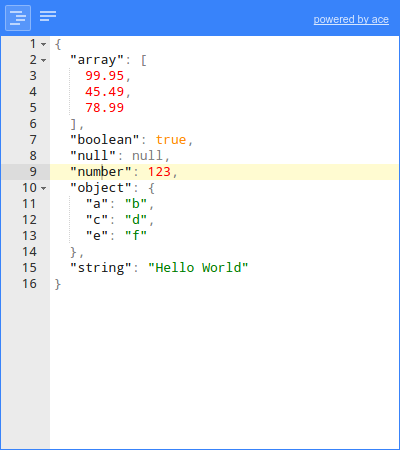
Code mode
- Colorized code (powered by Ace).
- Inspect JSON (powered by Ace).
- Format and compact JSON.
- Repair JSON.
- JSON schema validation (powered by ajv).
Text mode
- Format and compact JSON.
- Repair JSON.
- JSON schema validation (powered by ajv).
Preview mode
- Handle large JSON documents up to 500 MiB.
- Transform JSON using JMESPath queries.
- Format and compact JSON.
- Repair JSON.
- JSON schema validation (powered by ajv).
Documentation
Install
with npm (recommended):
npm install jsoneditor
Alternatively, you can use another JavaScript package manager like https://yarnpkg.com/, or a CDN such as https://cdnjs.com/ or https://www.jsdelivr.com/.
Use
Note that in the following example, you'll have to change the urls jsoneditor/dist/jsoneditor.min.js and jsoneditor/dist/jsoneditor.min.css to match the place where you've downloaded the library, or fill in the URL of the CDN you're using.
<!DOCTYPE HTML>
<html lang="en">
<head>
    <!-- when using the mode "code", it's important to specify charset utf-8 -->
    <meta charset="utf-8">

    <link href="jsoneditor/dist/jsoneditor.min.css" rel="stylesheet" type="text/css">
    <script src="jsoneditor/dist/jsoneditor.min.js"></script>
</head>
<body>
    <div id="jsoneditor" style="width: 400px; height: 400px;"></div>

    <script>
        // create the editor
        const container = document.getElementById("jsoneditor")
        const options = {}
        const editor = new JSONEditor(container, options)

        // set json
        const initialJson = {
            "Array": [1, 2, 3],
            "Boolean": true,
            "Null": null,
            "Number": 123,
            "Object": {"a": "b", "c": "d"},
            "String": "Hello World"
        }
        editor.set(initialJson)

        // get json
        const updatedJson = editor.get()
    </script>
</body>
</html>
Build
The code of the JSON Editor is located in the folder ./src. To build
jsoneditor:
Install dependencies:
npm install
Build JSON Editor:
npm run build
This will generate the files ./jsoneditor.js, ./jsoneditor.css, and
minified versions in the dist of the project.
To automatically build when a source file has changed:
npm start
This will update ./jsoneditor.js and ./jsoneditor.css in the dist folder
on every change, but it will NOT update the minified versions as that's
an expensive operation.
Test
Run unit tests:
npm test
Run code linting (JavaScript Standard Style):
npm run lint
License
jsoneditor is released as open source under the permissive the Apache 2.0 license.
If you are using jsoneditor commercially, there is a social (but no legal) expectation that you help fund its maintenance. Start here.

 一个在浏览器里直接查看、编辑、格式化和校验 JSON 的网页工具,不用再去硬啃原始文本。