






12.3K ·GitHub
Что это такое?
 Веб-инструмент, чтобы смотреть, редактировать, форматировать и проверять JSON прямо в браузере, а не возиться с сырым текстом.
Веб-инструмент, чтобы смотреть, редактировать, форматировать и проверять JSON прямо в браузере, а не возиться с сырым текстом.Это отдельное приложение или библиотека, которую я встраиваю в своё веб-приложение?Это компонент для вашего веб-приложения, а не готовый сервис: подключается как модуль CommonJS, модуль AMD или обычный файл JavaScript.
Это компонент для вашего веб-приложения, а не готовый сервис: подключается как модуль CommonJS, модуль AMD или обычный файл JavaScript.Как добавить его на веб-страницу?Подключите на странице собранные файлы jsoneditor.min.js и jsoneditor.min.css из папки dist или укажите ссылки на копии с CDN.
Подключите на странице собранные файлы jsoneditor.min.js и jsoneditor.min.css из папки dist или укажите ссылки на копии с CDN.Нужно ли мне отдельно подключать другие библиотеки?Ничего подключать самому не нужно: Ace (редактор кода), ajv (проверка по схеме) и jsonrepair идут в комплекте как npm-зависимости, так что двух собранных файлов достаточно.
Ничего подключать самому не нужно: Ace (редактор кода), ajv (проверка по схеме) и jsonrepair идут в комплекте как npm-зависимости, так что двух собранных файлов достаточно.Будет ли он работать в любом браузере?Он рассчитан на браузер: официально поддерживаются Chrome, Firefox, Safari и Edge.
Он рассчитан на браузер: официально поддерживаются Chrome, Firefox, Safari и Edge.Можно ли бесплатно использовать его в коммерческих проектах?Да, это бесплатный проект с открытым кодом под разрешительной лицензией Apache 2.0; коммерческие пользователи по негласной договорённости, а не по закону, могут поддержать его развитие финансово.
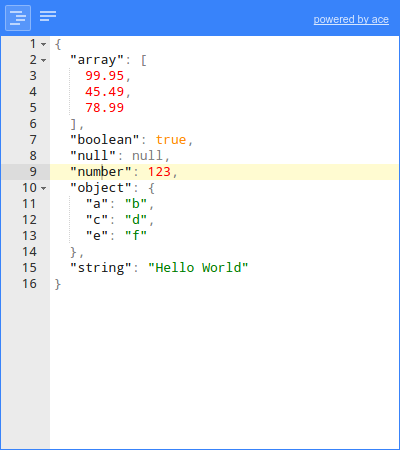
Да, это бесплатный проект с открытым кодом под разрешительной лицензией Apache 2.0; коммерческие пользователи по негласной договорённости, а не по закону, могут поддержать его развитие финансово.Какие режимы редактирования он предлагает?Три: редактор в виде дерева, где по структурированным данным можно кликать, редактор кода на основе Ace для работы с текстом и простой текстовый редактор.
Три: редактор в виде дерева, где по структурированным данным можно кликать, редактор кода на основе Ace для работы с текстом и простой текстовый редактор.Кроме редактирования, что ещё он умеет делать с моим JSON?Проверяет соответствие JSON Schema через встроенную ajv, чинит сломанный JSON с помощью jsonrepair и поддерживает запросы JMESPath через jmespath.
Проверяет соответствие JSON Schema через встроенную ajv, чинит сломанный JSON с помощью jsonrepair и поддерживает запросы JMESPath через jmespath.Откуда взялся этот проект?Он начинался как основной компонент популярного веб-приложения и был оттуда выложен в открытый доступ; репозиторий на GitHub ведёт историю с 2012 года.
Он начинался как основной компонент популярного веб-приложения и был оттуда выложен в открытый доступ; репозиторий на GitHub ведёт историю с 2012 года.What are similar projects?ace, editor.md, codemirror5, twinkleplop, monaco-editor, trix, validator.js, editor.js
ace, editor.md, codemirror5, twinkleplop, monaco-editor, trix, validator.js, editor.jsWhich topics is it in?commonjs, watch, code-editor, validation, amd, syntax-highlighting, editor, javascript-library, json, browser, web-app, web-development
commonjs, watch, code-editor, validation, amd, syntax-highlighting, editor, javascript-library, json, browser, web-app, web-development