




10.4K ·GitHub
What is this?
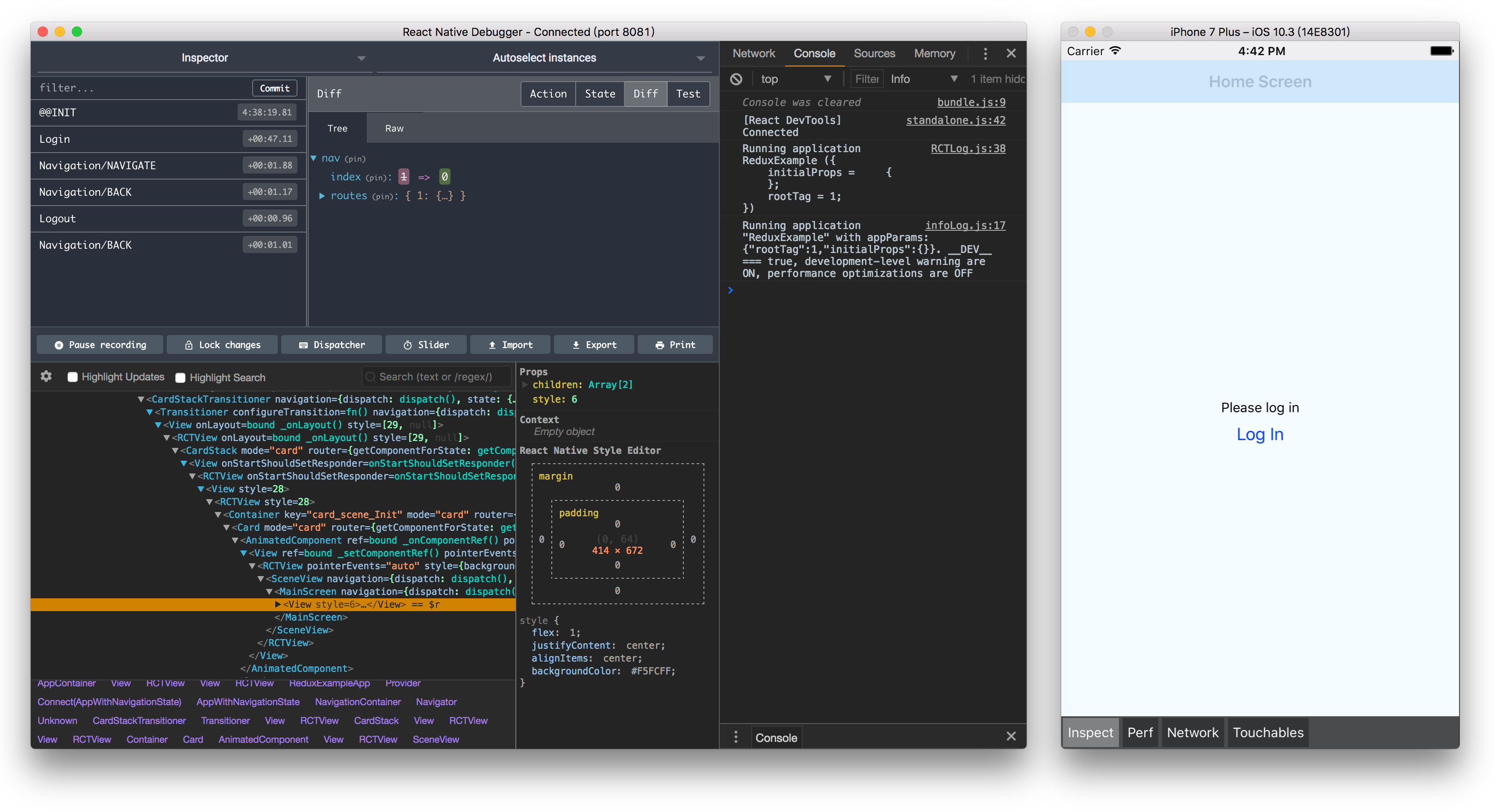
 A desktop app for debugging React Native applications: the official Remote Debugger with extra devtools built in — React Inspector, Redux DevTools and Apollo Client DevTools.
A desktop app for debugging React Native applications: the official Remote Debugger with extra devtools built in — React Inspector, Redux DevTools and Apollo Client DevTools.Is this a desktop app I run, or a library I add to my React Native project?It's a standalone desktop app (built on Electron), not a library: you install it on your machine and your React Native app connects to it as its remote debugger during development.
It's a standalone desktop app (built on Electron), not a library: you install it on your machine and your React Native app connects to it as its remote debugger during development.Which React Native versions does it work with?Versions must be matched: React Native Debugger 0.11 and newer requires react-native 0.62 or higher — check the compatibility table in the README before installing.
Versions must be matched: React Native Debugger 0.11 and newer requires react-native 0.62 or higher — check the compatibility table in the README before installing.My app uses Hermes or the New Architecture — will this debugger work?Not yet: the app currently supports only the old Remote Debugger, so Hermes / JSI / New Architecture apps are out of scope for now (support is tracked in discussion #774).
Not yet: the app currently supports only the old Remote Debugger, so Hermes / JSI / New Architecture apps are out of scope for now (support is tracked in discussion #774).Is it macOS-only, or does it also run on Windows and Linux?It runs on macOS, Windows and Linux — packaging scripts cover all three; Arch-based distributions also have react-native-debugger-bin in the AUR.
It runs on macOS, Windows and Linux — packaging scripts cover all three; Arch-based distributions also have react-native-debugger-bin in the AUR.What developer tools are built into the app?Besides the debugger itself: React Inspector (from react-devtools-core) for inspecting your component tree, Redux DevTools using the same API as redux-devtools-extension, and Apollo Client DevTools for GraphQL.
Besides the debugger itself: React Inspector (from react-devtools-core) for inspecting your component tree, Redux DevTools using the same API as redux-devtools-extension, and Apollo Client DevTools for GraphQL.Why use this instead of the official Remote Debugger?It is the official Remote Debugger under the hood, but bundles React Inspector, Redux DevTools and Apollo DevTools on top — so element inspection, Redux debugging and GraphQL tooling all live in one window instead of separate tools.
It is the official Remote Debugger under the hood, but bundles React Inspector, Redux DevTools and Apollo DevTools on top — so element inspection, Redux debugging and GraphQL tooling all live in one window instead of separate tools.Can I inspect network requests with it?Yes — network inspecting goes through the Chrome Developer Tools built into the app; the docs also cover enabling an 'open in editor' shortcut from the console.
Yes — network inspecting goes through the Chrome Developer Tools built into the app; the docs also cover enabling an 'open in editor' shortcut from the console.What are similar projects?devhub, reactotron, responsively-app, reactide, Lepton, ivideo, mobilecode, medis
devhub, reactotron, responsively-app, reactide, Lepton, ivideo, mobilecode, medisWhich topics is it in?debugger, redux, graphql, react-native, mobile-development, electron, react, free, desktop-app, javascript, cross-platform, developer-tools
debugger, redux, graphql, react-native, mobile-development, electron, react, free, desktop-app, javascript, cross-platform, developer-tools