
bloub README

The project's README from github.com/jeremy-prt/bloub. As one markdown file: README.md.

bloub

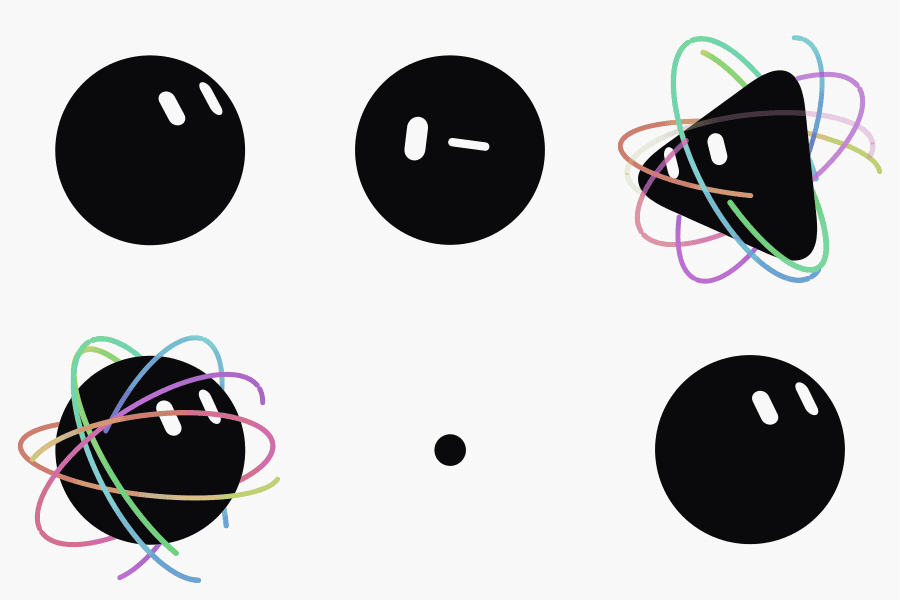
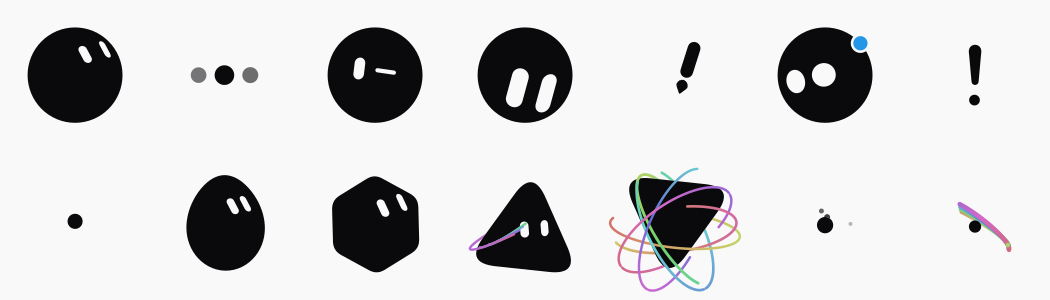
An SVG recreation of the x.ai bot avatar: one filled black shape that morphs between 14 states, two white shapes for the eyes that morph independently, on a plain background. No animation library.

The avatar going through idle, wink, orbit and burst

Running it

pnpm install
pnpm dev

Then open http://localhost:5190.

pnpm test     # vitest
pnpm build    # vue-tsc --noEmit && vite build

Vue 3, Vite, TypeScript, Tailwind 4. No ESLint and no Prettier: vue-tsc is the only gate, so run pnpm build before you call something done.

What's in it

The rail on the left switches between three views. Customise offers 8 body shapes, 12 colours and 16 rest expressions, kept between visits. Animations is a small editor: arrange states into a timeline, set how long each is held, save the result. Settings holds the language (French, English or Chinese) and the credits.

Anything on screen can be exported: the avatar as SVG, PNG or an animated GIF, and a whole timeline as GIF or MP4. The still formats need no library at all, and the video encoder is only fetched the first time you ask for one.

Two URLs are worth knowing:

The 14 states, frozen side by side

Why the numbers look arbitrary

They're measured, not chosen. The reference video was cut at 10 fps and each state measured off the frames: silhouettes by sub-pixel ray casting, eyes by capsule fitting, colours and stroke widths by direct sampling.

So the constants in the code are measurements, and rounding them to friendlier values breaks the resemblance, which is the only thing this project is trying to get right. A few are counter-intuitive enough to be worth knowing before you correct anything:

What you'd assume What the video shows
The eyes lean // They lean \\, around 26° off vertical
The body is a squircle It's a perfect circle, radial deviation under 0.7%
Transitions are springs Exponential ease-outs; the body never overshoots
The comet crosses the screen The dot stays put, the trail orbits it
The avatar floats at rest It doesn't. The life is gaze drift and blinking

docs/measurements.md has the rest, including how to regenerate the extracted profiles.

How it's put together

src/bot/ is framework-free and clock-free: engine.sample(t) is a pure function of time. Pausing, resuming, jumping to an arbitrary date and running tests all produce the same image, which is what makes the frozen state board and the DOM-less test suite possible.

docs/architecture.md The engine, radial-profile morphing, eyes as mask holes
docs/measurements.md What was measured, and regenerating profiles.ts
docs/intro.md The arrival sequence, and why it only plays one state
docs/interface.md Layout, the three-column scene, CSS traps
docs/export.md Exporting to SVG, PNG, GIF and MP4
docs/i18n.md The hand-rolled translation layer

Using the component

<BloubBot v-model:block="block" v-model:state="state" v-model:playing="playing" />
<BloubBot state="orbit" :size="120" :frozen-at="1.2" />

block is the playback cursor: a montage can play the same state twice, so the index is what identifies where you are; state follows it as an output. Pass frozenAt and the component renders one exact frame with no animation loop, which is how the thumbnails and the state board are drawn.

Props: size, shape, color, expression, paper, frozenAt, cycle, follow, gaze. Models: block, state, playing, elapsed. See BloubBot.vue for the details.

Changes

CHANGELOG.md, one entry per release — which is how you tell whether the copy you have carries a given fix.

License

MIT. See LICENSE.

Not affiliated with, endorsed by or connected to x.ai. It recreates the visual behaviour of their bot avatar as an exercise; "Grok" and "x.ai" belong to their owners. The MIT licence covers the code in this repository, not the design it imitates.

bloub (jeremy-prt/bloub)

Searching Database…

1.8K ·GitHub
这是什么?对 x.ai 机器人头像的 SVG 复刻:一个会在 14 种状态间变形的黑色形状,加上两个独立动画的白色眼睛形状,每个姿态都是逐帧对照参考视频测量而来,而非手工设计。
这是可嵌入的 Vue 组件,还是独立应用?两者都是:BloubBot.vue 是一个可复用的 Vue 组件(有 size、shape、color、expression、frozenAt 等 props),可以直接放进其他项目;仓库本身也是一个完整应用,带有 Customise、Animations 和 Settings 面板,用于设计和导出头像。
怎么把它跑起来?这是一个 Vue 3、Vite、TypeScript、Tailwind 4 项目:使用 pnpm 脚本——dev 启动开发服务器,build 生成构建产物(先运行 vue-tsc --noEmit 再运行 vite build),preview 用于查看效果。
使用它需要动画库吗?不需要。src/bot/ 中的核心引擎不依赖任何框架,也不依赖时钟(engine.sample(t) 是时间的纯函数)。唯一的外部依赖是用于视频编码的 mediabunny,它采用惰性加载,只有在你第一次导出 GIF 或 MP4 时才会获取。
我可以把动画数值四舍五入成更整的值吗?不行。这些常数并非随意设定:它们是通过子像素光线投射、胶囊体拟合以及对 10fps 参考视频的直接取色测量得到的,把它们改成更好看的数字会破坏与原头像的相似度。
头像有哪些可以自定义?Customise 面板提供 8 种身体形状、12 种颜色和 16 种静止表情,你的选择会在多次访问之间保留。
可以导出哪些格式?静态图像可导出为 SVG 或 PNG,动画输出为 GIF;整条时间线可以导出为 GIF 或 MP4。静态导出不需要任何库,视频导出会惰性加载编码器。
#planche 和 #etat 这两个 URL 是做什么的?#planche 会把全部 14 种状态并排冻结显示,便于快速目视检查;#etat=orbit&stop 则直接打开某个指定状态并暂停播放——开发和调试时很方便。
Animations 编辑器是怎么工作的?它是一个小型时间线编辑器,你可以把 14 种状态按顺序排列,设置每种状态的停留时长,然后保存生成的动画。
Creator
jeremy-prt
Size
1.2 MB
Stars
1.8K
Age
2mo
Commits · 90 Days