
Voicebox
The open-source AI voice studio.
Clone any voice. Generate speech. Dictate into any app. Talk to agents in voices you own.
The full voice I/O stack, running locally on your machine.


voicebox.sh •
Docs •
Download •
Features •
API •
Troubleshooting
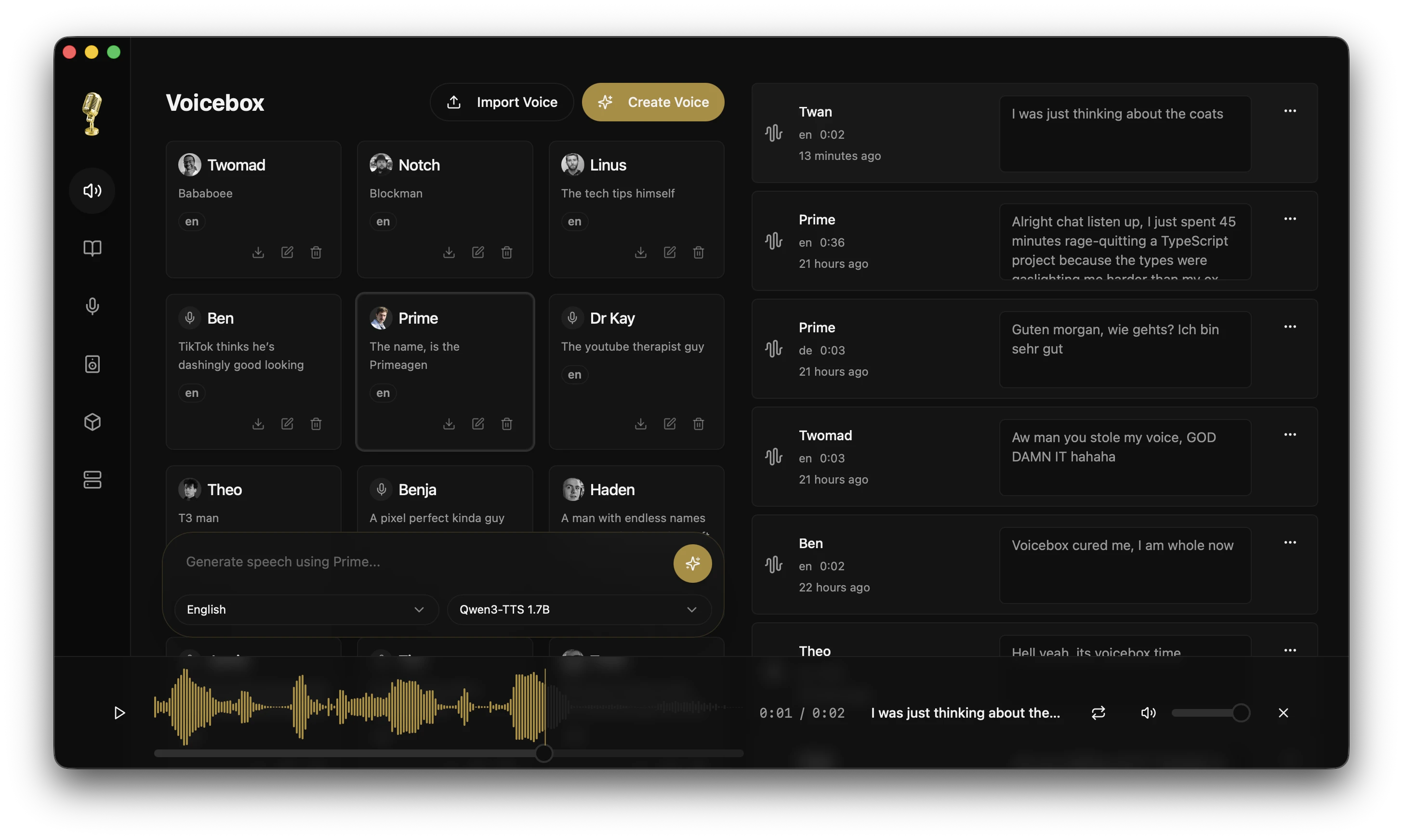
Click the image above to watch the demo video on voicebox.sh
What is Voicebox?
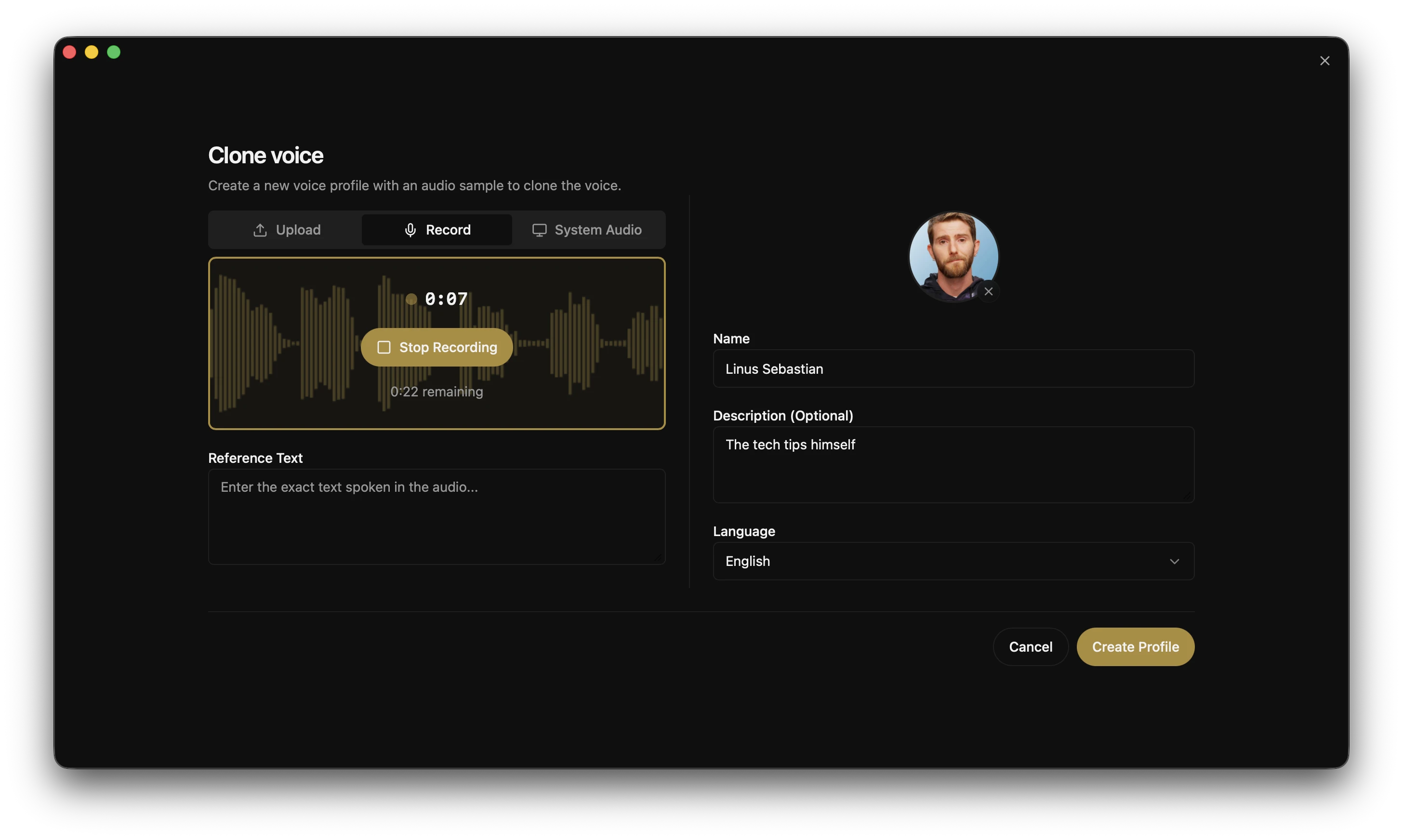
Voicebox is a local-first AI voice studio — a free and open-source alternative to ElevenLabs and WisprFlow in one app. Clone voices from a few seconds of audio, generate speech in 23 languages across 7 TTS engines, dictate into any text field with a global hotkey, and give any MCP-aware AI agent a voice of your choosing.
The two cloud incumbents sit on opposite halves of the voice I/O loop — ElevenLabs on output, WisprFlow on input. Voicebox does both, bridges them with a bundled local LLM for refinement and per-profile personas, and runs the whole thing on your machine.
- Complete privacy — models, voice data, and captures never leave your machine
- 7 TTS engines — Qwen3-TTS, Qwen CustomVoice, LuxTTS, Chatterbox Multilingual, Chatterbox Turbo, HumeAI TADA, and Kokoro
- Voice cloning and preset voices — zero-shot cloning from a reference sample, or 50+ curated preset voices via Kokoro and Qwen CustomVoice
- 23 languages — from English to Arabic, Japanese, Hindi, Swahili, and more
- Post-processing effects — pitch shift, reverb, delay, chorus, compression, and filters
- Expressive speech — paralinguistic tags like
[laugh], [sigh], [gasp] via Chatterbox Turbo; natural-language delivery control via Qwen CustomVoice
- Unlimited length — auto-chunking with crossfade for scripts, articles, and chapters
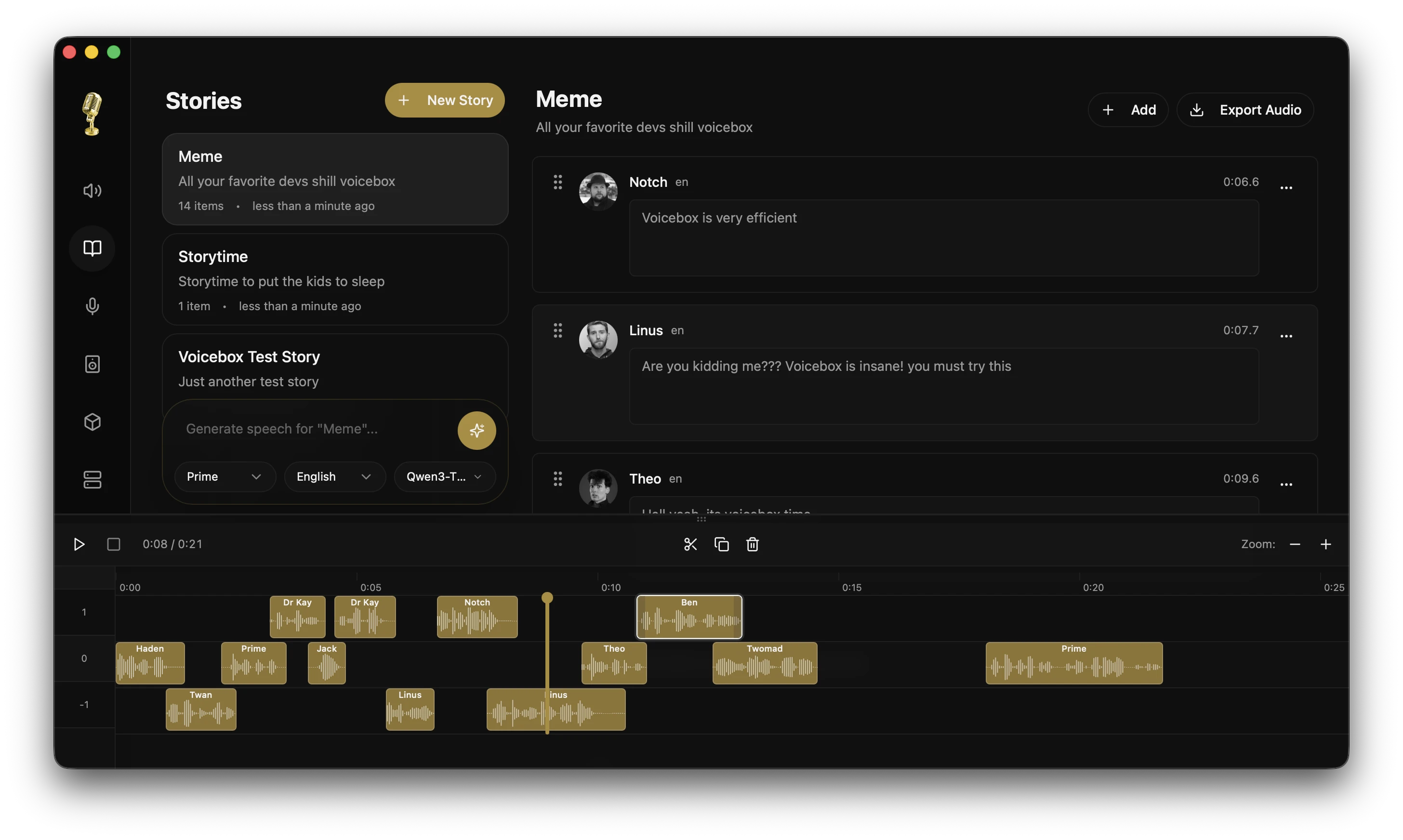
- Stories editor — multi-track timeline for conversations, podcasts, and narratives
- Voice input — global dictation hotkey with push-to-talk and toggle modes, accessibility-verified auto-paste on macOS, in-app mic on every text field, Whisper-based STT
- Agent voice output — one tool call (
voicebox.speak) and any MCP-aware agent (Claude Code, Cursor, Cline) speaks to you in a voice you've cloned
- Voice personalities — attach a free-form persona to any voice profile, then Compose, Rewrite, or Respond via a bundled local LLM — agents can invoke the same modes over MCP
- API-first — REST API plus a built-in MCP server for integrating voice I/O into your own apps and agents
- Native performance — built with Tauri (Rust), not Electron
- Runs everywhere — macOS (MLX/Metal), Windows (CUDA), Linux, AMD ROCm, Intel Arc, Docker
Download
View all binaries →
Linux — Pre-built binaries are not yet available. See voicebox.sh/linux-install for build-from-source instructions.
Having trouble? See the Troubleshooting Guide for common install, generation, model-download, and GPU issues.
Features
Multi-Engine Voice Cloning
Seven TTS engines with different strengths, switchable per-generation:
| Engine |
Languages |
Strengths |
| Qwen3-TTS (0.6B / 1.7B) |
10 |
High-quality multilingual cloning, delivery instructions ("speak slowly", "whisper") |
| Qwen CustomVoice |
10 |
9 curated preset voices with natural-language delivery control — no reference audio required |
| LuxTTS |
English |
Lightweight (~1GB VRAM), 48kHz output, 150x realtime on CPU |
| Chatterbox Multilingual |
23 |
Broadest language coverage — Arabic, Danish, Finnish, Greek, Hebrew, Hindi, Malay, Norwegian, Polish, Swahili, Swedish, Turkish and more |
| Chatterbox Turbo |
English |
Fast 350M model with paralinguistic emotion/sound tags |
| TADA (1B / 3B) |
10 |
HumeAI speech-language model — 700s+ coherent audio, text-acoustic dual alignment |
| Kokoro |
8 |
50 curated preset voices, tiny 82M model, fast CPU inference |
Only Chatterbox Turbo interprets paralinguistic tags like [laugh] and
[sigh]. Qwen3-TTS, LuxTTS, Chatterbox Multilingual, and HumeAI TADA read them
literally as text.
With Chatterbox Turbo selected, type / in the text input to open the tag
inserter and add expressive tags inline with speech:
[laugh] [chuckle] [gasp] [cough] [sigh] [groan] [sniff] [shush] [clear throat]
Post-Processing Effects
8 audio effects powered by Spotify's pedalboard library. Apply after generation, preview in real time, build reusable presets.
| Effect |
Description |
| Pitch Shift |
Up or down by up to 12 semitones |
| Reverb |
Configurable room size, damping, wet/dry mix |
| Delay |
Echo with adjustable time, feedback, and mix |
| Chorus / Flanger |
Modulated delay for metallic or lush textures |
| Compressor |
Dynamic range compression |
| Gain |
Volume adjustment (-40 to +40 dB) |
| High-Pass Filter |
Remove low frequencies |
| Low-Pass Filter |
Remove high frequencies |
Ships with 4 built-in presets (Robotic, Radio, Echo Chamber, Deep Voice) and supports custom presets. Effects can be assigned per-profile as defaults.
Unlimited Generation Length
Text is automatically split at sentence boundaries and each chunk is generated independently, then crossfaded together. Works with all engines.
- Configurable auto-chunking limit (100–5,000 chars)
- Crossfade slider (0–200ms) for smooth transitions
- Max text length: 50,000 characters
- Smart splitting respects abbreviations, CJK punctuation, and
[tags]
Generation Versions
Every generation supports multiple versions with provenance tracking:
- Original — clean TTS output, always preserved
- Effects versions — apply different effects chains from any source version
- Takes — regenerate with a new seed for variation
- Source tracking — each version records its lineage
- Favorites — star generations for quick access
Async Generation Queue
Generation is non-blocking. Submit and immediately start typing the next one.
- Serial execution queue prevents GPU contention
- Real-time SSE status streaming
- Failed generations can be retried
- Stale generations from crashes auto-recover on startup
Voice Profile Management
- Create profiles from audio files or record directly in-app
- Import/export profiles to share or back up
- Multi-sample support for higher quality cloning
- Per-profile default effects chains
- Organize with descriptions and language tags
Stories Editor
Multi-voice timeline editor for conversations, podcasts, and narratives.
- Multi-track composition with drag-and-drop
- Inline audio trimming and splitting
- Auto-playback with synchronized playhead
- Version pinning per track clip
The other half of the voice I/O loop. Hold a hotkey anywhere on your system, speak, release — on macOS the transcript pastes straight into the focused text field. Or hit the mic on any Voicebox text input and dictate directly into the app.
- Configurable chord bindings — hold-to-speak and tap-to-toggle chords, each rebindable in the in-app chord picker. Holding push-to-talk and tapping
Space mid-hold upgrades into a toggle session without a gap in audio
- Target-aware paste (macOS) — accessibility-verified injection into the focused text field, with atomic clipboard save/restore so your clipboard isn't clobbered
- First-run permissions UX — in-app gates walk you through the macOS Accessibility and Input Monitoring grants with deep-links to System Settings
- In-app mic button on every Voicebox text field — generation form, profile descriptions, story titles, anywhere you'd type
- LLM refinement — optional cleanup of ums, stutters, and false starts before paste
- On-screen pill — floating overlay surfacing
recording, transcribing, refining, and speaking states. Same pill agents use when they speak to you, so there's one mental model for both directions of the loop
Speech-to-Text
Voicebox runs OpenAI Whisper for transcription — the same model that backs dictation, the Captures tab, and the /transcribe API. Running on MLX (Apple Silicon) or PyTorch (CUDA / ROCm / DirectML / CPU) depending on your platform.
| Size |
Notes |
| Base / Small / Medium / Large |
Standard Whisper quality ladder |
| Turbo |
~8x faster than Whisper Large, minimal quality loss |
More engines (Parakeet v3, Qwen3-ASR) are planned — see Roadmap.
Captures
Every dictation, in-app recording, and uploaded audio file lands in the Captures tab — original audio paired with transcript, always preserved.
- Replay, re-transcribe, refine — rerun STT with any Whisper size, or re-run the raw transcript through the local LLM with different flags (filler cleanup, self-correction removal, technical-term preservation)
- Edit inline — tweak the transcript and save on blur
- Play as voice profile — turn any capture into speech with a cloned voice, one click
- Promote to voice sample — use a capture's audio + transcript as a reference sample on any voice profile
- Local capture storage — original audio and transcript stay in your Voicebox data directory, with a folder shortcut in Settings
Agent Voice Output
Every agent gets a voice. One tool call and any MCP-aware agent can speak to you in a voice you've cloned — task completions, questions, notifications. The same pill that surfaces during dictation surfaces during agent speech, so you always see what's coming out of your machine.
// In any MCP-aware agent:
await voicebox.speak({
  text: "Deploy complete.",
  profile: "Morgan",
});
Also exposed as POST /speak for anything that doesn't speak MCP — ACP, A2A, shell scripts, custom harnesses.
- Bidirectional pill —
recording, transcribing, refining, and speaking are all states of the same OS-level overlay, so dictation and agent speech share one surface
- Per-agent voice binding — in Settings → MCP, pin Claude Code to Morgan and Cursor to Scarlett so you can tell which agent is talking without looking. Each client's
last_seen_at timestamp confirms the install actually took
- Always visible — no silent background TTS; every agent-initiated speak surfaces the pill with the voice profile name for the full duration
- HTTP + stdio transports — install as a URL in Claude Code / Cursor / Windsurf / VS Code MCP, or point stdio-only clients at the bundled
voicebox-mcp binary
Voice Personalities
Attach a free-form personality to any voice profile — who this voice is, how they speak, what they care about. Two actions appear on the generate box when a personality is set, powered by a bundled Qwen3 LLM running entirely locally.
- Compose — a shuffle button that drops a fresh in-character line into the textarea; edit and speak, or click again for a different take
- Speak in character — a toggle that routes your input text through the personality LLM to be rewritten in their voice before TTS
Agents can reach the same rewrite path over MCP by passing personality: true to voicebox.speak, turning the tool into a text-in → personality-LLM → TTS pipeline. The same LLM backs dictation's refinement step — one LLM in the app, one model cache, one GPU-memory footprint.
Local LLM options: Qwen3 0.6B / 1.7B / 4B, sharing the TTS runtime (MLX on Apple Silicon, PyTorch elsewhere).
Use cases: agent dev loops (dictate a question, hear the answer in a cloned voice), interactive characters for games and narrative tools, speech assistance for people who can't speak in their original voice.
Model Management
- Per-model unload to free GPU memory without deleting downloads
- Custom models directory via
VOICEBOX_MODELS_DIR
- Model folder migration with progress tracking
- Download cancel/clear UI
GPU Support
| Platform |
Backend |
Notes |
| macOS (Apple Silicon) |
MLX (Metal) |
4-5x faster via Neural Engine |
| Windows (NVIDIA) |
PyTorch (CUDA) |
Auto-downloads CUDA binary from within the app |
| Linux (NVIDIA) |
PyTorch (CUDA) |
Use a local/remote Python backend with CUDA PyTorch |
| Linux (AMD) |
PyTorch (ROCm) |
Auto-configures HSA_OVERRIDE_GFX_VERSION |
| Windows (any GPU) |
DirectML |
Universal Windows GPU support |
| Intel Arc |
IPEX/XPU |
Intel discrete GPU acceleration |
| Any |
CPU |
Works everywhere, just slower |
API
Voicebox exposes a REST API for integrating voice I/O into your own apps and agents.
# Generate speech
curl -X POST http://127.0.0.1:17493/generate \
  -H "Content-Type: application/json" \
  -d '{"text": "Hello world", "profile_id": "abc123", "language": "en"}'

# Agent voice output — any app or script can speak in a cloned voice
curl -X POST http://127.0.0.1:17493/speak \
  -H "Content-Type: application/json" \
  -H "X-Voicebox-Client-Id: my-script" \
  -d '{"text": "Deploy complete.", "profile": "Morgan"}'

# Transcribe an audio file
curl -X POST http://127.0.0.1:17493/transcribe \
  -F "[email protected]" \
  -F "model=whisper-turbo"

# List voice profiles
curl http://127.0.0.1:17493/profiles
POST /speak accepts profile as a name (case-insensitive) or id, and resolves via the same precedence as the MCP tool: explicit arg → per-client binding → capture_settings.default_playback_voice_id.
MCP server
Voicebox ships a built-in Model Context Protocol server so any MCP-aware agent (Claude Code, Cursor, Windsurf, Cline, VS Code MCP extensions) can speak, transcribe, and browse captures and profiles.
Claude Code one-liner:
claude mcp add voicebox \
  --transport http \
  --url http://127.0.0.1:17493/mcp \
  --header "X-Voicebox-Client-Id: claude-code"
Any HTTP MCP client (Cursor, Windsurf, VS Code, etc.):
{
  "mcpServers": {
    "voicebox": {
      "url": "http://127.0.0.1:17493/mcp",
      "headers": { "X-Voicebox-Client-Id": "cursor" }
    }
  }
}
Stdio fallback for clients that don't speak HTTP MCP — point at the bundled voicebox-mcp binary inside the app:
{
  "mcpServers": {
    "voicebox": {
      "command": "/Applications/Voicebox.app/Contents/MacOS/voicebox-mcp",
      "env": { "VOICEBOX_CLIENT_ID": "claude-desktop" }
    }
  }
}
Four tools ship: voicebox.speak, voicebox.transcribe, voicebox.list_captures, voicebox.list_profiles. Per-client voice bindings are managed in Voicebox → Settings → MCP. See the full MCP guide for tool signatures, resolution precedence, the speaking-pill contract, and security notes.
// In any MCP-aware agent:
await voicebox.speak({
  text: "Tests passing. Ready to merge.",
  profile: "Morgan",      // optional — falls back to the per-client binding
  personality: true,      // optional — rewrites text through the profile's personality LLM first
});
Use cases: agent dev loops (voice in, voice out), game dialogue, podcast production, accessibility tools, voice assistants, content automation.
Full API documentation available at http://127.0.0.1:17493/docs.
Tech Stack
| Layer |
Technology |
| Desktop App |
Tauri (Rust) |
| Frontend |
React, TypeScript, Tailwind CSS |
| State |
Zustand, React Query |
| Backend |
FastAPI (Python) |

 Voicebox 是一款开源、本地优先的 AI 语音工作室:它可以克隆声音,生成 23 种语言的语音,通过全局快捷键把语音听写到任何应用中,还能让支持 MCP 的 AI 智能体拥有声音。所有功能都在你自己的电脑上运行,相当于免费的 ElevenLabs 和 WisprFlow 二合一替代品。