AutoEq
AutoEq is a tool for automatically equalizing headphones.
Go to autoeq.app to get started.
This Github repository now mainly serves developers. The contributions of this project are:
- Web application for easily equalize and tweak headphone frequency responses without needing to install anything
- Library for working with (headphone) frequency responses and optimizing parametric equalizers
- PyPi package for installing the library on your projects
- Collection of headphone measurements as numerical data from
oratory1990,
crinacle,
Innerfidelity,
Rtings and legacy
headphone.com measurements (which are not the same as what the company produces today).
- Collection of different headphone frequency response targets as numerical data
- Pre-computed equalizer settings in results, although these should not be used by normal users since
autoeq.app exists
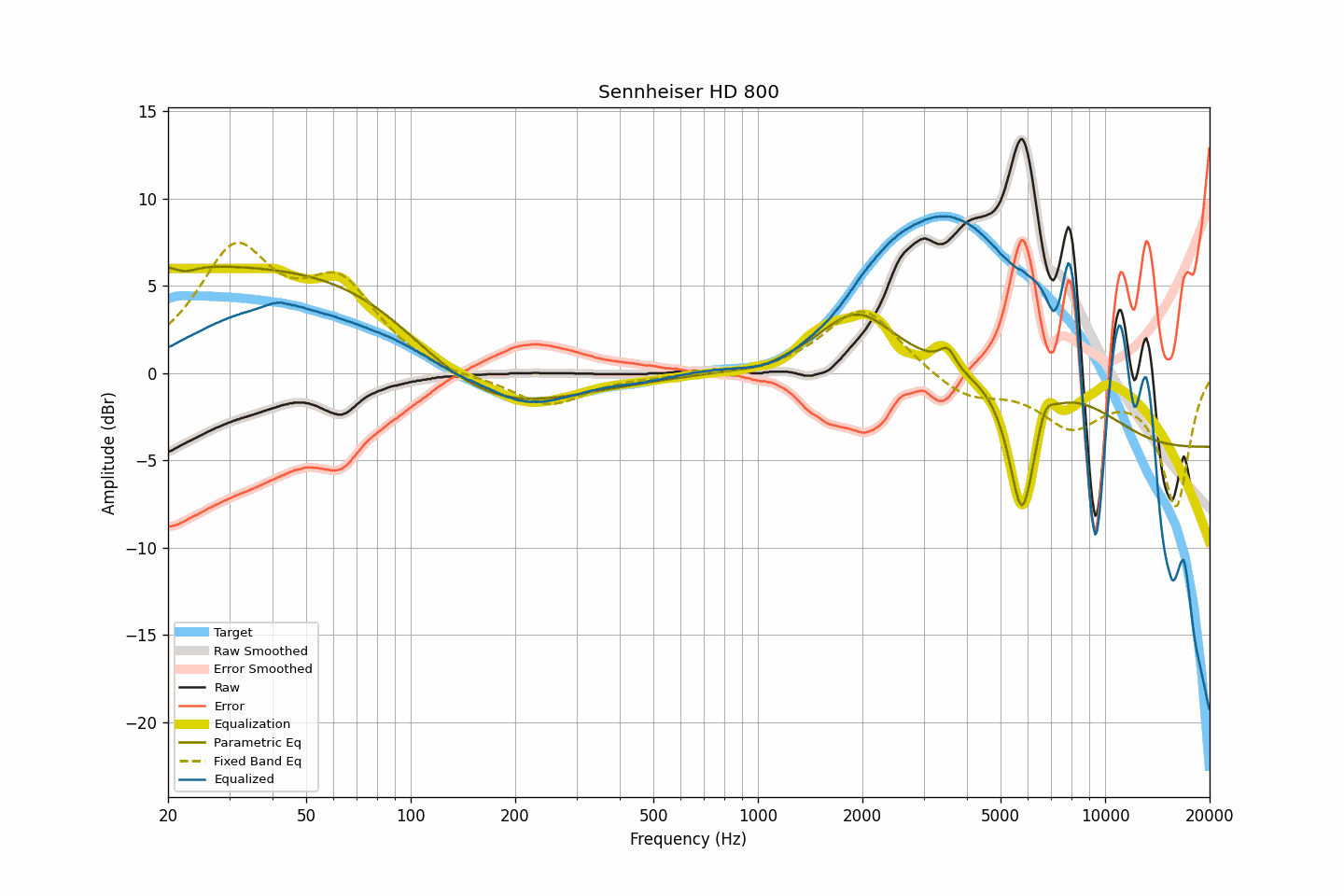
Sennheiser HD 800 equalization results plotted
Updates
2023-10-29 AutoEq version 4.0.0. Improved and unified naming conventions across the project. Cleaned up obsolete
files and reorganized directory structure. Completely reworked database management tools.
2022-05-14 Web application. Reorganized measurements and results.
2022-10-30 Restructured the project and published in PyPi. Source code moved under autoeq directory and
command line usage changed from python autoeq.py to python -m autoeq with underscores _ replaced with hyphens -
in the parameter names.
2022-09-18 Parametric eq optimizer reworked. The new optimizer supports shelf filters, has a powerful configuration
system, run 10x faster, has limits for Fc, Q and gain value ranges and treats +10 kHz range as average value instead of
trying to fix it precisely.
Usage
AutoEq produces settings for basically all types of equalizer apps but does not do the equalization itself. You'll need
a different app for that. Go to autoeq.app and select your equalizer app of choice. Quick
instructions for importing the produced settings will be shown there.
Command Line Use
In addition to the web application, AutoEq can be used from command line (terminal). This is advanced use mainly
intended for developers. The following instructions apply for command line and Python interface use.
Installing
- Download and install Git: https://git-scm.com/downloads. When installing Git on Windows, use Windows SSL verification
instead of Open SSL or you might run into problems when installing project dependencies.
- Download and install 64-bit Python 3. Make sure to check Add Python 3.X to PATH.
- You may need to install libsndfile if you're having problems with
soundfile
when installing and/or running AutoEq.
- On Linux you may need to install Python dev packages
sudo apt install python3-dev python3-pip python3-venv
git clone https://github.com/jaakkopasanen/AutoEq.git
cd AutoEq
- Create a python virtual environment
python -m venv venv
# On Windows
venv\Scripts\activate.bat
# On Linux and Mac
. venv/bin/activate
python -m pip install -U pip
- Install required packages
python -m pip install -U -e .
- Verify installation. If everything went well, you'll see the list of command line parameters AutoEq accepts.
python -m autoeq --help
python -m autoeq --input-file="measurements/oratory1990/data/over-ear/Sennheiser HD 800.csv" --output-dir="my_results" --target="targets/harman_over-ear_2018_wo_bass.csv" --max-gain=24 --parametric-eq --parametric-eq-config=4_PEAKING_WITH_LOW_SHELF,4_PEAKING_WITH_HIGH_SHELF --bass-boost=6 --convolution-eq --fs=48000 --bit-depth=32 --f-res=16
When coming back at a later time you'll only need to activate virtual environment again
# On Windows
cd AutoEq
venv\Scripts\activate.bat
# On Linux and Mac
cd AutoEq
. venv/bin/activate
To learn more about virtual environments, read Python' venv documentation.
Updating
AutoEq is in active development and gets new measurements, results and features all the time. You can get the latest
version from git
git pull
Dependencies may change from time to time, you can update to the latest with
python -m pip install -U -e .
Checking Installation
This prints out CLI parameters if installation was successful.
python -m autoeq --help
Example
Equalizing Sennheiser HD 650 and saving results to my_results/:
python -m autoeq --input-file="measurements/oratory1990/data/over-ear/Sennheiser HD 650.csv" --output-dir="my_results" --target="targets/harman_over-ear_2018.csv" --convolution-eq --parametric-eq --ten-band-eq --fs=44100,48000
Building
Add changelog entry before building and update version number in pyproject.toml!
Install build and twine
python -m pip install build twine
Add updates to autoeq/README.md before building!
Build PyPi package on Windows
copy /y README.md README.md.bak && copy /y autoeq\README.md README.md && python -m build && copy /y README.md.bak README.md && del README.md.bak
Build PyPi package on Linux / MacOS
cp README.md README.md.bak && cp autoeq/README.md README.md && python -m build && cp README.md.bak README.md && rm README.md.bak
publish
python -m twine upload dist/autoeq-<VERSION>*
Remember to add Git tag!
Issues are the way to go if you are experiencing problems or have
ideas or feature requests. Issues are not the correct channel for headphone requests because this project sources the
measurements from other databases and a headphone missing from AutoEq means it has not been measured by any of the
supported sources.
You can find me in Reddit,
Audio Science Review and
Head-fi if you just want to say hello.

 AutoEq 会根据真实的频响测量数据,自动生成耳机均衡器设置,帮助你把耳机调整到目标声音曲线。