



-DFE0E5)








📕 Table of Contents
💡 What is RAGFlow?
RAGFlow is a leading open-source Retrieval-Augmented Generation (RAG) engine that fuses cutting-edge RAG with Agent capabilities to create a superior context layer for LLMs. It offers a streamlined RAG workflow adaptable to enterprises of any scale. Powered by a converged context engine and pre-built agent templates, RAGFlow enables developers to transform complex data into high-fidelity, production-ready AI systems with exceptional efficiency and precision.
🎮 Get Started
Try our cloud service at https://cloud.ragflow.io.
🔥 Latest Updates
- 2026-06-15 Support multiple chat channels such as Feishu, Discord, Telegram, Line, etc.
- 2026-04-24 Supports DeepSeek v4.
- 2026-03-24 RAGFlow Skill on OpenClaw — Provides an official skill for accessing RAGFlow datasets via OpenClaw.
- 2025-12-26 Supports 'Memory' for AI agent.
- 2025-11-19 Supports Gemini 3 Pro.
- 2025-11-12 Supports data synchronization from Confluence, S3, Notion, Discord, Google Drive.
- 2025-10-23 Supports MinerU & Docling as document parsing methods.
- 2025-10-15 Supports orchestrable ingestion pipeline.
- 2025-08-08 Supports OpenAI's latest GPT-5 series models.
- 2025-08-01 Supports agentic workflow and MCP.
- 2025-05-23 Adds a Python/JavaScript code executor component to Agent.
- 2025-03-19 Supports using a multi-modal model to make sense of images within PDF or DOCX files.
🎉 Stay Tuned
⭐️ Star our repository to stay up-to-date with exciting new features and improvements! Get instant notifications for new
releases! 🌟
🌟 Key Features
🍭 "Quality in, quality out"
- Deep document understanding-based knowledge extraction from unstructured data with complicated
formats.
- Finds "needle in a data haystack" of literally unlimited tokens.
🍱 Template-based chunking
- Intelligent and explainable.
- Plenty of template options to choose from.
🌱 Grounded citations with reduced hallucinations
- Visualization of text chunking to allow human intervention.
- Quick view of the key references and traceable citations to support grounded answers.
🍔 Compatibility with heterogeneous data sources
- Supports Word, Slides, Excel, TXT, images, scanned copies, structured data, web pages, and more.
🛀 Automated and effortless RAG workflow
- Streamlined RAG orchestration catered to both personal and large businesses.
- Configurable LLMs as well as embedding models.
- Multiple recall paired with fused re-ranking.
- Intuitive APIs for seamless integration with business.
🔎 System Architecture
🎬 Self-Hosting
📝 Prerequisites
- CPU >= 4 cores
- RAM >= 16 GB
- Disk >= 50 GB
- Docker >= 24.0.0 & Docker Compose >= v2.26.1
- Python >= 3.13
- gVisor: Required only if you intend to use the code executor (sandbox) feature of RAGFlow.
[!TIP]
If you have not installed Docker on your local machine (Windows, Mac, or Linux), see Install Docker Engine.
🚀 Start up the server
Ensure vm.max_map_count >= 262144:
To check the value of vm.max_map_count:
sysctl vm.max_map_count
Reset vm.max_map_count to a value at least 262144 if it is not.
# In this case, we set it to 262144:
sudo sysctl -w vm.max_map_count=262144
This change will be reset after a system reboot. To ensure your change remains permanent, add or update the
vm.max_map_count value in /etc/sysctl.conf accordingly:
vm.max_map_count=262144
Clone the repo:
git clone https://github.com/infiniflow/ragflow.git
Start up the server using the pre-built Docker images:
[!CAUTION]
All Docker images are built for x86 platforms. We don't currently offer Docker images for ARM64.
If you are on an ARM64 platform, follow this guide to build a Docker image compatible with your system.
The command below downloads the v0.27.1 edition of the RAGFlow Docker image. See the following table for descriptions of different RAGFlow editions. To download a RAGFlow edition different from v0.27.1, update the RAGFLOW_IMAGE variable accordingly in docker/.env before using docker compose to start the server.
   cd ragflow/docker

   git checkout v0.27.1
   # Optional: use a stable tag (see releases: https://github.com/infiniflow/ragflow/releases)
   # This step ensures the **entrypoint.sh** file in the code matches the Docker image version.

   # Use CPU for DeepDoc tasks:
   docker compose -f docker-compose.yml up -d

   # To use GPU to accelerate DeepDoc tasks:
   # sed -i '1i DEVICE=gpu' .env
   # docker compose -f docker-compose.yml up -d
Note: Prior to v0.22.0, we provided both images with embedding models and slim images without embedding models. Details as follows:
| RAGFlow image tag |
Image size (GB) |
Has embedding models? |
Stable? |
| v0.21.1 |
≈9 |
✔️ |
Stable release |
| v0.21.1-slim |
≈2 |
❌ |
Stable release |
Starting with v0.22.0, we ship only the slim edition and no longer append the -slim suffix to the image tag.
Check the server status after having the server up and running:
docker logs -f docker-ragflow-cpu-1
The following output confirms a successful launch of the system:
      ____   ___    ______ ______ __
     / __ \ /   |  / ____// ____// /____  _      __
    / /_/ // /| | / / __ / /_   / // __ \| | /| / /
   / _, _// ___ |/ /_/ // __/  / // /_/ /| |/ |/ /
  /_/ |_|/_/  |_|\____//_/    /_/ \____/ |__/|__/

 * Running on all addresses (0.0.0.0)
If you skip this confirmation step and directly log in to RAGFlow, your browser may prompt a network abnormal
error because, at that moment, your RAGFlow may not be fully initialized.
In your web browser, enter the IP address of your server and log in to RAGFlow.
With the default settings, you only need to enter http://IP_OF_YOUR_MACHINE (sans port number) as the default
HTTP serving port 80 can be omitted when using the default configurations.
In service_conf.yaml.template, select the desired LLM factory in user_default_llm and update
the API_KEY field with the corresponding API key.
See llm_api_key_setup for more information.
The show is on!
🔧 Configurations
When it comes to system configurations, you will need to manage the following files:
- .env: Keeps the fundamental setups for the system, such as
SVR_HTTP_PORT, MYSQL_PASSWORD, and
MINIO_PASSWORD.
- service_conf.yaml.template: Configures the back-end services. The environment variables in this file will be automatically populated when the Docker container starts. Any environment variables set within the Docker container will be available for use, allowing you to customize service behavior based on the deployment environment.
- docker-compose.yml: The system relies on docker-compose.yml to start up.
The ./docker/README file provides a detailed description of the environment settings and service
configurations which can be used as ${ENV_VARS} in the service_conf.yaml.template file.
To update the default HTTP serving port (80), go to docker-compose.yml and change 80:80
to <YOUR_SERVING_PORT>:80.
Updates to the above configurations require a reboot of all containers to take effect:
docker compose -f docker-compose.yml up -d
Switch doc engine from Elasticsearch to Infinity
RAGFlow uses Elasticsearch by default for storing full text and vectors. To switch to Infinity, follow these steps:
Stop all running containers:
docker compose -f docker/docker-compose.yml down -v
[!WARNING]
-v will delete the docker container volumes, and the existing data will be cleared.
Set DOC_ENGINE in docker/.env to infinity.
Start the containers:
docker compose -f docker/docker-compose.yml up -d
[!WARNING]
Switching to Infinity on a Linux/arm64 machine is not yet officially supported.
🔧 Build a Docker Image
This image is approximately 2 GB in size and relies on external LLM and embedding services.
git clone https://github.com/infiniflow/ragflow.git
cd ragflow/
docker build --platform linux/amd64 -f Dockerfile -t infiniflow/ragflow:nightly .
Or if you are behind a proxy, you can pass proxy arguments:
docker build --platform linux/amd64 \
  --build-arg http_proxy=http://YOUR_PROXY:PORT \
  --build-arg https_proxy=http://YOUR_PROXY:PORT \
  -f Dockerfile -t infiniflow/ragflow:nightly .
🔨 Launch Service from Source for Development
[!IMPORTANT]
After cloning the repository for the first time, run git config --local --unset core.hooksPath, uv tool install lefthook and lefthook install once from the repo root to enable local Git hooks.
Install uv, or skip this step if it is already installed:
pipx install uv
Clone the source code and install Python dependencies:
git clone https://github.com/infiniflow/ragflow.git
cd ragflow/
uv sync --python 3.13 # install RAGFlow dependent python modules
uv run python3 ragflow_deps/download_deps.py
git config --local --unset core.hooksPath
uv tool install lefthook
lefthook install
Launch the dependent services (MinIO, Elasticsearch, Redis, and MySQL) using Docker Compose:
docker compose -f docker/docker-compose-base.yml up -d
Add the following line to /etc/hosts to resolve all hosts specified in docker/.env to 127.0.0.1:
127.0.0.1 es01 infinity mysql minio redis sandbox-executor-manager
If you cannot access HuggingFace, set the HF_ENDPOINT environment variable to use a mirror site:
export HF_ENDPOINT=https://hf-mirror.com
If your operating system does not have jemalloc, please install it as follows:
# Ubuntu
sudo apt-get install libjemalloc-dev
# CentOS
sudo yum install jemalloc
# OpenSUSE
sudo zypper install jemalloc
# macOS
brew install jemalloc
Launch backend service:
source .venv/bin/activate
export PYTHONPATH=$(pwd)
bash docker/launch_backend_service.sh
Install frontend dependencies:
cd web
npm install
Launch frontend service:
npm run dev
The following output confirms a successful launch of the system:
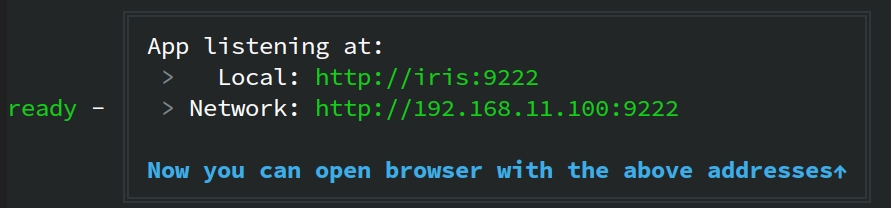
Stop RAGFlow front-end and back-end service after development is complete:
pkill -f "ragflow_server.py|task_executor.py"
📚 Documentation
📜 Roadmap
See the RAGFlow Roadmap 2026
🙌 Contributing
RAGFlow flourishes via open-source collaboration. In this spirit, we embrace diverse contributions from the community.
If you would like to be a part, review our Contribution Guidelines first.



 RAGFlow is an open-source Retrieval-Augmented Generation (RAG) engine that combines RAG with Agent capabilities to build a context layer for LLMs, turning complex enterprise data into production-ready AI systems.