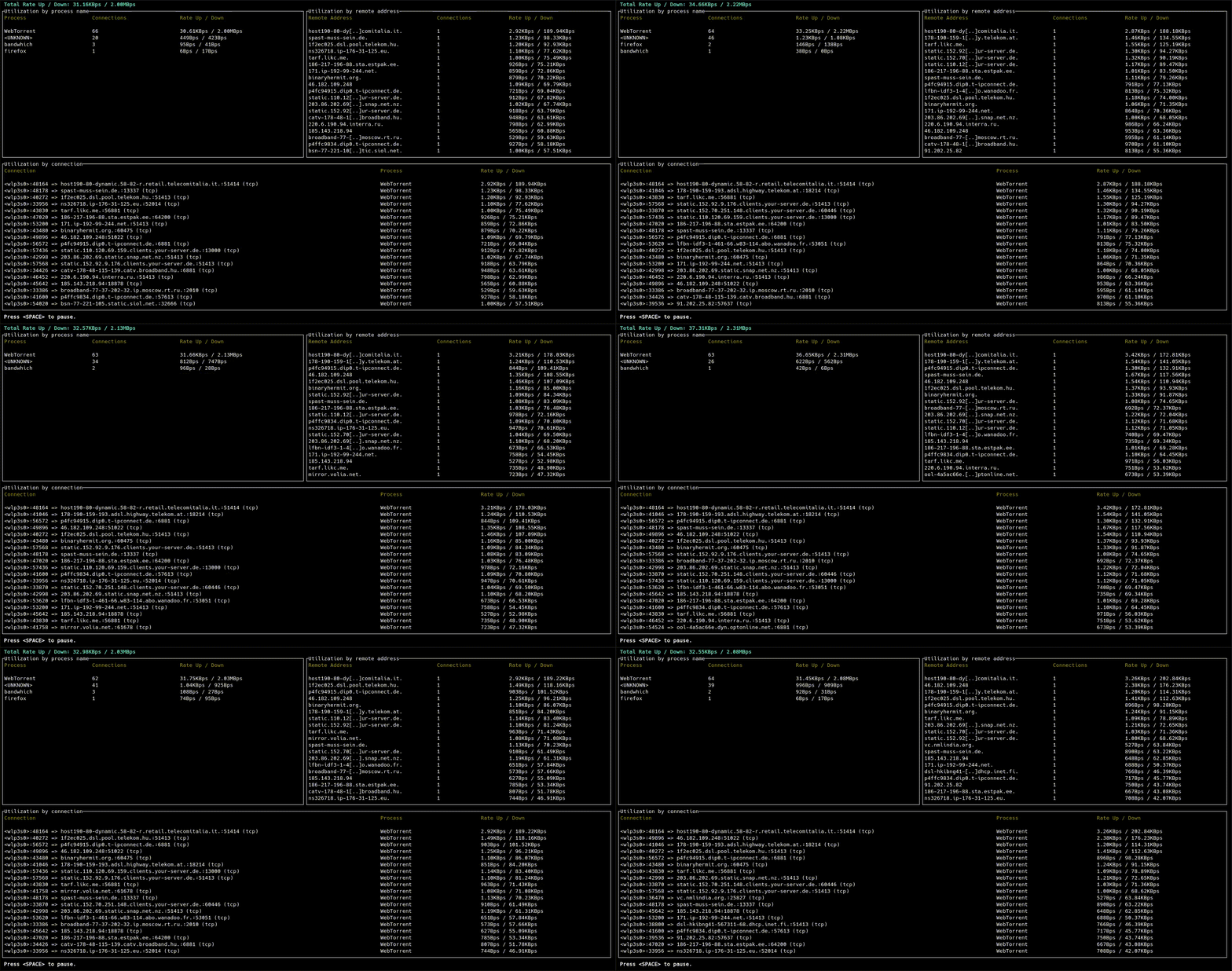

What is this?
 bandwhich is a CLI utility that shows current network bandwidth usage broken down by process, connection, and remote IP/hostname, right in your terminal.
bandwhich is a CLI utility that shows current network bandwidth usage broken down by process, connection, and remote IP/hostname, right in your terminal.Is this a GUI app or a terminal dashboard?It's a terminal (TUI) dashboard that redraws live in your terminal window and adapts the displayed columns to the window size.
It's a terminal (TUI) dashboard that redraws live in your terminal window and adapts the displayed columns to the window size.How do I install and run it?Download a prebuilt binary from the Releases page for your OS/arch, or build from source with cargo using cross for cross-compiling; see INSTALL.md for platform-specific instructions.
Download a prebuilt binary from the Releases page for your OS/arch, or build from source with cargo using cross for cross-compiling; see INSTALL.md for platform-specific instructions.Do I need anything extra to capture packets?On Linux it reads /proc and sniffs raw packets; on macOS it uses lsof; on Windows it relies on WinApi and you likely need to install npcap first.
On Linux it reads /proc and sniffs raw packets; on macOS it uses lsof; on Windows it relies on WinApi and you likely need to install npcap first.Why do I need sudo or special permissions to run it?Packet sniffing requires elevated privileges, so on Linux you either grant the binary capabilities with setcap (capnetraw, capnetadmin, capsysptrace, capdacreadsearch) or run it with sudo every time.
Packet sniffing requires elevated privileges, so on Linux you either grant the binary capabilities with setcap (capnetraw, capnetadmin, capsysptrace, capdacreadsearch) or run it with sudo every time.Which platforms and architectures are supported?Full support for Linux x64/aarch64, macOS (Apple Silicon and Intel), and Windows x64; best-effort support for ARMv7 Linux and Android aarch64 (as a raw binary, not an APK).
Full support for Linux x64/aarch64, macOS (Apple Silicon and Intel), and Windows x64; best-effort support for ARMv7 Linux and Android aarch64 (as a raw binary, not an APK).Is this project actively getting new features?No, it is in passive maintenance: critical bugs are fixed, but no new features are being actively developed due to lack of funding/manpower, though PRs and co-maintainers are welcome.
No, it is in passive maintenance: critical bugs are fixed, but no new features are being actively developed due to lack of funding/manpower, though PRs and co-maintainers are welcome.How does bandwhich figure out which process owns which connection?It sniffs the given network interface for IP packet sizes and cross-references that with the /proc filesystem on Linux, lsof on macOS, or WinApi on Windows to map traffic back to processes.
It sniffs the given network interface for IP packet sizes and cross-references that with the /proc filesystem on Linux, lsof on macOS, or WinApi on Windows to map traffic back to processes.Can it show hostnames instead of raw IPs?Yes, it attempts best-effort reverse DNS lookups in the background to resolve remote IPs to hostnames.
Yes, it attempts best-effort reverse DNS lookups in the background to resolve remote IPs to hostnames.If I installed it in my home directory, why does sudo say command not found?Many distros' sudo doesn't preserve your user $PATH, so you need to either preserve $PATH for sudo, run it as sudo env PATH=$PATH bandwhich, or pass sudo the full path via sudo $(command -v bandwhich).
Many distros' sudo doesn't preserve your user $PATH, so you need to either preserve $PATH for sudo, run it as sudo env PATH=$PATH bandwhich, or pass sudo the full path via sudo $(command -v bandwhich).Which topics is it in?network-monitoring, system-monitor, privacy-tools, sysadmin, dashboard, monitoring, command-line, networking, rust, command-line-tool, android, terminal
network-monitoring, system-monitor, privacy-tools, sysadmin, dashboard, monitoring, command-line, networking, rust, command-line-tool, android, terminal