Wake






A native desktop app that gathers every coding-agent session on your machine into one place — browse, full-text search, and resume any conversation in seconds. Built with Rust + GPUI (gpui 0.2 + gpui-component 0.5). macOS first; experimental Linux support since v0.2.5, experimental Windows support since v0.2.7.
Your agent history is scattered across ~/.claude, ~/.codex, and a dozen other private directories. Wake reads them all, read-only, and gives you one fast window into it. Everything stays local; Wake only contacts GitHub when you explicitly check for an update.
Features
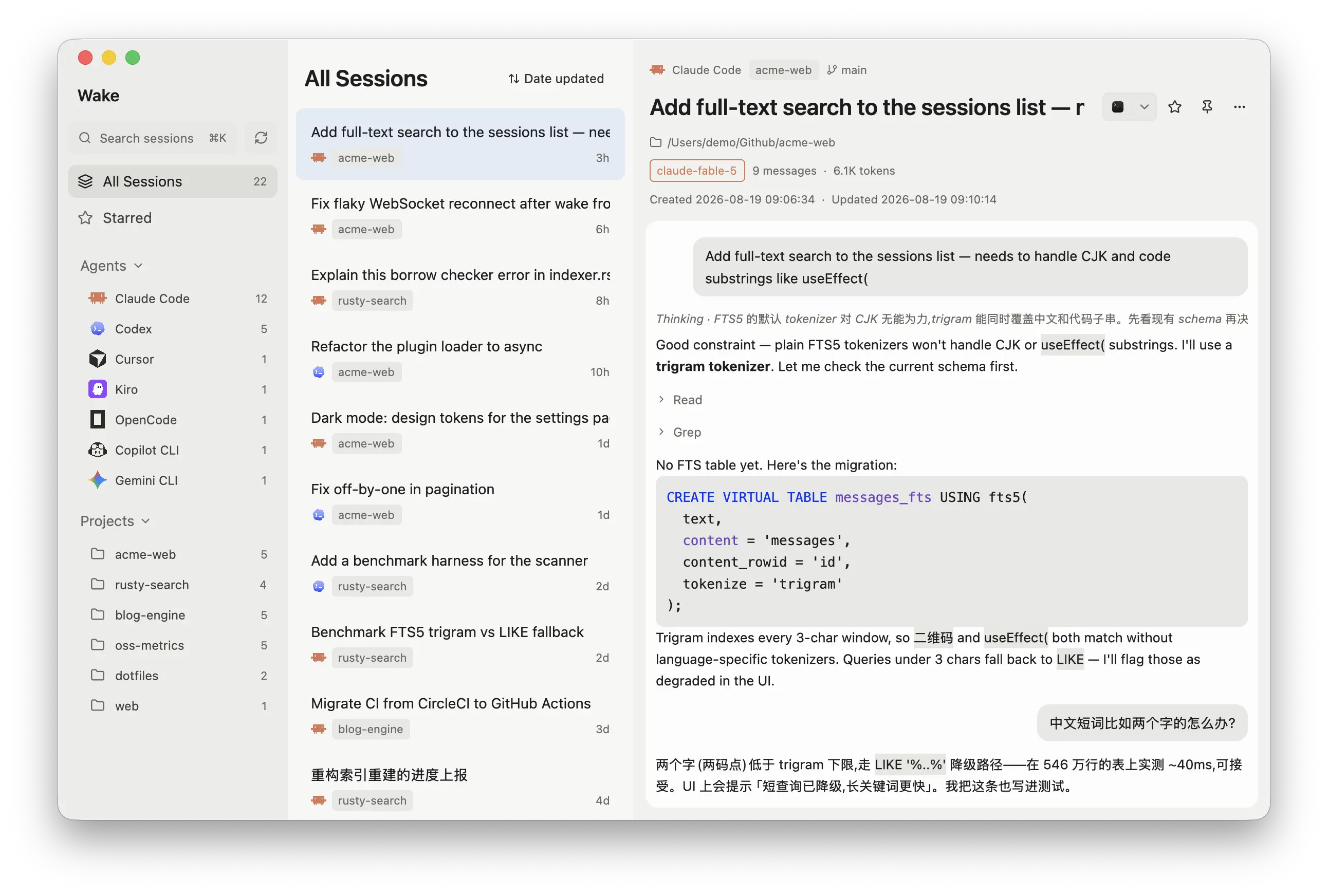
- Unified browsing — all sessions grouped by agent / project, with Grok Build subagents nested under their parent and live file watching for incremental updates
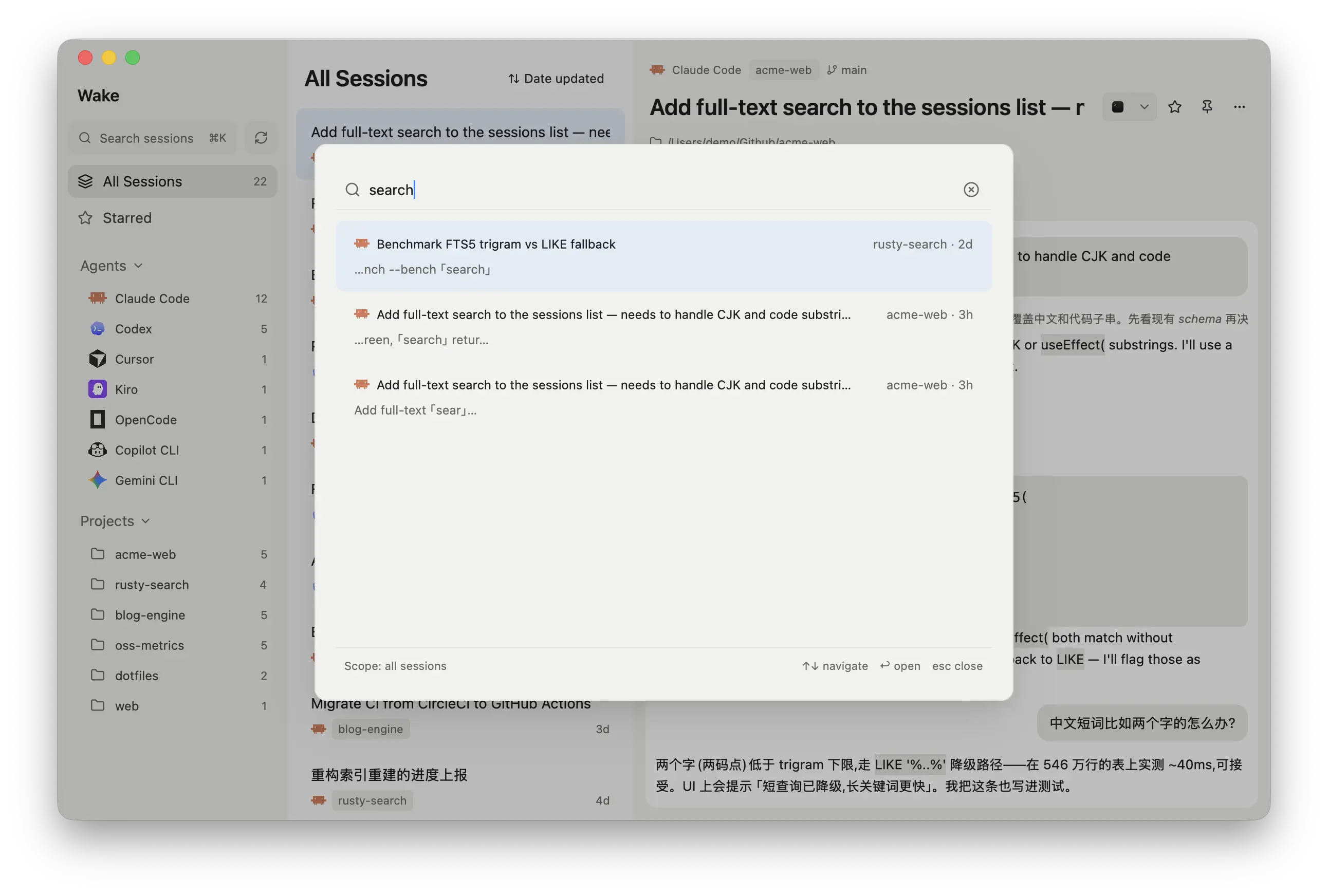
- Full-text search (⌘K / Ctrl+K) — SQLite FTS5 trigram index; handles CJK text and code substrings (like
useEffect() equally well; jumps straight to the matched message in the transcript
- Transcript view — per-message rendering with user/assistant bubbles, inline images (copy or save them), collapsible tool-call clusters, thinking summaries, tree-sitter code highlighting (30+ languages)
- One-click resume — reopens the session in your terminal (Terminal/iTerm on macOS; native terminal hosts on Linux and Windows) at the original project directory (
claude --resume, codex resume, …)
- Manage — star/pin (stored in Wake's own DB, original files untouched), export to Markdown or save an inline image through the system Save dialog (Wake remembers the last folder), delete (system Trash + tombstone so deleted sessions stay deleted)
- Insights — a stats page for your whole library: GitHub-style activity heatmap with streaks, hour / weekday / month breakdowns, and Agents / Projects / Models leaderboards switchable between sessions, tokens, and prompts
- Remote hosts — mirror the sessions on your other machines over SSH (Settings → Remote hosts); they show up next to local ones with an
@host badge, searchable like everything else, and resume through a copied ssh -t command
- Connect your agents (MCP) — a bundled read-only MCP server,
wake-mcp, lets Claude Code, Codex, Cursor or any MCP client search your whole history, list recent sessions per project and read transcripts page by page, so a new agent can pick up where another one left off; Settings → Connect has copy-paste setup snippets
Supported agents
| Agent |
Data source |
Model |
Via |
| Claude Code |
~/.claude/projects/**/*.jsonl |
✅ |
— |
| Codex CLI |
~/.codex/sessions + state_5.sqlite (read-only) |
✅ |
✅ |
| Qoder CLI |
~/.qoder/projects/*/*.jsonl (QODER_CONFIG_DIR is respected) |
✅ |
— |
| Copilot CLI |
~/.copilot/session-store.db |
— |
— |
| Cursor (CLI transcripts) |
~/.cursor/projects/**/agent-transcripts |
— |
— |
| OpenCode |
~/.local/share/opencode/opencode.db |
✅ |
— |
OpenCode 2 (opencode2) |
~/.local/share/opencode/{opencode.db,opencode-next.db} (session_v2 or session + session_message); both paths are scanned |
✅ |
— |
| Kiro |
~/.kiro/sessions/cli |
✅ |
— |
| Gemini CLI |
~/.gemini/tmp/**/chats |
— |
— |
| Pi |
~/.pi/agent/sessions/**/*.jsonl |
✅ |
— |
| Oh My Pi |
~/.omp/agent/sessions/**/*.jsonl |
✅ |
— |
| Grok Build |
~/.grok/sessions/**/updates.jsonl |
✅ |
— |
| Kimi Code |
~/.kimi-code/sessions/**/wire.jsonl |
— |
— |
| Antigravity CLI |
~/.gemini/antigravity-cli/conversation_summaries.db (metadata only — transcripts are encrypted) |
— |
— |
DeepSeek Harness (dsh) |
~/.dsh/sessions/**/session.jsonl[.zstd] (zstd-compressed logs are decoded transparently) |
✅ |
— |
| Hermes Agent |
~/.hermes/state.db + profiles/*/state.db (HERMES_HOME is respected) |
✅ |
✅ |
| OpenClaw |
~/.openclaw/agents/*/agent/openclaw-agent.sqlite + legacy agents/*/sessions/*.jsonl (OPENCLAW_STATE_DIR is respected) |
✅ |
✅ |
Model = whether Wake shows which LLM a session used (the model the session last used). Via = whether Wake shows where the session was started from (CLI, IDE extension, desktop app) — Codex records this in its local data; Hermes and OpenClaw record the channel a session came in through (Telegram, Discord, …). A "—" means the agent's local data simply doesn't record that field, not a missing feature.
Cursor IDE chats, Windsurf, and Trae encrypt their local data; Amp, Factory (Droid), and Warp keep sessions in the cloud — none of those are supported. Reasonix stores sessions locally but hasn't been mapped yet.
Remote hosts
Wake can mirror the sessions on your other machines and show them next to the local ones. Add a host in Settings → Remote hosts (an alias from ~/.ssh/config, or user@host); Wake then syncs on launch, on refresh, and whenever you click Sync now. Remote sessions carry an @host badge, are searchable like everything else, and resume through Copy SSH command, a ready-to-paste ssh -t <host> 'cd <project> && codex resume <id>'.
Before you add a host:
- SSH has to work without prompts: load your key into an agent (Wake runs without a terminal, so it can never answer a passphrase prompt) and connect once from a terminal so the host key is already trusted
rsync is needed on both ends — macOS and most Linux distributions ship one; on Windows install it yourself
How it works, and what it doesn't do yet:
- Wake first asks the remote which of the known agent directories exist, then mirrors only those with
rsync into remotes/<host>/ under its own data directory. Only session data and sidecar files are copied, never credentials, and nothing on the remote is ever written
- Remote sessions are read-only in Wake: they can't be moved to the Trash, and the mirror simply follows whatever is on the remote
- The remote is assumed to use each agent's default paths under the login user's home (
CODEX_HOME-style overrides on the remote aren't detected), and remote Windows machines aren't supported
Connect your agents (MCP)
Wake ships wake-mcp, a small read-only MCP server over stdio that sits next to the app binary (Wake.app/Contents/MacOS/wake-mcp on macOS, beside wake on Linux and Windows). Point an MCP client at it and the agent gets four tools:
| Tool |
What it does |
wake_search |
Full-text search across every agent's transcripts (CJK and code substrings work); each snippet carries a wake://session/<key>#<seq> reference |
wake_list_sessions |
Most recently updated sessions, scoped by project (pass the agent's working directory), agent, time window or starred |
wake_get_session |
One transcript as compact Markdown — user and assistant messages with [seq N] markers, tool calls folded to a line, injected context omitted — paginated by from_seq |
wake_list_projects |
Projects with indexed sessions, most recently active first |
Setup is a copy-paste from Settings → Connect, or run wake-mcp setup in a terminal. For example, Claude Code:
claude mcp add --scope user wake -- "/Applications/Wake.app/Contents/MacOS/wake-mcp"
Codex reads the same server from ~/.codex/config.toml:
[mcp_servers.wake]
command = "/Applications/Wake.app/Contents/MacOS/wake-mcp"
A few things worth knowing:
- Everything is read-only: the server opens Wake's index without write access and never scans or modifies anything; there are no delete or star tools
- Search and lists come from Wake's index, so keep Wake running for fresh results — every reply says how recent the index is. Reading a transcript parses the agent's files live, so it is always current
- Agents see the same session files Wake indexes, on this machine only (remote-host mirrors included); nothing leaves the machine
wake-mcp call wake_search '{"query":"useEffect("}' runs a single tool from the terminal, handy for checking what an agent would see
The full reference — every parameter, output formats, key and reference formats, error semantics, troubleshooting — is in docs/mcp.md.
Language
Wake's interface follows your system language on first launch and falls back to
English. Simplified Chinese ships with the app; pick a fixed language under
Settings → General → Language.
Adding a language is one flat JSON file mapping the English text to your
translation — drop it in Wake's config folder to use it immediately, or send it
as a pull request. Untranslated strings simply stay English, so a partial pack is
welcome. See crates/wake/locales/README.md.
Privacy stance
- Agent data directories are opened read-only; Wake never writes to another tool's files or databases
- Credential files (
auth.json and friends) are never read
- Remote hosts are mirrored read-only with
rsync over your existing SSH setup: only session data and its sidecar files come across (never credentials), nothing on the remote machine is ever written, and the mirror lives inside Wake's own data directory (remotes/<host>/), so removing the host removes it
- No background network requests — the only network actions are a user-initiated update check against Wake's public GitHub Release metadata and, if you configure remote hosts, SSH/rsync to those hosts on launch, refresh, and Sync now; session data is never sent anywhere else
- Wake's own index lives at
~/Library/Application Support/wake/wake.db (Linux: ~/.local/share/wake, Windows: %LOCALAPPDATA%\wake) and can be rebuilt from scratch at any time (stars/pins live in a separate table and survive rebuilds). Two small preference files (appearance, window.json) sit beside it on macOS, under ~/.config/wake on Linux and %APPDATA%\wake on Windows; Open In and export-folder choices live in the index database's prefs table
On the author's machine (~310 sessions, ~800 MB of JSONL): full index ~5 s, subsequent launches are instant (mtime-based incremental scan), search results in under 1 ms.
Install
Download Wake-<version>-macos.zip from the latest release, unzip, and drag Wake to Applications. The release is a Universal Binary for both Apple Silicon and Intel Macs. Or build from source (requires a Rust toolchain):
git clone https://github.com/iAmCorey/Wake && cd Wake
scripts/make-app.sh          # builds dist/Wake.app (icon + Info.plist, ad-hoc signed)
open dist/Wake.app
To build the same Universal Binary locally, install the aarch64-apple-darwin and x86_64-apple-darwin Rust targets, then run scripts/make-app.sh --universal.
The app is ad-hoc signed, so if you download a prebuilt copy instead of building it yourself, macOS Gatekeeper will block the first launch — right-click the app and choose Open, or run xattr -d com.apple.quarantine Wake.app.
Linux (experimental)
Prebuilt packages for arm64 and x86_64 (asset names use Debian's amd64) are attached to each release: a .deb, and a tar.gz with a user-level install.sh (no root needed). Or build from source:
sudo apt-get install -y libasound2-dev libfontconfig1-dev libwayland-dev \
  libxkbcommon-dev libxkbcommon-x11-dev libssl-dev libzstd-dev pkg-config cmake clang
git clone https://github.com/iAmCorey/Wake && cd Wake
scripts/make-linux.sh        # builds dist/wake-<version>-linux-<arch>.tar.gz and .deb
The data layer, rendering and search are fully tested on Linux; terminal-resume targets and desktop integration have seen less real-desktop mileage yet — issues welcome.
Windows (experimental)
Download wake-<version>-windows-x86_64.zip from the latest release, unzip, and run Wake.exe — the binary is unsigned, so SmartScreen may block the first launch (click More info → Run anyway). Or build from source (requires a Rust toolchain with the MSVC target):
git clone https://github.com/iAmCorey/Wake; cd Wake
powershell -ExecutionPolicy Bypass -File scripts/make-windows.ps1   # builds dist/wake-<version>-windows-<arch>.zip
# or just: cargo run -p wake
Resume opens sessions in Windows Terminal, PowerShell (7+ or the built-in Windows PowerShell), Command Prompt, Alacritty or WezTerm (whichever are installed); delete goes to the Recycle Bin. Agent data lives in the same ~/.claude-style directories under your user profile, so everything indexed on macOS/Linux is indexed here too. Same beta caveat as Linux: the data layer is fully tested, desktop integration has seen less mileage — issues welcome.
Development
cargo run -p wake                      # run in dev mode
scripts/test.sh                        # one-command test entry: data-layer tests + UI compile gate
scripts/test.sh --smoke                # adds a real-data scan baseline (reads your local agent dirs, read-only)
cargo test -p wake-core                # data-layer tests only (adapter contracts, FTS, scanner)
cargo run -p wake-core --bin scan      # data-layer smoke test: scan and print stats
cargo run -p wake-core --bin scan -- --search "useEffect("   # search smoke test
cargo run -p wake-core --bin wake-mcp -- setup                # print MCP setup snippets for the dev build
cargo run -p wake-core --bin wake-mcp -- call wake_search '{"query":"useEffect("}'   # run one MCP tool against your index
WAKE_THEME=dark cargo run -p wake      # force dark/light (defaults to system)
WAKE_HOME=/path cargo run -p wake      # point all agent adapters at a different home dir (portable installs, testing)
WAKE_LIVE_REMOTE_HOST=<host> cargo test -p wake-core --test remote_sync live -- --ignored   # run the remote-host pipeline against a real SSH host
git config core.hooksPath scripts/hooks   # optional: run tests before every commit
python3 scripts/demo-home.py           # build a synthetic fake-home dataset for screenshots/demos
CI runs cargo test -p wake-core plus a full app build on every push to main and every PR. The test suite parses synthetic fixture sessions only — your real agent data is never touched (the remote-host end-to-end test uses a fake ssh and your system rsync against a synthetic home).
Architecture
crates/
├── wake-core        # pure data layer, no UI dependencies
│   ├── adapters/    #   claude / codex / qoder / copilot / cursor / opencode / kiro / hermes / openclaw
│   │                #   gemini / pi / omp / grok / kimi / antigravity / dsh
│   │                #   (AgentAdapter trait — add an adapter, get the whole UI for free;
│   │                #   remote.rs wraps any adapter over a synced cache for remote hosts)
│   ├── remote.rs    #   remote hosts: ssh probe + rsync whitelist mirror into <data dir>/remotes/<host>/
│   ├── scanner.rs   #   single-pass scan: meta + FTS in one go, mtime incremental
│   ├── watcher.rs   #   notify-based file watching → per-file incremental updates
│   ├── db.rs        #   rusqlite (WAL): sessions / messages / messages_fts / user_data / tombstones (+ location, remote_hosts & schema meta tables)
│   ├── mcp/         #   wake-mcp: read-only MCP server over stdio (hand-written JSON-RPC, four tools)
│   └── services/    #   terminal resume (per-platform: AppleScript / argv / Win32) / export / trash / agent context helpers
└── wake             # GPUI app (three-pane workbench + ⌘K / Ctrl+K palette)
Design notes live in DESIGN.md, product decisions in PRODUCT.md, release history in CHANGELOG.md.
Star History

License
MIT. Brand icons are from lobe-icons (MIT); agent names and logos belong to their respective owners.

 Wake is a native desktop app that gathers every coding-agent session on your machine into one place, letting you browse, full-text search, and resume any conversation across tools like Claude Code, Codex, Cursor and many others.