
agento11y README

The project's README from github.com/grafana/agento11y. As one markdown file: README.md.

Grafana Agent Observability SDK

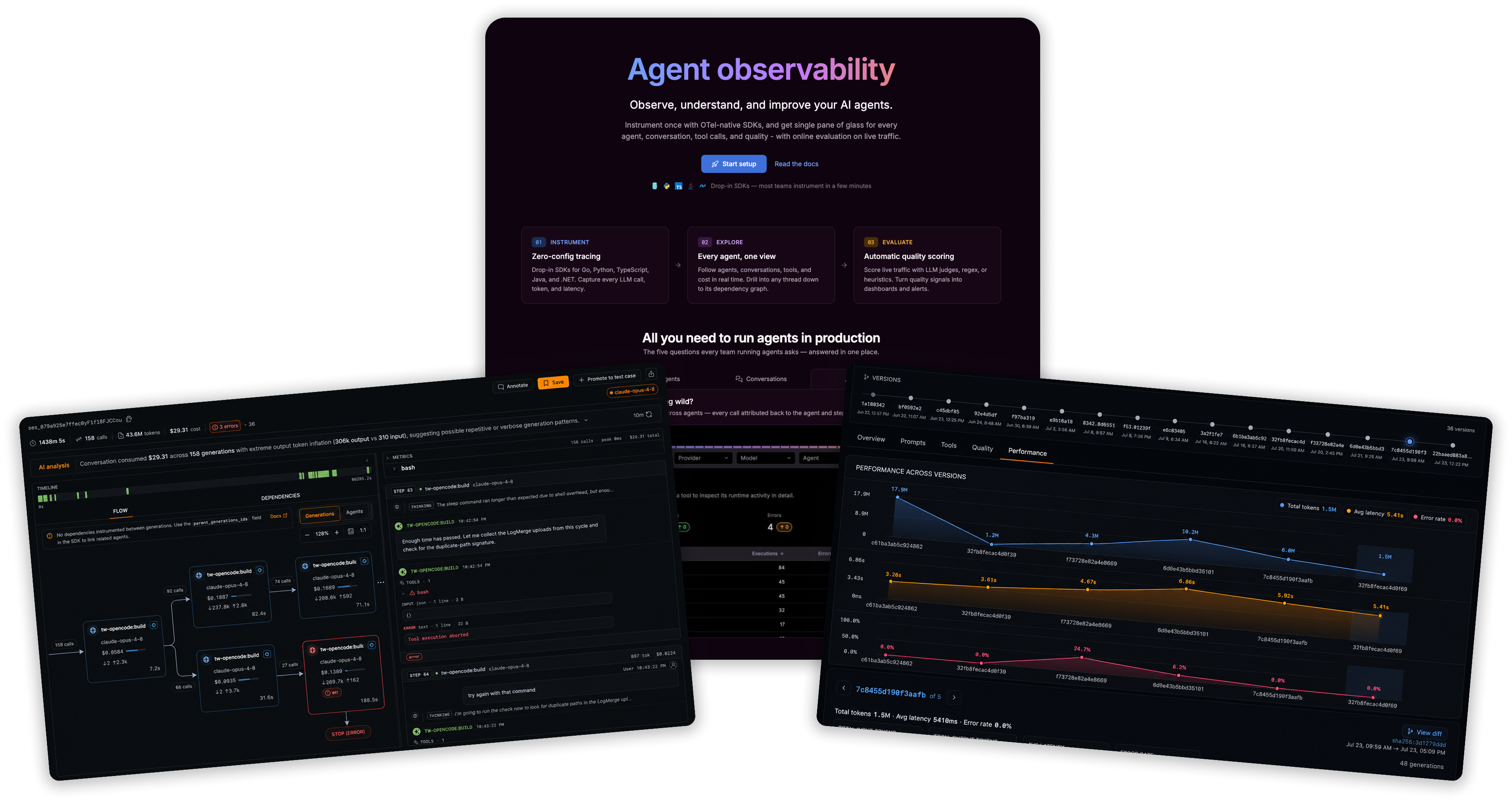
Grafana Agent observability landing, analytics, and conversation explore views

Grafana Agent Observability monitors the agents you build and the coding agents you use. This repo provides the open-source SDKs and plugins that send telemetry to it.

Coding agent observability

Capture sessions from the coding agents you already use — Cursor, Claude Code, Codex, Copilot CLI, OpenCode, Pi, Vibe, and others — so you can observe usage, cost, tokens, and tools across all of them in one place.

For Hermes, use its separate Python plugin guide. The shared launcher does not support Hermes.

For the other coding agents, install agento11y:

# Linux or macOS
curl -fsSL https://raw.githubusercontent.com/grafana/agento11y/main/plugins/agento11y/scripts/install.sh | sh
# macOS with Homebrew
brew install grafana/grafana/agento11y
# Windows, or any platform with Go 1.25+
go install github.com/grafana/agento11y/plugins/agento11y/cmd/agento11y@latest

Then run agento11y login and launch your agent, for example agento11y codex. The Coding Agent Observability guide covers all install options, configuration, and supported agents.

Observability for agents you build

Use Grafana Agent Observability to monitor the agents you build and run in your own apps and services — generations, tools, cost, traces, and evals. Instrument them with the SDKs (Go, Python, JS, .NET, Java). The rest of this README covers setup.

Instrument an application with an AI coding agent

If you want your own app or agent code instrumented, the recommended path is the agento11y-instrument agent skill. gcx is Grafana's CLI for working with Grafana Cloud resources; see the gcx installation docs if you want more detail.

Install gcx with the quick install script:

curl -fsSL https://raw.githubusercontent.com/grafana/gcx/main/scripts/install.sh | sh

Or with Homebrew:

brew install grafana/grafana/gcx

Then install the skill:

gcx agent skills install agento11y-instrument

If gcx is already installed but the skill is missing, update gcx first. Homebrew users can run brew update && brew upgrade gcx; script users can re-run the quick install script.

Use the `agento11y-instrument` skill to instrument this codebase with Grafana Agent observability.

The skill inspects your code, applies the SDK with small diffs after confirmation, and verifies that data lands in Grafana Cloud with gcx agento11y.

If your agent does not support skills, give it llms.txt and ask it to Instrument this codebase with Grafana Agent observability. The agent wires the SDK into your app or agent code.

Or open the Agent Observability plugin in your Grafana Cloud stack and use the onboarding wizard.

Instrument an application manually

Set the AGENTO11Y_* env vars and construct the client. To configure it explicitly instead, see the per-SDK READMEs linked under SDKs.

TypeScript

import { Agento11yClient } from "@grafana/agento11y";

const client = new Agento11yClient(); // reads AGENTO11Y_* env vars

await client.startGeneration(
  { conversationId: "conv-1", model: { provider: "openai", name: "gpt-5" } },
  async (recorder) => {
    recorder.setResult({ output: [{ role: "assistant", content: "Hello" }] });
  },
);

await client.shutdown();

Python

from agento11y import Client, GenerationStart, ModelRef, assistant_text_message

client = Client()  # reads AGENTO11Y_* env vars

with client.start_generation(
    GenerationStart(
        conversation_id="conv-1",
        model=ModelRef(provider="openai", name="gpt-5"),
    )
) as rec:
    rec.set_result(output=[assistant_text_message("Hello")])

client.shutdown()

Go

client := agento11y.NewClient(agento11y.Config{}) // reads AGENTO11Y_* env vars
defer func() { _ = client.Shutdown(context.Background()) }()

ctx, rec := client.StartGeneration(context.Background(), agento11y.GenerationStart{
    ConversationID: "conv-1",
    Model:          agento11y.ModelRef{Provider: "openai", Name: "gpt-5"},
})
defer rec.End()

rec.SetResult(agento11y.Generation{
    Output: []agento11y.Message{agento11y.AssistantTextMessage("Hello from Grafana Agent observability")},
}, nil)

SDKs

Language Package Path
Go github.com/grafana/agento11y/go go/
Python agento11y python/
TypeScript/JavaScript @grafana/agento11y js/
.NET/C# Grafana.Agento11y dotnet/
Java com.grafana.agento11y java/

Provider adapters

Language Providers Where
Go Anthropic, OpenAI, Gemini go-providers/
Python Anthropic, OpenAI, Gemini python-providers/
Java Anthropic, OpenAI, Gemini java/providers/
.NET Anthropic, OpenAI, Gemini dotnet/src/
TypeScript/JavaScript Anthropic, OpenAI, Gemini Subpath exports of @grafana/agento11y. See js/README.md.

Framework integrations

Language Frameworks Where
Python LangChain, LangGraph, OpenAI Agents, LlamaIndex, Google ADK, Strands Agents, Claude Agent SDK, LiteLLM, Pydantic AI python-frameworks/
TypeScript/JavaScript LangChain, LangGraph, OpenAI Agents, LlamaIndex, Google ADK, Strands, Vercel AI SDK Subpath exports of @grafana/agento11y. See js/README.md.
Go Google ADK go-frameworks/
Java Google ADK java/frameworks/

Runnable examples

Self-contained examples grouped into three tiers. See examples/README.md for the full map.

The getting-started quickstarts each make a real LLM call and record the generation to Grafana Agent observability.

Stack Example
Go examples/getting-started/go/
Go hooks and guards examples/getting-started/go-hooks/
Python examples/getting-started/python/
Python hooks and guards examples/getting-started/python-hooks/
Python (multi-agent) examples/getting-started/python-multi-agent/
Python + Pydantic AI examples/getting-started/python-pydantic-ai/
Python + Strands examples/getting-started/python-strands/
Python + Claude Agent SDK examples/getting-started/python-claude-agent-sdk/
TypeScript examples/getting-started/typescript/
TypeScript hooks and guards examples/getting-started/typescript-hooks/
TypeScript + Strands examples/getting-started/typescript-strands/

The experiments are offline evals: run an agent over a dataset, grade it, and publish the results. See examples/experiments/README.md.

Stack Example
Python examples/experiments/python/
Go examples/experiments/go/
Go (evaluator stored in your tenant) examples/experiments/go/cloud-evaluator/
TypeScript (evaluator stored in your tenant) examples/experiments/typescript/
DeepEval examples/experiments/deepeval/
CI quality gate (Python, Go, or TypeScript) examples/experiments/ci/

The reference app is a fuller FastAPI service with framework callbacks and manual instrumentation side by side.

Stack Example
Python + LangChain (FastAPI) examples/python-langchain/
Python + LangChain (Amazon Bedrock AgentCore) examples/bedrock-agentcore/

Hooks and guards

Application SDK hooks evaluate Agent Observability guard rules on your request path before a provider call. A guard can allow the request, deny it, or return transformed input such as redacted messages. Go, Python, and TypeScript hook requests propagate the active conversation and OpenTelemetry trace correlation so Agent Observability can show a denied preflight attempt in conversation detail even when no generation was created. See the SDK READMEs for manual hook evaluation, and the runnable examples/getting-started/go-hooks/, examples/getting-started/python-hooks/, and examples/getting-started/typescript-hooks/ examples for preflight guard setups.

Content capture and privacy

The SDKs default to no_tool_content: full generation messages ship to Agent Observability, but tool-execution arguments and results stay out of spans. The coding-agent plugins default to metadata_only. See Content Capture Modes for the mode matrix, defaults per surface, and the generation, tool-execution, and embedding resolution rules.

The SDKs emit spans and metrics through OpenTelemetry providers your application registers, and do not create those providers themselves. If you skip that step, conversations still arrive but analytics stays empty. See OpenTelemetry Setup for the wiring and the failure modes.

To attach custom key/values (team, project, env, request id, end-user id), see Tags and Metadata. It covers which of client tags, per-generation tags, metadata, and user_id reach the generation export vs OTel spans vs metrics, and the cardinality rules for metric labels.

Grafana Cloud credentials

All four connection values (API URL, Instance ID, API token, and OTLP endpoint) live on the Connection tab of the Agent Observability plugin in your stack:

https://<your-stack>.grafana.net/plugins/grafana-agento11y-app

Follow Create a token in Cloud Access Policies on the Connection page and create one token scoped with sigil:write, metrics:write, traces:write, and logs:write. The same token then covers both AGENTO11Y_AUTH_TOKEN (Agent Observability ingest) and OTEL_EXPORTER_OTLP_HEADERS (OTel traces and metrics).

See the Grafana Cloud Agent observability getting started docs for the full setup flow.

Why Grafana Agent observability

Contributing

Contributor notes (proto regeneration, mise tasks, conformance suites) live in docs/development.md. Agent context for working in this repo is in CLAUDE.md.

License

Apache License 2.0

agento11y (grafana/agento11y)

Searching Database…

Что это такое?Grafana Agent Observability следит за AI-агентами — как за теми, что вы создаёте сами, так и за кодинг-агентами, которыми пользуетесь. В этом репозитории лежат открытые SDK и плагины, которые отправляют ей телеметрию.
Так это облачный дашборд или код внутри моего проекта?И то и другое. Дашборды и аналитика живут в вашем стеке Grafana Cloud, а этот репозиторий — клиентская часть: SDK для пяти языков плюс CLI agento11y и плагины, которые передают туда данные.
Как начать следить за своим кодинг-агентом?Установите CLI agento11y, выполните agento11y login, а затем запускайте агента через него — например, agento11y codex. В руководстве Coding Agent Observability перечислены все варианты установки и поддерживаемые агенты.
Что нужно, чтобы данные пошли?Стек Grafana Cloud: возьмите из вкладки Connection плагина API URL, Instance ID, API-токен и OTLP-эндпоинт, а также создайте токен со скоупами sigil:write, metrics:write, traces:write и logs:write.
Из-за чего настройка чаще всего незаметно не работает?SDK сами не создают OpenTelemetry-провайдеры — их должен зарегистрировать ваше приложение. Пропустите этот шаг, и диалоги будут приходить, но аналитика останется пустой.
Сколько содержимого агента оно перехватывает?SDK передают полные сообщения генераций, но по умолчанию не включают в спаны аргументы и результаты выполнения инструментов; плагины для кодинг-агентов идут дальше и собирают только метаданные.
Что я реально увижу о своих кодинг-агентах?Использование, расходы, затраты токенов и вызовы инструментов по каждой записанной сессии — по Cursor, Claude Code, Codex и остальным, собранные в одном месте вместо разбросанных логов каждого агента.
Может ли AI-кодинг-агент сам вписать SDK в моё приложение?Да. Установите CLI gcx от Grafana (быстрый скрипт или Homebrew), затем скилл agento11y-instrument: агент изучит ваш код, после вашего подтверждения внесёт небольшие правки для SDK и проверит, что данные попадают в Grafana Cloud. Агентам без поддержки скиллов можно вместо этого дать llms.txt, или воспользоваться мастером подключения в плагине Grafana Cloud.
Что такое guards?Правила, которые SDK проверяет на пути вашего запроса перед вызовом провайдера: guard может разрешить запрос, отклонить его или вернуть преобразованные данные, например сообщения с вырезанной чувствительной информацией. Отклонённые preflight-попытки всё равно видны в деталях диалога.
Оно может само оценивать качество моего агента?Да. Например, есть офлайн-эксперименты — прогнать агента по датасету, оценить его, опубликовать результаты, — а оценщики могут проверять и живой трафик, чтобы команды замечали регрессии, не читая каждый диалог. Есть и примеры quality-gate для CI.
Creator
grafana
Size
27.8 MB
Stars
129
Age
6mo
Commits · 90 Days