Phonon brings natural text-to-speech to phones, laptops, browsers, and local
services. It is built for offline assistants, accessibility tools, and
interactive experiences that need speech without a cloud round trip. The runtime
is written in Rust and needs no PyTorch.
uvx ptts --lang en "Hello from Phonon." -o speech.wav
The first run downloads the default model and caches it. See Model
setup to use another model.
What you get
Small enough to ship: Choose Phonon 31m or Phonon 40m. Each can ship
inside a mobile app or load in a browser tab.
Five languages: Speak English, French, German, Spanish, and Portuguese,
with more languages available on request.
Fast across devices: A custom inference stack runs in browsers and on
phones, laptops, and embedded hardware, with Core ML on Apple devices, QNN on
supported Snapdragon NPUs, and GPU support. Multiple backends
deliver faster inference than Kokoro and llama.cpp-based runtimes on the same
hardware.
Voices ready to use or make your own: Choose from ready-to-use voices, or
design or clone your own and bring it to your device with two
scripts.
Control the delivery: Set the speaking rate with the duration_delta
condition, and start playing streamed audio before the full utterance is ready.
Performance
Two model sizes, one inference stack. Each cell is how many seconds of audio Phonon makes per
second of compute (higher is faster; above 1x is faster than real time) and the time to first
byte (TTFB). CPU rows use the number of cores shown; the Neural Engine row runs on the accelerator.
Device
Phonon 31m
Phonon 40m
MacBook Air M5, CPU + KleidiAI, 1 core
26x · 5 ms
20x · 7 ms
MacBook Air M5, CPU + KleidiAI, 4 cores
41x · 6 ms
39x · 8 ms
iPhone 16 Pro, Neural Engine
22x · 9 ms
20x · 12 ms
Raspberry Pi 5, CPU, 1 core
2.3x · 68 ms
2.2x · 88 ms
TTFB stays under 20 ms on Apple devices, because Phonon streams frame by frame instead of waiting
for the whole sentence.
On one MacBook Air core, Phonon 40m reaches 20x real time with a 7 ms TTFB. Kokoro (82M), through
its own PyTorch package on the same core, reaches 7.3x with a 776 ms TTFB, since it makes the whole
sentence before returning any audio.
Swift Package Manager: https://github.com/gradium-ai/xn-ptts.git, or GitHub Releases
The package at each release tag, or ptts-swift-<version>.zip, with its matching compiled framework. Needs a Core ML model bundle: the release has one for Phonon 31m, or export your own. Swift guide.
ptts.h and libptts_ffi, built from source with Rust, for Linux, Windows, macOS, iOS and Android. Works from any language that can call C. C guide.
The packages are named ptts, except the npm package phonon-tts; Swift apps import PhononTTS.
Model setup
Without a model argument, the command line, Python, the browser package, the servers and Rust download the default model from Hugging Face on first use and cache it. The default is Phonon 31m, hf://gradium/phonon-31m-en, pinned to one commit. Swift, Android and the C library load a model folder you supply.
Phonon 31m is public. The Phonon 40m models are gated. To use one, accept its terms on its Hugging Face page; approval is automatic. Then set HF_TOKEN or run hf auth login, and the command line, Python, the servers and Rust download it like any other model. The browser package has no token to send, so it loads only Phonon 31m from Hugging Face. To use a Phonon 40m model in a browser, download its files and serve them with your app, under the model's license.
To use another model, pass a Hugging Face repo as hf://OWNER/MODEL, adding a commit as hf://OWNER/MODEL@COMMIT_SHA for a repeatable version, or a local checkpoint folder. Private repos also need HF_TOKEN or a saved HF login. Local folders require no Hub access.
Voices
Each checkpoint comes with a default voice. The voice catalog
gradium/phonon-voices has
many more, in every language Phonon speaks. When a checkpoint does not have the
voice you ask for, the command line and Python look it up there and download
only that voice. The servers serve the catalog's voices in their language. ptts --list-voices lists the catalog with each voice's language. Pick a voice in the
language of your text.
ptts --lang en --voice Zoey "Hello from Phonon." -o speech.wav
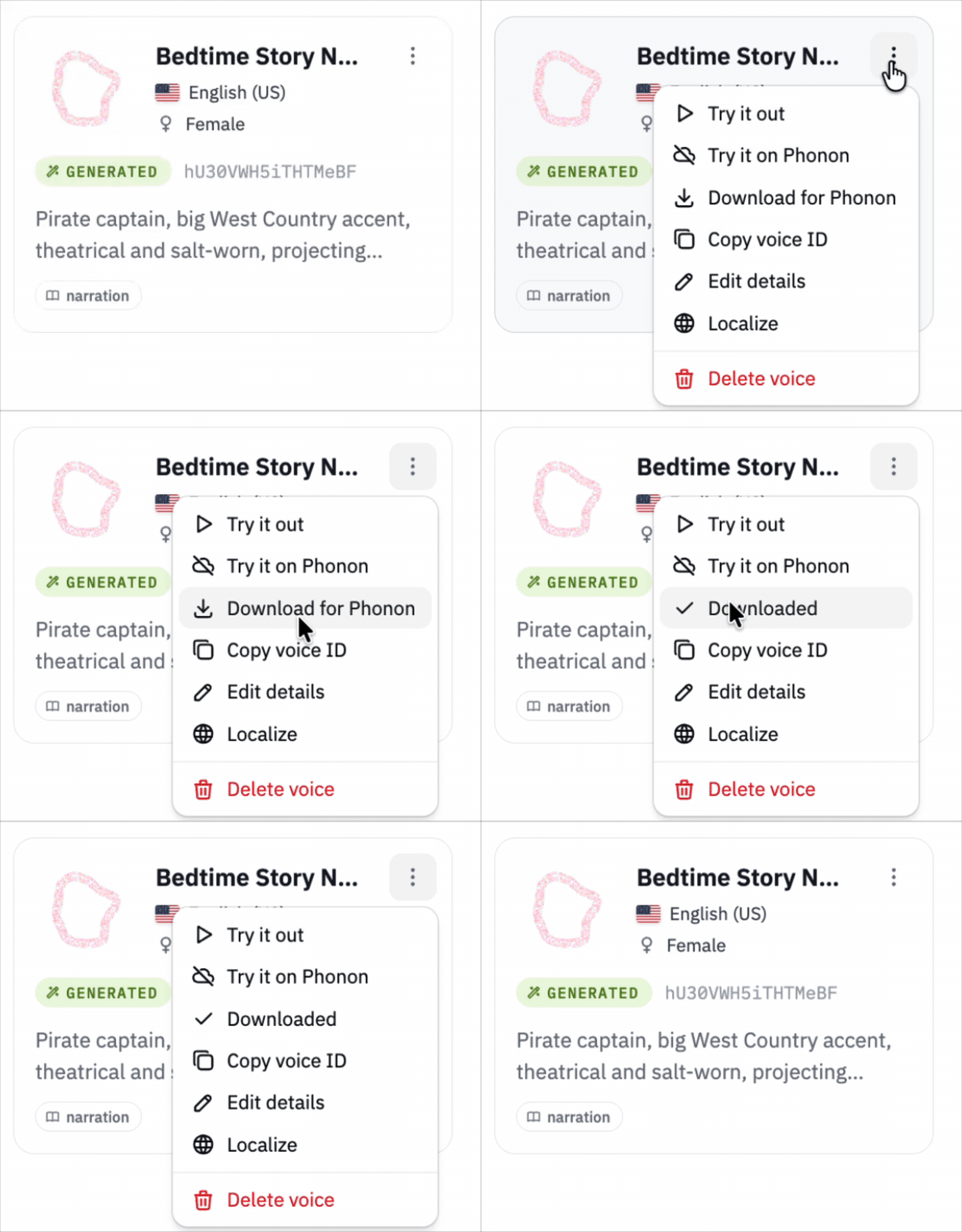
Design a voice in Voice Design, or open one of your custom voices in the catalog.
Click ⋮ on the voice, then Download for Phonon.
Pass the file you get to --voice of the desktop ptts command, or to tts.add_voice in Python. It works with every Phonon checkpoint.
You can also design a voice from a
text description in Gradium Studio, or clone one
from a short recording, and download it from the command line. Two scripts download these voices as voice files. They
need uv and a Gradium API key, which you can
create in Gradium Studio. The voice files work with every Phonon checkpoint.
Run the scripts from a clone of this repository, or pass their URL to uv run,
for example uv run https://raw.githubusercontent.com/gradium-ai/xn-ptts/main/scripts/download-voice.py --list.
export GRADIUM_API_KEY=...

# List your voices, with their IDs
uv run scripts/download-voice.py --list

# Download a voice you designed or cloned, by ID
uv run scripts/download-voice.py VOICE_ID -o voice.safetensors

# Clone a voice from a recording; 10 seconds of clear speech are used
uv run scripts/clone-voice.py speaker.wav --lang en -o voice.safetensors

ptts --lang en --voice voice.safetensors "Hello from Phonon." -o speech.wav
A voice file path works with the desktop ptts command; the Python command takes voice names only. In Python, register the file with tts.add_voice("NAME", "voice.safetensors"). To use it by name in the servers too, save it in a local checkpoint folder's voices/: -o model/voices/NAME.safetensors adds the voice NAME. A cloned voice is also saved in your Gradium account, so download-voice.py can fetch it again by the ID clone-voice.py prints. Clone a voice only with the speaker's consent.
Quickstart
These examples use the default model.
Command line
Show command line quickstart
On Mac or Linux, install the prebuilt desktop command from Gradium's Homebrew
tap:
brew install gradium-ai/tap/ptts
You can also extract a desktop archive and put ptts on your
PATH. Neither path needs Python or Rust. Generate a mono 24 kHz WAV:
ptts --lang en "Hello from Phonon." -o speech.wav
Use --model for another model (see Model setup), --quant q8 for faster q8 weights on the CPU, and --voice NAME to choose a voice, from the model or the voice catalog; omitting it uses the model's default voice. Run ptts --help for the remaining options. CLI guide →
Python
Show Python quickstart
Install the Python package into your environment:
python -m pip install ptts
Then save speech in four lines:
import ptts

tts = ptts.TTS(lang="en")
tts.save("speech.wav", "Hello from Phonon.")
with tts.stream("Speech can play while the rest is being generated.") as audio:
    for pcm in audio:
        # Send each chunk to your player at audio.sample_rate.
        print(pcm.shape)
Leaving the with block stops generation and releases its workers. To use another model, pass a local folder or a Hugging Face repo as the first argument, for example ptts.TTS("hf://gradium/phonon-40m-fr", lang="fr"). Phonon 40m is gated: see Model setup.
The wheel also provides a command:
python -m ptts --lang en "Hello from Phonon." -o speech.wav
Rust and Python both install a command named ptts, with different flags. python -m ptts explicitly selects Python. Python guide →
model picks another one: a public Hugging Face repo as
'hf://OWNER/MODEL@COMMIT_SHA', or the URLs of files you serve with your app.
The browser cannot load gated repos, so the Phonon 40m models load only from
files you serve.
Use the returned Blob for a download link or your audio player.
tts.stream(text) yields mono Float32Array chunks for streaming playback; the
browser guide includes a complete Web Audio
example. Call tts.dispose() when finished with the model.
The first load downloads and caches the files. onProgress reports download
progress. Serve over HTTPS or localhost for caching, and use a browser with
WebAssembly SIMD. The package runs in browsers, not Node.js. CPU is the default.
Threading and WebGPU setup are covered in the browser guide
→.
Swift
Show Swift quickstart
In Xcode, choose File, Add Package Dependencies, enter
https://github.com/gradium-ai/xn-ptts.git, and select the ptts library
product. Swift Package Manager downloads the matching compiled framework. This
path needs no Rust build.
Download the Core ML bundle of the default model, phonon-31m-en-coreml.zip,
from the release, unzip it,
rename the folder to Models, and add it to your app target as a folder
reference, so the app holds one Models folder with the .mlpackage files
inside. The Swift guide
covers Xcode's synchronized folders and how to export a bundle for another model.
import Foundation
import PhononTTS

guard let bundled = Bundle.main.url(forResource: "Models", withExtension: nil) else {
    throw PhononError(description: "Add the model folder to your app as Models.")
}
let models = try PhononModels.install(bundled: bundled)
let tts = try await Phonon.load(models: models, language: .english)
let player = try PhononPlayer()
try await player.play(tts.stream("Hello from Phonon."))
In an app, keep tts and player as properties of an object that stays alive, not as local constants: play returns when generation ends, and releasing the player stops the audio. You can also download models on first run. Requires iOS 18+ or macOS 15+ on Apple silicon, including Mac Catalyst apps. Swift guide and Stop example →
Android
Show Android integration options
Snapdragon NPU: The QNN Android library provides a Kotlin API and an AAR around the optimized QNN engine. It requires Android 12+, ARM64, working QNN HTP support and a model bundle compiled for the phone's SoC. There is no automatic CPU fallback. Build the AAR from this repository using its build guide. The planned Maven package is ai.gradium:ptts; it is not published yet.
Download the bundle of the default model, phonon-31m-en-qnn.zip, from the release. Load the unzipped folder on a worker thread and stream audio to your player:
import ai.gradium.phonon.PhononTTS

val tts = PhononTTS.load(context, modelDirectory, lang = "en")
val sampleRate = tts.sampleRate
tts.speak("Hello from Phonon.") { pcm ->
    audioSink.write(pcm) // Mono float PCM at sampleRate.
    true // Return false to stop; tts.stop() also works from another thread.
}
// Reuse tts. Stop and wait for speech to finish before calling tts.close().
The QNN guide covers native library extraction, model bundles and the runnable Speak/Stop example.
CPU: The existing Android guide provides a Kotlin wrapper over the C library. From the repository root:
Copy android/jniLibs into your app's src/main/, then add the Kotlin wrapper and JNA dependency as described in the guide. Supply a checkpoint with its own config, tokenizer, weights and voices. Load PhononTTS(modelDir, "en") on a worker thread and reuse it. The guide includes AudioTrack playback, CPU requirements and callback cancellation.
Docker and OpenAI-compatible API
Show Docker and API quickstart
Start the speech server, which downloads the default model on first start:
docker run --rm -p 127.0.0.1:8880:8880 -e PTTS_LANG=en -e PTTS_QUANT=q8 ghcr.io/gradium-ai/ptts-openai-server:latest
latest follows the newest release; for a repeatable deployment, use a version tag such as 0.7.1.
For applications with an OpenAI-compatible TTS setting, use http://localhost:8880/v1 as the base URL and a voice the server has (GET /v1/audio/voices lists them). The server guide includes client setup recipes, supported formats, and limits.
For a download cache that survives container replacement, use the Hub Compose file. Set PTTS_MODEL to serve another model: hf://OWNER/MODEL@COMMIT_SHA, or a folder mounted into the container. For a gated model, such as hf://gradium/phonon-40m-fr, also set HF_TOKEN. The image contains no model weights. Deployment and access controls are in the server guide →.
Rust
Show Rust quickstart
Add ptts with tokenizer and Hugging Face download support to your Rust project, or use a path dependency to develop from source:
cargo add ptts --features hf,hub
use ptts::checkpoint::{Checkpoint, DEFAULT_MODEL, ResolveOptions};
use ptts::preprocess::Lang;
use ptts::synth::{DeviceKind, Quant};

fn main() -> Result<(), Box<dyn std::error::Error>> {
    let checkpoint =
        Checkpoint::locate(DEFAULT_MODEL, ResolveOptions { quant: Quant::Q80, weights: None })?;
    let mut tts = checkpoint.builder(Lang::En).device(DeviceKind::Cpu).build()?;
    checkpoint.register_voices(&mut tts);
    let pcm = tts.say("Hello from Phonon.")?;
    ptts::wav::write_wav_file("speech.wav", &pcm, tts.sample_rate())?;
    Ok(())
}
Build with --release and reuse the model. tts.stream(text)? yields audio chunks for your own playback. Checkpoint::locate also takes a local folder or hf://OWNER/MODEL@COMMIT_SHA. Without the hub feature the library never downloads, and reads local folders only. Rust API and small example →
C
Show C quickstart
Build the library from a checkout of this repository. It needs Rust:
cargo build --release -p ptts-ffi
This writes libptts_ffi to target/release/. Include ptts.h and link the library:
#include "ptts.h"

static bool on_audio(const float *pcm, size_t n, void *user) {
    // Play or save `n` samples: 24 kHz mono, in [-1, 1].
    return true; // false stops early
}

PttsHandle *h = ptts_new("phonon-31m-en", PTTS_UNIT_CPU, "en");
PttsResult result;
ptts_speak(h, "Hello from Phonon.", on_audio, NULL, &result);
ptts_free(h);
phonon-31m-en is the default model's folder, downloaded as the C guide shows: the library itself never downloads. On macOS and iOS the library runs Core ML, so pass a Core ML bundle instead. Load once and reuse the handle. C guide, with error handling and a complete example →
Examples
Apps built on Phonon, in the examples repository. Use them as a reference, or build on them.
Development: build packages, run the local demo, and develop from source.
Questions and feedback
Report bugs or request integrations through GitHub Issues. Include your runtime version, device/OS, model revision, weight format, normalization language, and a small reproduction.
Acknowledgements
Phonon builds on the ground-breaking work on Continuous Audio Language Models
developed by Kyutai. This line of work resulted in Pocket
TTS which Phonon builds heavily on.
It uses the xn Rust tensor runtime.
Pocket TTS checkpoints load too, when they supply their own config, tokenizer
JSON, weights, and voices.
License
The code is MIT OR Apache-2.0, at your option: MIT ·
Apache-2.0.
Model weights and voices are distributed separately and have their own terms.
Phonon 31m is under Apache 2.0, and Phonon 40m and Phonon 40m multilingual are
under CC BY-NC 4.0. Check each model's page on Hugging Face before
redistribution.
Pull requests need to accept the Contributor License Agreement in
CONTRIBUTING.md. Unless you
explicitly state otherwise, any contribution intentionally submitted for
inclusion in this repository is dual licensed as above.










 Phonon 是一个文本转语音引擎,可以直接在手机、笔记本电脑、浏览器和本地服务器上生成自然的语音,因此应用说话时无需往返云端。