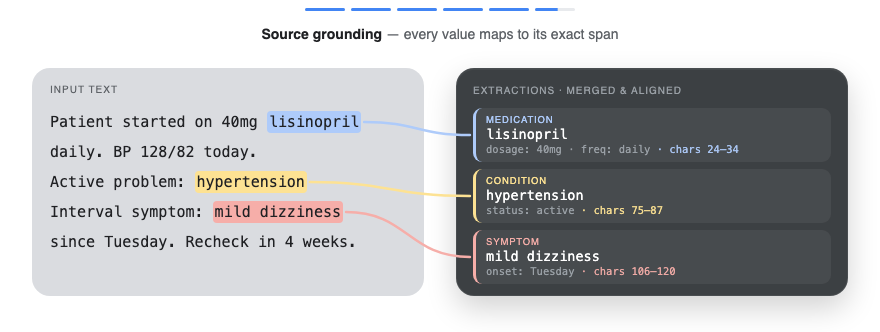
LangExtract is a Python library that uses LLMs to extract structured information from unstructured text documents based on user-defined instructions. It processes materials such as clinical notes or reports, identifying and organizing key details while ensuring the extracted data corresponds to the source text.
Try the live demo → Run grounded extraction on Romeo and Juliet in your browser, no install required.
Why LangExtract?
Precise Source Grounding: Maps every extraction to its exact location in the source text, enabling visual highlighting for easy traceability and verification.
Reliable Structured Outputs: Enforces a consistent output schema based on your few-shot examples, leveraging controlled generation in supported models like Gemini to guarantee robust, structured results.
Optimized for Long Documents: Overcomes the "needle-in-a-haystack" challenge of large document extraction by using an optimized strategy of text chunking, parallel processing, and multiple passes for higher recall.
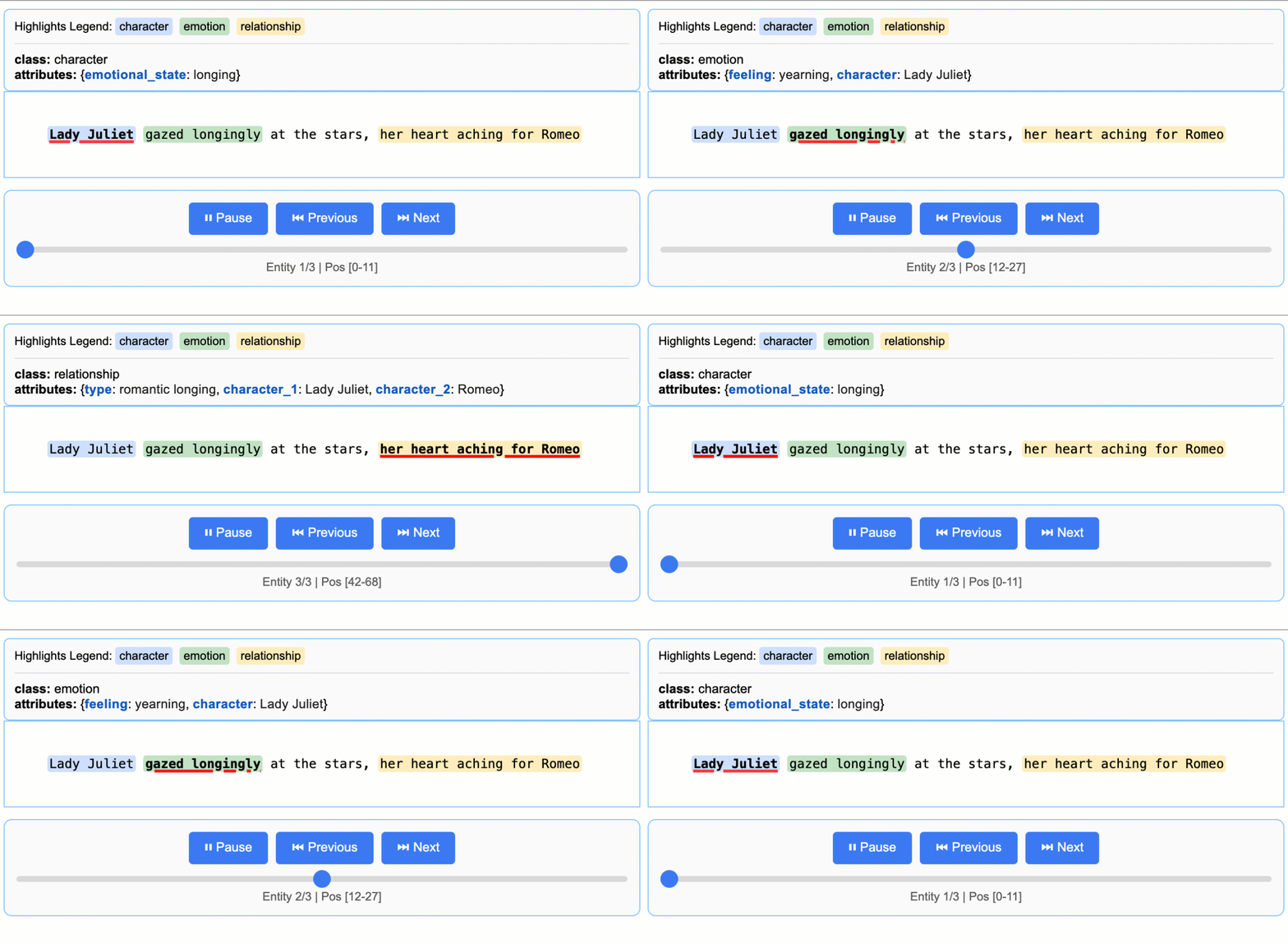
Interactive Visualization: Instantly generates a self-contained, interactive HTML file to visualize and review thousands of extracted entities in their original context.
Flexible LLM Support: Supports your preferred models, from cloud-based LLMs like the Google Gemini family to local open-source models via the built-in Ollama interface.
Adaptable to Any Domain: Define extraction tasks for any domain using just a few examples. LangExtract adapts to your needs without requiring any model fine-tuning.
Leverages LLM World Knowledge: Utilize precise prompt wording and few-shot examples to influence how the extraction task may utilize LLM knowledge. The accuracy of any inferred information and its adherence to the task specification are contingent upon the selected LLM, the complexity of the task, the clarity of the prompt instructions, and the nature of the prompt examples.
Quick Start
Note: Using cloud-hosted models like Gemini requires an API key. See the API Key Setup section for instructions on how to get and configure your key.
Extract structured information with just a few lines of code.
1. Define Your Extraction Task
First, create a prompt that clearly describes what you want to extract. Then, provide a high-quality example to guide the model.
import langextract as lx
import textwrap

# 1. Define the prompt and extraction rules
prompt = textwrap.dedent("""\
    Extract characters, emotions, and relationships in order of appearance.
    Use exact text for extractions. Do not paraphrase or overlap entities.
    Provide meaningful attributes for each entity to add context.""")

# 2. Provide a high-quality example to guide the model
examples = [
    lx.data.ExampleData(
        text="ROMEO. But soft! What light through yonder window breaks? It is the east, and Juliet is the sun.",
        extractions=[
            lx.data.Extraction(
                extraction_class="character",
                extraction_text="ROMEO",
                attributes={"emotional_state": "wonder"}
            ),
            lx.data.Extraction(
                extraction_class="emotion",
                extraction_text="But soft!",
                attributes={"feeling": "gentle awe"}
            ),
            lx.data.Extraction(
                extraction_class="relationship",
                extraction_text="Juliet is the sun",
                attributes={"type": "metaphor"}
            ),
        ]
    )
]
Note: Examples drive model behavior. Each extraction_text should ideally be verbatim from the example's text (no paraphrasing), listed in order of appearance. LangExtract raises Prompt alignment warnings by default if examples don't follow this pattern—resolve these for best results.
Grounding: LLMs may occasionally extract content from few-shot examples rather than the input text. LangExtract automatically detects this: extractions that cannot be located in the source text will have char_interval = None. Filter these out with [e for e in result.extractions if e.char_interval] to keep only grounded results.
2. Run the Extraction
Provide your input text and the prompt materials to the lx.extract function.
# The input text to be processed
input_text = "Lady Juliet gazed longingly at the stars, her heart aching for Romeo"

# Run the extraction
result = lx.extract(
    text_or_documents=input_text,
    prompt_description=prompt,
    examples=examples,
    model_id="gemini-3.5-flash",
)
For advanced constraints beyond examples, such as enum values on extraction
attributes, Gemini and OpenAI support output_schema with or without
few-shot examples. See
Custom output schemas.
Model Selection: gemini-3.5-flash is the recommended default, offering strong extraction quality for LangExtract's schema-constrained workflows. For high-volume or cost-sensitive workloads, consider the current stable Flash-Lite model, gemini-3.1-flash-lite; for highly complex tasks requiring deeper reasoning, evaluate a current Gemini Pro model from the official model documentation. For large-scale or production use, a paid Gemini tier is suggested to increase throughput and avoid rate limits. See the rate-limit documentation for details.
Model Lifecycle: Note that Gemini models have a lifecycle with defined retirement dates. Users should consult the official model version documentation to stay informed about the latest stable and legacy versions.
3. Visualize the Results
The extractions can be saved to a .jsonl file, a popular format for working with language model data. LangExtract can then generate an interactive HTML visualization from this file to review the entities in context.
# Save the results to a JSONL file
lx.io.save_annotated_documents([result], output_name="extraction_results.jsonl", output_dir=".")

# Generate the visualization from the file
html_content = lx.visualize("extraction_results.jsonl")
with open("visualization.html", "w") as f:
    if hasattr(html_content, 'data'):
        f.write(html_content.data)  # For Jupyter/Colab
    else:
        f.write(html_content)
This creates an animated and interactive HTML file:
Note on LLM Knowledge Utilization: This example demonstrates extractions that stay close to the text evidence - extracting "longing" for Lady Juliet's emotional state and identifying "yearning" from "gazed longingly at the stars." The task could be modified to generate attributes that draw more heavily from the LLM's world knowledge (e.g., adding "identity": "Capulet family daughter" or "literary_context": "tragic heroine"). The balance between text-evidence and knowledge-inference is controlled by your prompt instructions and example attributes.
Scaling to Longer Documents
For larger texts, you can process entire documents directly from URLs with parallel processing and enhanced sensitivity:
# Process Romeo & Juliet directly from Project Gutenberg
result = lx.extract(
    text_or_documents="https://www.gutenberg.org/files/1513/1513-0.txt",
    prompt_description=prompt,
    examples=examples,
    model_id="gemini-3.5-flash",
    extraction_passes=3,    # Improves recall through multiple passes
    max_workers=20,         # Parallel processing for speed
    max_char_buffer=1000    # Smaller contexts for better accuracy
)
This approach can extract hundreds of entities from full novels while maintaining high accuracy. The interactive visualization seamlessly handles large result sets, making it easy to explore hundreds of entities from the output JSONL file. See the full Romeo and Juliet extraction example → for detailed results and performance insights.
Vertex AI Batch Processing
Save costs on large-scale tasks by enabling Vertex AI Batch API with
language_model_params that include vertexai=True, project, location,
and a batch config.
See an example of the Vertex AI Batch API usage in this example.
Installation
From PyPI
pip install langextract
Recommended for most users. For isolated environments, consider using a virtual environment:
When using LangExtract with cloud-hosted models (like Gemini or OpenAI), you'll need to
set up an API key. On-device models don't require an API key. For developers
using local LLMs, LangExtract offers built-in support for Ollama and can be
extended to other third-party APIs by updating the inference endpoints.
# Add API key to .env file
cat >> .env << 'EOF'
LANGEXTRACT_API_KEY=your-api-key-here
EOF

# Keep your API key secure
echo '.env' >> .gitignore
In your Python code:
import langextract as lx

result = lx.extract(
    text_or_documents=input_text,
    prompt_description="Extract information...",
    examples=[...],
    model_id="gemini-3.5-flash"
)
Option 3: Direct API Key (Not Recommended for Production)
You can also provide the API key directly in your code, though this is not recommended for production use:
result = lx.extract(
    text_or_documents=input_text,
    prompt_description="Extract information...",
    examples=[...],
    model_id="gemini-3.5-flash",
    api_key="your-api-key-here"  # Only use this for testing/development
)
Option 4: Vertex AI (Service Accounts)
Use Vertex AI for authentication with service accounts:
import langextract as lx

# OPENAI_API_KEY in the environment is picked up automatically; pass
# api_key=... explicitly only if you need to override it.
result = lx.extract(
    text_or_documents=input_text,
    prompt_description=prompt,
    examples=examples,
    model_id="gpt-4o",  # Automatically selects OpenAI provider
)
The OpenAI provider uses structured outputs or JSON mode and auto-determines
fence behavior — leave fence_output and use_schema_constraints unset.
output_schema is also supported for OpenAI models that support structured
outputs; provide a LangExtract output-envelope JSON schema, preferably with the
lx.schema helpers.
For large, non-latency-sensitive OpenAI workloads, enable the OpenAI Batch API
with language_model_params. Batch mode is opt-in and falls back to realtime
calls when the prompt count is below the configured threshold.
For OpenAI-compatible endpoints or non-GPT model IDs (which skip auto-routing), use ModelConfig with an explicit provider:
from langextract.factory import ModelConfig

result = lx.extract(
    text_or_documents=input_text,
    prompt_description=prompt,
    examples=examples,
    config=ModelConfig(
        model_id="my-openai-compatible-model",
        provider="openai",
        provider_kwargs={"api_key": "sk-...", "base_url": "https://..."},
    ),
)
Using Local LLMs with Ollama
LangExtract supports local inference using Ollama, allowing you to run models without API keys:
import langextract as lx

result = lx.extract(
    text_or_documents=input_text,
    prompt_description=prompt,
    examples=examples,
    model_id="gemma2:2b",  # Automatically selects Ollama provider
    model_url="http://localhost:11434",
)
The Ollama provider exposes FormatModeSchema for JSON mode. Leave fence_output
and use_schema_constraints unset so the factory auto-configures from the provider's
schema. Ollama does not currently support output_schema.
Quick setup: Install Ollama from ollama.com, run ollama pull gemma2:2b, then ollama serve.
For detailed installation, Docker setup, and examples, see examples/ollama/.
More Examples
Additional examples of LangExtract in action:
Romeo and Juliet Full Text Extraction
LangExtract can process complete documents directly from URLs. This example demonstrates extraction from the full text of Romeo and Juliet from Project Gutenberg (147,843 characters), showing parallel processing, sequential extraction passes, and performance optimization for long document processing.
Disclaimer: This demonstration is for illustrative purposes of LangExtract's baseline capability only. It does not represent a finished or approved product, is not intended to diagnose or suggest treatment of any disease or condition, and should not be used for medical advice.
LangExtract excels at extracting structured medical information from clinical text. These examples demonstrate both basic entity recognition (medication names, dosages, routes) and relationship extraction (connecting medications to their attributes), showing LangExtract's effectiveness for healthcare applications.
Explore RadExtract, a live interactive demo on HuggingFace Spaces that shows how LangExtract can automatically structure radiology reports. Try it directly in your browser with no setup required.
Extend LangExtract with custom model providers! Check out our Community Provider Plugins registry to discover providers created by the community or add your own.
Contributions are welcome! See CONTRIBUTING.md to get started
with development, testing, and pull requests. You must sign a
Contributor License Agreement
before submitting patches.
# Clone the repository
git clone https://github.com/google/langextract.git
cd langextract

# Install with test dependencies
pip install -e ".[test]"

# Run all tests
pytest tests
Or reproduce the full CI matrix locally with tox:
tox # runs pylint + pytest
langextract (google/langextract)
Choose a tag and it will appear here. With no tags selected, all catalog projects are shown.
Searching Database…
Choose a tag and it will appear here. With no tags selected, all catalog projects are shown.
What is this?LangExtract is a Python library that uses LLMs to pull structured information out of unstructured text, mapping each extraction back to its exact location in the source document.
Is it a standalone app or a library I import into my code?It is a Python library you import and call via the lx.extract function inside your own scripts.
How do I install it and get a basic extraction running?Install from PyPI (recommended) or from source using pyproject.toml, then define a prompt plus a high-quality example and call lx.extract with your input text.
Do I need a Gemini API key, or can I run it without one?Cloud models like Gemini or OpenAI need an API key you set via environment variable, .env file, or Vertex AI service account; on-device models via Ollama don't require any key.
Does the extracted data always match the source text exactly?No — LLMs can sometimes pull content from the few-shot examples instead of the real input, but LangExtract flags this automatically by setting char_interval to None so you can filter ungrounded results out.
Is this meant for clinical/medical production use, or just demos?The medication and radiology examples are explicitly illustrative only, not approved for diagnosis or medical advice; it's aimed at developers building extraction pipelines, not a certified medical product.
Can I run extraction fully offline without any cloud calls?Yes, via the built-in Ollama interface for local open-source models, which skips API keys and cloud calls entirely.
How does it handle very long documents like a whole novel?It chunks text, runs parallel processing, and makes multiple extraction passes to overcome the needle-in-a-haystack problem, and has been used to pull hundreds of entities from the full text of Romeo and Juliet (147,843 characters).
What does the interactive visualization look like?Running lx.extract and saving results to a .jsonl file lets you generate a self-contained, animated HTML file that highlights every extracted entity in its original context for easy review.
Can I add support for a model provider that isn't built in?Yes, through a lightweight plugin system: you register a provider with @router.register(...) from langextract.providers and can distribute it as a separate Python package.
Which LLM providers does it support out of the box?Google Gemini (recommended default is gemini-3.5-flash), OpenAI models via an optional dependency, and local models through Ollama, plus Vertex AI batch processing for cost savings at scale.






 LangExtract is a Python library that uses LLMs to pull structured information out of unstructured text, mapping each extraction back to its exact location in the source document.