
汉字 | English




eCapture(旁观者): capture SSL/TLS text content without a CA certificate using eBPF.
[!IMPORTANT]
Supports Linux/Android on x86_64 (kernel 4.18+) and aarch64 (kernel 5.5+). Kernel version requirements apply per CPU architecture for both Linux and Android.
Need ROOT permission or specific Linux capabilities.
Does not support Windows and macOS system.
Introduction
- SSL/TLS plaintext capture, support openssl\libressl\boringssl\gnutls\nspr(nss) libraries.
- GoTLS plaintext support go tls library, which refers to encrypted communication in https/tls programs written in the golang language.
- Bash audit, capture bash command for Host Security Audit.
- Zsh audit, capture zsh command for Host Security Audit.
- MySQL query SQL audit, support mysqld 5.6\5.7\8.0, and MariaDB.
Getting started
Download
ELF binary file
[!TIP]
support Linux/Android x86_64/aarch64.
Download ELF zip file release , unzip and use by
command sudo ecapture --help.
Docker image
[!TIP]
Linux only.
# pull docker image
docker pull gojue/ecapture:latest
# run
docker run --rm --privileged=true --net=host -v ${HOST_PATH}:${CONTAINER_PATH} gojue/ecapture ARGS
⚠️ Security Note: --privileged=true grants full host access. For production use, consider specific capabilities instead. See Minimum Privileges Guide.
see Docker Hub for more information.
Capture openssl text content.
sudo ecapture tls
eCapture will automatically detect the system's OpenSSL library and start capturing plaintext. When you make an HTTPS request (e.g., curl https://google.com), the captured request and response will be displayed:
...
INF module started successfully. moduleName=EBPFProbeOPENSSL
??? UUID:233851_233851_curl_5_1_172.16.71.1:51837, Name:HTTP2Request, Type:2, Length:304
header field ":method" = "GET"
header field ":path" = "/"
header field ":authority" = "google.com"
...
📄 For complete output examples, see docs/example-outputs.md.
Modules
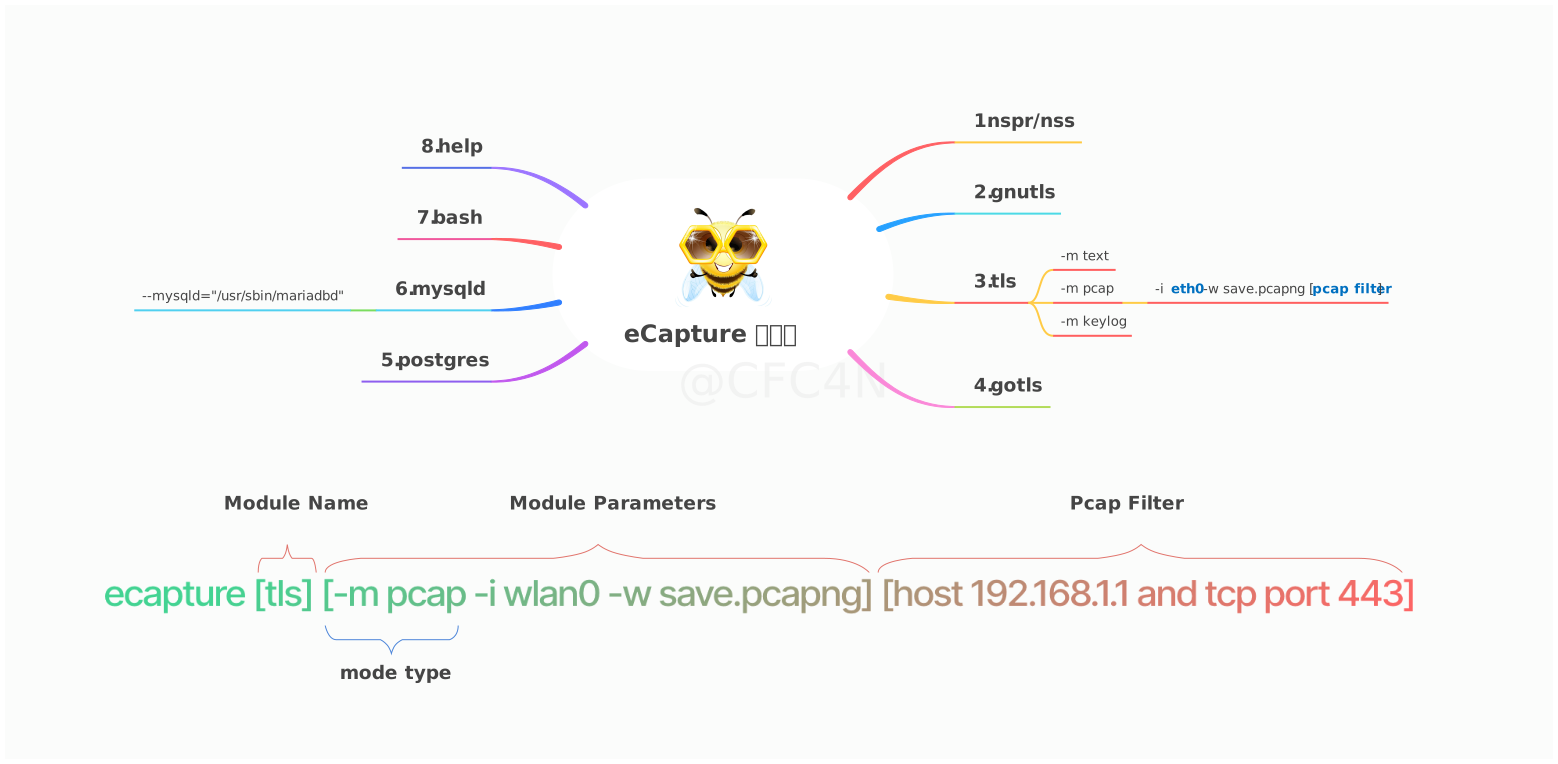
The eCapture tool comprises 8 modules that respectively support plaintext capture for TLS/SSL encryption libraries like OpenSSL, GnuTLS, NSPR, BoringSSL, and GoTLS. Additionally, it facilitates software audits for Bash, MySQL, and PostgreSQL applications.
- bash capture bash command
- zsh capture zsh command
- gnutls capture gnutls text content without CA cert for gnutls libraries.
- gotls Capturing plaintext communication from Golang programs encrypted with TLS/HTTPS.
- mysqld capture sql queries from mysqld 5.6/5.7/8.0 .
- nss capture nss/nspr encrypted text content without CA cert for nss/nspr libraries.
- postgres capture sql queries from postgres 10+.
- tls use to capture tls/ssl text content without CA cert. (Support openssl 1.0.x/1.1.x/3.0.x or newer).
You can use
ecapture -h to view the list of subcommands.
OpenSSL Module
eCapture search /etc/ld.so.conf file default, to search load directories of SO file, and search openssl shard
libraries location. or you can use --libssl
flag to set shard library path.
If target program is compile statically, you can set program path as --libssl flag value directly。
The OpenSSL module supports three capture modes:
pcap/pcapng mode stores captured plaintext data in pcap-NG format.keylog/key mode saves the TLS handshake keys to a file.text mode directly captures plaintext data, either outputting to a specified file or printing to the command line.
Pcap Mode
Supported TLS encrypted http 1.0/1.1/2.0 over TCP, and http3 QUIC protocol over UDP.
You can specify -m pcap or -m pcapng and use it in conjunction with --pcapfile and -i parameters. The default value for --pcapfile is ecapture_openssl.pcapng.
sudo ecapture tls -m pcap -i eth0 --pcapfile=ecapture.pcapng tcp port 443
This command saves captured plaintext data packets as a pcapng file, which can be viewed using Wireshark.
📄 For complete pcapng mode output, see docs/example-outputs.md.
Keylog Mode
You can specify -m keylog or -m key and use it in conjunction with the --keylogfile parameter, which defaults to ecapture_masterkey.log.
The captured OpenSSL TLS Master Secret information is saved to --keylogfile. You can also enable tcpdump packet capture and then use Wireshark to open the file and set the Master Secret path to view plaintext data packets.
sudo ecapture tls -m keylog -keylogfile=openssl_keylog.log
You can also directly use the tshark software for real-time decryption and display:
tshark -o tls.keylog_file:ecapture_masterkey.log -Y http -T fields -e http.file_data -f "port 443" -i eth0
Text Mode
sudo ecapture tls -m text will output all plaintext data packets. (Starting from v0.7.0, it no longer captures
SSLKEYLOG information.)
GoTLS Module
Similar to the OpenSSL module.
gotls command
capture tls text context.
Step 1:
sudo ecapture gotls --elfpath=/home/cfc4n/go_https_client --hex
Step 2:
/home/cfc4n/go_https_client
more help
sudo ecapture gotls -h
Other Modules
such as bash\mysqld\postgres modules, you can use ecapture -h to view the list of subcommands.
Videos
eCaptureQ GUI Application
eCaptureQ is a cross-platform graphical user interface client for eCapture,
visualizing eBPF TLS capture
capabilities. Built using the Rust + Tauri + React technology stack, it provides a real-time, responsive interface,
enabling easy analysis of encrypted traffic without the need for CA certificates. It simplifies complex eBPF capture
techniques, making them easy to use. Supports two modes:
- Integrated Mode: Unified Linux/Android execution
- Remote Mode: Windows/macOS/Linux client connects to a remote eCapture service
Event Forwarding
Event Forwarding Projects
Video Demonstration
https://github.com/user-attachments/assets/c8b7a84d-58eb-4fdb-9843-f775c97bdbfb
🔗 GitHub Repository
Protobuf Protocols
For details of the Protobuf log schema used by eCapture/eCaptureQ, see:
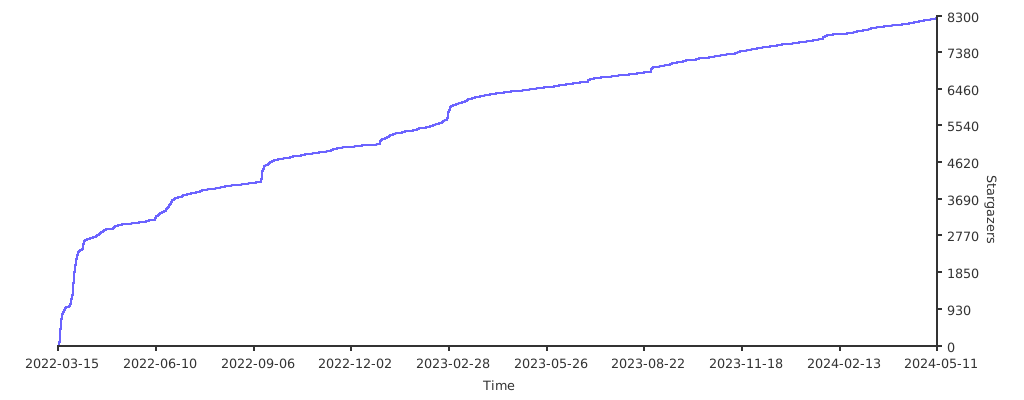
Stargazers over time
Security & Operations
Contributing
See CONTRIBUTING for details on submitting patches and the contribution workflow.
Compilation
Custom Compilation
You can customize the features you want, such as setting the offset address for uprobe to support statically compiled OpenSSL libraries. Refer to the compilation guide for compilation instructions.
Configurations Remote Update
After eCapture is running, you can dynamically modify the configurations through HTTP interfaces. Refer to the HTTP API Documentation.
Event Forwarding
eCapture supports multiple event forwarding methods. You can forward events to packet capture software such as Burp Suite. For details, refer to the Event Forwarding API Documentation.

 一个开源的命令行安全工具,利用 eBPF 直接捕获 SSL/TLS 流量的明文内容,无需安装 CA 证书,也不用 MITM 代理。它还能审计主机上的 shell 命令和数据库查询。